1. Introducción
This manual provides comprehensive instructions for the installation, operation, and maintenance of your Intermatic EC210WK Countdown Timer. This device is designed to provide silent, timed control for various electrical loads, enhancing energy savings and convenience in your home or office.
The EC210WK offers selectable countdown times of 10, 20, 30, and 60 minutes, along with a "HOLD" function for continuous operation. It is suitable for controlling indoor and outdoor lighting, bathroom and exhaust fans, and other energy-consuming appliances.
2. Información importante de seguridad
ADVERTENCIA: Risk of electric shock. Improper installation can lead to serious injury or death. Always turn off power at the circuit breaker or fuse box before installing or servicing this device. Installation should be performed by a qualified electrician or in accordance with local electrical codes.
- Desconecte la energía en el disyuntor antes de la instalación.
- Asegúrese de que todas las conexiones del cableado sean seguras.
- Este dispositivo es solo para uso en interiores.
- No exceda las capacidades de carga máxima especificadas en la sección de especificaciones.
- Se requiere un cable neutro para su funcionamiento.
3. Contenido del paquete
Verifique que todos los componentes estén presentes antes de comenzar la instalación:
- Intermatic EC210WK Countdown Timer (1 unit)
- Manual de instrucciones (este documento)
Note: A wall plate is sold separately and is not included with this unit.
4. Instalación
4.1 Herramientas necesarias
- Destornillador (Phillips y/o de cabeza plana)
- Pelacables
- Cinta aisladora (opcional)
- Volumentage Tester (recomendado)
4.2 Diagrama de cableado y conexiones
The EC210WK timer requires a neutral wire for proper operation. Ensure your electrical box has a neutral wire available. Refer to the wiring diagram below for correct connections.
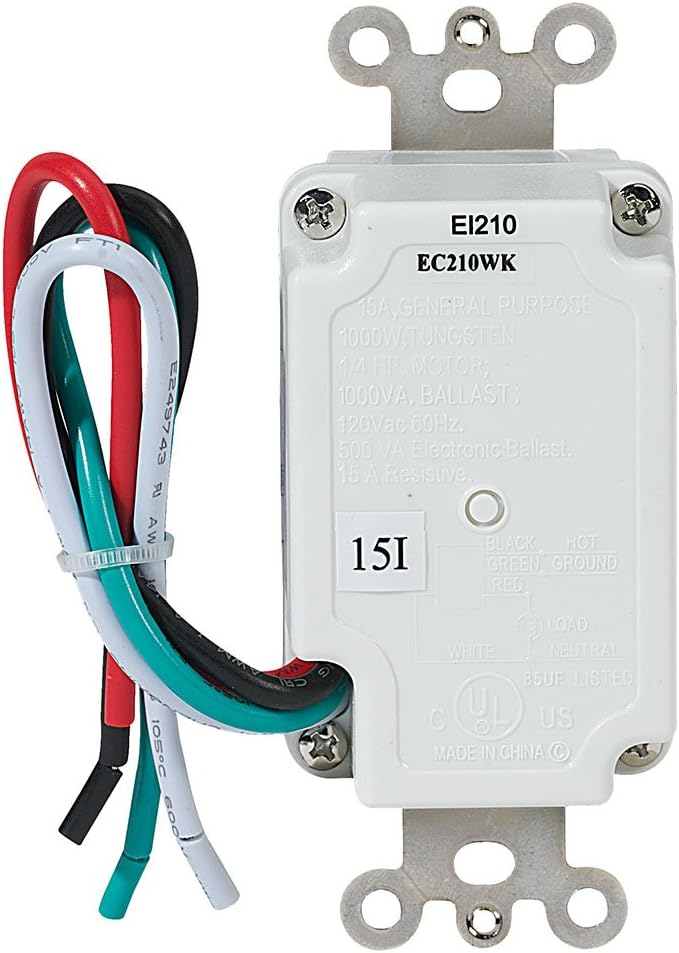
- Apague la energía: Localice el disyuntor que controla el interruptor que va a reemplazar y apáguelo. Verifique que la energía esté apagada usando un vol.tage probador.
- Quitar el interruptor antiguo: Carefully remove the existing wall plate and unscrew the old switch from the electrical box. Disconnect the wires from the old switch.
- Identificar cables:
- Cable negro: Connects to the incoming 120 VAC HOT line.
- Alambre blanco: Connects to the NEUTRAL line.
- Cable rojo: Connects to the LOAD (the appliance or light fixture).
- Cable verde: Connects to the GROUND wire.
- Conectar nuevo temporizador: Using wire nuts (not included), connect the wires from the EC210WK timer to the corresponding wires in the electrical box.
- Timer's Black wire to House Hot wire.
- Timer's White wire to House Neutral wire.
- Timer's Red wire to House Load wire.
- Timer's Green wire to House Ground wire.
- Temporizador de montaje: Carefully fold the wires into the electrical box, ensuring no wires are pinched. Secure the timer to the electrical box using the provided screws.
- Instale la placa de pared: Attach a standard decorator-style wall plate (not included) over the timer.
- Restaurar energía: Vuelva a encender la energía en el disyuntor.
5. Operación
The Intermatic EC210WK timer features five push buttons for selecting countdown durations and a "HOLD" function.

- Seleccionar un tiempo de cuenta regresiva: Press the desired time button (10 MIN, 20 MIN, 30 MIN, or 60 MIN). The corresponding LED indicator will illuminate, and the connected load will turn ON for the selected duration. The load will automatically turn OFF when the countdown expires.
- Función "HOLD": Press the "HOLD" button to keep the connected load ON continuously. The "HOLD" LED indicator will illuminate. To exit the "HOLD" function, press any of the countdown time buttons, or press the "HOLD" button again to turn the load OFF.
- Canceling a Countdown: To turn OFF the connected load before the countdown expires, press the currently active countdown button again, or press the "HOLD" button (which will then require a second press to turn off if the load was already on).
6. Mantenimiento
The Intermatic EC210WK Countdown Timer requires minimal maintenance.
- Limpieza: To clean the surface of the timer, wipe with a soft, damp Paño. No utilice limpiadores abrasivos ni disolventes. Asegúrese de que el aparato esté apagado antes de limpiarlo.
- Inspección: Periodically inspect the timer and wall plate for any signs of damage or loose connections. If any issues are found, turn off power at the circuit breaker and consult a qualified electrician.
7. Solución de problemas
If you experience issues with your EC210WK timer, refer to the following common problems and solutions:
| Problema | Posible causa | Solución |
|---|---|---|
| Timer does not turn ON. | No power to the timer; incorrect wiring; tripped circuit breaker. | Check circuit breaker. Verify wiring connections (Hot, Neutral, Load, Ground). Ensure power is restored. |
| Load does not turn OFF after countdown. | Timer is in "HOLD" mode; internal malfunction. | Press the "HOLD" button to disengage. If issue persists, contact customer support. |
| LED indicators do not light up. | Sin energía; unidad defectuosa. | Check power supply and wiring. If power is present and wired correctly, the unit may be faulty. |
| Timer makes noise. | This timer is designed for silent operation. Noise indicates a potential issue. | Immediately turn off power at the circuit breaker and contact customer support. |
8. Especificaciones
Technical specifications for the Intermatic EC210WK Countdown Timer:
- Modelo: EC210WK
- Color: Blanco
- Vol de entradatage: 120 VAC, 60 Hz
- Carga resistente: 15 A, 1800 W
- Carga de tungsteno: 8.3 A, 1000 W
- Inductive Ballast: 8A, 1000 VA
- Balasto electrónico: 500 VA
- Motor: 1 / 4 HP
- Countdown Settings: 10, 20, 30, 60 minutes, and HOLD
- Tipo de montaje: En la pared
- Cambiar estilo: Convertidor de señal único
- Peso del artículo: 5.3 onzas
- Certificaciones: Listado por UL
9. Garantía y soporte
Garantía: This Intermatic EC210WK Countdown Timer is covered by a 1-year limited warranty from the date of purchase. This warranty covers defects in materials and workmanship under normal use.
Atención al cliente: For technical assistance, warranty claims, or further information, please contact Intermatic customer service. Refer to the official Intermatic webSitio para obtener información de contacto actualizada.
Conserve su comprobante de compra para fines de garantía.


