1. Introducción
The CyberPower BRG1500AVRLCD Intelligent LCD UPS System is designed to provide reliable battery backup and surge protection for desktop computers, workstations, networking devices, and home entertainment systems. This Uninterruptible Power Supply (UPS) system utilizes line interactive topology and simulated sine wave output to safeguard your valuable electronics from power interruptions and fluctuations.
Las características principales incluyen volumen automáticotage Regulation (AVR) to correct minor power fluctuations without switching to battery power, thereby extending battery life. It also offers two USB charge ports (2.1 Amps shared) for portable devices.

Figure 1: CyberPower BRG1500AVRLCD UPS System in a typical office environment, providing power protection to connected devices.
2. Precauciones de seguridad
Lea y siga atentamente todas las instrucciones de seguridad antes de instalar o utilizar el SAI. De lo contrario, podría sufrir daños en la unidad, en los equipos conectados o lesiones personales.
- Do not install the UPS in direct sunlight, near heat-emitting appliances, or in areas with excessive humidity.
- Asegúrese de que el UPS esté conectado a una toma de corriente con conexión a tierra.
- No abra el SAI casing. No hay piezas que el usuario pueda reparar en el interior. Solicite el mantenimiento a personal cualificado.
- No utilice el UPS para equipos médicos o de soporte vital.
- Ensure proper ventilation around the UPS. Do not block any ventilation openings.
- In case of fire, use a powder fire extinguisher. Do not use water.
3. Contenido del paquete
Verifique que todos los artículos estén presentes en el paquete:
- Unidad UPS
- Manual de usuario
4. Producto terminadoview
4.1 Panel frontal

Figura 2: Frente view of the CyberPower BRG1500AVRLCD UPS, highlighting the Intelligent LCD panel and USB charging ports.
The front panel features the Intelligent LCD display, control buttons (Display, Mute, Enter, Setup), and two USB charge ports (USB-A and USB-C) for convenient charging of portable devices.
4.2 Panel trasero
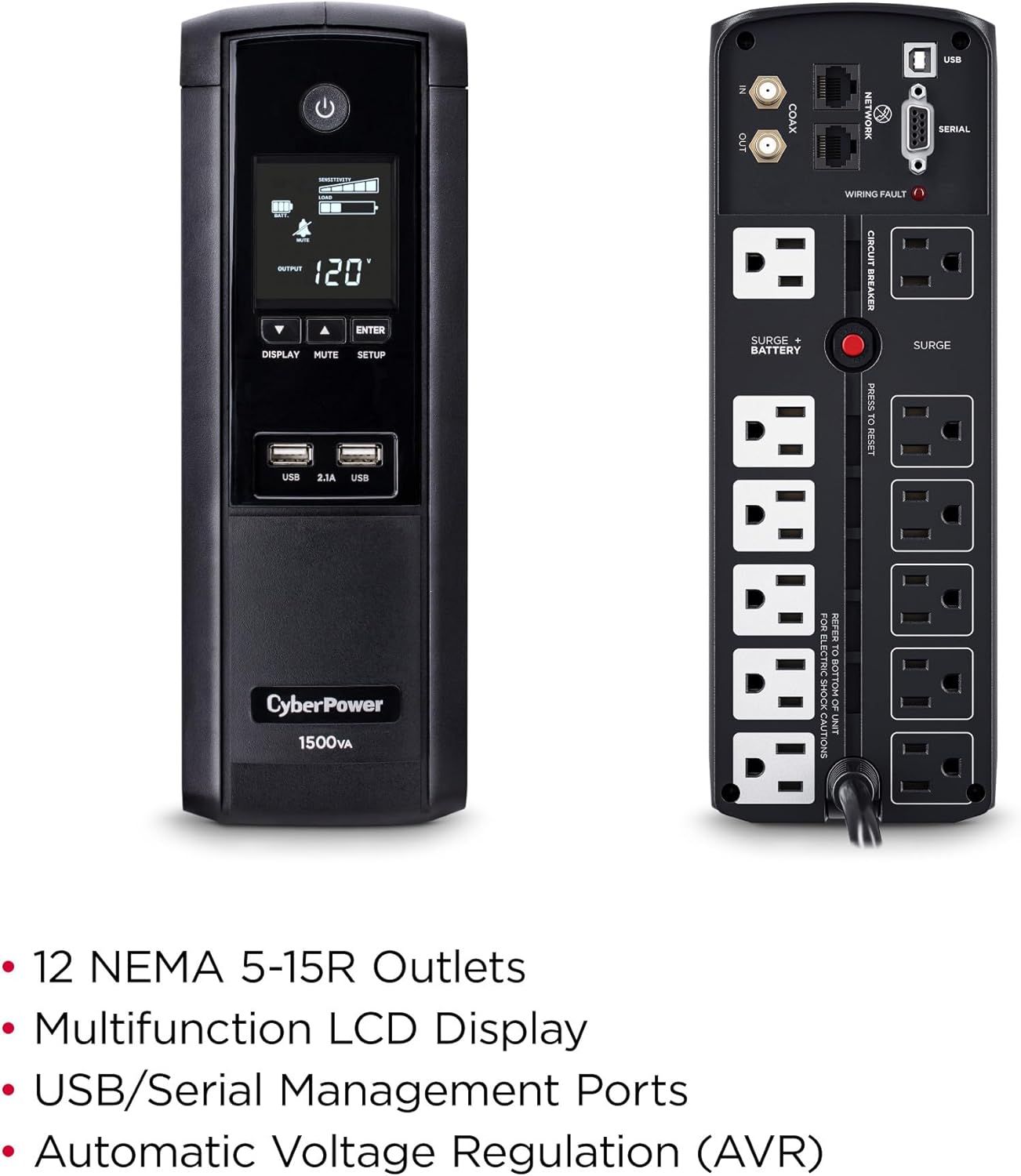
Figura 3: Posterior view of the CyberPower BRG1500AVRLCD UPS, detailing the NEMA 5-15R outlets, network, cable, and serial ports.
The rear panel includes 12 NEMA 5-15R outlets: six battery backup & surge protected outlets and six surge protected outlets. It also features network (RJ45) and cable (Coax) surge protection ports, a serial port, and a USB port for management software connectivity. A circuit breaker reset button is also located on the rear panel.
5. Configuración
5.1 Carga inicial
Before initial use, plug the UPS into a grounded wall outlet and allow it to charge for at least 8 hours to ensure maximum battery runtime. The unit will automatically turn on when connected to mains power.
5.2 Conexión de equipos
- Tomacorrientes con respaldo de batería y protección contra sobretensiones: Conecte equipos críticos como su computadora, monitor y discos duros externos a estas tomas. Estos dispositivos recibirán energía de la batería del SAI durante una salida.tage.
- Salidas protegidas contra sobretensiones: Connect non-critical equipment that still requires surge protection, such as printers or scanners, to these outlets. These devices will not receive battery backup power.
- Puertos de carga USB: Use the front USB-A and USB-C ports to charge mobile phones, MP3 players, and cameras.
- Protección de línea de datos: Connect your network cable (RJ45) and coaxial cable (Coax) through the designated IN/OUT ports on the rear panel to protect against surges.
6. Instrucciones de funcionamiento
6.1 Encendido y apagado del SAI
- Encender: Press and hold the Power button on the front panel for approximately 2 seconds. The LCD display will light up.
- Apagar: Press and hold the Power button for approximately 2 seconds. The LCD display will turn off.
6.2 Funciones de la pantalla LCD
The multifunction LCD panel displays immediate, detailed information on battery and power conditions. Use the 'Display' button to cycle through various screens:

Figura 4: Examples of information displayed on the Intelligent LCD panel, including input/output voltage, load, and battery status.
- Vol de entradatage: Muestra el volumen actualtage de la red eléctrica.
- Vol de salidatage: Muestra el voltage suministrada por el UPS a los equipos conectados.
- Capacidad de la batería: Indica el nivel de carga actual de las baterías internas.
- Capacidad de carga: Muestra el porcentajetage de la capacidad del UPS utilizada por los equipos conectados.
- Tiempo de ejecución estimado: Provides an estimate of how long the UPS can supply power during an outagy en función de la carga actual.
- Registro de eventos: Registra eventos de energía como nuestrotages, sobretensiones y voltage fluctuaciones.
6.3 Vol automáticotage Regulación (AVR)
El UPS cuenta con Vol automáticotage Regulation (AVR), which automatically corrects minor power fluctuations (sags and overvoltages) without switching to battery power. This extends the life of the battery by reducing the number of times it needs to discharge and recharge.
6.4 PowerPanel Personal Edition Management Software
The UPS comes with FREE PowerPanel Personal Edition Management Software (Download). This software allows for advanced power management features, including scheduled shutdowns, remote monitoring, and customizable alerts. Refer to the software's documentation for installation and usage instructions.
7. Mantenimiento
7.1 Reemplazo de batería
The CyberPower BRG1500AVRLCD uses two 12V batteries. The batteries are designed to last approximately 3-5 years under normal operating conditions. When the batteries reach the end of their service life, they should be replaced by qualified personnel. For battery replacement, contact CyberPower Systems customer support or a certified technician.
7.2 Limpieza
Limpie periódicamente el exterior del SAI con un paño seco. Asegúrese de que las aberturas de ventilación estén libres de polvo y residuos para mantener un flujo de aire adecuado y evitar el sobrecalentamiento.
8. Solución de problemas
If the UPS is not functioning correctly, refer to the following common issues:
- El UPS no enciende: Ensure the power cord is securely plugged into a grounded wall outlet and the UPS. Check the circuit breaker on the rear panel and reset if tripped.
- El UPS emite un pitido continuo: This usually indicates the UPS is operating on battery power during an outage or a low battery condition. Save your work and shut down connected equipment if the outage se prolonga.
-
Documentos relacionados - BRG1500AVRLCD

Guía de configuración de funciones del UPS CyberPower
Guía detallada para configurar funciones y configuraciones en los sistemas UPS LCD inteligentes de CyberPower, incluido volumentagConfiguración, sensibilidad, alarmas y opciones de visualización.
Manual del usuario del UPS CyberPower BRG1500AVRLCD2: Características, instalación y funcionamiento
Manual de usuario completo del SAI LCD inteligente CyberPower BRG1500AVRLCD2. Conozca sus características, instalación, funcionamiento básico, reemplazo de batería, solución de problemas y especificaciones técnicas.
CyberPower PR750LCD3C Intelligent UPS Series User Manual
User manual for the CyberPower PR750LCD3C Intelligent UPS Series, providing detailed information on installation, operation, safety warnings, troubleshooting, and technical specifications for this Uninterruptible Power Supply.
Manual del usuario de la serie OR1000LCDRM1U/OR1500LCDRM1U del sistema UPS inteligente CyberPower | Guía de protección de energía
Manual de usuario completo para la serie de UPS inteligentes CyberPower (OR1000LCDRM1U, OR1500LCDRM1U). Aprenda sobre instalación, características, funcionamiento, reemplazo de baterías, solución de problemas, especificaciones técnicas y seguridad para una protección de energía confiable.
Manual del usuario de la serie de SAI inteligentes CyberPower - CP850/1000/1350/1500AVRLCD
Manual de usuario de los modelos CP850AVRLCD, CP1000AVRLCD, CP1350AVRLCD y CP1500AVRLCD de la serie CyberPower Intelligent UPS. Abarca características, seguridad, instalación, funcionamiento, reemplazo de batería, resolución de problemas, especificaciones técnicas y tecnología GreenPower UPS.
CyberPower PR5000RTXL2UC Smart App Sinewave UPS Series User Manual
Comprehensive user manual for the CyberPower PR5000RTXL2UC Smart App Sinewave UPS Series. Covers installation, basic and network operation, LCD settings, EPO/ROO configuration, dry contact monitoring, battery replacement, technical specifications, troubleshooting, and warranty information.