Introducción
This manual provides comprehensive instructions for the setup, operation, and maintenance of your Genius SW-2.1 355 Speaker System. Please read this manual thoroughly before using the product to ensure proper functionality and to maximize your listening experience.
Información de seguridad
Tenga en cuenta las siguientes precauciones de seguridad para evitar dañar el dispositivo o lesionarse usted mismo:
- No exponga los altavoces al agua ni a la humedad.
- Evite colocar los altavoces cerca de fuentes de calor o bajo la luz solar directa.
- Asegúrese de que haya una ventilación adecuada alrededor del subwoofer para evitar el sobrecalentamiento.
- Utilice únicamente el adaptador de corriente suministrado con la unidad.
- No intente abrir ni reparar la unidad usted mismo. Encargue cualquier servicio técnico a personal cualificado.
- Mantener fuera del alcance de los niños.
Contenido del paquete
Verifique que todos los artículos estén presentes en el paquete:
- 1 unidad de subwoofer
- 2 altavoces satélite
- 1 x Audio input cable (3.5mm stereo jack)
- 1 x adaptador de corriente
- 1 x Manual de usuario (este documento)
Producto terminadoview
The Genius SW-2.1 355 Speaker System consists of a subwoofer and two satellite speakers designed to deliver clear audio and powerful bass for your multimedia needs.
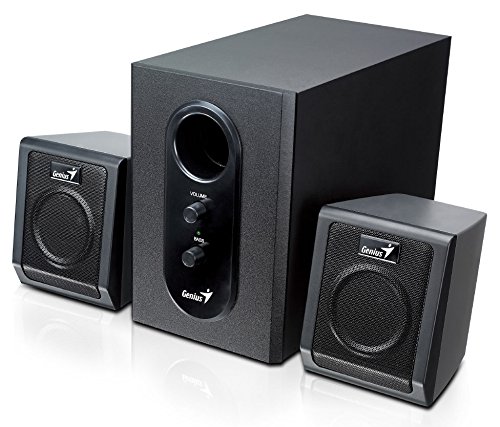
This image displays the Genius SW-2.1 355 Speaker System. It features a central, larger subwoofer unit with volume and bass control knobs on its front panel, and two smaller satellite speakers positioned on either side. All components are black.
Componentes:
- Subwoofer: The main unit housing the bass driver and control panel.
- Altavoces satélite: Two compact speakers for mid-range and high-frequency audio.
- Panel de control: Located on the subwoofer, featuring Volume and Bass adjustment knobs.
Configuración
- Posicionamiento de los altavoces: Place the subwoofer on the floor or a sturdy surface. Position the satellite speakers on either side of your listening area, facing towards you for optimal stereo separation.
- Conexión de altavoces satélite: Connect the cables from the two satellite speakers to the corresponding output jacks on the rear of the subwoofer unit. Ensure a secure connection.
- Conexión de fuente de audio: Connect one end of the 3.5mm audio input cable to the "Audio In" jack on the subwoofer. Connect the other end to the audio output jack (e.g., headphone jack) of your computer, MP3 player, smartphone, or other audio source.
- Conexión de energía: Plug the power adapter into the DC input jack on the subwoofer. Then, plug the power adapter into a standard electrical outlet.
- Encendido: Turn on the speaker system using the power switch, usually integrated with the volume knob.
Operación
- Encendido/apagado y control de volumen: The main knob on the subwoofer controls both power and overall volume. Rotate clockwise to turn on and increase volume; rotate counter-clockwise to decrease volume and turn off.
- Ajuste de graves: Use the "Bass" knob on the subwoofer to adjust the level of low-frequency sound. Rotate clockwise to increase bass, and counter-clockwise to decrease it, according to your preference.
- Volumen de la fuente de audio: For optimal sound quality, set the volume on your audio source (computer, phone, etc.) to about 75% and then use the speaker system's volume control for fine adjustments.
Mantenimiento
- Limpieza: Utilice un paño suave y seco para limpiar las superficies de los altavoces. No utilice limpiadores líquidos ni productos abrasivos.
- Almacenamiento: Si va a almacenar los altavoces durante un período prolongado, desconéctelos de la alimentación y guárdelos en un lugar fresco y seco.
- Sistema de organización de cables: Asegúrese de que los cables no estén enredados ni pellizcados para evitar daños.
Solución de problemas
| Problema | Posible causa | Solución |
|---|---|---|
| Sin sonido |
|
|
| Sonido distorsionado |
|
|
| Bajo débil |
|
|
Presupuesto
| Característica | Detalle |
|---|---|
| Nombre del modelo | SW-2.1 355 |
| Tipo de altavoz | 2.1 Channel Multimedia Speaker System (Bookshelf, Satellite, Subwoofer) |
| Potencia de salida total | 10 Watts RMS (5W Subwoofer + 2.5W x 2 Satellites) |
| Material | Wood (Subwoofer) |
| Tecnología de conectividad | Con cable (entrada de audio de 3.5 mm) |
| Dispositivos compatibles | MP3 Player, Personal Computer, Smartphones, Tablets, Televisions |
| Controles | Volumen, Bajo |
| Fuente de poder | DC |
| Peso del artículo | 2.78 kilogramos |
| Dimensiones del paquete | 39.6 x 25 x 18.4 cm |
Garantía y soporte
Genius products are designed for reliability and performance. For information regarding warranty coverage, technical support, or service inquiries, please refer to the warranty card included with your product or visit the official Genius webSitio. Conserve su recibo de compra como comprobante de compra.


