1. Introducción
This manual provides detailed instructions for the proper use, setup, and maintenance of your Genius HS-920BT Bluetooth Headset. Please read this manual thoroughly before using the device to ensure optimal performance and longevity.
The Genius HS-920BT is a versatile Bluetooth headset designed for wireless audio streaming and hands-free communication with compatible devices such as smartphones, tablets, and PCs.
2. Contenido del paquete
Verifique que todos los artículos estén presentes en su paquete:
- Genius HS-920BT Bluetooth Headset
- Cable de carga USB
- Multi-language User Manual (this document)
3. Producto terminadoview
The HS-920BT headset features an adjustable headband and comfortable earcups, integrating controls for audio playback and call management.
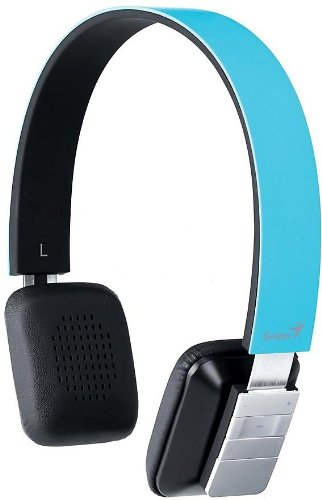
Figure 1: Genius HS-920BT Bluetooth Headset (Blue)
This image displays the Genius HS-920BT Bluetooth Headset in blue, viewed from an angle, highlighting its adjustable headband and earcup design.
Características principales:
- Wireless Bluetooth connectivity for audio and calls (A2DP support)
- Integrated rechargeable Lithium-Ion battery
- Micrófono incorporado para comunicación manos libres
- On-ear controls for volume adjustment, track skipping (AVRCP support)
- Diadema ajustable para un ajuste cómodo
- 40 mm driver units for clear sound
4. Configuración
4.1 Carga de los auriculares
Before initial use, fully charge the headset. Use the provided USB charging cable.
- Conecte el extremo pequeño del cable de carga USB al puerto de carga del auricular.
- Conecte el extremo más grande del cable USB a un puerto USB con alimentación (por ejemplo, computadora, adaptador de pared USB).
- The LED indicator on the headset will illuminate during charging and change color or turn off when fully charged. Refer to the headset's LED behavior for specific indications.
Una carga completa suele tardar entre 2 y 3 horas aproximadamente.
4.2 Emparejamiento con un dispositivo Bluetooth
To use the HS-920BT wirelessly, you must pair it with your Bluetooth-enabled device.
- Encendido: Press and hold the Power button on the headset until the LED indicator flashes, usually alternating blue and red, indicating pairing mode.
- Activar Bluetooth: On your smartphone, tablet, or PC, enable Bluetooth functionality.
- Buscar Dispositivos: In your device's Bluetooth settings, search for available devices. The headset should appear as "HS-920BT".
- Seleccionar y emparejar: Select "HS-920BT" from the list. If prompted for a passcode, enter "0000" (four zeros).
- Confirmación: Once paired, the headset's LED indicator will typically flash blue slowly, and your device will confirm the connection.
The headset will automatically attempt to reconnect to the last paired device when powered on, if that device's Bluetooth is active and within range.
5. Instrucciones de funcionamiento
The HS-920BT features intuitive controls located on the earcup.

Figure 2: Earcup Controls of HS-920BT
This image shows a close-up of the right earcup of the Genius HS-920BT Bluetooth Headset, detailing the control buttons for power, volume, and track navigation.
5.1 Encendido y apagado
- Encendido: Mantenga presionado el botón de encendido durante aproximadamente 3 segundos hasta que el indicador LED parpadee en azul.
- Apagado: Mantenga presionado el botón de encendido durante aproximadamente 3 segundos hasta que el indicador LED se apague.
5.2 Reproducción de música
- Reproducir/Pausa: Presione el botón Reproducir/Pausa una vez.
- Pista siguiente: Press the "Next Track" button (usually marked with a forward arrow).
- Pista anterior: Press the "Previous Track" button (usually marked with a backward arrow).
5.3 Gestión de llamadas
- Responder/Finalizar llamada: Press the Multi-function button (often the same as Play/Pause) once during an incoming call to answer, or once during a call to end it.
- Rechazar llamada: Mantenga presionado el botón multifunción durante aproximadamente 2 segundos durante una llamada entrante.
- Volver a marcar el último número: Presione dos veces el botón multifunción cuando no esté en una llamada.
5.4 Control de volumen
- Aumenta el volumen: Presione el botón de subir volumen (+).
- Disminuir volumen: Presione el botón para bajar el volumen (-).
6. Mantenimiento
Proper care ensures the longevity of your headset.
- Limpieza: Utilice un paño suave y seco para limpiar los auriculares. No utilice limpiadores abrasivos ni disolventes.
- Almacenamiento: Guarde los auriculares en un lugar fresco y seco, alejado de la luz solar directa y de temperaturas extremas.
- Cuidado de la batería: Para prolongar la vida útil de la batería, evite descargarla por completo con frecuencia. Cargue los auriculares regularmente, incluso si no los usa durante períodos prolongados.
- Exposición al agua: Los auriculares no son resistentes al agua. Evite la exposición al agua o a la humedad excesiva.
7. Solución de problemas
If you encounter issues with your HS-920BT headset, refer to the following common solutions:
| Problema | Posible solución |
|---|---|
| El auricular no se enciende. | Ensure the battery is charged. Connect the headset to a power source using the USB cable. |
| No se pueden emparejar los auriculares con un dispositivo. |
|
| No hay sonido o volumen bajo. |
|
| La calidad de la llamada es mala. |
|
8. Especificaciones
| Nombre del modelo: | HS-920BT |
| Tecnología inalámbrica: | Bluetooth |
| Unidades de controlador: | 40 milímetros |
| Batería: | Batería de iones de litio recargable incorporada |
| Tipo de control: | Volume Control, Track Navigation, Call Management |
| Micrófono: | Incorporado |
| Pro compatiblefiles: | A2DP, AVRCP |
| Plataforma de hardware: | PC, teléfono inteligente, tableta |
| Peso del artículo: | 110 gramos |
| Dimensiones (LxAnxAl): | 13.6 x 17.3 x 2.9 cm |
9. Garantía y soporte
For warranty information and technical support, please refer to the warranty card included with your product or visit the official Genius webSitio. Conserve su recibo de compra como comprobante de compra.
Para obtener más ayuda, puede comunicarse con el servicio de atención al cliente de Genius a través de sus canales oficiales.


