1. Introducción
The Coby Car Dash Cam (Model DCHD101-V2) is designed to provide reliable video recording of your driving experience. Equipped with a 1080P Full HD camera, 4x digital zoom, and a 140° wide-angle lens, it captures clear footage. Key features include LED night vision, automatic motion detection, and G-sensor collision detection for enhanced security. The device features a 2.7-inch LCD screen for on-spot playback and supports MicroSD cards up to 32GB.
This manual provides detailed instructions for the proper installation, operation, and maintenance of your Coby Car Dash Cam to ensure optimal performance and longevity.
2. ¿Qué hay en la caja?
- Coby Car Dash Cam Unit
- Montaje de succión
- Cargador de coche (cable de alimentación)
- Cable USB
- Manual de usuario (este documento)
3. Producto terminadoview
Familiarize yourself with the components and controls of your Coby Car Dash Cam.
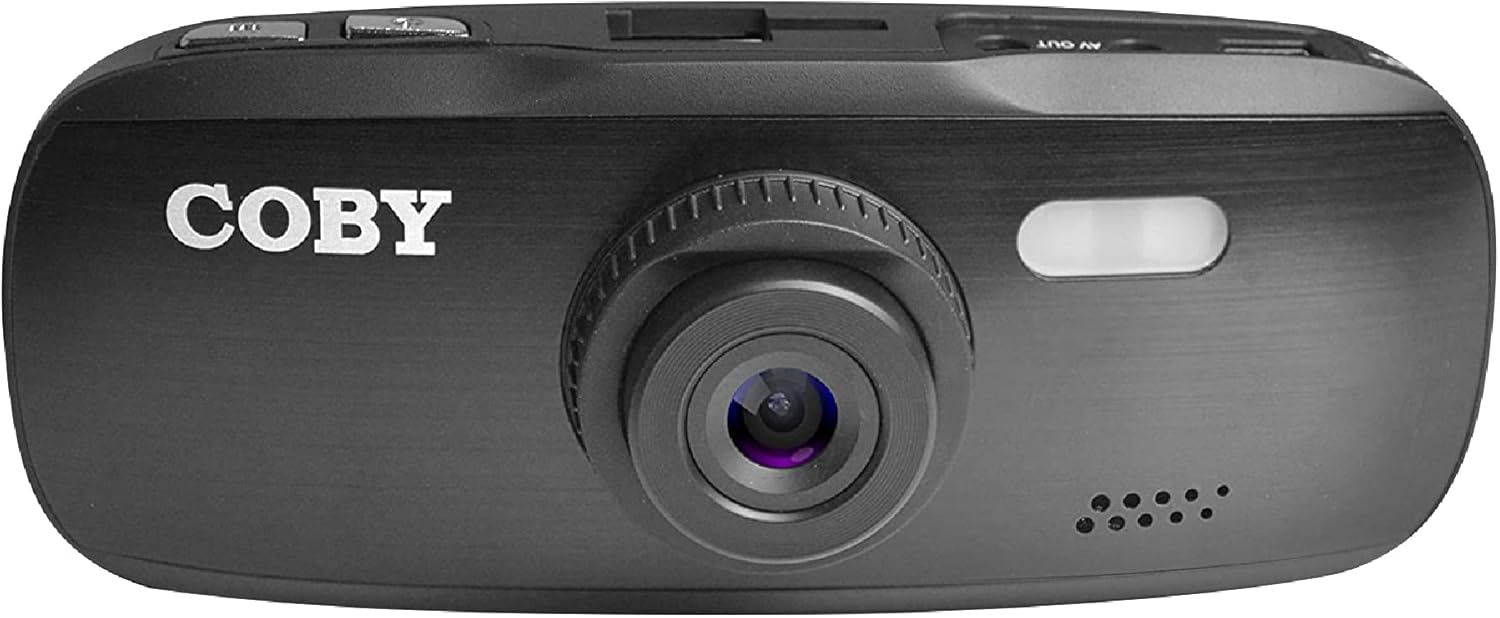
Figura 3.1: Frente View of the Dash Cam. This image displays the front of the Coby dash cam, highlighting the main camera lens and the Coby brand logo.

Figura 3.2: Posterior View with LCD Screen and Controls. The back of the dash cam is shown, featuring the 2.7-inch LCD screen displaying a scenic road, flanked by control buttons on both sides.

Figura 3.3: Lado View with Ports and Slots. This image illustrates the side of the dash cam, detailing the MicroSD card slot, AV Out port, and Micro USB port for connectivity.
3.1. Componentes y controles
- Lente de la cámara: Main lens for video recording.
- Pantalla LCD: Pantalla de 2.7 pulgadas para transmisión en vivo view, reproducción y navegación por menús.
- Botón de encendido: Enciende/apaga el dispositivo.
- Botón de menú: Accede a la configuración del sistema.
- Botón de modo: Switches between video recording, still photo, and playback modes.
- Botón REC: Inicia/detiene la grabación de vídeo.
- Botones arriba / abajo: Navegue por las opciones del menú y ajuste la configuración.
- Ranura para tarjeta microSD: Insert your MicroSD card (up to 32GB, Class 10 recommended).
- Puerto micro USB: Para suministro de energía y transferencia de datos a una computadora.
- Puerto de salida AV: Para conectar a una pantalla externa.
- Altavoz/Micrófono: Para grabación y reproducción de audio.
4. Configuración
4.1. Installing the Suction Mount
- Clean the windshield area where you intend to mount the dash cam. Ensure it is free of dust and grease for optimal suction.
- Attach the suction mount to the dash cam by sliding it into the top mount slot until it clicks securely.
- Press the suction cup firmly against the cleaned windshield and push down the lever on the mount to secure it.
- Ajuste el ángulo de la cámara del tablero para garantizar una visión clara. view del camino por delante, evitando obstrucciones desde atrásview mirror or other vehicle components.

Figure 4.1: Dash Cam Mounted in a Vehicle. This image shows the dash cam securely mounted on the windshield, providing a clear view of the road from the driver's seat.
4.2. Inserción de la tarjeta MicroSD
- Localice la ranura para tarjeta MicroSD en el costado de la cámara del tablero.
- Insert a Class 10 or higher MicroSD card (up to 32GB) into the slot with the gold contacts facing the back of the camera until it clicks into place.
- Para quitarla, empuje suavemente la tarjeta hasta que salga.
- Nota: It is recommended to format the MicroSD card within the dash cam before first use and periodically thereafter to ensure stable recording.
4.3. Conexión de alimentación
- Connect the provided car charger to the Micro USB port on the dash cam.
- Conecte el otro extremo del cargador de automóvil a la toma de corriente de 12 V de su vehículo (toma del encendedor de cigarrillos).
- The dash cam is designed to automatically power on and begin recording when the vehicle's ignition is turned on, and power is supplied. It will also automatically power off shortly after the ignition is turned off.
5. Instrucciones de funcionamiento
5.1. Grabación básica
- Once powered on, the dash cam will automatically start recording in a continuous loop.
- The recording indicator (usually a red dot or flashing icon) will appear on the screen.
- To manually stop recording, press the REC button. Press it again to resume recording.
- Grabación en bucle: The dash cam records video in segments (e.g., 1, 3, or 5 minutes). When the MicroSD card is full, the oldest unlocked files serán sobrescritos por nuevas grabaciones.
5.2. Sensor G (Grabación de emergencia)
- The built-in G-sensor detects sudden movements, such as hard braking, impacts, or sharp turns.
- When triggered, the current video segment will be automatically locked and saved to prevent it from being overwritten by loop recording.
- These locked files are typically stored in a separate folder on the MicroSD card (e.g., "EVENT" or "EMERGENCY").
5.3. Detección de movimiento
- When enabled in the settings, the dash cam can automatically start recording when motion is detected in front of the lens, even when the vehicle is parked.
- This feature is useful for monitoring your vehicle while it is stationary.
- Nota: Continuous use of motion detection while parked may drain your vehicle's battery if not connected to a constant power source or a dedicated hardwire kit.
5.4. Menu Settings and Playback
- Accediendo al Menú: While not recording, press the MENÚ botón para entrar en el menú de configuración.
- Menú de navegación: Utilice el Up y Abajo Botones de flecha para desplazarse por las opciones.
- Selección de opciones: Presione el REC button (often functions as OK/Confirm) to select an option or enter a sub-menu.
- Salir del menú: Presione el MENÚ Presione nuevamente el botón para salir del menú.
- Modos de conmutación: Presione el MODO button to switch between Video Recording, Still Photo, and Playback modes.
- Reproducción: In Playback mode, use the Up y Abajo botones para seleccionar un file, luego presione REC Para jugar.
- Fecha/Hora Stamp: Ensure the date and time are correctly set in the menu for accurate recording timestamps.
6. Mantenimiento
- Limpieza de la lente y la pantalla: Use a soft, lint-free cloth to gently wipe the camera lens and LCD screen. Avoid abrasive materials or chemical cleaners that could damage the surfaces.
- Gestión de tarjetas MicroSD:
- Format the MicroSD card regularly (e.g., once a month) using the dash cam's format function. This helps maintain card performance and prevents data corruption.
- Replace the MicroSD card periodically (e.g., every 6-12 months, depending on usage) as continuous overwriting can degrade its lifespan.
- Consideraciones de temperatura: Evite exponer la cámara de tablero a temperaturas extremas durante períodos prolongados. Las altas temperaturas pueden afectar la duración de la batería y el rendimiento del dispositivo.
7. Solución de problemas
| Problema | Posible causa | Solución |
|---|---|---|
| La cámara del tablero no se enciende. | No power supply; low internal battery; faulty power cable. |
|
| Dash cam turns off unexpectedly or overheats. | Poor power connection; faulty MicroSD card; extreme ambient temperature. |
|
| "Card Error" or "Please Insert Card" message. | MicroSD card not inserted correctly; card corrupted; incompatible card. |
|
| Cannot access menu settings or buttons unresponsive. | Device is recording; temporary software glitch. |
|
| Suction mount does not stick. | Dirty windshield; cold temperature; worn suction cup. |
|
8. Especificaciones
| Característica | Detalle |
|---|---|
| Nombre del modelo | DCHD101 |
| Número de modelo del artículo | DCHD101-V2 |
| Resolución de captura de video | 1080p Full HD (30 FPS), 720p (60 FPS) |
| Megapíxeles de la cámara | 5.0 megapíxeles |
| Ángulo de la lente | Gran angular de 140 grados |
| Zoom digital | 4x |
| Tipo de pantalla | 2.7" HD Wide Screen LCD |
| Soporte de almacenamiento | Up to 32GB MicroSDHC card (not included) |
| Características especiales | G-Sensor, Loop Recording, LED Night Vision, Automatic Motion Detection |
| Tipo de montaje | Montaje de succión |
| Tecnología de conectividad | Auxiliary (Micro USB, AV Out) |
| Peso del artículo | 3.2 onzas |
| Dimensiones del producto | 4.3 x 1.3 x 1.8 pulgadas |
| Fabricante | Electrónica Summit, LLC |
9. Garantía y soporte
9.1. Información de garantía
This Coby Car Dash Cam (Model DCHD101-V2) comes with a Garantía del fabricante de 30 días A partir de la fecha de compra. Esta garantía cubre defectos de materiales y mano de obra en condiciones normales de uso. No cubre daños causados por mal uso, accidentes, modificaciones no autorizadas ni causas externas.
Conserve su comprobante de compra para reclamos de garantía.
9.2. Atención al cliente
For technical assistance, troubleshooting, or warranty inquiries, please contact Coby customer support. You may find contact information on the official Coby websitio o a través del minorista donde se compró el producto.
You can also visit the official Coby store on Amazon for more information and product updates: Coby Amazon Store.


