1. Introducción
This manual provides comprehensive instructions for the Intel Dual Band Wireless-AC 7265 Wi-Fi + Bluetooth 4.0 adapter. Designed for seamless integration into compatible systems, this adapter offers robust wireless connectivity for various computing needs.
Important Note: This adapter does NOT support HP and Lenovo computers.
2. Características principales
- Download Speeds up to 867 Mbps with 2x2 Design.
- Optimized for use with Intel Core i Series CPUs.
- Integrated Bluetooth 4.0 for wireless peripheral connectivity.
- M.2 Interface, compatible with the latest laptops and mini PCs.
- Dual-band operation supporting 2.4 GHz and 5 GHz Wi-Fi connections.
3. Especificaciones del producto
| Atributo | Valor |
|---|---|
| Número de modelo | 7265NGW |
| Dimensiones del producto | 3.9 x 1.4 x 0.6 pulgadas |
| Peso del artículo | 0.352 onzas |
| Interfaz de hardware | M.2 (Bluetooth) |
| Protocolo de enlace de datos | Bluetooth, Wi-Fi 802.11ac |
| Velocidad de transferencia de datos | Up to 867 Mbps (Wi-Fi), 433 Megabits Per Second (Bluetooth) |
| Fabricante | Intel |
4. Configuración e instalación
Installing the Intel Dual Band Wireless-AC 7265 adapter is a straightforward process, typically involving a plug-and-play experience with minimal driver installation required.
4.1. Instalación Física
- Ensure your computer is powered off and disconnected from any power source.
- Locate the M.2 slot on your laptop or motherboard. This may require opening the back panel of your device.
- Carefully insert the Intel 7265NGW adapter into the M.2 slot.
- Secure the adapter with the retaining screw, if applicable.
- Connect the two antenna cables to the corresponding "MAIN" and "AUX" ports on the adapter. Note: Connecting both antennas is crucial for utilizing the Bluetooth functionality.

Figura 1: Frente view of the Intel 7265NGW adapter, highlighting the antenna connection points.
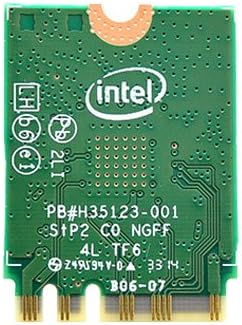
Figura 2: Atrás view of the Intel 7265NGW adapter, displaying the reverse side of the circuit board.
4.2. Instalación del controlador
Upon booting your system after physical installation, the operating system (e.g., Windows) may automatically detect and install the necessary drivers. If not, you can download the latest drivers directly from the official Intel support website. A simple driver install will make the adapter ready for use.
5. Operación
The Intel Dual Band Wireless-AC 7265 provides stable and consistent wireless connectivity for both Wi-Fi and Bluetooth functions. It supports both 2.4 GHz and 5 GHz Wi-Fi bands, allowing for flexible connection options depending on your network environment.
5.1. Conectividad WiFi
Once installed and drivers are in place, your system's Wi-Fi settings will display available networks. Select your desired network and enter the password to connect. The adapter is capable of delivering speeds up to 867 Mbps, suitable for browsing, streaming high-definition content, and downloading large files without significant issues.
5.2. Conectividad Bluetooth
To use the integrated Bluetooth 4.0, ensure both antenna cables are properly connected to the adapter. Access your system's Bluetooth settings to pair with compatible devices such as keyboards, mice, headphones, and other peripherals. The Bluetooth functionality provides reliable short-range wireless communication.
6. Mantenimiento
The Intel Dual Band Wireless-AC 7265 adapter is designed for durability and reliability. Minimal maintenance is required to ensure optimal performance.
- Actualizaciones de controladores: Verifique periódicamente el soporte de Intel webSitio para controladores actualizados para garantizar la compatibilidad y mejoras de rendimiento.
- Limpieza del sistema: If the adapter is installed in a laptop or desktop, ensure the internal components are kept free of dust to prevent overheating and maintain stable operation.
- Inspección física: Avoid physical damage to the adapter and its antenna connections.
7. Solución de problemas
If you encounter issues with your Intel Dual Band Wireless-AC 7265 adapter, consider the following common solutions:
- Sin Wi-Fi ni Bluetooth:
- Verify that the adapter is correctly seated in the M.2 slot.
- Ensure both antenna cables are securely connected to the "MAIN" and "AUX" ports on the adapter. Bluetooth functionality specifically requires both antennas.
- Check Device Manager (Windows) to confirm the adapter is recognized and drivers are installed without errors. Reinstall drivers if necessary.
- Slow Wi-Fi Speeds or Disconnections:
- Ensure you are connected to the appropriate Wi-Fi band (2.4 GHz for range, 5 GHz for speed).
- Actualice el firmware de su enrutador Wi-Fi.
- Reduce las interferencias de otros dispositivos electrónicos.
- Problemas de emparejamiento de Bluetooth:
- Confirm Bluetooth is enabled in your system settings.
- Ensure the device you are trying to pair is in pairing mode and within range.
- As mentioned, ensure both antennas are connected to the adapter.
- Problemas de compatibilidad:
Remember, this adapter is explicitly stated to NOT support HP and Lenovo computers. Attempting to use it with these brands may result in non-functionality or instability.
8. Garantía y soporte
The Intel Dual Band Wireless-AC 7265 adapter comes with a 1 Year Intel Direct Warranty. For warranty claims, technical support, or further assistance, please contact Intel's official customer support channels.
For the most up-to-date support information and driver downloads, please visit the official Intel websitio.


