1. Introducción
This manual provides comprehensive instructions for the safe and efficient operation, setup, and maintenance of your Sealey SDH70 Industrial Dehumidifier. Please read this manual thoroughly before operating the unit and retain it for future reference. The Sealey SDH70 is designed for professional use in various industrial and commercial environments to effectively control humidity levels.
2. Instrucciones de seguridad
Observe siempre las siguientes precauciones de seguridad para reducir el riesgo de incendio, descarga eléctrica o lesiones.
- Asegúrese de que la fuente de alimentación coincida con el volumen.tage se especifica en la etiqueta de clasificación del deshumidificador.
- Do not operate the unit with a damaged power cord or plug. Contact qualified service personnel for repair.
- Coloque el deshumidificador sobre una superficie estable y nivelada para evitar que se vuelque.
- Maintain adequate clearance around the unit for proper airflow (at least 20 cm from walls or other objects).
- No introduzca objetos en las rejillas de entrada o salida de aire.
- Unplug the unit before cleaning, performing maintenance, or moving it.
- Este aparato no está diseñado para ser utilizado por personas (incluidos niños) con capacidades físicas, sensoriales o mentales reducidas, o con falta de experiencia y conocimientos, a menos que hayan recibido supervisión o instrucciones sobre el uso del aparato por parte de una persona responsable de su seguridad.
- No utilice el deshumidificador en áreas donde se almacenen líquidos o gases inflamables.
- La unidad contiene refrigerante R290. El mantenimiento solo debe ser realizado por personal cualificado.
3. Producto terminadoview
Familiarize yourself with the components of your Sealey SDH70 Industrial Dehumidifier.

Figura 3.1: Lado delantero view of the Sealey SDH70 Industrial Dehumidifier. This image shows the robust red and black casing, the control panel on the side, and the durable wheels for portability.
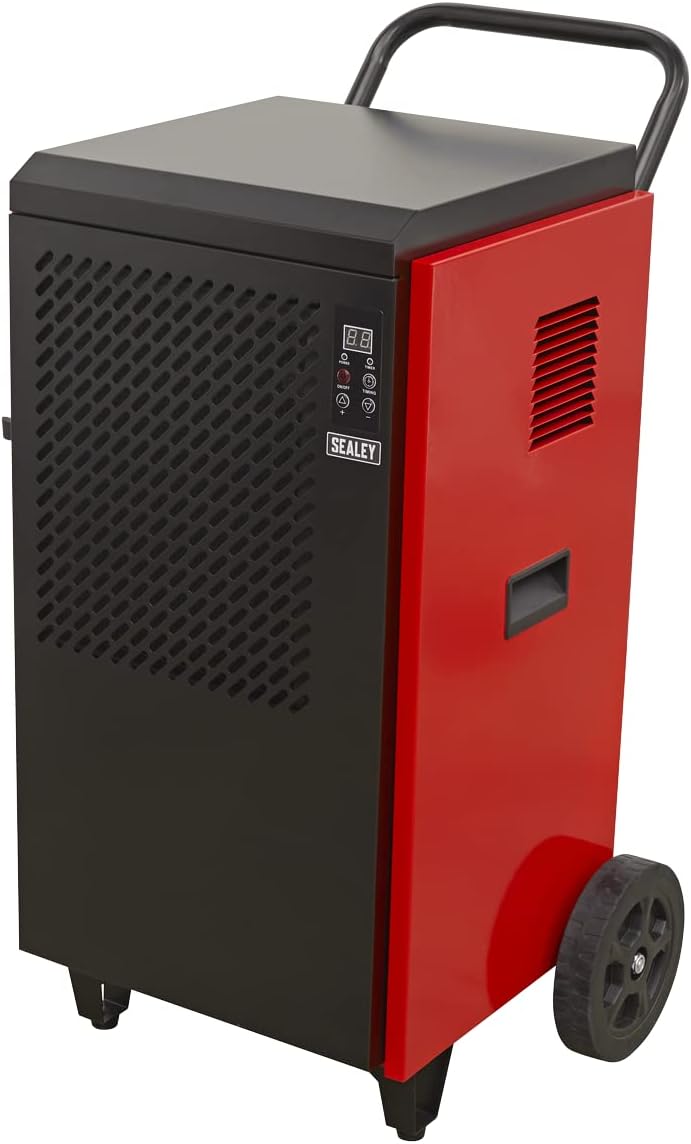
Figura 3.2: Lado view of the dehumidifier, highlighting the continuous drainage hose connection point at the bottom. The hose allows for direct water removal without manual emptying.

Figura 3.3: Detallado view of the digital control panel. It features a digital display for humidity readings, power button, full tank indicator, timer indicator, and up/down buttons for setting desired humidity levels and timer functions.
4. Configuración
- Desembalaje: Carefully remove the dehumidifier from its packaging. Inspect for any shipping damage. Retain packaging for future transport or storage.
- Colocación: Position the unit on a firm, level surface in the area requiring dehumidification. Ensure there is at least 20 cm (8 inches) of clear space around all sides of the unit to allow for proper air circulation. Do not block the air inlet or outlet.
- Configuración del drenaje: The SDH70 is designed for continuous drainage. Connect the provided drainage hose to the drainage outlet at the bottom of the unit. Route the hose to a suitable drain or collection container, ensuring it is sloped downwards to allow gravity flow. Ensure the hose is not kinked or blocked.
- Conexión de energía: Conecte el cable de alimentación a una toma de corriente con conexión a tierra que coincida con el volumen.tage requisitos de la unidad.
5. Instrucciones de funcionamiento
- Encendido/apagado: Presione el FUERZA button on the control panel to turn the unit on or off. The digital display will illuminate.
- Configuración de la humedad deseada:
- When the unit is running, the display shows the current room humidity.
- Presione el UP (▲) o ABAJO (▼) buttons to adjust the desired humidity level. The setting range is typically between 30% and 90% Relative Humidity (RH).
- The unit will operate until the set humidity level is reached, then cycle off. It will restart automatically if the humidity rises above the set level.
- Función de temporizador:
- Presione el MOMENTO button to set the auto-off timer. Each press increases the timer by one hour, up to 24 hours.
- The unit will automatically shut off after the set number of hours.
- Para cancelar el temporizador, presione el MOMENTO button until "00" is displayed.
- Operación continua: For continuous dehumidification, set the desired humidity level to the lowest possible setting (e.g., 30% RH). The unit will run continuously, provided the drainage hose is properly set up.
6. Mantenimiento
El mantenimiento regular garantiza un rendimiento óptimo y prolonga la vida útil de su deshumidificador.
- Limpieza del filtro de aire:

Figura 6.1: Demonstrates the removal of the washable air filter from the side of the dehumidifier for cleaning.
- The air filter should be cleaned every two weeks or more frequently depending on the operating environment.
- Unplug the unit before attempting to clean the filter.
- Locate the air filter access panel (typically on the side or rear). Remove the filter.
- Lave el filtro con agua tibia y jabón. Enjuáguelo bien y déjelo secar al aire antes de volver a colocarlo. No lo use en el lavavajillas.
- A clean filter ensures efficient operation and prevents dust buildup inside the unit.
- Limpieza del exterior: Limpie el exterior de la unidad con un paño suave yamp paño. No utilice productos químicos agresivos, abrasivos ni disolventes.
- Almacenamiento: If storing the unit for an extended period, ensure it is clean and dry. Coil the power cord neatly. Store in a cool, dry place, preferably in its original packaging.
7. Solución de problemas
Antes de contactar con el servicio de atención al cliente, consulte la siguiente tabla para conocer los problemas comunes y sus soluciones.
| Problema | Posible causa | Solución |
|---|---|---|
| La unidad no se enciende. | No hay suministro de energía; cable de alimentación suelto; disyuntor disparado. | Verifique la toma de corriente; asegúrese de que el cable de alimentación esté enchufado de forma segura; reinicie el disyuntor. |
| El deshumidificador no recoge agua. | Humidity setting too high; Room temperature too low; Air filter clogged; Drainage hose kinked/blocked. | Lower humidity setting; Ensure room temperature is above 5°C (41°F); Clean air filter; Check drainage hose for obstructions. |
| La unidad es ruidosa. | Unit not level; Air filter clogged; Internal components loose. | Place on a level surface; Clean air filter; If noise persists, contact service. |
| El flujo de aire es débil. | Filtro de aire obstruido; entrada/salida de aire bloqueada. | Clean air filter; Ensure no obstructions around air vents. |
8. Especificaciones
Technical specifications for the Sealey SDH70 Industrial Dehumidifier.
| Característica | Detalle |
|---|---|
| Marca | Sealey |
| Número de modelo | SDH70 |
| Color | Rojo |
| Dimensiones del producto (L x An x Al) | 49 x 60 x 105 cm |
| Peso del artículo | 46.7 kilogramos |
| Capacidad | 70 Litres (dehumidification capacity per day) |
| Refrigerante | R290 (Ecológico) |

Figura 8.1: The R290 Eco Friendly logo, indicating the type of refrigerant used in the SDH70 dehumidifier.
9. Garantía y soporte
Your Sealey SDH70 Industrial Dehumidifier comes with a manufacturer's warranty.

Figura 9.1: Sealey 1 Year Guarantee logo, indicating the product warranty.
Sealey products are manufactured to a high standard and are guaranteed for 1 year from the date of purchase against manufacturing defects. This guarantee is subject to the terms and conditions available on the official Sealey website or from your retailer.
For technical support, spare parts, or warranty claims, please contact your authorized Sealey dealer or visit the official Sealey website for contact information. When contacting support, please have your model number (SDH70) and purchase details ready.


