Introducción
The Coby CVR-22 Portable Cassette Recorder is designed for simple and convenient audio recording and playback. Featuring one-touch recording, a built-in microphone, and a retractable handle, this device offers excellent portability for capturing audio wherever you go. Rediscover your classic tape collection or record new content with ease.
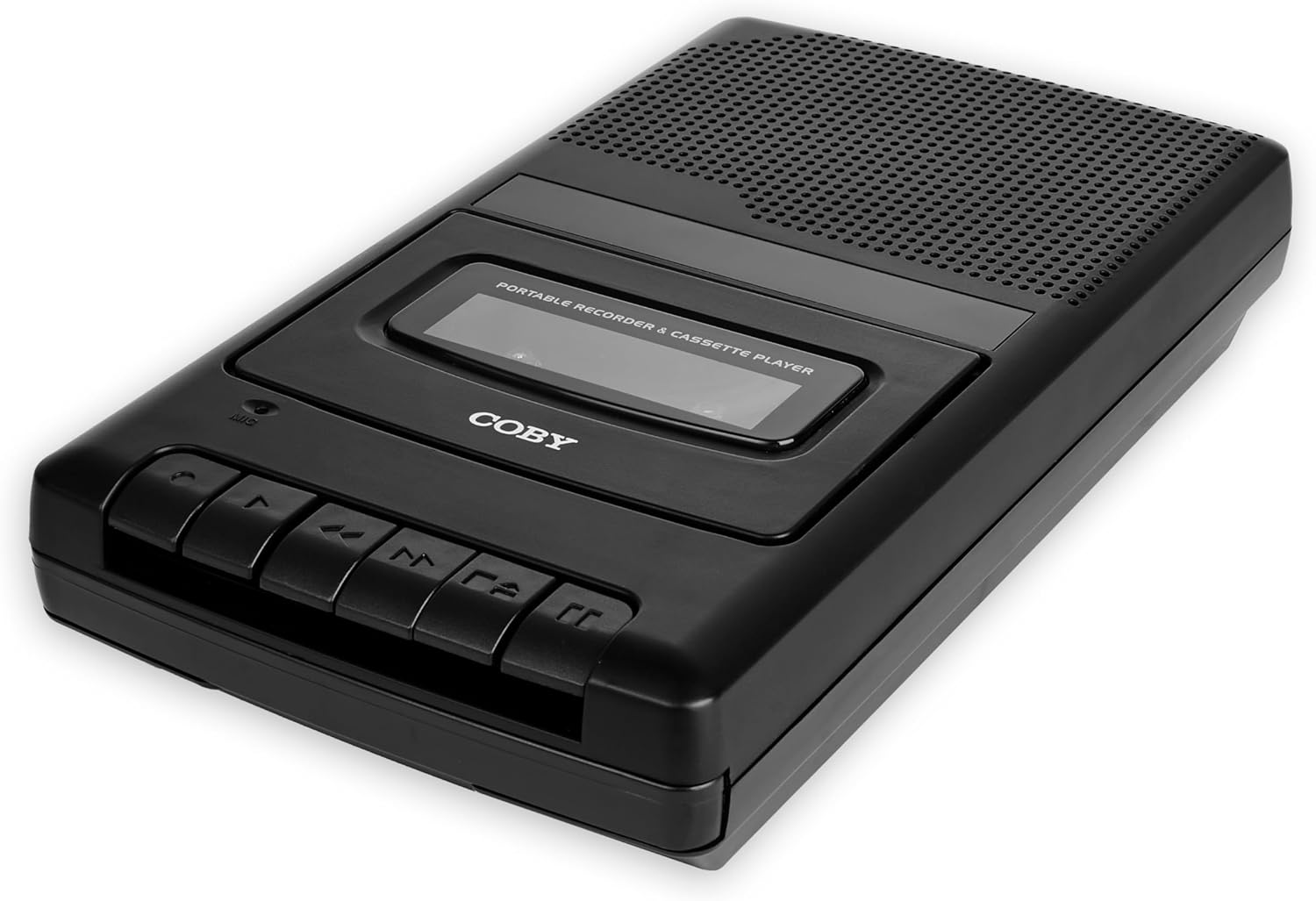
Image: The Coby CVR-22 Portable Cassette Recorder, showcasing su diseño compacto y botones de control.
Configuración
Encender el dispositivo
The CVR-22 operates on two (2) AA batteries. Ensure batteries are inserted correctly according to polarity markings inside the battery compartment.
- Locate the battery compartment on the underside or rear of the unit.
- Abra la tapa del compartimiento de la batería.
- Inserte dos pilas AA, haciendo coincidir los terminales positivo (+) y negativo (-) como se indica.
- Cierre bien la tapa del compartimento de la batería.

Image: The Coby CVR-22 showing a cassette being inserted and indicating its 2x AA battery power requirement.
Instrucciones de funcionamiento
Inserción de una cinta de casete
- Presione el DETENER/EXPULSAR Botón para abrir la puerta del compartimento del casete.
- Insert a standard audio cassette tape with the open edge facing upwards and the tape side facing the unit.
- Cierre suavemente la puerta del compartimiento del casete hasta que encaje en su lugar.
Reproducción
- Asegúrese de que la cinta de casete esté insertada correctamente.
- Presione el JUGAR Botón. La cinta comenzará a reproducirse.
- Adjust the volume using the volume control dial, typically located on the side of the unit.
- Para detener la reproducción, presione el DETENER/EXPULSAR botón.
- Para avanzar rápidamente, presione el botón FF (Avance rápido) botón.
- Para rebobinar, presione el botón REW (Rebobinar) botón.

Image: A user holding the Coby CVR-22, illustrating the joy of rediscovering a classic tape collection.
Grabación
The CVR-22 features one-touch recording and a built-in microphone for convenient audio capture.
- Ensure a blank or recordable cassette tape is inserted.
- Presione el REGISTRO botón (normalmente rojo). El JUGAR El botón también se activará simultáneamente.
- The built-in microphone will begin recording audio. Position the recorder appropriately for optimal sound capture.
- Para detener la grabación, presione el DETENER/EXPULSAR botón.

Image: The Coby CVR-22 being used in a classroom setting, highlighting its utility for recording classes and lectures.

Image: The Coby CVR-22 positioned on a meeting table, demonstrating its suitability for recording meetings with its one-touch record button.
Conexiones externas
The CVR-22 includes a 3.5mm headphone jack for private listening and potentially an external microphone input (check your specific unit for microphone input if needed, as the built-in mic is standard).
- Toma de auriculares: Connect standard 3.5mm headphones for personal audio playback.
- External Microphone Input (if available): For higher quality recordings or specific recording scenarios, an external microphone can be connected to the designated input jack.

Image: The Coby CVR-22 connected to an external microphone setup, illustrating its built-in audio input/output ports for versatile use.
Mantenimiento
Limpieza de la unidad
- Limpie el exterior de la unidad con un paño suave y seco.
- No utilice limpiadores abrasivos ni disolventes, ya que pueden dañar el acabado.
- Periodically clean the tape head and pinch roller using a specialized cassette head cleaner or a cotton swab lightly dampened with isopropyl alcohol. This helps maintain optimal sound quality.
Cuidado de la batería
- Retire las baterías si la unidad no se utilizará durante un período prolongado para evitar fugas.
- Deseche las baterías usadas de manera responsable de acuerdo con las regulaciones locales.
Solución de problemas
| Problema | Posible causa | Solución |
|---|---|---|
| La unidad no se enciende. | Pilas muertas o insertadas incorrectamente. | Reemplace las baterías por otras nuevas, asegurándose de la polaridad correcta. |
| No hay sonido durante la reproducción. | Volume too low; headphones not connected properly; tape head dirty. | Increase volume; ensure headphones are fully inserted; clean tape head. |
| La grabación está distorsionada o no es clara. | Microphone too far from sound source; tape head dirty; faulty tape. | Move closer to sound source; clean tape head; try a different tape. |
| La cinta no se mueve o se atasca. | Tape is tangled or damaged; unit mechanism issue. | Carefully remove and inspect tape; try a different tape. If issue persists, contact support. |
Presupuesto
| Característica | Detalle |
|---|---|
| Marca | Coby |
| Número de modelo | CVR-22 |
| Color | Negro |
| Fuente de poder | 2 x AA Batteries (Not rechargeable) |
| Medio de grabación | Cinta de casete |
| Funciones de grabación | One-Touch Recording, Built-in Microphone, Auto-Stop |
| Funciones de reproducción | Stop Car |
| Salida de audio | Altavoz incorporado, conector para auriculares de 3.5 mm |
| Dimensiones (D x W x H) | 14.8 cm x 25.9 cm x 5 cm (aprox.) |
| Manejar | Retráctil |
Garantía y soporte
Specific warranty information for the Coby CVR-22 Portable Cassette Recorder is not available in this manual. Please refer to the product packaging or the manufacturer's official webSitio para conocer los términos y condiciones detallados de la garantía.
For technical support or service inquiries, please contact Coby customer service through their official channels. Keep your purchase receipt as proof of purchase.
Manufacturer: Summit Electronics, US


