Introducción
Thank you for choosing the Technoline WT 745 Radio Controlled Alarm Clock. This digital alarm clock features precise timekeeping, dual alarms with snooze, date and weekday display, and indoor temperature monitoring. Please read this manual carefully to ensure proper setup and operation.
Contenido del paquete
- Technoline WT 745 Radio Controlled Alarm Clock
- Manual de usuario
Nota: Se requieren 2 pilas AAA, no incluidas.
Producto terminadoview
Familiarize yourself with the main components of your WT 745 alarm clock.
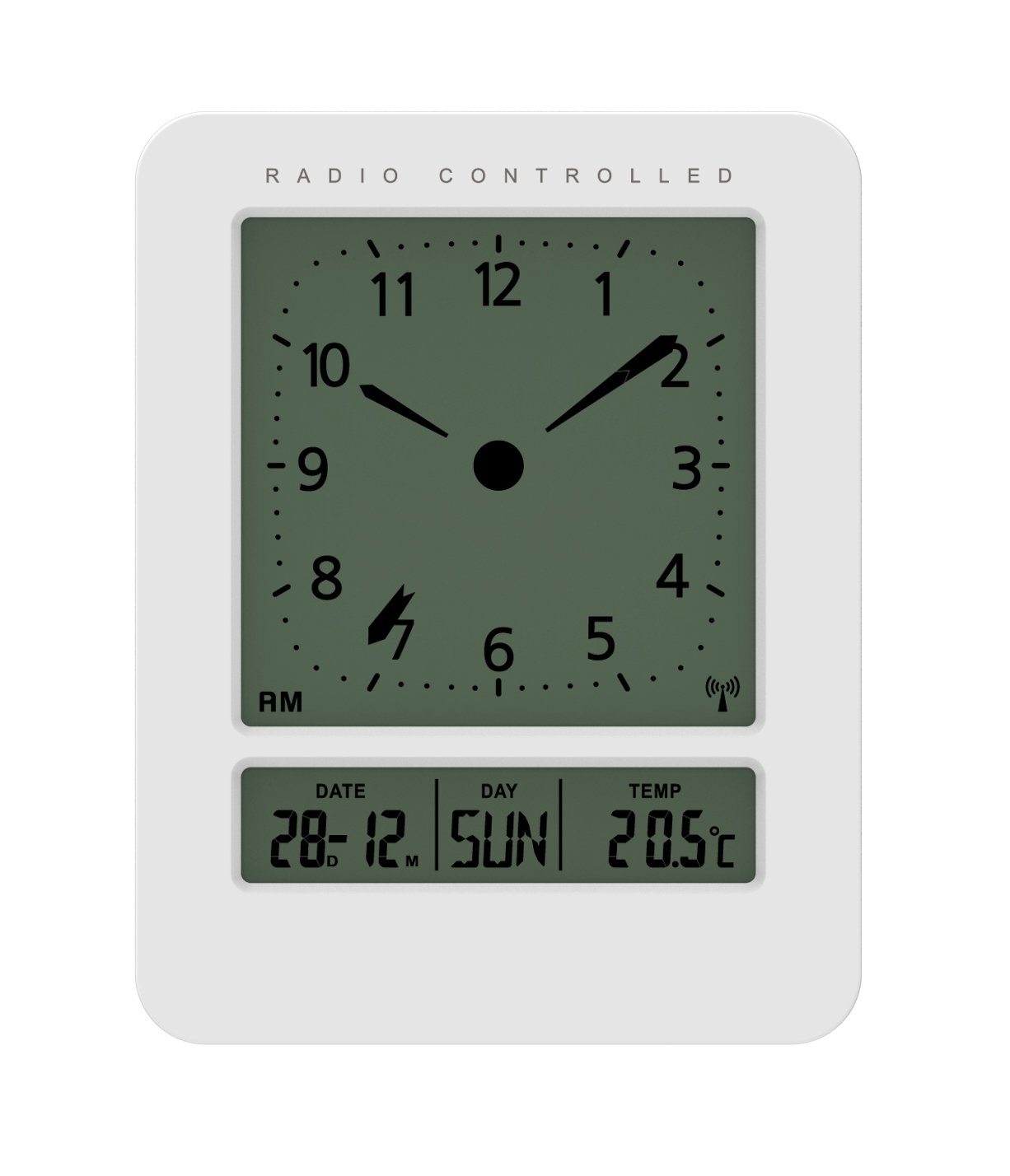
Imagen: Frontal y lateral view of the Technoline WT 745 Radio Controlled Alarm Clock, showing the digital display with time, date, day, and temperature, and the analog clock face. The clock is white with a light grey display.
- Analog Clock Face: Displays current time with hour, minute, and second hands.
- Pantalla digital: Shows date, day of the week, and indoor temperature.
- Radio Controlled Indicator: Symbol indicating successful radio signal reception.
- Botones de control: Buttons for setting time, alarm, and other functions, typically located on the back or side.
- Compartimento de la batería: Located on the back for 2x AAA batteries.
Configuración
1. Insertar baterías
- Abra la tapa del compartimiento de la batería en la parte posterior del reloj despertador.
- Inserte 2 pilas AAA nuevas, observando la polaridad correcta (+/-).
- Cierre bien la tapa del compartimento de la batería.
Note: The clock will automatically start searching for the radio time signal after battery insertion. This process may take several minutes.
2. Recepción inicial de la señal de radio
- Coloque el reloj cerca de una ventana para una recepción óptima de la señal.
- Evite colocarlo cerca de dispositivos electrónicos que puedan causar interferencias.
- Once the signal is received, the time, date, and day will be automatically set. The radio controlled indicator will appear on the display.
If the signal is not received within 10 minutes, try repositioning the clock or manually setting the time (see "Manual Time Setting").
Instrucciones de funcionamiento
Configuración de la alarma
- Presione el SET DE ALARMAS button (location not specified, assume standard placement). The alarm time will flash.
- Utilice el UP or ABAJO Botones para ajustar la hora.
- Prensa SET DE ALARMAS nuevamente para confirmar la hora y pasar a los minutos.
- Utilice el UP or ABAJO Botones para ajustar los minutos.
- Prensa SET DE ALARMAS to save the alarm time.
- Para activar/desactivar la alarma, presione el botón ALARMA ENCENDIDA / APAGADA Botón. Un icono de alarma aparecerá/desaparecerá en la pantalla.
The WT 745 supports two independent alarms. Repeat the steps above to set the second alarm.
Función de repetición
- Cuando suene la alarma, presione el DORMITAR button (usually a large button on top). The alarm will pause for approximately 5 minutes and then sound again.
- To stop the alarm completely, press any other button (e.g., ALARM ON/OFF) or let it ring for its full duration.
Activación de la luz de fondo
- Presione el LUZ or DORMITAR button to temporarily illuminate the display for easy viewing en condiciones de poca luz.
Viewing Date, Day, and Temperature
- The digital display continuously shows the current date, day of the week, and indoor temperature. No specific action is required to view estos.
Ajuste manual de la hora (si la señal de radio no está disponible)
- Mantenga pulsado el TIEMPO ESTABLECIDO Botón durante unos segundos hasta que los dígitos de la hora parpadeen.
- Utilice el UP or ABAJO Botones para ajustar la hora.
- Prensa TIEMPO ESTABLECIDO nuevamente para confirmar la hora y pasar a los minutos.
- Utilice el UP or ABAJO Botones para ajustar los minutos.
- Continuar presionando TIEMPO ESTABLECIDO to cycle through and adjust year, month, and day as needed.
- Prensa TIEMPO ESTABLECIDO one last time to exit manual setting mode.
Mantenimiento
- Limpieza: Limpie el reloj con un paño suave y seco. No utilice limpiadores abrasivos ni disolventes.
- Reemplazo de batería: Replace batteries when the display dims or functions become erratic. Always replace both batteries simultaneously with new ones.
- Almacenamiento: Si va a guardar el reloj durante un período prolongado, retire las pilas para evitar fugas.
- Ambiente: Mantenga el reloj alejado de la luz solar directa, temperaturas extremas y alta humedad.
Solución de problemas
| Problema | Posible causa | Solución |
|---|---|---|
| La pantalla está en blanco o tenue. | Las baterías están bajas o insertadas incorrectamente. | Reemplace las baterías con baterías AAA nuevas, asegurándose de la polaridad correcta. |
| El reloj no recibe señal de radio. | Interference, poor location, or signal too weak. | Move the clock closer to a window, away from electronic devices. Try manual time setting. |
| La alarma no suena. | La alarma no está activada o está configurada incorrectamente. | Ensure the alarm icon is visible on the display. Recheck alarm time settings. |
| Hora incorrecta mostrada. | Radio signal lost or manual time set incorrectly. | Allow the clock to resynchronize with the radio signal. If persistent, manually set the time. |
Presupuesto
- Modelo: WT 745
- Marca: Línea tecnológica
- Dimensiones: 7.1 x 4.5 x 9.2 cm (largo x ancho x alto)
- Peso: 150 gramos
- Material: Plástico
- Tipo de pantalla: Digital with Analog Clock Face
- Fuente de energía: Pilas 2 x AAA (no incluidas)
- Características especiales: Radio Controlled Time, Dual Alarms, Snooze Function, Date Display, Day of Week Display, Indoor Temperature Display, Backlight.
- Uso: Interior
Garantía y soporte
For warranty information or technical support, please refer to the warranty card included with your product or visit the official Technoline webSitio. Conserve su recibo de compra como comprobante de compra.
Oficial Websitio: www.technoline.eu