1. Introducción
This manual provides essential information for the safe and efficient operation of your NEC X555UNS 55-inch 1080p LED TV. Please read these instructions thoroughly before installation and use, and retain them for future reference.
The NEC X555UNS is designed for professional signage applications, particularly for building video walls, offering superior off-angle viewing and minimal color shift due to its S-IPS panel technology. It supports 24/7 operation with advanced heat management and localized dimming for improved brightness uniformity.

Image: The NEC X555UNS 55-inch LED TV displaying vibrant, colorful content, showcasing its high-quality visual output.
2. Información de seguridad
Observe siempre las siguientes precauciones de seguridad para evitar daños al producto y garantizar la seguridad del usuario:
- Ensure the product is installed by qualified personnel.
- No bloquee las aberturas de ventilación.
- Evite exponer la unidad a la lluvia o la humedad.
- Utilice únicamente el cable de alimentación suministrado con la unidad o un reemplazo adecuado.
- Desconecte la energía antes de limpiar o reparar.
- No intente reparar la unidad usted mismo. Encargue cualquier reparación a personal técnico cualificado.
3. Contenido del paquete
Verifique que todos los artículos estén presentes en el paquete:
- NEC X555UNS 55-inch LED TV Unit
- Pararse
- Cable de alimentación
- Mando a distancia
- Manual de instrucciones (este documento)

Imagen: Frente view of the NEC X555UNS 55-inch LED TV, showing its sleek, dark display panel when powered off.
4. Configuración e instalación
4.1 Instalación física
The NEC X555UNS is designed for video wall applications. Ensure proper mounting hardware is used for secure installation. The unit weighs approximately 81 pounds (36.7 kg).
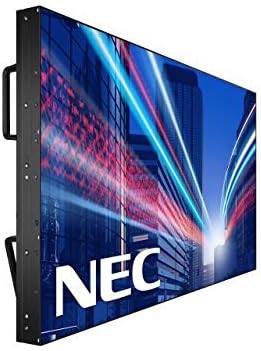
Imagen: Lateral view of the NEC X555UNS 55-inch LED TV, highlighting its robust construction and integrated handles for easier installation in video wall configurations.
4.2 Conectividad
Connect your video sources and network cables to the appropriate ports on the display. The X555UNS offers various connectivity options:
- HDMI: Para entrada de audio y vídeo de alta definición.
- DVI‑D: For digital video input.
- LAN: For network control and content distribution.
- Puerto de pantalla: Supports UHD pass-through for daisy-chaining multiple displays in a video wall setup.
- OPS Slot: Allows for integration of single board computers.
For video wall configurations, utilize the DisplayPort for UHD daisy-chaining to achieve a high-resolution display across the entire wall.
4.3 Encendido inicial
- Connect the power cord to the display and a suitable power outlet.
- Presione el botón de encendido en la pantalla o en el control remoto.
- The display will power on and show the NEC logo.
- Use the on-screen menu to configure initial settings such as language, input source, and display mode.
El Auto ID feature can simplify installation time, especially in multi-display setups, by reducing configuration steps to a single button press.
5. Instrucciones de funcionamiento
5.1 Funcionamiento básico
Use the remote control or the buttons on the display to navigate the on-screen menu (OSD). Adjust settings such as brightness, contrast, color temperature, and input source.
5.2 Funciones de visualización
- S-IPS Panel Technology: Provides excellent off-angle viewing and minimizes color shift, making it ideal for public viewing and video walls.
- Direct LED Backlighting with Localized Dimming: Enhances brightness uniformity and achieves a higher dynamic contrast ratio.
- Operación 24/7: Designed for continuous use with advanced thermal protection, internal temperature sensors, and fan-based cooling.
- 700 cd/m² Brillo: Ensures clear visibility even in brightly lit environments.
6. Mantenimiento
6.1 Limpieza de la pantalla
Para limpiar la pantalla, límpiela suavemente con un paño suave que no deje pelusa. Para manchas difíciles,ampen the cloth slightly with water or a mild, non-abrasive screen cleaner. Do not spray liquid directly onto the screen.
6.2 Cuidados generales
- Mantenga la pantalla en un área bien ventilada para evitar el sobrecalentamiento.
- Evite colocar objetos pesados sobre la pantalla.
- Revise periódicamente las conexiones de los cables para asegurarse de que sean seguras.
7. Solución de problemas
If you encounter issues with your NEC X555UNS, refer to the following common problems and solutions:
| Problema | Posible causa | Solución |
|---|---|---|
| Sin poder | Cable de alimentación desconectado; toma de corriente defectuosa. | Verifique la conexión del cable de alimentación; pruebe la toma de corriente con otro dispositivo. |
| Sin imagen | Fuente de entrada incorrecta seleccionada; cable de video suelto o defectuoso. | Seleccione la fuente de entrada correcta; verifique las conexiones del cable de video. |
| Mala calidad de imagen | Resolution mismatch; Display settings incorrect. | Adjust resolution on source device; Calibrate display settings (brightness, contrast). |
If the problem persists, contact NEC customer support.
8. Especificaciones
| Característica | Detalle |
|---|---|
| Nombre del modelo | X555UNS |
| Tamaño de pantalla | 55 pulgadas |
| Tecnología de visualización | LED, S-IPS Panel |
| Resolución | 1080p (Full HD) |
| Relación de aspecto | 16:9 |
| Frecuencia de actualización | 60 Hz |
| Brillo | 700 cd/m² (nits) |
| Conectividad | HDMI, DVI-D, LAN, DisplayPort |
| Características especiales | Flat, S-IPS Panel, Auto ID, UHD Daisy Chain, OPS Slot, 24/7 Operation, Advanced Thermal Protection |
| Dimensiones del producto | 54 x 12 x 34 pulgadas (aprox.) |
| Peso del artículo | 81 libras (aprox.) |
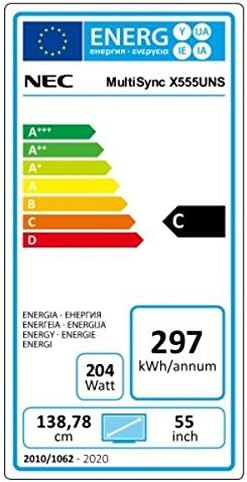
Image: Energy efficiency label for the NEC MultiSync X555UNS, showing energy consumption details and efficiency class.
9. Garantía y soporte
For warranty information and technical support, please refer to the official NEC website or contact your local NEC representative. Keep your purchase receipt as proof of purchase.
Recursos en línea: Visita www.necdisplay.com for product documentation, drivers, and support contact information.
Atención al cliente: For direct assistance, please contact NEC customer service.