1. Introducción
This manual provides detailed instructions for the installation, operation, maintenance, and troubleshooting of your Gateway SX2865 SFF Desktop Motherboard H61 (Model DB.U7411.001). This motherboard is designed for Small Form Factor (SFF) desktop systems, featuring the Intel H61 Express chipset and supporting LGA 1155/1156 CPUs and DDR3 RAM. Please read this manual thoroughly before proceeding with any installation or configuration to ensure proper functionality and safety.
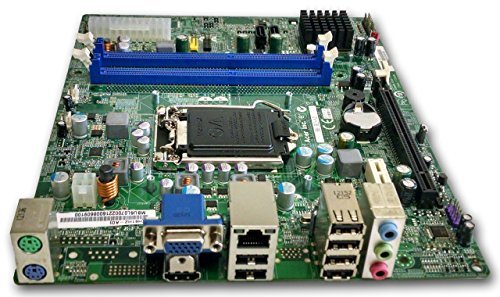
Figura 1: Encimaview of the Gateway SX2865 SFF Desktop Motherboard H61. This image displays the main components and layout of the motherboard, including the CPU socket, RAM slots, and various connectors.
2. Información de seguridad
Always observe the following safety precautions when handling and installing computer components:
- Desconecte el cable de alimentación del tomacorriente de pared antes de instalar o quitar cualquier componente.
- Use una pulsera antiestática para evitar daños por descarga electrostática (ESD) en componentes sensibles.
- Manipule la placa base por los bordes para evitar tocar componentes o circuitos sensibles.
- Asegúrese de que haya una ventilación adecuada dentro de la carcasa de la computadora para evitar el sobrecalentamiento.
- No exponga la placa base a la humedad ni a temperaturas extremas.
- Si no está seguro de algún paso de la instalación, consulte con un técnico calificado.
3. Configuración e instalación
Follow these steps to properly install the Gateway SX2865 SFF Desktop Motherboard into your system:
3.1. Preparación del chasis
- Open your computer chassis and ensure it is clean and free of dust.
- Install the I/O shield provided with your chassis or motherboard into the rear panel opening.
- Verify that the standoffs in the chassis align with the mounting holes on the motherboard. Adjust if necessary.
3.2. Instalación de la CPU
- Locate the CPU socket (LGA 1155/1156) on the motherboard.
- Levante suavemente la palanca de carga y abra la cubierta del zócalo de la CPU.
- Carefully align the CPU with the socket, matching the golden triangle on the CPU with the triangle mark on the socket. Do not force the CPU into the socket.
- Cierre la tapa del enchufe y presione la palanca de carga hasta que encaje en su lugar.
- Apply a thin layer of thermal paste to the CPU surface (if not pre-applied on the cooler).
- Install the CPU cooler according to its manufacturer's instructions, ensuring it is securely fastened.
3.3. Instalación de RAM
- Localice las ranuras DDR3 DIMM en la placa base.
- Abra los clips en ambos extremos de la ranura DIMM.
- Alinee la muesca del módulo RAM con la marca en la ranura DIMM.
- Presione firmemente ambos extremos del módulo RAM hasta que los clips encajen en su lugar.
3.4. Montaje de la placa base
- Carefully place the motherboard into the chassis, aligning the mounting holes with the standoffs.
- Asegure la placa base con tornillos, teniendo cuidado de no apretarlos demasiado.
3.5. Conexión de periféricos y alimentación
- Conecte el conector de alimentación ATX de 24 pines y el conector de alimentación de CPU de 4 pines de su fuente de alimentación a la placa base.
- Conecte los cables de datos SATA de sus dispositivos de almacenamiento (HDD/SSD) a los puertos SATA de la placa base.
- Connect front panel connectors (power button, reset button, USB, audio) to their respective headers on the motherboard. Refer to the motherboard's silkscreen labels for correct orientation.
- Install any expansion cards (e.g., graphics card) into the appropriate PCIe slots and secure them.
- Connect all necessary cables to your power supply.
4. Operación y configuración
4.1. Arranque inicial
- After all components are installed and connected, close the chassis.
- Conecte su monitor, teclado y mouse.
- Connect the power cord to the power supply and a wall outlet.
- Presione el botón de encendido de su computadora.
4.2. Configuración de BIOS/UEFI
The BIOS (Basic Input/Output System) or UEFI (Unified Extensible Firmware Interface) is firmware that initializes hardware during the booting process. To enter the BIOS/UEFI setup utility:
- During the initial boot-up sequence, repeatedly press the designated key (commonly Del, F2, o F10). The exact key may vary; check the on-screen prompts.
- Within the BIOS/UEFI, you can configure settings such as:
- Fecha y hora del sistema
- Boot Order (to install an operating system from a USB drive or DVD)
- SATA Mode (AHCI, IDE)
- CPU and Memory settings (advanced users)
- Save changes and exit the BIOS/UEFI to continue booting.
4.3. Instalación del sistema operativo y del controlador
After configuring the BIOS/UEFI, proceed with installing your preferred operating system (e.g., Windows, Linux). Once the OS is installed, install the necessary drivers for the motherboard's components (chipset, audio, LAN, etc.). These drivers are typically available on the manufacturer's website (Acer/Gateway) or can be found through the operating system's update features.
5. Mantenimiento
El mantenimiento regular ayuda a garantizar la longevidad y el rendimiento estable de su placa base:
- Eliminación de polvo: Periodically clean the inside of your computer case, including the motherboard, CPU cooler, and fan vents, using compressed air. Ensure the system is powered off and unplugged before cleaning.
- Actualizaciones del BIOS: Verifique el fabricante website (Acer/Gateway) for BIOS/UEFI updates. Updates can improve stability, add support for new hardware, or fix bugs. Follow the update instructions carefully to avoid damaging the motherboard.
- Actualizaciones de controladores: Keep your system drivers updated to ensure optimal performance and compatibility.
- Inspección física: Inspeccione ocasionalmente la placa base para detectar cualquier signo de daño, conexiones sueltas o capacitores abultados.
6. Solución de problemas
Si tiene problemas con su placa base, consulte los siguientes pasos de solución de problemas comunes:
- Sin energía:
- Ensure the power supply is connected correctly to the motherboard (24-pin ATX and 4-pin CPU).
- Check that the power supply switch is in the 'ON' position.
- Verify the power cord is securely plugged into both the power supply and the wall outlet.
- Confirm the front panel power button connector is correctly attached to the motherboard.
- Sin pantalla:
- Ensure the monitor is powered on and connected to the correct video output (either integrated graphics or a dedicated graphics card).
- Vuelva a colocar los módulos de RAM. Intente arrancar con solo un módulo de RAM instalado.
- Vuelva a colocar la tarjeta gráfica (si corresponde).
- Check if the CPU cooler is properly installed and the CPU power connector is secure.
- System Fails to Boot / POST Errors:
- Listen for beep codes from the motherboard's speaker (if installed). Consult the motherboard's documentation for beep code meanings.
- Clear the CMOS (Complementary Metal-Oxide-Semiconductor) by removing the CMOS battery for a few minutes or using the clear CMOS jumper (refer to motherboard layout).
- Ensure all essential components (CPU, RAM, GPU) are correctly installed.
- Problemas del sistema operativo:
- Verify that all necessary drivers are installed and up to date.
- Check SATA cable connections for storage devices.
- Run diagnostic tools for hard drives/SSDs and RAM.
7. Especificaciones
Key technical specifications for the Gateway SX2865 SFF Desktop Motherboard H61 (Model DB.U7411.001):
| Característica | Detalle |
|---|---|
| Marca | Puerta |
| Nombre del modelo | SX2865 |
| Número de modelo del artículo | DB.U7411.001 |
| Fabricante | Acer |
| Tipo de chipset | Intel H61 Express |
| Zócalo de CPU | LGA 1155 or LGA 1156 |
| Procesadores compatibles | Intel Xeon (and other compatible LGA 1155/1156 CPUs) |
| Tecnología de memoria RAM | DDR3 |
| Velocidad del reloj de memoria | 2133 MHz (Max supported, actual speed depends on CPU and RAM) |
| Capacidad de almacenamiento de memoria | 16 GB (Maximum supported) |
| Dispositivos compatibles | Ordenador personal |
| Plataforma | Linux (and other compatible operating systems) |
| Factor de forma | uATX (Micro-ATX) |
8. Garantía y soporte
For warranty information and technical support regarding your Gateway SX2865 SFF Desktop Motherboard H61 (Model DB.U7411.001), please refer to the documentation provided with your original system or contact the manufacturer directly.
- Fabricante: Acer (as per product specifications)
- Marca: Puerta
- Visita la página oficial Soporte de puerta de enlace websitio or Soporte Acer websitio Para conductores, preguntas frecuentes e información de contacto.
- Guarde su comprobante de compra para reclamos de garantía.


