Introducción
This manual provides essential instructions for the setup, operation, maintenance, and troubleshooting of your HP Flexible Thin Client T520. Please read this document thoroughly before using the device to ensure proper functionality and longevity.
1. Configuración
1.1 Desembalaje y verificación del contenido
Retire con cuidado todos los componentes del embalaje. Compruebe que estén presentes los siguientes elementos:
- HP Flexible Thin Client T520 unit
- Adaptador de corriente y cable
- Teclado
- Ratón
- Vertical stand (if included)
- Documentación (este manual)
1.2 Conexión de periféricos
Before powering on the thin client, connect all necessary peripherals.
- Conectar pantalla: Use a DisplayPort or VGA cable to connect your monitor to the corresponding port on the rear of the thin client. The T520 supports up to 3840x2160 resolution via DisplayPort.
- Conecte dispositivos USB: Plug the keyboard and mouse into any available USB ports. The thin client features USB 3.0 (SuperSpeed) ports on the front and USB 2.0 ports on the rear.
- Conectar red: For a wired connection, insert an Ethernet cable into the RJ-45 network port on the rear.
- Conectar audio: If using external speakers or a headset, connect them to the audio output jack. A microphone can be connected to the microphone input jack.
- Conecte la electricidad: Insert the power adapter cable into the DC-in port on the rear of the thin client, then plug the power cord into an electrical outlet.
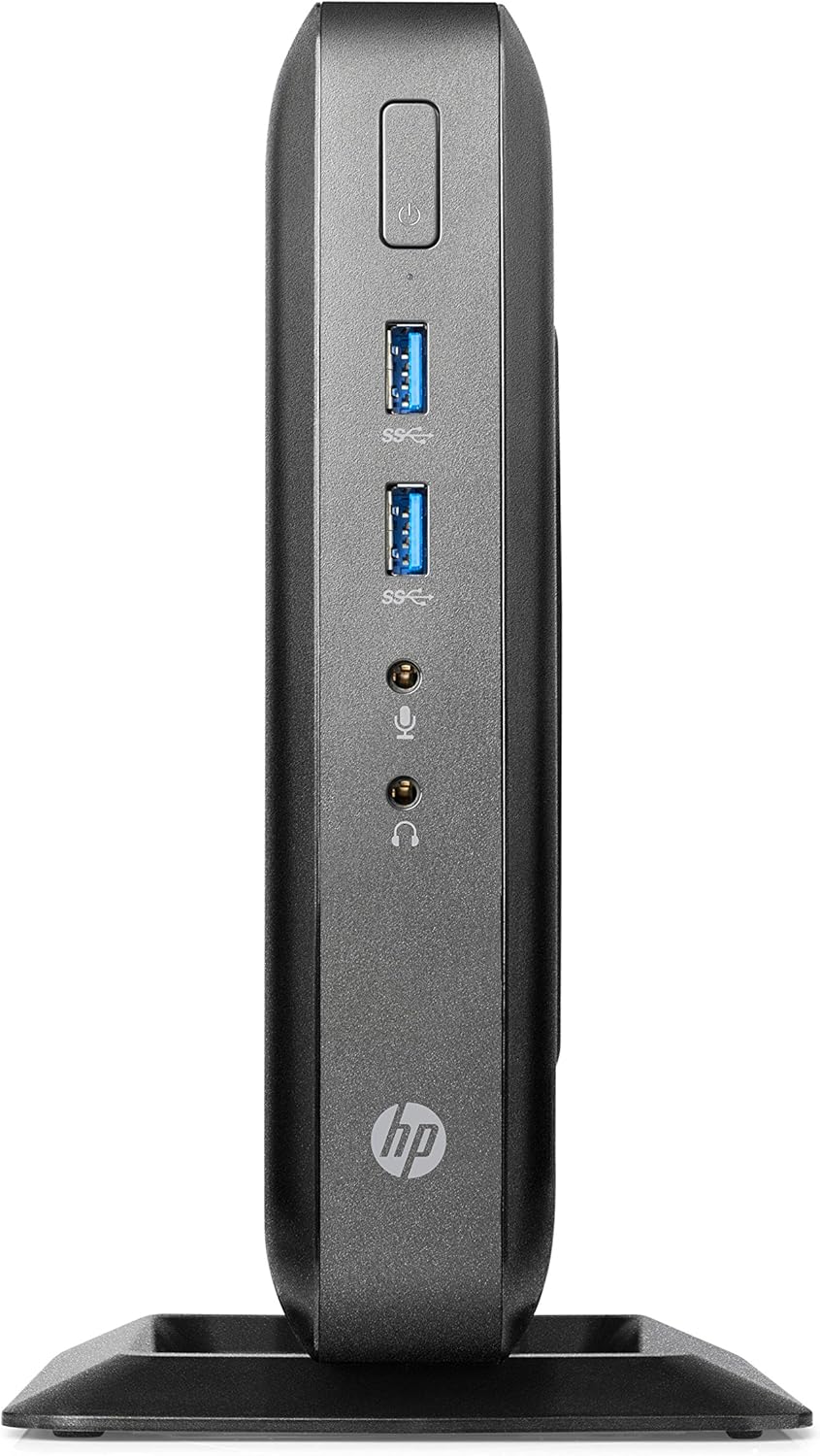
Figure 1: Front panel connections of the HP Flexible Thin Client T520. This view shows the power button, two SuperSpeed USB (USB 3.0) ports, a headphone jack, and a microphone jack.

Figure 2: Rear panel connections of the HP Flexible Thin Client T520. This view includes the Ethernet port, DisplayPort, HDMI port, VGA port, multiple USB 2.0 ports, and the DC power input.
1.3 Encendido inicial
After connecting all peripherals and power, press the power button located on the front of the thin client. The device will boot into the Windows Embedded Standard 7E operating system.
2. Instrucciones de funcionamiento
2.1 Encendido y apagado
- Para encender: Presione el botón de encendido en el panel frontal.
- Para desconectar: From the Windows Embedded Standard 7E desktop, click the Comenzar botón, luego seleccione Cerrar. Allow the system to power off completely before disconnecting power.
- Para reiniciar: From the Windows Embedded Standard 7E desktop, click the Comenzar botón, luego seleccione Reanudar.
2.2 Sistema Operativoview
The HP Flexible Thin Client T520 runs on Windows Embedded Standard 7E, a specialized operating system designed for thin client environments. It provides a familiar Windows interface for accessing remote desktops, virtual applications, and web-based services.
2.3 Conectividad de red
The thin client is designed for network-centric operations. Ensure a stable wired Ethernet connection for optimal performance. Network settings can be configured through the Windows Control Panel, typically managed by your IT administrator in a corporate environment.
3. Mantenimiento
3.1 Limpieza del dispositivo
Para mantener un rendimiento y una apariencia óptimos:
- Ensure the thin client is powered off and disconnected from the power source before cleaning.
- Utilice un paño suave y sin pelusa ligeramenteampLimpiar con agua o una solución de limpieza suave, no abrasiva.
- No rocíe líquidos directamente sobre el dispositivo.
- Evite utilizar productos químicos agresivos, disolventes o materiales abrasivos.
3.2 Actualizaciones de software
Regularly check for and apply any available operating system or firmware updates as recommended by HP or your IT department. This ensures security and performance enhancements.
3.3 Gestión del almacenamiento
The T520 features a 16 GB SSD. While primarily used for the operating system and client software, it is advisable to monitor available storage space. Avoid storing large, unnecessary files directly on the thin client's local drive.
4. Solución de problemas
This section addresses common issues you might encounter with your HP Flexible Thin Client T520.
4.1 Sin energía
- Verify the power cable is securely connected to both the thin client and the electrical outlet.
- Asegúrese de que la toma de corriente funcione probándola con otro dispositivo.
- Compruebe si el adaptador de corriente presenta daños visibles.
4.2 No hay salida de pantalla
- Confirm the monitor is powered on and connected correctly to the thin client's DisplayPort or VGA port.
- Asegúrese de que la fuente de entrada correcta esté seleccionada en su monitor.
- Test with a different monitor or display cable if available.
4.3 Problemas de conectividad de red
- Check that the Ethernet cable is securely plugged into both the thin client and the network router/switch.
- Verify network status lights on the Ethernet port are active.
- Consult your network administrator for network configuration assistance.
4.4 Los dispositivos periféricos no responden
- Asegúrese de que los dispositivos USB (teclado, mouse) estén conectados correctamente a los puertos USB.
- Intente conectar los dispositivos a diferentes puertos USB.
- Test the peripherals on another computer to confirm they are functional.
5. Especificaciones
The following table outlines the key technical specifications for the HP Flexible Thin Client T520 (G9F08AA#ABA):
| Característica | Especificación |
|---|---|
| Procesador | AMD G-Series GX-212JC 1.2 GHz |
| RAM | Memoria SDRAM DDR4 de 3 GB |
| Almacenamiento | SSD de 16 GB |
| Sistema operativo | Windows Embedded Standard 7E |
| Coprocesador gráfico | AMD Embedded G-Series (Integrated) |
| Resolución máxima de pantalla | 3840x2160 (via DisplayPort) |
| Puertos (delanteros) | 2x USB 3.0, Headphone, Microphone |
| Puertos (traseros) | Ethernet (RJ-45), DisplayPort, HDMI, VGA, Multiple USB 2.0, DC-in |
| Peso del artículo | 7.73 libras |
| Dimensiones (paquete) | 20 x 12 x 6.9 pulgadas |
6. Garantía y soporte
6.1 Garantía del fabricante
The HP Flexible Thin Client T520 typically comes with a 3-year manufacturer warranty. Please refer to the warranty documentation included with your product or visit the official HP support websitio para conocer los términos y condiciones específicos.
6.2 Soporte técnico
Para obtener asistencia técnica, descargas de controladores o más ayuda para solucionar problemas, visite el soporte oficial de HP. website or contact HP customer service. Have your product model (T520) and serial number ready when seeking support.


