1. Introducción
This manual provides essential instructions for the proper installation, operation, and maintenance of the Clarke 51447D 20-Inch Polypropylene Rotary Scrub Brush. This brush is designed for general scrubbing of hard floor surfaces and is compatible with Clarke Encore S20, L20, and S20E floor scrubbers. Please read this manual thoroughly before use to ensure safe and efficient operation.
2. Información de seguridad
Observe siempre las siguientes precauciones de seguridad:
- Ensure the floor scrubber is turned off and unplugged before installing or removing the brush.
- Wear appropriate personal protective equipment (PPE) such as gloves and eye protection during installation, operation, and maintenance.
- Inspect the brush for damage before each use. Do not use a damaged brush.
- Mantenga las manos y la ropa suelta alejadas de las piezas móviles durante el funcionamiento.
- Guarde el cepillo en un lugar limpio y seco cuando no esté en uso.
3. Contenido del paquete
Verifique que todos los elementos estén presentes:
- 1 x Clarke 51447D 20-Inch Polypropylene Rotary Scrub Brush with Clutch Plate
4. Configuración e instalación
This section details the procedure for installing the brush onto a compatible Clarke Encore floor scrubber.
- Prepare el depurador: Ensure the floor scrubber is powered off and unplugged from its power source. Raise the brush deck to access the brush mounting area.
- Retire la maleza existente (si corresponde): If a brush is already installed, carefully detach it according to your scrubber's specific instructions.
- Alinear el pincel: Position the Clarke 51447D brush beneath the scrubber's brush deck. Align the clutch plate of the brush with the drive hub on the scrubber. The brush features a dual-direction design, so specific orientation is not required for functionality, but ensure it seats properly.
- Secure the Brush: Gently push the brush upwards until the clutch plate engages with the drive hub. You may need to rotate the brush slightly to ensure proper engagement. The brush should fit snugly and securely.
- Verificar instalación: Once installed, gently pull down on the brush to confirm it is securely attached and does not wobble. Lower the brush deck.
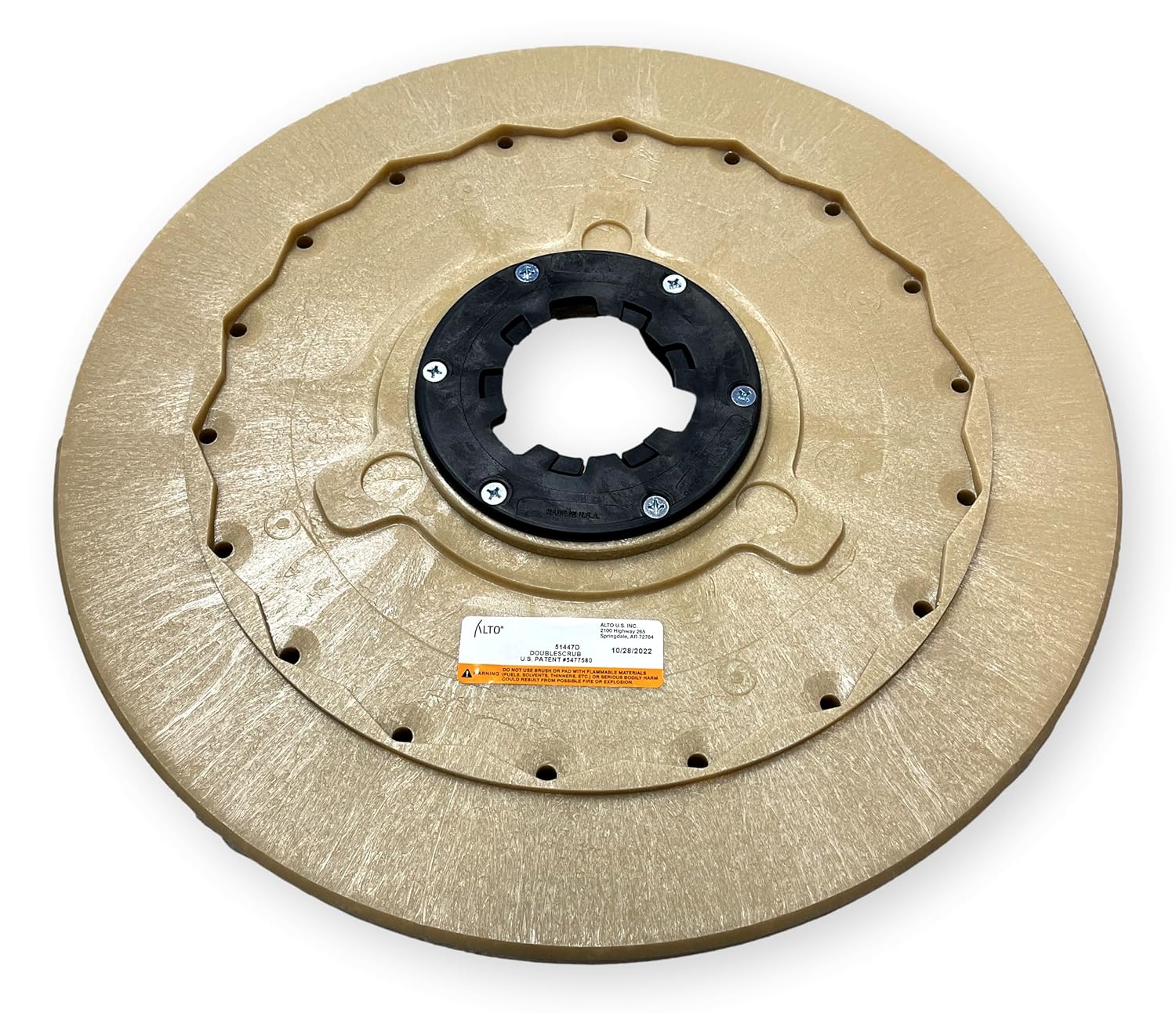
Image 1: Underside of the Clarke 51447D brush, illustrating the clutch plate mechanism.
5. Instrucciones de funcionamiento
Once the brush is installed, operate your Clarke Encore floor scrubber according to its manufacturer's instructions. The 51447D brush is designed for general scrubbing of hard surfaces. Adjust the brush pressure and water/solution flow on your scrubber as needed for the specific cleaning task and floor type.
- Compatibilidad de superficies: This polypropylene brush is suitable for various hard floor surfaces, including tile, linoleum, and sealed concrete.
- Doble dirección: The brush is designed for effective cleaning in both forward and reverse directions of the scrubber.
- Rendimiento óptimo: For best results, ensure the brush is clean and free of debris before each use.

Imagen 2: Arriba view of the Clarke 51447D brush, highlighting the polypropylene bristles.
6. Mantenimiento
Regular maintenance extends the life of your brush and ensures consistent cleaning performance.
- Después de cada uso: Remove the brush from the scrubber. Rinse the bristles thoroughly with clean water to remove dirt, debris, and cleaning solution residue.
- Inspección: Periodically inspect the bristles for wear, damage, or excessive matting. Check the clutch plate for any signs of damage or wear.
- Almacenamiento: Store the brush in a clean, dry area, preferably hanging or on its side to allow bristles to dry completely and maintain their shape. Avoid storing in direct sunlight or extreme temperatures.
- Reemplazo: Replace the brush when bristles show significant wear, are severely matted, or if the clutch plate is damaged, as this can affect cleaning effectiveness and potentially damage the scrubber.
7. Solución de problemas
| Problema | Posible causa | Solución |
|---|---|---|
| El cepillo no gira | Brush not properly engaged with drive hub. Scrubber motor issue. | Re-install brush, ensuring clutch plate is fully engaged. Consult scrubber manual for motor troubleshooting. |
| Pobre rendimiento de limpieza | Worn bristles. Incorrect brush pressure. Inadequate cleaning solution. | Replace brush if bristles are worn. Adjust scrubber's brush pressure. Verify cleaning solution concentration. |
| Vibración o ruido excesivo | Brush not seated correctly. Damaged brush or clutch plate. Debris caught in brush. | Remove and re-install brush. Inspect brush for damage and replace if necessary. Clean brush thoroughly. |
| Brush detaches during operation | Improper installation. Damaged clutch plate. | Ensure brush is securely engaged during installation. Inspect clutch plate for damage and replace brush if needed. |
| Bristles matted or bent | Improper storage. Excessive use on rough surfaces. | Store brush correctly. Consider replacing if performance is affected. |
8. Especificaciones
- Modelo: 51447D
- Material del pincel: Polipropileno
- Ancho del pincel: 20 pulgadas
- Tipo de pincel: Rotary Scrub Brush
- Dirección: Dirección dual
- Características: Integrated Clutch Plate
- Compatible Scrubber Models: Clarke Encore S20, L20, S20E
- Dimensiones del producto: 20.25" de largo x 20.25" de ancho x 2.28" de alto
- Peso: Aproximadamente 8.8 libras
9. Garantía y soporte
For specific warranty information regarding the Clarke 51447D brush, please refer to the documentation provided with your original purchase or contact Clarke customer support directly. General wear and tear on bristles are typically not covered under warranty. For technical assistance or replacement parts, please contact your authorized Clarke dealer or visit the official Clarke websitio.


