Introducción
Gracias por la compraasing the Amazon Basics Portable Wireless, 2.1 Bluetooth Speaker. This manual provides important information regarding the setup, operation, maintenance, and troubleshooting of your new speaker. Please read it thoroughly before use and retain it for future reference.
Producto terminadoview
The Amazon Basics Portable Wireless, 2.1 Bluetooth Speaker offers high-quality sound with a portable design. It features Bluetooth connectivity for wireless audio streaming, a 3.5mm aux-in jack for wired connections, and a built-in microphone for hands-free calling.
Contenido del paquete
- Amazon Basics Portable Wireless, 2.1 Bluetooth Speaker
- Cable de carga USB
- Manual de instrucciones
Componentes del altavoz
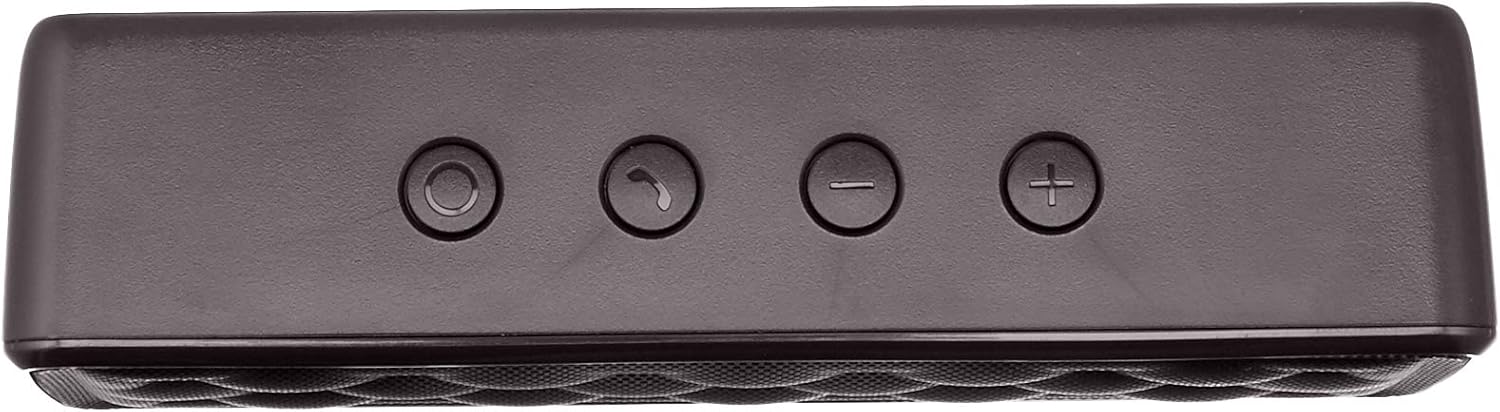


Configuración
1. Carga del altavoz
Before first use, fully charge the speaker. Connect the supplied USB charging cable to the Micro USB port on the speaker and the other end to a USB power source (e.g., computer USB port, USB wall adapter). The charging indicator light will illuminate during charging and turn off when fully charged. A full charge takes approximately 3 hours.
2. Encendido / apagado
To power on the speaker, slide the ON/OFF switch located on the rear panel to the "ON" position. To power off, slide the switch to the "OFF" position.
Instrucciones de funcionamiento
Emparejamiento Bluetooth
- Asegúrese de que el altavoz esté encendido y a menos de 10 metros (33 pies) de su dispositivo con Bluetooth.
- The speaker will automatically enter pairing mode, indicated by a flashing blue LED light.
- En su dispositivo, vaya a la configuración de Bluetooth y busque los dispositivos disponibles.
- Select "Amazon Basics Speaker" from the list.
- Once paired, the blue LED light will stop flashing and remain solid. You can now stream audio wirelessly.
Note: If pairing fails, turn off the speaker and your device's Bluetooth, then repeat the steps. The speaker will attempt to reconnect to the last paired device automatically when powered on.
Reproducción de audio
- Control de volumen: Use the '+' and '-' buttons on the top panel of the speaker to adjust the volume. You can also control the volume from your connected device.
- Reproducir/Pausa: Use the controls on your connected device to play or pause audio.
Llamadas manos libres
Cuando se conecta a través de Bluetooth, el micrófono incorporado del altavoz permite realizar llamadas con manos libres.
- Responder/Finalizar llamada: Press the Call/Bluetooth button once to answer an incoming call or end an ongoing call.
- Rechazar llamada: Press and hold the Call/Bluetooth button for 2 seconds to reject an incoming call.
- Rellamada Double-press the Call/Bluetooth button to redial the last number.
Modo de entrada AUX
To connect non-Bluetooth audio devices, use the 3.5mm AUX input jack on the rear panel. Connect one end of a 3.5mm audio cable (not included) to the speaker's AUX port and the other end to your audio device's headphone jack. The speaker will automatically switch to AUX mode when a cable is inserted.

Mantenimiento
- Limpie el altavoz con un paño suave y seco. No utilice limpiadores abrasivos ni disolventes.
- Evite exponer el altavoz a temperaturas extremas, humedad o luz solar directa.
- No sumerja el altavoz en agua. No es impermeable.
- Guarde el altavoz en un lugar fresco y seco cuando no lo utilice durante períodos prolongados.
Solución de problemas
| Problema | Posible causa | Solución |
|---|---|---|
| El altavoz no se enciende. | La batería está agotada. | Cargue el altavoz utilizando el cable USB suministrado. |
| No se puede emparejar a través de Bluetooth. | El Bluetooth está desactivado en su dispositivo; el altavoz está fuera de alcance; el altavoz ya está emparejado con otro dispositivo. | Ensure Bluetooth is enabled on your device. Move the speaker closer to your device (within 33 feet). Disconnect from other devices or restart the speaker to enter pairing mode. |
| No hay sonido o volumen bajo. | Volume is too low on speaker or device; incorrect input mode. | Increase volume on both the speaker and your connected device. Ensure the correct input mode (Bluetooth or AUX) is active. |
| Distorsión de sonido. | Volume is too high; speaker is too far from the device. | Reduce the volume on the speaker and/or your device. Move the speaker closer to your device. |
Presupuesto
| Nombre del modelo | BSK30BK |
| Tecnología de conectividad | Bluetooth, Auxiliar |
| alcance inalámbrico | Hasta 33 pies (10 metros) |
| Potencia de salida del altavoz | 2 x 2.5 Watts (5 Watts total) |
| Duración de la batería | Hasta 8 horas (con una carga completa) |
| Tiempo de carga | Aproximadamente 3 horas |
| Dimensiones (L x An x Al) | 6.3" x 1.5" x 2.6" (16 cm x 3.8 cm x 6.6 cm) |
| Peso | 8.1 onzas (0.23 kg) |
| Micrófono incorporado | Sí |
| Impermeable | No |
Información de garantía
This product is covered by a Limited Warranty. For detailed information regarding warranty terms and conditions, please refer to the documentation included with your purchase or visit the Amazon Basics official websitio.
Atención al cliente
For further assistance, troubleshooting, or product information, please visit the Amazon Basics support page or contact customer service through your Amazon account.
Información importante de seguridad
- No desmonte, repare ni modifique el producto.
- Keep the product away from water and high humidity.
- Evite la exposición prolongada a la luz solar directa o al calor extremo.
- No deje caer ni someta el producto a impactos fuertes.
- Deseche el producto y su batería de forma responsable de acuerdo con las regulaciones locales.
Vídeos de productos
No official instructional videos from the seller are available for this product at this time.


