Introducción
This manual provides essential instructions for the safe and effective use of your Coby CVG-02-RC Virtual Reality Goggles. Please read this manual thoroughly before using the device and retain it for future reference.
The Coby CVG-02-RC transforms your smartphone into a 3D virtual reality headset, offering an immersive experience for compatible VR applications and content. It features adjustable optics and comes with a wireless remote control for enhanced interaction.
Información de seguridad
- Do not use the VR goggles while operating a vehicle or machinery, or in situations requiring full attention to your surroundings.
- Take frequent breaks during use to prevent eye strain, dizziness, or discomfort. If you experience any discomfort, discontinue use immediately.
- Ensure your surroundings are clear of obstacles to avoid injury while immersed in virtual reality.
- Mantenga el dispositivo alejado de la luz solar directa, altas temperaturas y humedad.
- No intente desmontar ni modificar el dispositivo. Esto anulará la garantía y podría causar daños.
- This device is not suitable for children under 13 years of age. Adult supervision is recommended for younger users.
Contenido del paquete
Verifique que todos los artículos estén presentes en el paquete:
- Coby CVG-02-RC Virtual Reality Goggles
- Control remoto inalámbrico
- Manual de usuario (este documento)
Producto terminadoview
Familiarize yourself with the components of your Coby VR Goggles.
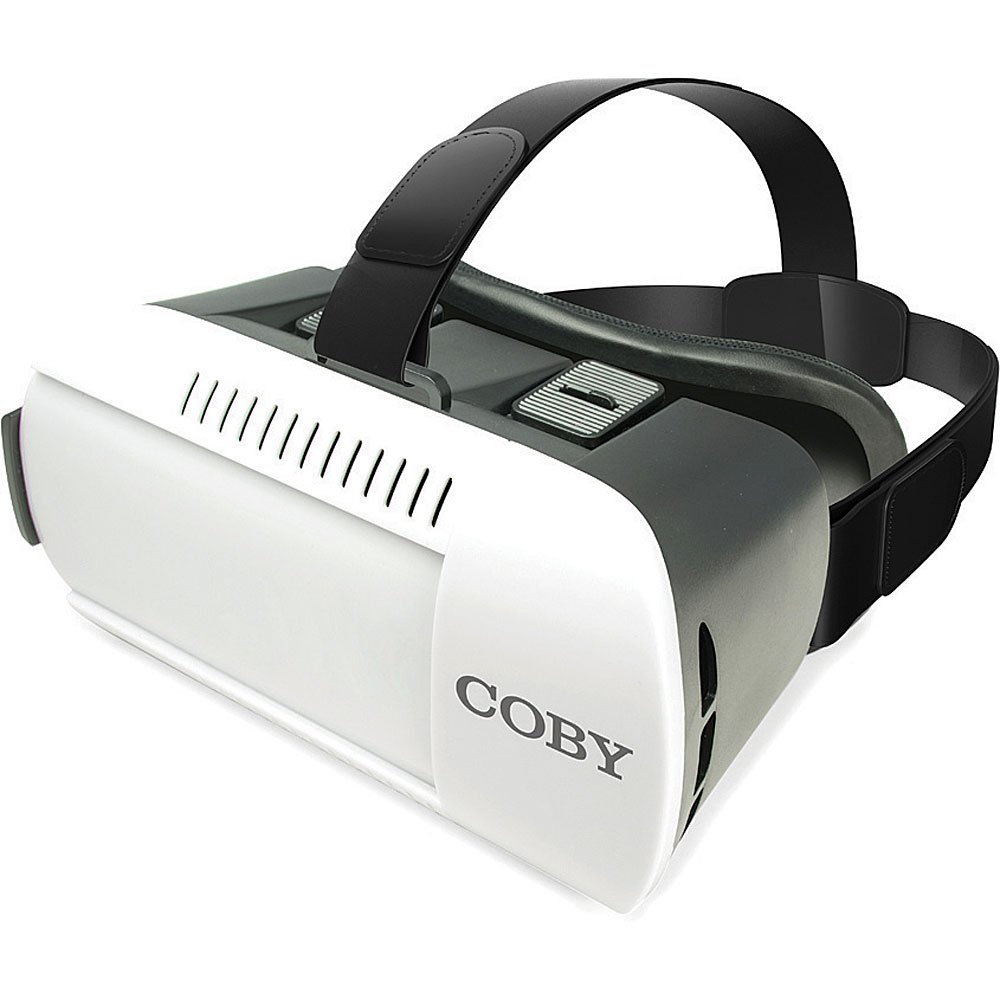
Figura 1: Frente view of the Coby CVG-02-RC Virtual Reality Goggles. This image shows the main body of the goggles, including the adjustable head strap, the padded face cushion, and the lenses visible from the user's perspective. The top features adjustment sliders for lens positioning.
Goggles Components:
- Correa de cabeza ajustable: Secures the goggles to your head.
- Padded Face Cushion: Provides comfort and blocks external light.
- Spherical Lenses: Provide the 3D virtual reality view.
- Lens Adjustment Dials/Sliders: Located on top, these allow for focus and interpupillary distance (IPD) adjustments.
- Smartphone Tray/Compartment: Front section where the smartphone is inserted.
Control remoto inalámbrico:
The remote control typically includes buttons for navigation, selection, and volume, enhancing interaction within VR applications. Refer to the remote's specific instructions for detailed button functions.
Configuración
1. Insertar su teléfono inteligente
- Open the front cover of the VR goggles. This usually involves unlatching or sliding the front panel.
- Place your smartphone into the designated tray or holder. Ensure the phone is centered and securely held. The screen should face the lenses.
- Cierre la cubierta frontal de forma segura.
- Nota: The goggles are compatible with smartphones up to 6 inches in screen size.
2. Adjusting the Head Straps
- Place the goggles on your head.
- Adjust the side and top straps to achieve a comfortable and secure fit. The goggles should feel snug but not overly tight, and the image should be centered in your vision.
3. Emparejamiento del control remoto inalámbrico
- Asegúrese de que el Bluetooth de su teléfono inteligente esté habilitado.
- Turn on the wireless remote control (refer to the remote's specific instructions for power on/off).
- En su teléfono inteligente, busque los dispositivos Bluetooth disponibles.
- Select the remote control from the list (e.g., "VR-Remote" or similar) to pair.
- Once paired, the remote can be used to navigate within VR applications.
4. Descarga de aplicaciones de RV
For the best experience, download virtual reality applications from your smartphone's app store:
- Para dispositivos iOS: Visita el Tienda de aplicaciones de Apple and search for "VR games," "3D split screen," or "virtual reality."
- Para dispositivos Android: Visita el Tienda Google Play and search for "VR games," "3D split screen," or "virtual reality."
Many VR apps are designed for split-screen viewing, which is necessary for these goggles.
Operante
Using the VR Goggles
- Launch a VR application on your smartphone. The screen should display a split-screen view.
- Insert your smartphone into the goggles as described in the "Setup" section.
- Put on the goggles and adjust the head straps for comfort.
- Use the lens adjustment dials/sliders on the top of the goggles to achieve a clear and focused image. Adjust both the focus (distance from lenses to screen) and the interpupillary distance (IPD - distance between the centers of the lenses) until the image is sharp and comfortable for both eyes.
- Use the wireless remote control to interact with the VR application.
Adjusting Lenses
The Coby CVG-02-RC features adjustable dual optics to optimize your viewExperiencia:
- Ajuste de enfoque: Slide the dials on the top of the goggles forward or backward to adjust the clarity of the image. This compensates for different vision needs.
- Ajuste de IPD (distancia interpupilar): Slide the dials left or right to adjust the distance between the lenses. This aligns the lenses with your eyes for a single, clear 3D image.

Figura 2: Arriba view of the Coby CVG-02-RC Virtual Reality Goggles, highlighting the lens adjustment sliders. These sliders allow users to fine-tune the focus and interpupillary distance for optimal viewaportando comodidad y claridad.
Mantenimiento
- Limpieza de lentes: Use a soft, dry microfiber cloth specifically designed for optical lenses. Do not use abrasive cleaners or paper towels.
- Cleaning Goggles Body: Limpie el exterior con un paño suave y ligeramente húmedo.amp paño. Evite que entre humedad en las aberturas.
- Almacenamiento: Store the goggles in a cool, dry place away from direct sunlight and dust. Use the original packaging or a protective case if available.
- Cojín acolchado: The foam padding can be gently wiped with a damp Paño y jabón suave si es necesario. Asegúrese de que esté completamente seco antes de usarlo.
Solución de problemas
| Problema | Posible causa | Solución |
|---|---|---|
| La imagen está borrosa o desenfocada. | Incorrect lens adjustment. | Adjust the focus and IPD dials/sliders on top of the goggles until the image is clear. |
| Double vision or eye strain. | Incorrect IPD adjustment; phone not centered. | Adjust the IPD dials to match your eye distance. Ensure your smartphone is perfectly centered in the tray. Take a break. |
| El control remoto no se conecta. | Bluetooth not enabled; remote not powered on; remote not paired. | Ensure Bluetooth is on your phone. Power on the remote. Re-pair the remote via your phone's Bluetooth settings. Check remote battery. |
| No 3D effect or distorted image. | App not designed for VR; phone not properly seated. | Ensure the app displays a split-screen VR view. Re-seat your smartphone securely and centered in the goggles. |
| Sobrecalentamiento del teléfono inteligente. | Extended use of demanding VR apps. | Remove the phone from the goggles and allow it to cool down. Reduce usage time for demanding applications. |
Presupuesto
- Modelo: CVG-02-RC
- Campo de View (FOV): 98-99 grados
- Tipo de lente: High Transparency Spherical Lens
- Compatibilidad con teléfonos inteligentes: Up to 6 inches screen size (iOS/Android)
- Connectivity (Remote): Bluetooth
- Dimensiones del producto: 13 x 14 x 20 pulgadas (aproximado, según los datos del producto)
- Peso del artículo: 1.2 libras (aproximadamente, según los datos del producto)
- Fabricante: Coby
Garantía y soporte
Para obtener información sobre la garantía y soporte técnico, consulte la tarjeta de garantía incluida con su producto o visite el sitio web oficial de Coby. webSitio. Conserve su recibo de compra como comprobante de compra.
Para obtener más ayuda, puede comunicarse con el servicio de atención al cliente de Coby a través de sus canales oficiales.


