1. Introducción
The Barska 0.83 Cu Ft Biometric Wall Safe is designed for secure storage of important items and valuables. This safe features a biometric fingerprint access system, a digital keypad, and a left-opening door for convenient in-wall installation between standard wall studs. It offers a 120-fingerprint capacity, an internal locked compartment, an LED light, and a fold-down tray for enhanced organization and accessibility.

Image: The Barska Biometric Wall Safe, displaying its exterior when closed and its interior with the door open.
2. Contenido del paquete
Verifique que todos los siguientes componentes estén incluidos en su paquete:
- BioMetric Wall Safe
- 6 pilas AA (incluidas)
- 2 Exterior Keys
- 2 Interior Keys
- Llave Allen
- Tornillos de montaje
- Internal Floor Mats
- Plastic Separator

Imagen: Dimensiones del producto y representación visual de todos los accesorios incluidos.
3. Información de seguridad
Please read and understand all safety instructions before installing or operating the safe. Failure to follow these instructions may result in injury or damage to the product.
- Always store emergency keys in a secure location, NOT inside the safe.
- Asegúrese de que la caja fuerte esté montada de forma segura para evitar su extracción no autorizada.
- Keep fingers clear of the door and locking mechanism when closing.
- Do not attempt to force the safe open if it is jammed. Refer to the troubleshooting section.
Advertencia importante
If the user resets the safe to Factory Default mode, ANY fingerprint can open the safe. Register at least two different fingerprints and test a few times before closing the safe door. Contact with a non-registered fingerprint, if the safe opens, the safe is still in Factory Default mode. Avoid leaving the safe door open and unattended. This will allow unauthorized individuals to add their fingerprints and/or reprogram the safe, gaining full access to the safe and its contents. Test the Emergency Keys and store them in a secure place, NOT inside of the safe. To maximize the security and performance of the safe, test registered fingerprints every 6 months.
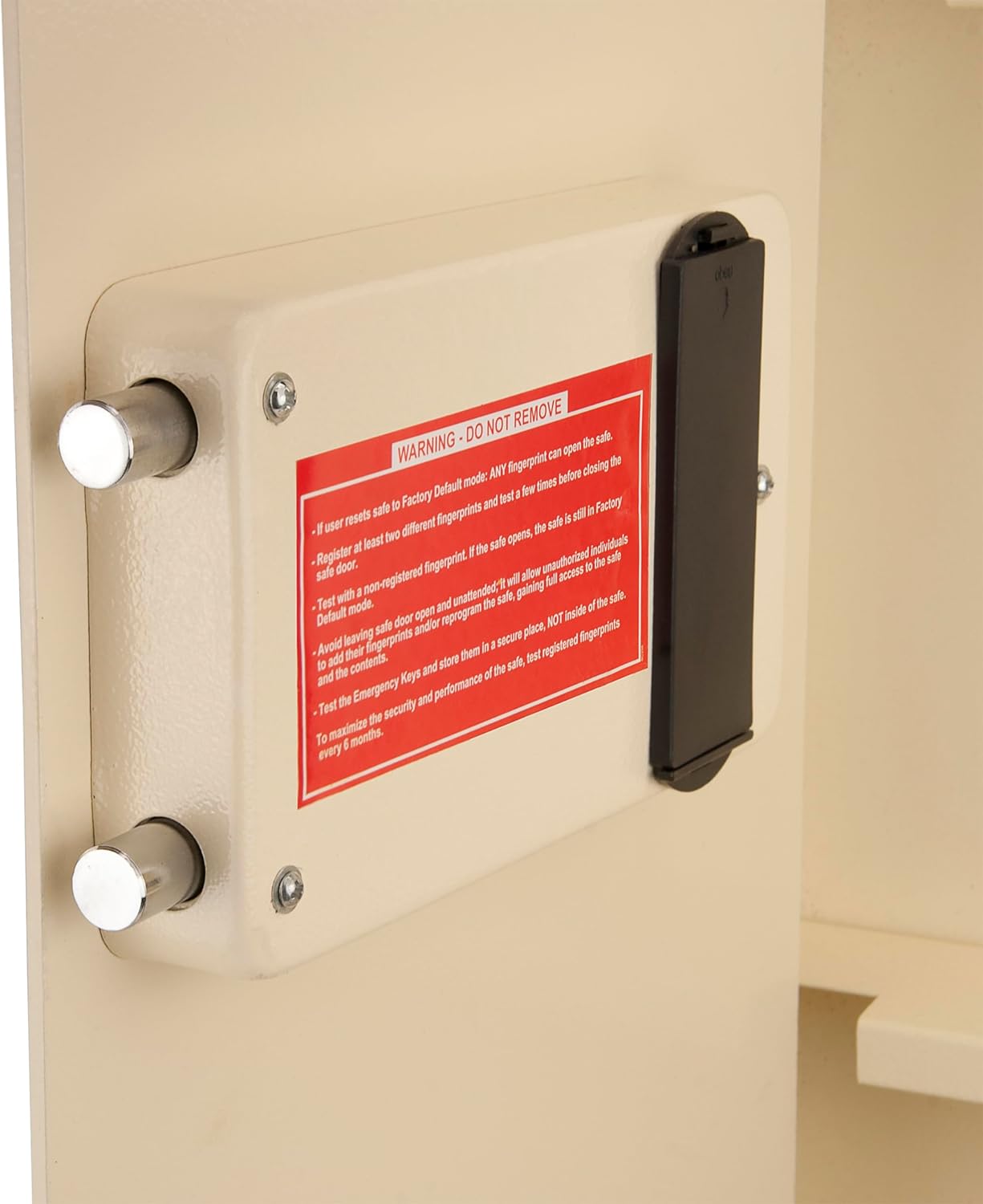
Imagen: Un detalle view of the warning label inside the safe, emphasizing critical operational and security guidelines.
4. Configuración e instalación
This wall safe is designed for hidden in-wall installation between standard 16-inch on-center wall studs. Professional installation is recommended.
4.1 Selección del sitio
Choose a location in a wall that is free from electrical wiring, plumbing, or other obstructions. Ensure the wall studs are 16 inches on center for proper fitment.
4.2 Preparación de la pared
- Localice los montantes de la pared con un buscador de montantes.
- Mark the outline for the safe's opening on the wall, ensuring it aligns with the inner dimensions of the safe. Refer to the specifications for precise measurements.
- Carefully cut out the marked section of the drywall.
4.3 Montaje de la caja fuerte
- Slide the safe into the prepared wall opening.
- Align the pre-drilled holes on the safe's flange with the wall studs.
- Use the provided mounting screws (or appropriate lag bolts for stronger installation) to secure the safe firmly to the wall studs. Ensure all screws are tightened to prevent movement.
- Verify the safe is level and flush with the wall surface.

Image: The Barska wall safe seamlessly integrated into a wall, demonstrating its hidden installation.
5. Instrucciones de funcionamiento
Your Barska Biometric Wall Safe offers multiple access methods for convenience and security.
5.1 Instalación inicial de la batería
Insert the 6 AA batteries into the battery compartment, typically located on the inside of the safe door. Ensure correct polarity.
5.2 Biometric Fingerprint Access
La caja fuerte puede almacenar hasta 120 huellas dactilares únicas.
- Registro de huellas dactilares: Follow the specific instructions in your quick start guide to enter programming mode and scan your desired fingerprints multiple times for accurate registration.
- Apertura con huella dactilar: Place a registered finger firmly on the biometric scanner. The indicator light will confirm successful recognition, and the safe will unlock.
5.3 Key Access (Emergency Override)
In case of battery failure or forgotten fingerprints, the safe can be opened using the provided emergency keys.
- Locate the emergency keyhole, usually concealed behind a cover on the safe's exterior.
- Insert one of the exterior keys and turn it to unlock the safe.

Image: Demonstrating the biometric fingerprint scanner and the emergency key access for opening the safe.
5.4 Características interiores
The safe's interior is designed for organized storage:
- Estante extraíble: Adjust or remove the shelf to accommodate items of various sizes.
- Locked Compartment: An additional small compartment with its own key provides extra security for sensitive items.
- Luz LED: Ilumina el interior para mejorar la visibilidad en condiciones de poca luz.
- Fold-Down Tray: Offers a convenient surface for temporary placement of items during access.

Imagen: El interior de la caja fuerte, mostradoasing its organizational features and capacity for various items.
6. Mantenimiento
El mantenimiento regular garantiza la longevidad y el funcionamiento confiable de su caja fuerte.
- Reemplazo de batería: Replace the 6 AA batteries annually, or when the low battery indicator activates. Always use fresh, high-quality alkaline batteries.
- Limpieza: Wipe the exterior and interior surfaces with a soft, dry cloth. Avoid abrasive cleaners or solvents. Keep the biometric scanner clean and free of debris.
- Fingerprint Testing: Periodically test your registered fingerprints (every 6 months) to ensure the biometric system is functioning correctly.
- Almacenamiento de claves: Ensure emergency keys are stored securely outside the safe and their location is known to trusted individuals.
7. Solución de problemas
If you encounter issues with your Barska Biometric Wall Safe, refer to the following common problems and solutions:
| Problema | Posible causa | Solución |
|---|---|---|
| La caja fuerte no se abre con huella dactilar. | Unregistered fingerprint, improper placement, low batteries, dirty scanner. | Ensure finger is registered and placed correctly. Clean scanner. Replace batteries. Use emergency key. |
| Safe does not respond. | Baterías agotadas. | Replace all 6 AA batteries. Use emergency key to open if necessary. |
| Door will not close or latch. | Obstruction, misalignment. | Check for any items blocking the door or latch mechanism. Ensure safe is properly mounted and not warped. |
| La tecla de emergencia no funciona. | Incorrect key, lock mechanism jammed. | Ensure you are using the correct exterior key. Do not force. Contact customer support if issue persists. |
If you experience issues not covered here, please contact Barska customer support for assistance.
8. Especificaciones
| Marca | Barca |
| Número de modelo | AX12880 |
| Dimensiones del producto | 4" de profundidad x 15.5" de ancho x 31.5" de alto |
| Capacidad | 0.83 pies cúbicos |
| Tipo de bloqueo | Biometric, Key |
| Material | Acero aleado |
| Peso del artículo | 48 libras |
| Tipo de montaje | Montaje en pared |
| Pilas necesarias | 6 pilas AA (incluidas) |
| Características especiales | Alarm System, Anti-Theft, Biometric Fingerprint, Removable Shelf, Scratch Resistant |
| Apertura de puerta | Apertura izquierda |
| Código Postal | 790272003075 |
9. Garantía y soporte
For warranty information, please refer to the manufacturer's documentation included with your product or visit the official Barska websitio.
If you require replacement parts, accessories, or further technical assistance, please visit the Barska website to request keys or replacement parts. You can also find additional support resources there.
Para obtener más información, visite el Barska Store.


