Introducción
Gracias por la compraasing the Havit HV-MS991GT Wireless Mouse. This manual provides essential information for setting up, operating, maintaining, and troubleshooting your device. Please read it carefully before use to ensure optimal performance and longevity of your mouse.
Instrucciones de instalación
- Desempaquetar el ratón: Retire con cuidado el ratón y el receptor USB del embalaje.
- Instale las baterías:
Locate the battery compartment on the underside of the mouse. Open the cover and insert one AA battery (not included), ensuring correct polarity (+/-). Close the battery compartment cover.
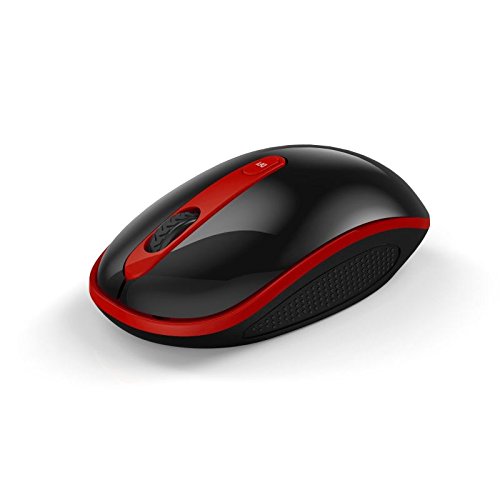
Image: The Havit HV-MS991GT Wireless Mouse, featuring a black body with red accents and a scroll wheel. This image illustrates the overall design of the mouse.
- Conecte el receptor USB: Plug the mini USB receiver into an available USB port on your computer. The system will automatically detect and install the necessary drivers.
- Encender el ratón: Locate the power switch on the underside of the mouse and slide it to the "ON" position. The mouse is now ready for use.
Instrucciones de funcionamiento
The Havit HV-MS991GT Wireless Mouse is designed for intuitive use with standard mouse functions.
- Funciones básicas:
- Click izquierdo: Selección primaria y activación.
- Botón derecho del ratón: Accede a los menús contextuales.
- Rueda de desplazamiento: Se desplaza por documentos y web páginas verticalmente. La rueda de desplazamiento también funciona como botón central.
- Ajuste de PPP: This mouse features adjustable DPI settings (1000-1600 DPI) for varying cursor speeds and precision. A dedicated DPI button, usually located near the scroll wheel, allows you to cycle through these settings. Press the button to switch between DPI levels.
- Alcance inalámbrico: The advanced 2.4GHz wireless technology provides an effective working distance of up to 15 meters (approximately 49 feet) from the USB receiver.
- Compatibilidad del sistema: This mouse is compatible with Windows 2000, Windows XP, Windows Vista, Windows 7, and Windows 8 operating systems.
Mantenimiento
- Limpieza: Para limpiar el ratón, frote suavemente su superficie con un paño suave y seco. Para la suciedad difícil, limpie ligeramenteampen the cloth with water. Avoid using harsh chemicals or abrasive cleaners, as these can damage the mouse's finish.
- Reemplazo de batería: When the mouse performance degrades or it stops responding, it is likely time to replace the battery. Follow the battery installation steps in the "Setup Instructions" section.
- Función de suspensión automática: The mouse features a built-in auto sleep function to conserve battery life. If the mouse is inactive for a period, it will enter a low-power sleep mode. To wake it up, simply move the mouse or click any button.
- Almacenamiento del receptor: The mini USB receiver can be stored inside the mouse's battery compartment when not in use, making it convenient for travel and preventing loss.
Solución de problemas
| Problema | Solución |
|---|---|
| El ratón no responde. |
|
| El movimiento del cursor es errático o lento. |
|
| La conexión inalámbrica es inestable. |
|
Presupuesto
| Característica | Detalle |
|---|---|
| Marca | Hábito |
| Número de modelo | HV-MS991GT |
| Tecnología de conectividad | 2.4GHz inalámbrica |
| Configuración de DPI | 1000-1600 ppp |
| Número de botones | 4 |
| Vida clave | 1,000,000 de veces |
| alcance inalámbrico | Hasta 15 metros |
| Compatibilidad con sistemas operativos | Windows 2000/XP/Vista/7/8 |
| Duración media de la batería | 12 meses |
| Pilas incluidas | No (Requires 1x AA battery) |
| Peso del artículo | 120 gramos |
| Dimensiones del paquete | 16.2 x 10.8 x 6 cm |
Garantía y soporte
Specific warranty information for the Havit HV-MS991GT Wireless Mouse is not provided in this manual. Please refer to the product packaging or the manufacturer's official website for details regarding warranty coverage and customer support contact information.


