Introducción
This manual provides essential instructions for the setup, operation, maintenance, and troubleshooting of your NEC NP-M403H projector. Please read this manual thoroughly before using the projector to ensure proper and safe operation.
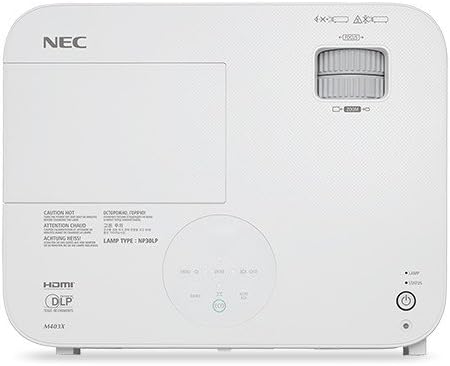
Imagen: Arriba view of the NEC NP-M403H projector, showing the lens, control panel, and ventilation. This image illustrates the overall design and key external features from a top-down perspective.
Configuración
Follow these steps for initial setup of your NEC NP-M403H projector.
- Desembalaje: Retire con cuidado el proyector y todos los accesorios del embalaje. Asegúrese de que todos los componentes estén presentes.
- Colocación: Position the projector on a stable, flat surface or mount it to the ceiling. Ensure adequate ventilation around the unit. The compact and lightweight design allows for flexible placement.
- Conexión de energía: Connect the power cord to the projector and then to a suitable electrical outlet.
- Conexión de fuentes de entrada:
The projector supports various connectivity options. Use appropriate cables to connect your source devices (e.g., computer, media player) to the projector's input ports.
- HDMI: Para vídeo y audio digital de alta definición.
- VGA (entrada de computadora): Para señales de computadora analógicas.
- USB: For certain data or control functions.
- Audio en: Para entrada de audio analógica.

Imagen: Trasera view of the NEC NP-M403H projector, displaying the array of input and output ports including HDMI, VGA, USB, and audio connections. This image helps users identify where to connect their source devices.
- Encendido inicial: Presione el botón de encendido del proyector o del control remoto. El proyector iniciará su secuencia de encendido.
Instrucciones de funcionamiento
This section details the basic operation of your projector.
Encendido/apagado
- Encendido: Press the power button. The projector features a quick startup function.
- Apagado: Press the power button again. The projector supports direct power off, allowing for quick shutdown.
Ajuste de imagen
- Enfocar: Rotate the focus ring on the lens to achieve a clear image.
- Zoom: Ajuste el anillo de zoom en la lente para cambiar el tamaño de la imagen.
- Corrección trapezoidal: Utilice el menú del proyector o los botones dedicados para corregir la distorsión trapezoidal si el proyector no está perfectamente perpendicular a la pantalla.

Imagen: Frontal view of the NEC NP-M403H projector, highlighting the lens assembly and front ventilation. This image assists users in locating the lens for focus and zoom adjustments.
Selección de fuente de entrada
The projector can automatically detect input signals (Autosense™). You can also manually select the input source using the "Input" button on the projector or remote control.
Modo ecologico
Para extender lamp life and reduce power consumption, activate ECO Mode. This feature contributes to energy savings and environmental protection. The projector offers a lamp life of up to 8,000 hours in ECO Mode.
Mantenimiento
El mantenimiento regular garantiza un rendimiento óptimo y prolonga la vida útil de su proyector.
- Lamp Reemplazo: El proyector lamp has a life of up to 8,000 hours in ECO Mode. When the lamp reaches the end of its life, a warning indicator will appear. Refer to the full service manual for detailed lamp instrucciones de reemplazo.
- Limpieza/reemplazo del filtro: The projector is equipped with an air filter to prevent dust accumulation. Regularly clean the filter to maintain proper airflow and cooling. Replace the filter as needed; the projector features an extended filter life.
- Limpieza de lentes: Limpie suavemente la lente del proyector con un paño suave y sin pelusa, especialmente diseñado para superficies ópticas. No utilice limpiadores abrasivos.
- Limpieza exterior: Limpie el exterior del proyector con un paño suave y seco. Evite el uso de productos químicos agresivos.
Solución de problemas
This section addresses common issues you might encounter with your NEC NP-M403H projector.
| Problema | Posible causa | Solución |
|---|---|---|
| No se muestra ninguna imagen |
|
|
| La imagen es borrosa |
|
|
| La imagen es trapezoidal |
|
|
| El proyector se sobrecalienta o se apaga |
|
|
Presupuesto
Key technical specifications for the NEC NP-M403H projector:
- Modelo: NP-M403H
- Marca: Comité ejecutivo nacional
- Tecnología de visualización: DLP
- Brillo: 4000 lúmenes
- Resolución nativa: 1920 x 1080 (1080p)
- Resolución máxima de pantalla: 1920 x 1080
- Relación de contraste: Hasta 10,000:1
- Lamp Vida: Up to 8,000 hours (ECO Mode)
- Conectividad: HDMI, USB, VGA
- Dimensiones (Ancho x Alto x Profundidad): 14.5 x 4.3 x 11.5 pulgadas
- Peso: 9.8 libras
- Características especiales: Lightweight, Portable, ECO Mode, Autosense™
Garantía y soporte
Para obtener información detallada sobre la garantía, consulte la tarjeta de garantía incluida con su producto o visite el sitio web oficial de NEC. website. Technical support contact details are typically provided in the product packaging or on the manufacturer's support pages.


