1. Introducción
This manual provides detailed instructions for the safe and efficient use of your Crivit Silvercrest FM Scan Radio, Model 43142. Please read this manual thoroughly before operating the device and retain it for future reference. This portable radio features automatic station search, 10 station memory presets, a digital display for frequency and time, and alarm, snooze, and sleep functions.
2. Contenido del paquete
Asegúrese de que todos los artículos estén presentes al desembalar:
- Crivit Silvercrest FM Scan Radio (Model 43142)
- Auriculares
- Correa de muñeca
- Batteries (if included in your specific package)
3. Producto terminadoview
Familiarícese con los componentes y controles de la radio.
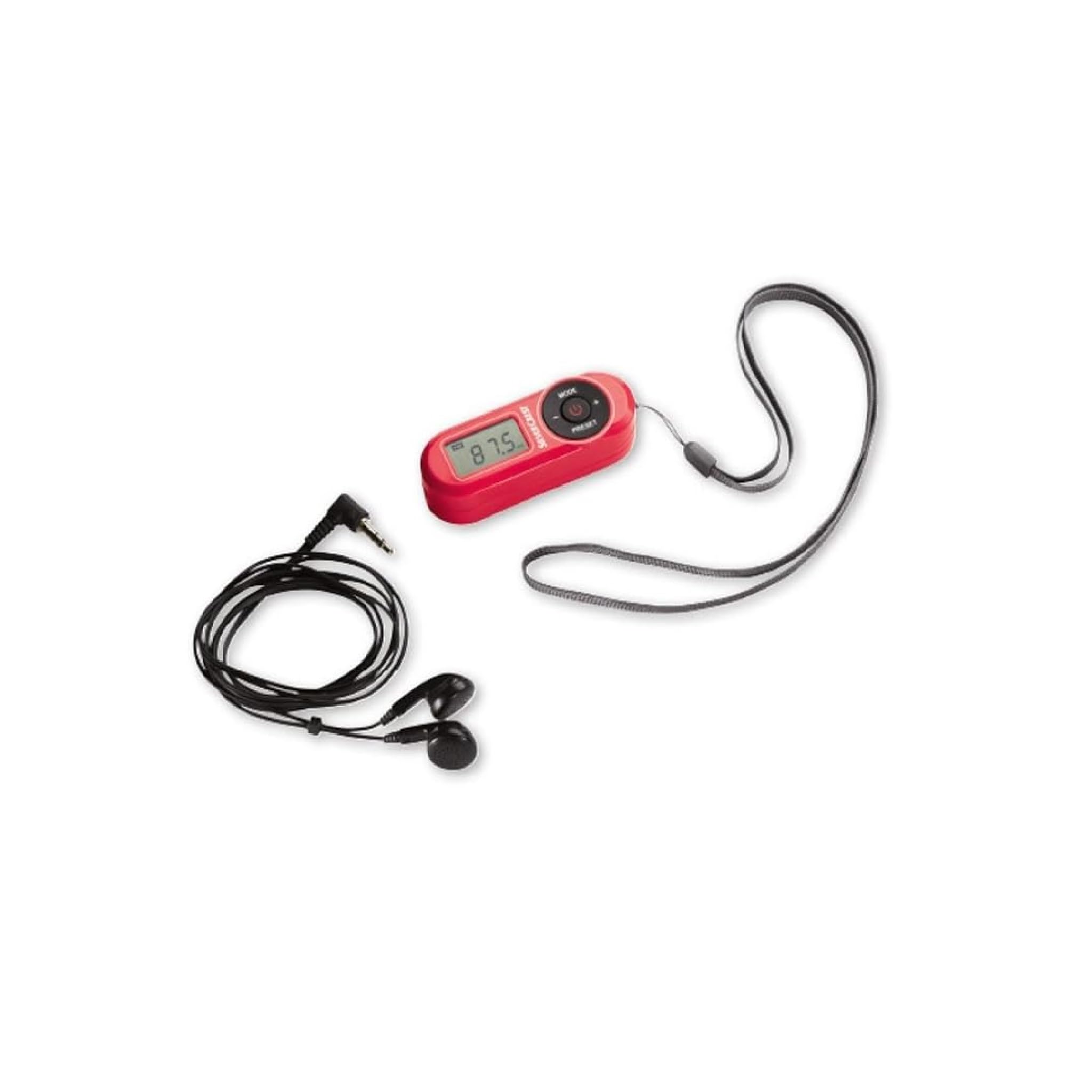
Figura 1: Frente view of the Crivit Silvercrest FM Scan Radio, showing the digital display, control buttons, and included accessories (earphones and wrist strap).
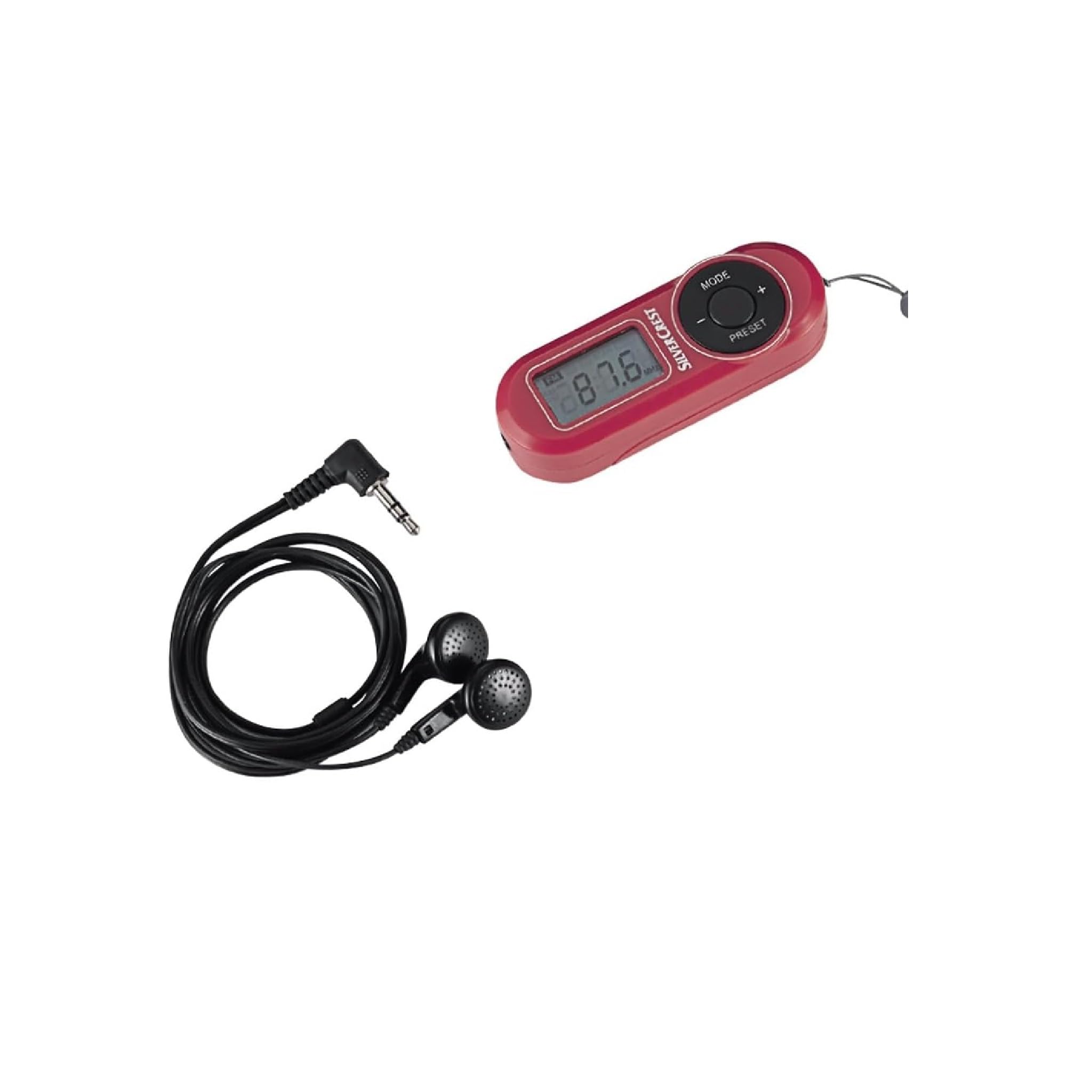
Figura 2: De cerca view of the radio's control panel, highlighting the MODE, PRESET, and volume buttons, along with the Silvercrest branding.
Controles y pantalla:
- Digital LC-Display: Muestra la frecuencia, la hora y el estado de la alarma.
- Botón MODE: Switches between functions (e.g., radio, time setting).
- Botones +/-: Adjusts volume, tunes frequency, or navigates menu options.
- Botón PRESET: Accesses and saves radio station presets.
- Botón de encendido: Enciende/apaga la radio.
- Toma de auriculares: 3.5 mm audio output for earphones.
4. Configuración
4.1 Instalación de la batería
- Localiza la tapa del compartimento de las pilas en la parte posterior de la radio.
- Deslice o levante la cubierta para abrir.
- Insert the required batteries (e.g., AAA, as specified in the battery compartment) ensuring correct polarity (+/-).
- Cierre bien la tapa del compartimento de la batería.
4.2 Conexión de auriculares
The included earphones serve as the radio's antenna. For optimal reception, ensure they are fully plugged in.
- Insert the 3.5 mm jack of the earphones into the headphone port on the radio.
- Ajuste el cable del auricular para obtener la mejor recepción.
5. Instrucciones de funcionamiento
5.1 Encendido y apagado
- Para encender la radio, mantenga presionado el Fuerza botón.
- Para apagar la radio, mantenga presionada la tecla Fuerza botón de nuevo.
5.2 Automatic Station Search
The radio features an automatic station search function to find available FM stations.
- Con la radio encendida, presione el botón MODO button until the radio function is active.
- Mantenga pulsado el PROGRAMAR button (or a specific scan button if available) to initiate an automatic scan. The radio will scan and store available stations into memory presets.
5.3 Guardar y recuperar ajustes preestablecidos
La radio puede almacenar hasta 10 estaciones de FM.
- Para guardar una estación: Sintonice la emisora deseada. Mantenga pulsado el botón PROGRAMAR button until a preset number flashes on the display. Use the +/- botones para seleccionar un número preestablecido (P1-P10), luego presione PROGRAMAR De nuevo para confirmar.
- Para recuperar una estación: Presione brevemente el PROGRAMAR button to cycle through the stored stations.
5.4 Ajuste del volumen
Utilice el +/- buttons to increase or decrease the volume level during playback.
5.5 Alarm, Snooze, and Sleep Functions
The radio includes an alarm clock with snooze and sleep timer features.
- Configuración de la alarma: En el modo de visualización de la hora, mantenga pulsado el botón MODO hasta que la hora de la alarma parpadee. Utilice el +/- buttons to set the hour and minute, pressing MODO para confirmar cada uno.
- Función de repetición: When the alarm sounds, press any button (except power off) to activate snooze. The alarm will sound again after a short interval.
- Función del sueño: Para configurar un temporizador de apagado, presione el MODO button repeatedly until the sleep timer option appears. Use the +/- buttons to select the desired sleep duration (e.g., 15, 30, 60 minutes). The radio will automatically turn off after the set time.
6. Mantenimiento
6.1 Limpieza
To clean the radio, use a soft, dry cloth. Do not use abrasive cleaners, solvents, or strong chemicals, as these can damage the surface.
6.2 Almacenamiento
When not in use for extended periods, remove the batteries to prevent leakage and store the radio in a cool, dry place away from direct sunlight and extreme temperatures.
7. Solución de problemas
| Problema | Posible causa | Solución |
|---|---|---|
| Sin energía/La radio no enciende | Las baterías están agotadas o insertadas incorrectamente. | Reemplace las baterías por otras nuevas, asegurándose de la polaridad correcta. |
| Mala recepción de radio | Earphones not fully plugged in or poor signal area. | Ensure earphones are fully inserted. Adjust earphone cable position. Move to an area with better signal. |
| No hay sonido de los auriculares | Volume too low or earphones faulty. | Increase volume. Test with another pair of earphones. |
| La pantalla está en blanco o parpadea | Batería baja. | Reemplace las baterías. |
8. Especificaciones
| Característica | Detalle |
|---|---|
| Marca | Crivit |
| Número de modelo | 43142 |
| Tecnología de sintonizador | FM |
| Bandas de radio compatibles | FM (87.5 - 108 MHz) |
| Interfaz de hardware | Audio de 3.5 mm |
| Dispositivos compatibles | Auriculares |
| Características especiales | Portable, Automatic Station Search, 10 Presets, Alarm, Snooze, Sleep Function |
| Componentes incluidos | Earphones, Wrist Strap, Batteries (if applicable) |
| Fuente de poder | Alimentado por batería |
| Dimensiones del producto | 10 x 5 x 2 cm |
| Color | Rojo |
| Tecnología de conectividad | Bluetooth (Note: This may refer to internal components or a miscategorization, primary audio output is 3.5mm jack) |
| Usos recomendados | Personal use, Music, Travel |
9. Garantía y soporte
Para obtener información sobre la garantía y atención al cliente, consulte la documentación proporcionada al momento de la compra o comuníquese con el vendedor. Conserve el comprobante de compra para cualquier reclamación de garantía.


