1. Introducción
This manual provides detailed instructions for the installation, operation, maintenance, and troubleshooting of your Zalman ZM1200-ARX 1200W ATX Power Supply Unit. The ZM1200-ARX is a high-performance, fully modular power supply designed to deliver stable and efficient power to your computer system. Please read this manual thoroughly before installation and retain it for future reference.

Figura 1: Vista frontal superior view of the Zalman ZM1200-ARX Power Supply Unit.
2. Información de seguridad
To ensure safe operation and prevent damage to your system, please observe the following safety precautions:
- ¡PRECAUCIÓN! Do not remove the power supply cover. There are no user-serviceable parts inside. Refer all servicing to qualified service personnel.
- No opere la fuente de alimentación en entornos con alta humedad o temperaturas extremas.
- Asegúrese de que la fuente de alimentación esté desconectada de la toma de corriente CA antes de realizar la instalación o el mantenimiento.
- Instale la fuente de alimentación en un área bien ventilada para evitar el sobrecalentamiento.
- Use only the modular cables provided with the Zalman ZM1200-ARX. Using incompatible cables may cause damage.
- Este producto está diseñado exclusivamente para su uso en sistemas informáticos. No lo utilice para ningún otro fin.

Figure 2: Warning label and electrical specifications on the PSU.
3. Contenido del paquete
Verifique que todos los siguientes elementos estén incluidos en su paquete:
- Zalman ZM1200-ARX 1200W ATX Power Supply Unit
- Modular Cable Set (various types for motherboard, CPU, PCIe, SATA, Molex)
- Cable de alimentación de CA
- Tornillos de montaje
- Manual de usuario (este documento)
- Cable Ties (for organization)
- Storage Pouch for unused cables

Figure 3: All components included in the Zalman ZM1200-ARX package.
4. Configuración e instalación
4.1. Instalación Física
Follow these steps to install the power supply into your computer case:
- Ensure your computer is powered off and disconnected from the AC power outlet.
- Abra la carcasa de su computadora según las instrucciones del fabricante.
- Locate the power supply mounting area, typically at the bottom or top rear of the case.
- Carefully slide the Zalman ZM1200-ARX into the designated slot.
- Align the screw holes on the power supply with those on the case.
- Asegure la fuente de alimentación utilizando los tornillos de montaje proporcionados.

Figure 4: Dimensions of the Zalman ZM1200-ARX Power Supply Unit.
4.2. Conexiones de cables
The ZM1200-ARX is a fully modular power supply, allowing you to connect only the cables you need. This helps improve airflow and cable management within your case.
- Cable de placa base ATX de 24 pines: Connect to the main power connector on your motherboard.
- 8-pin (4+4) EPS/ATX 12V CPU Cable: Connect to the CPU power connector(s) on your motherboard.
- 8-pin (6+2) PCIe Cables: Connect to your graphics cards. Use separate cables for each high-power graphics card.
- Cables de alimentación SATA: Conéctese a dispositivos SATA como SSD, HDD y unidades ópticas.
- Molex (Peripheral) Cables: Conéctese a periféricos más antiguos o ventiladores de caja.
- Ensure all cables are securely seated in both the power supply and the component.
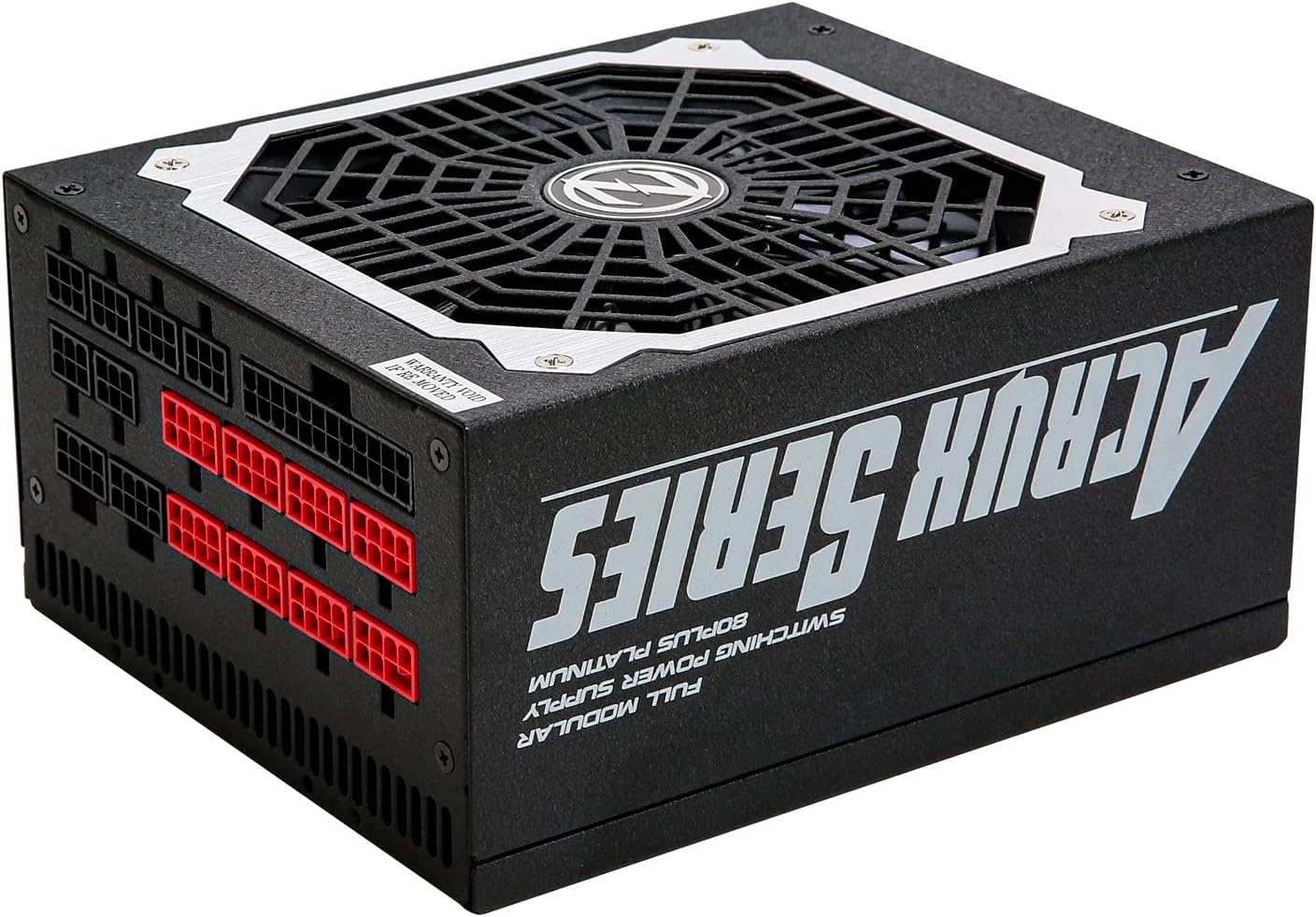
Figure 5: Modular cable connection ports on the Zalman ZM1200-ARX.
5. Instrucciones de funcionamiento
Después de completar la instalación y conectar todos los cables necesarios:
- Connect the AC power cord to the power supply's AC inlet and then to a wall outlet.
- Flip the power switch on the rear of the power supply to the 'ON' (I) position.
- Power on your computer system using the case's power button.
- To power off, shut down your computer normally, then flip the power switch on the PSU to the 'OFF' (O) position and disconnect the AC power cord if desired.

Figura 6: Posterior view of the PSU showing the AC input and power switch.
6. Mantenimiento
Un mantenimiento adecuado garantiza la longevidad y el rendimiento óptimo de su fuente de alimentación:
- Limpieza: Periodically clean the exterior of the power supply and the fan grille to prevent dust buildup. Use compressed air to gently remove dust from the fan and vents. Ensure the power supply is off and unplugged before cleaning.
- Flujo de aire: Ensure that the power supply's fan intake and exhaust are not obstructed. Maintain good airflow within your computer case to prevent heat buildup.
- Sistema de organización de cables: Organize cables neatly to improve airflow and prevent them from interfering with cooling fans.
7. Solución de problemas
If you encounter issues with your Zalman ZM1200-ARX, refer to the following table for common problems and solutions:
| Problema | Posible causa | Solución |
|---|---|---|
| El sistema no se enciende. | AC power cord not connected, PSU switch off, loose cables. | Check AC power cord, ensure PSU switch is 'ON', re-seat all modular cables. |
| El sistema se enciende pero se apaga inmediatamente. | Overload, short circuit, faulty component. | Disconnect non-essential components to isolate the issue. Check for short circuits. Consult a technician if problem persists. |
| Unstable system operation or crashes. | Insufficient power, faulty PSU, or other component issues. | Ensure total system power draw is within PSU limits. Test with another known-good PSU if possible. |
| El ventilador hace ruido o no gira. | Dust buildup, fan malfunction. | Clean fan grille and blades with compressed air. If fan still malfunctions, contact support. |
8. Especificaciones
Detailed technical specifications for the Zalman ZM1200-ARX Power Supply Unit:
| Característica | Especificación |
|---|---|
| Nombre del modelo | ZM1200-ARX |
| Potencia de salida total | 1200 vatios |
| Factor de forma | ATX |
| Calificación de eficiencia | 80 más platino |
| Modularidad | Modular completo |
| Método de enfriamiento | Aire (enfriado por ventilador) |
| Vol de entrada de CAtage | 115-240 V CA |
| Frecuencia de entrada de CA | 50-60 Hz |
| Salida CC +3.3 V | 25A |
| Salida CC +5 V | 22A |
| Salida CC +12 V | 100A |
| Salida CC -12 V | 0.3A |
| DC Output +5Vsb | 2.5A |
| Wat máximo combinadotage (+3.3V/+5V) | 120 W |
| Wat máximo combinadotag(+12V) | 1200 W |
| Dimensiones (L x An x Al) | 18 x 15 x 8.6 cm (7.09 x 5.91 x 3.39 pulgadas) |
| Peso | 3100 gramos (6.83 libras) |
9. Garantía y soporte
For warranty information, technical support, or service inquiries regarding your Zalman ZM1200-ARX Power Supply Unit, please refer to the warranty card included with your product or visit the official Zalman websitio. La información de contacto para el servicio de atención al cliente normalmente se puede encontrar en el sitio web del fabricante. websitio.