1. Introducción
This manual provides essential instructions for the proper installation, operation, and maintenance of your Baxtran IFN 2001 Industrial Scale. This robust platform scale is designed for industrial applications, offering a high capacity of 3000 kg with 1 kg accuracy. It features a durable steel frame, four load cells, and an external BR80 LED display. Please read this manual thoroughly before using the scale to ensure safe and efficient operation.
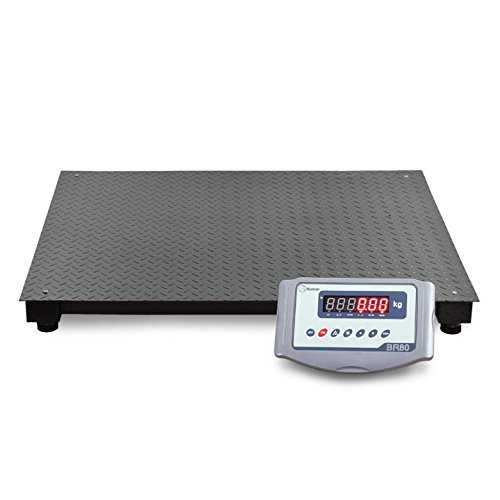
Figura 1: Baxtran IFN 2001 Industrial Scale with a package being weighed and the BR80 display unit.
2. Información de seguridad
- Utilice siempre la báscula sobre una superficie estable y nivelada para garantizar lecturas precisas.
- Do not exceed the maximum capacity of 3000 kg. Overloading can damage the load cells and affect accuracy.
- Avoid dropping heavy objects onto the scale platform.
- Keep the scale away from strong electromagnetic fields, vibrations, and extreme temperature fluctuations.
- Asegúrese de que todos los cables estén conectados y asegurados correctamente para evitar tropiezos o daños.
- The scale platform and load cells have an IP66 rating, and the display unit has an IP54 rating. While protected against dust and water splashes, avoid direct high-pressure water jets or prolonged submersion.
- Only use the provided AC/DC adapter for power.
- Do not attempt to repair or modify the scale yourself. Refer to qualified service personnel.
3. Contenido del paquete
Verifique que todos los componentes estén presentes y sin daños al desembalarlo:
- Baxtran IFN 2001 Industrial Scale Platform (200 x 150 cm)
- BR80 Display Unit
- AC/DC Power Adapter (100-240Vac, 50-60Hz)
- Connection Cable for Display Unit
- Manual de usuario (este documento)
4. Configuración
4.1 Desembalaje y colocación
Carefully remove all components from the packaging. Due to the scale's weight (approximately 202 kg / 445 lbs), it is recommended to use appropriate lifting equipment and personnel for safe handling and placement.
Place the scale platform on a firm, level, and stable surface. Ensure there is sufficient space around the scale for safe operation and to prevent any objects from touching the platform, which could affect accuracy.
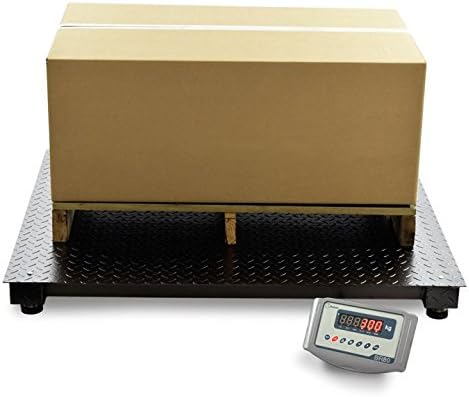
Figura 2: The robust, textured surface of the Baxtran IFN 2001 scale platform.
4.2 Conexión de la unidad de visualización
Connect the cable from the scale platform's junction box (Summenbox) to the designated port on the BR80 display unit. Ensure the connection is secure. The junction box is IP66 rated, providing protection against dust and powerful water jets.
4.3 Conexión de alimentación
Plug the AC/DC power adapter into the BR80 display unit and then into a suitable electrical outlet (100-240Vac, 50-60Hz). The display unit contains an internal 6V/4Ah battery, providing approximately 30 hours of operation on a full charge.
4.4 Nivelación de la báscula
The scale is equipped with four height-adjustable feet (10 mm adjustment range). Use a spirit level to ensure the scale platform is perfectly level. Adjust each foot by rotating it until the scale is stable and level. This is crucial for accurate measurements.

Figura 3: Detail of an adjustable foot on the scale platform, used for leveling.
4.5 Calibración inicial
The Baxtran IFN 2001 scale requires external calibration. This procedure should be performed by a qualified technician or according to local regulations using certified calibration weights. Refer to the BR80 display unit's specific manual for detailed calibration instructions, or contact your supplier for assistance.
5. Instrucciones de funcionamiento
5.1 Encendido/Apagado
Presione el ENCENDIDO/APAGADO button on the BR80 display unit to power on the scale. The LED display will perform a self-test and then show "0.000 kg" when ready for use. Press the ENCENDIDO/APAGADO button again to turn off the scale.
5.2 Pesaje básico
- Ensure the display shows "0.000 kg" before placing any item on the platform.
- Carefully place the item to be weighed in the center of the scale platform.
- Wait for the reading on the BR80 LED display (20 mm digit size) to stabilize.
- Record the weight displayed in kilograms (kg).
- Remove the item from the platform. The display should return to "0.000 kg".
5.3 Función de tara
La función de tara le permite pesar artículos en un contenedor restando el peso del contenedor.
- Place the empty container on the scale platform. The display will show its weight.
- Presione el TARA button on the BR80 display unit. The display will reset to "0.000 kg".
- Place the items to be weighed inside the container. The display will now show only the net weight of the items.
- To clear the tare, remove both the container and items, then press the TARA botón de nuevo.
5.4 RS232 Output
The BR80 display unit is equipped with an RS232 output for connecting to a PC or printer. This allows for data transfer of weighing results. Refer to the BR80 display unit's specific manual for details on RS232 communication protocols and data formats.
5.5 Funcionamiento con batería
The internal 6V/4Ah battery provides up to 30 hours of continuous operation. When the battery level is low, a low battery indicator will appear on the display. Connect the scale to the AC/DC power adapter to recharge the battery. The scale can be operated while charging.
6. Mantenimiento
6.1 Limpieza
Regularly clean the scale platform and display unit.
- For the platform (IP66): Use a damp cloth with mild detergent. Avoid abrasive cleaners or solvents. Ensure no water enters the load cell areas or junction box.
- For the display unit (IP54): Use a soft, dry, or slightly damp cloth. Do not spray cleaning liquids directly onto the display.
- Ensure the scale is disconnected from the power supply before cleaning.
6.2 Inspección
Inspeccione periódicamente lo siguiente:
- cables: Check for any signs of wear, cuts, or damage.
- Células de carga: Ensure the four load cells are free from debris and physical damage.
- Pies ajustables: Verify that all feet are securely in place and the scale remains level.
- Platform Surface: Check for any deformation or damage that could affect weighing accuracy.
6.3 Cuidado de la batería
To prolong battery life, avoid fully discharging the battery frequently. Recharge the battery when the low battery indicator appears. If the scale is not used for an extended period, charge the battery periodically (e.g., every 3 months) to maintain its capacity.
7. Solución de problemas
| Problema | Posible causa | Solución |
|---|---|---|
| La báscula no se enciende. | No power from adapter; discharged battery; faulty power button. | Check power adapter connection and outlet. Charge the battery. If problem persists, contact support. |
| Lecturas inexactas. | Scale not level; external vibrations; damaged load cells; calibration required. | Ensure scale is level. Relocate scale away from vibrations. Inspect load cells for damage. Perform external calibration. |
| La pantalla muestra "SOBRECARGA" o un código de error. | El peso excede la capacidad máxima; impacto repentino. | Remove excess weight. Avoid dropping items. If error persists, load cells may be damaged. |
| La pantalla está en blanco o parpadea. | Loose cable connection; low battery; display unit fault. | Check cable between platform and display. Charge battery. If problem persists, contact support. |
If you encounter issues not listed here or if the suggested solutions do not resolve the problem, please contact your supplier or a qualified service technician.
8. Especificaciones
| Modelo | IFN 2001 |
| Capacidad | 3000 kilogramos |
| Exactitud | 1 kilogramos |
| Dimensiones de la plataforma | 200 x 150 cm (205 x 154.99 cm product dimensions) |
| Material del marco | tubo de acero pintado |
| Material de la plataforma | Painted and lacquered steel with textured coating (black enameled) |
| Celdas de carga | 4 x Nickel-plated steel, IP66 protection |
| Junction Box (Summenbox) | ABS, protección IP66 |
| Pies ajustables | 4 x Height adjustable (10 mm) |
| Monitor | BR80 model, ABS casing |
| Tipo de pantalla | 7-segment LED, 20 mm digit size |
| Protección de pantalla | IP54 |
| Batería interna | 6V/4Ah, approx. 30 hours runtime |
| Temperatura de funcionamiento | -10 °C a 40 °C |
| Fuente de alimentación | AC/DC adapter 100-240Vac 50-60Hz |
| Conectividad | RS232 output (for PC and printer) |
| Peso del producto | 202 kg (445.33 libras) |
| Fabricante | Giropes |


