Introducción
This manual provides detailed instructions for the setup, operation, and maintenance of your Hyperkin Knight Premium Controller. Designed for use with PlayStation 3 (PS3), PC, and Mac systems, this controller offers a versatile gaming experience with its ergonomic design and responsive controls. Please read this manual thoroughly before using the product to ensure optimal performance and longevity.
Características del producto
- Joysticks analógicos duales: Two wide-spectrum analog joysticks for precise control.
- Pressure-Sensitive D-Pad: An eight-way directional pad with pressure sensitivity.
- Botones sensibles a la presión: Four shoulder buttons and four face buttons with pressure sensitivity for nuanced input.
- Retroalimentación de fuerza: Integrated force feedback for immersive gaming experiences.
- Botón de inicio: Dedicated button for system menu access.
- Cable largo: A 6-foot (1.8 meter) cable for flexible positioning.
- Compatibilidad multiplataforma: Compatible with all PS3 models, as well as PC and Mac via USB.
Contenido del paquete
- Hyperkin Knight Premium Controller (White)
- Integrated USB Cable (6 ft.)
Instrucciones de instalación
Conexión a PlayStation 3 (PS3)
- Asegúrese de que su consola PS3 esté apagada o en modo de espera.
- Localiza un puerto USB disponible en tu consola PS3.
- Plug the USB connector of the Hyperkin Knight Controller into the USB port on your PS3.
- Power on your PS3 console. The controller should be automatically recognized and assigned a player number.
- If the controller does not respond, try a different USB port or restart the console.
Conexión a PC/Mac
- Locate an available USB port on your PC or Mac computer.
- Plug the USB connector of the Hyperkin Knight Controller into the USB port.
- Your operating system (Windows, macOS) should automatically detect and install the necessary drivers. This process may take a few moments.
- Once installed, the controller will be ready for use with compatible games and applications. You may need to configure controller settings within individual games or system preferences.
- Nota: Functionality may vary depending on the operating system and specific game titles.
Instrucciones de funcionamiento
The Hyperkin Knight Premium Controller features a standard layout for intuitive gameplay.
Disposición del controlador

Imagen: Arriba view of the Hyperkin Knight Premium Controller, showing the D-pad, analog sticks, face buttons, and central buttons.
- D-Pad (Pad direccional): Located on the left, used for directional input.
- Joystick analógico izquierdo: Below the D-Pad, for precise movement and camera control.
- Joystick analógico derecho: On the right side, typically for camera control or aiming.
- Botones de cara (triángulo, círculo, cruz, cuadrado): On the right, used for actions within games.
- Botones de hombro (L1, L2, R1, R2): Located on the top edge of the controller, used for various in-game functions.
- Botón SELECCIONAR: Typically used for menu access or specific game functions.
- Botón de inicio: Generalmente se utiliza para pausar juegos o confirmar selecciones.
- Botón de inicio: Central button to access the PS3 XMB (CrossMediaBar) or system menus on PC/Mac.
Retroalimentación de fuerza
The controller features force feedback (rumble) functionality, which provides tactile sensations during gameplay, enhancing immersion. This feature is automatically enabled when supported by the game and system. If you wish to disable it, check your game's or system's controller settings.
Mantenimiento
- Limpieza: Utilice un paño suave y seco para limpiar el mando. Para suciedad difícil de eliminar, limpie ligeramenteampEnjuague el paño con agua. Evite usar productos químicos agresivos o limpiadores abrasivos.
- Almacenamiento: Guarde el controlador en un lugar fresco y seco, alejado de la luz solar directa y de temperaturas extremas. Evite enrollar el cable demasiado fuerte para evitar daños.
- Cuidado de cables: Do not pull the controller by its cable. Always grasp the USB connector when plugging or unplugging.
Solución de problemas
El controlador no responde
- Verifica la conexión: Ensure the USB cable is securely plugged into both the controller and the console/computer.
- Pruebe un puerto USB diferente: Connect the controller to another USB port on your system.
- Reiniciar el sistema: Power cycle your PS3, PC, or Mac.
- Driver Check (PC/Mac): On PC, check Device Manager to see if the controller is recognized and if there are any driver issues. On Mac, check System Information > USB.
Incorrect Button Mapping or Limited Functionality
- Configuración del juego: Many games allow for custom controller mapping. Check the in-game settings for controller configuration.
- System Settings (PC/Mac): For PC, some games or emulators may require specific controller configurations or third-party software. For Mac, check System Preferences > Game Controllers (if available) or specific application settings.
- Compatibilidad de PS3: While compatible with all PS3 models, some older games or specific PS3 system software versions might have unique controller handling. Ensure your PS3 system software is up to date.
Force Feedback Not Working
- Soporte de juego: Verifica que el juego que estás jugando admita la retroalimentación de fuerza.
- Configuración del juego: Check the game's options menu to ensure force feedback (rumble) is enabled.
- Configuración del sistema: On PC, ensure rumble is enabled in your controller settings.
Presupuesto
| Número de modelo | M07213-WH |
| Compatibilidad | PlayStation 3, PC, Mac (via USB) |
| Longitud del cable | 6 pies (aprox. 1.8 metros) |
| Tipo de entrada | Pressure-sensitive buttons and D-pad, dual analog joysticks |
| Comentario | Force Feedback (Rumble) |
| Dimensiones | 2.99 x 7.99 x 7.01 pulgadas (aprox. 7.6 x 20.3 x 17.8 cm) |
| Peso | 12.5 onzas (aprox. 354 gramos) |
| Fabricante | Hyperkin Inc |
Garantía y soporte
For warranty information and technical support, please refer to the official Hyperkin webSitio web o contacte directamente con el servicio de atención al cliente. Conserve su recibo de compra como comprobante para cualquier reclamación de garantía.
Fabricante: Hyperkin Inc
Websitio: www.hiperkin.com (Por favor visite la página oficial website for the most current support information.)
Producto terminadoview Imágenes
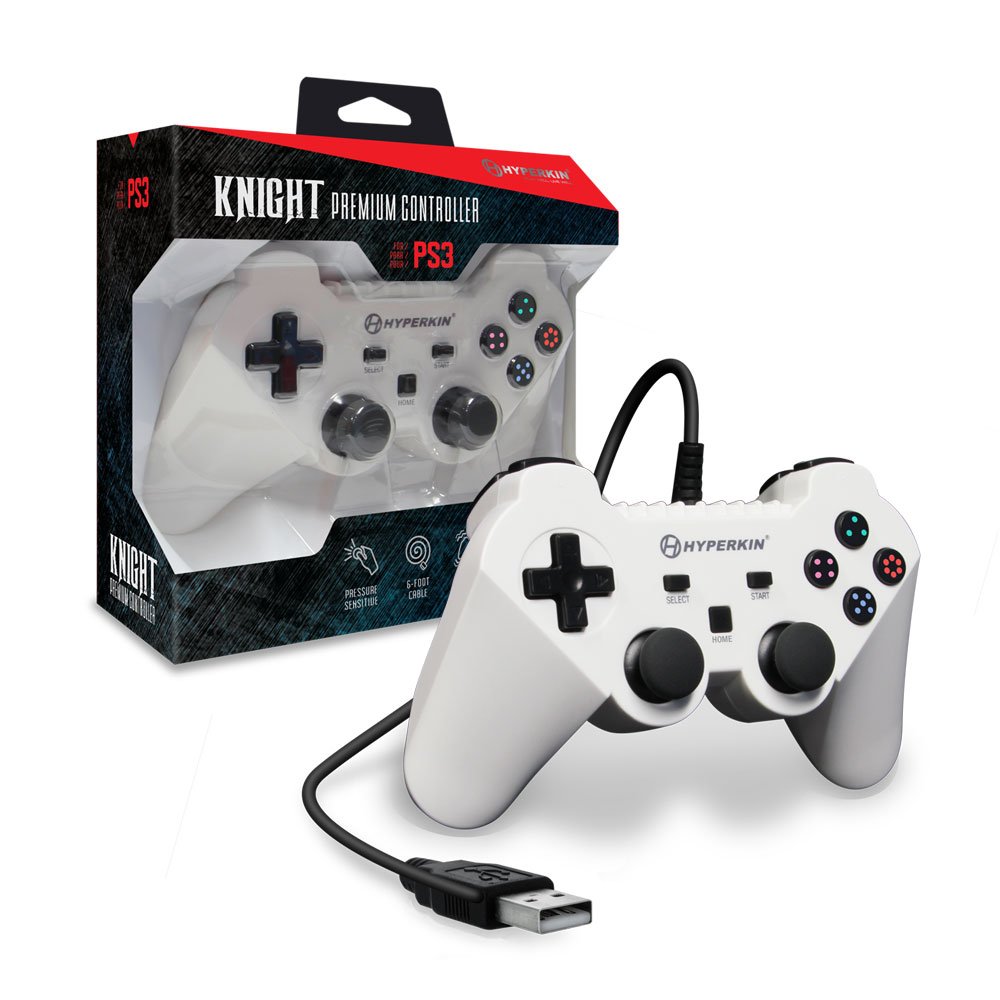
Image: The Hyperkin Knight Premium Controller displayed alongside its retail packaging, highlighting the product's design and branding.

Imagen: Un primer plano view of the Hyperkin Knight Premium Controller's retail box, showcasing características clave y elementos de diseño.

Imagen: Un ángulo view of the Hyperkin Knight Premium Controller, emphasizing its ergonomic shape and button placement.


