1. Producto terminadoview
The SellEton SL-700 Series Floor Scale is a robust industrial weighing solution designed for heavy-duty applications. It features a durable carbon steel platform and is paired with the SL-7515-C metal indicator, offering accurate measurements and ease of use.
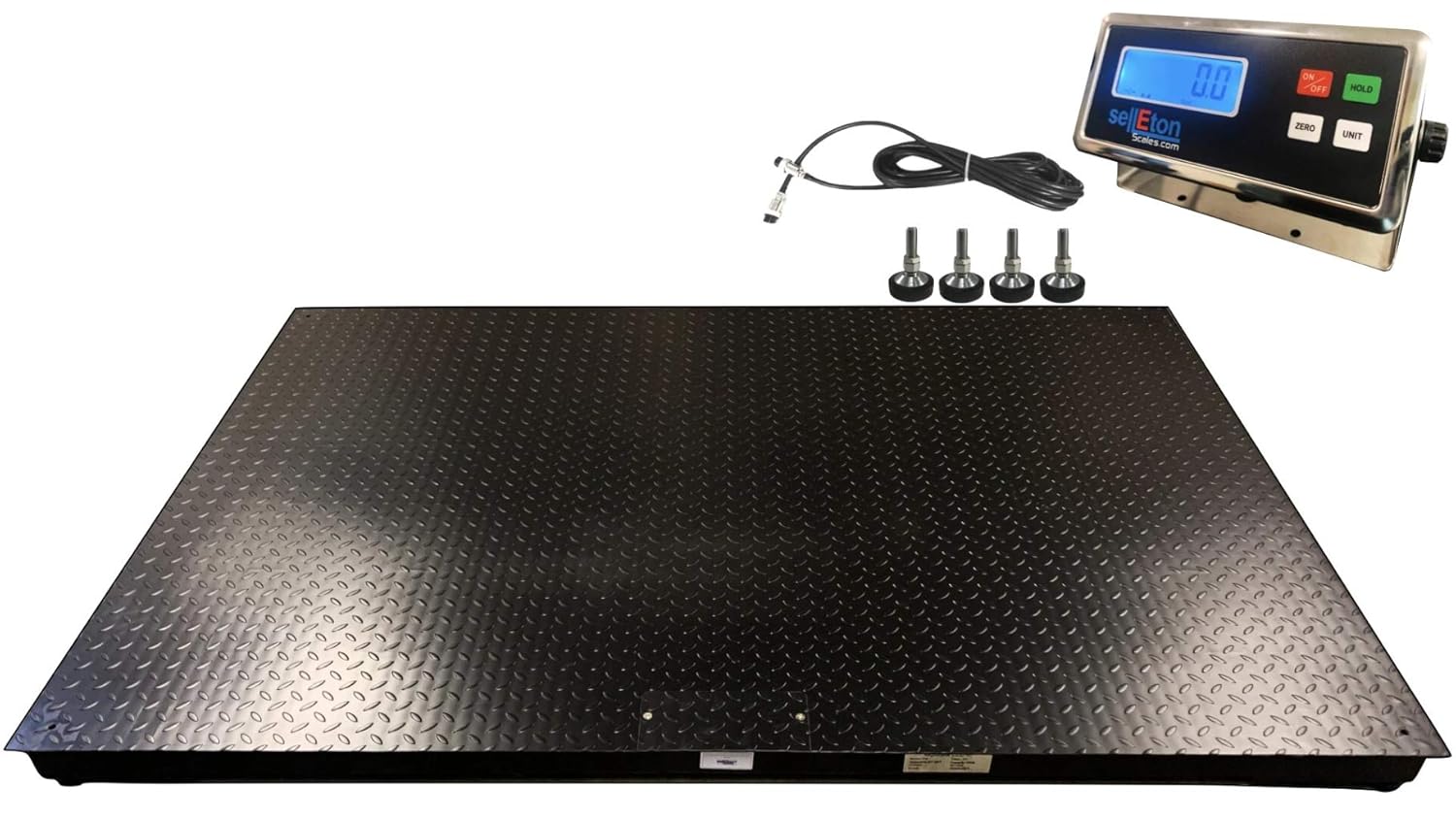
Image: SellEton SL-700 Series Floor Scale with SL-7515-C Indicator, showing the scale platform, indicator, connecting cable, and adjustable feet.

Image: An industrial digital floor scale from the SL-700 series, pre-calibrated and ready for use.

Image: Close-up of the SellEton SL-7515-C indicator, featuring an LCD screen and control buttons.
Características principales:
- Construcción resistente: Professional-grade carbon steel floor scale suitable for industrial and shipping use.
- Alta precisión: Capable of handling up to 2,500-pound loads with 0.5 lb accuracy.
- Durable Load Cells: Four high-quality alloy load cells ensure accuracy across the full capacity range.
- Indicador fácil de usar: Includes an easy-to-read LCD screen and intuitive controls.
- Diseño robusto: Protected against dust, splash water, or immersion, ensuring durability in demanding environments.
Proceso de fabricación:
Vídeo: Terminadoview of the manufacturing process for SellEton floor scales, highlighting the use of advanced technology and precision craftsmanship in the USA.
2. Información de seguridad
Please read and understand all safety instructions before operating the scale. Failure to follow these instructions may result in injury or damage to the equipment.
- Ensure the scale is placed on a stable, level surface to prevent tipping and ensure accurate readings.
- Do not exceed the maximum weight capacity of 2,500 lbs (1134 kg). Overloading can damage the load cells and compromise accuracy.
- Keep the scale and indicator away from excessive moisture, dust, and extreme temperatures unless specifically designed for such environments.
- Avoid dropping heavy objects onto the scale platform, as this can cause damage.
- Desconecte la alimentación antes de limpiar o realizar cualquier mantenimiento.
- Only use approved power adapters and cables.
3. Configuración
Follow these steps to set up your SellEton SL-700 Series Floor Scale and SL-7515-C Indicator.
3.1 Desembalaje y colocación
- Retire con cuidado todos los componentes del embalaje.
- Place the scale platform on a firm, level surface. Ensure there is adequate space around the scale for safe operation and loading.
- Adjust the four adjustable feet on the scale platform to ensure it is level and stable. Use a spirit level for best results.
3.2 Load Cell Installation (if not pre-installed)
If your load cells are not pre-installed, refer to the following video for a step-by-step guide:
Video: Detailed instructions on how to install load cells in SellEton Floor Scales.
3.3 Connecting the Indicator
- Locate the load cell cable extending from the scale platform.
- Connect the load cell cable to the "Load Cell" port on the back of the SL-7515-C indicator. Ensure the connection is secure.
- Connect the power adapter to the "DC Power" port on the indicator and then plug it into a suitable power outlet.

Imagen: Trasera view of the SL-7515-C indicator, showing the DC Power, RS232, and Load Cell connection ports.
4. Instrucciones de funcionamiento
This section details the basic operation of your SellEton SL-7515-C Indicator.
4.1 Encendido y apagado
- Presione el ENCENDIDO/APAGADO button to turn the indicator on or off.
4.2 Zeroing the Scale
Before weighing, ensure the scale is empty and stable. If the display does not show 0.00, press the CERO botón para restablecerlo.
4.3 Conversión de unidades
To switch between weighing units (e.g., pounds (lb) and kilograms (kg)), press the UNIT/PRINT botón.
4.4 Procedimiento de pesaje
- Turn on the indicator and wait for it to display 0.00.
- Carefully place the item to be weighed onto the center of the scale platform.
- Lea el peso que se muestra en la pantalla LCD.
- To weigh another item, remove the current item and wait for the display to return to 0.00, or press CERO Si es necesario.

Image: Close-up of the SL-7515-C indicator showing a weight reading of 10000.00 lb.

Image: A pallet wrapped in plastic film placed on a SellEton floor scale for weighing.
4.5 Adjusting Zero and Negative Range
To adjust the zero range and negative range settings on your SL-7515-C indicator, follow the instructions in this video:
Video: Guide on adjusting the zero range and negative range settings for the SL-7515-C indicator.
5. Mantenimiento
Regular maintenance ensures the longevity and accuracy of your scale.
- Limpieza: Wipe the scale platform and indicator with a damp cloth. Avoid using abrasive cleaners or excessive water, especially near electronic components.
- Inspección: Periodically check all cables for damage and ensure connections are secure. Inspect the load cells and adjustable feet for any signs of wear or damage.
- Calibración: For optimal accuracy, professional calibration is recommended periodically, especially after relocation or significant temperature changes.
6. Solución de problemas
Esta sección proporciona soluciones a problemas comunes que puede encontrar.
6.1 Lecturas inexactas
- Ensure the scale is on a level and stable surface.
- Check that no objects are touching the scale platform or interfering with its movement.
- Verify that the load cells are correctly installed and undamaged.
- Considere una calibración profesional si persisten las imprecisiones.
6.2 Problemas de visualización
- Check power connections and ensure the adapter is functioning correctly.
- If the display is blank or erratic, try restarting the indicator.
6.3 Restablecimiento de fábrica
If you experience persistent issues or need to revert all settings to default, you can perform a factory reset. Note: This will not revert to an old calibration. You will need to calibrate your scale for proper readings after a factory reset.
Video: Demonstration on how to perform a factory reset on the SellEton SL-7515-C Indicator.
7. Especificaciones
| Característica | Detalle |
|---|---|
| Marca | SELLETON.COM ACCURATE SCALES WITH BETTER PRICING |
| Modelo | SL-700 Series Floor Scale with SL-7515-C Indicator |
| Material | Acero carbono |
| Precisión de lectura | 0.5 libras |
| Capacidad máxima | 2,500 libras |
| Dimensiones de la plataforma | 5' x 4' (60" x 48") |
| Modelo de indicador | SL-7515-C |
| Pantalla indicadora | Pantalla LCD |

Image: Technical drawing showing the dimensions of the SL-7515-C indicator.
8. Garantía
Every SellEton scale is backed by a 5-year warranty. For warranty claims or detailed information, please contact SellEton customer support.
9. Soporte
For further assistance, technical support, or to explore other SellEton products, please visit the official SellEton store:


