1. Introducción
This manual provides detailed instructions for the assembly, operation, and maintenance of your Kappesberg S973 Office Desk. Please read all instructions carefully before beginning assembly and retain this manual for future reference.
Información de seguridad
- Monte siempre el escritorio sobre una superficie suave y limpia para evitar arañazos.
- Asegúrese de que todo el hardware esté bien apretado antes de usar.
- Do not overload the desk or shelves.
- Mantenga las piezas pequeñas fuera del alcance de los niños durante el montaje.
- Si falta alguna pieza o está dañada, no proceda al montaje. Contacte con atención al cliente.
2. Contenido del paquete
Before starting assembly, verify that all components listed below are present in your package. Unpack all items and lay them out on a clean, soft surface.
- Desk panels (top, side, back, shelves)
- Hardware pack (screws, dowels, cam locks, cam studs, L-brackets, plastic feet)
- Assembly tools (usually an Allen key, screwdriver not included)
- Folleto de instrucciones (este manual)
Note: The exact number and type of hardware may vary slightly. Refer to the specific hardware diagram included in your package.
3. Instrucciones de montaje
Follow these steps carefully to assemble your Kappesberg S973 Office Desk. It is recommended to have two people for assembly.
Step 1: Prepare the Base Structure
Identify the main side panels and the bottom panel. Attach the plastic feet to the bottom edges of the side panels. Connect the side panels to the bottom panel using dowels and cam locks/studs as indicated in your hardware diagram.
Step 2: Assemble the CPU/Storage Compartment
Assemble the vertical and horizontal panels that form the CPU and storage shelves on the right side of the desk. Secure them to the main desk structure using the provided hardware.
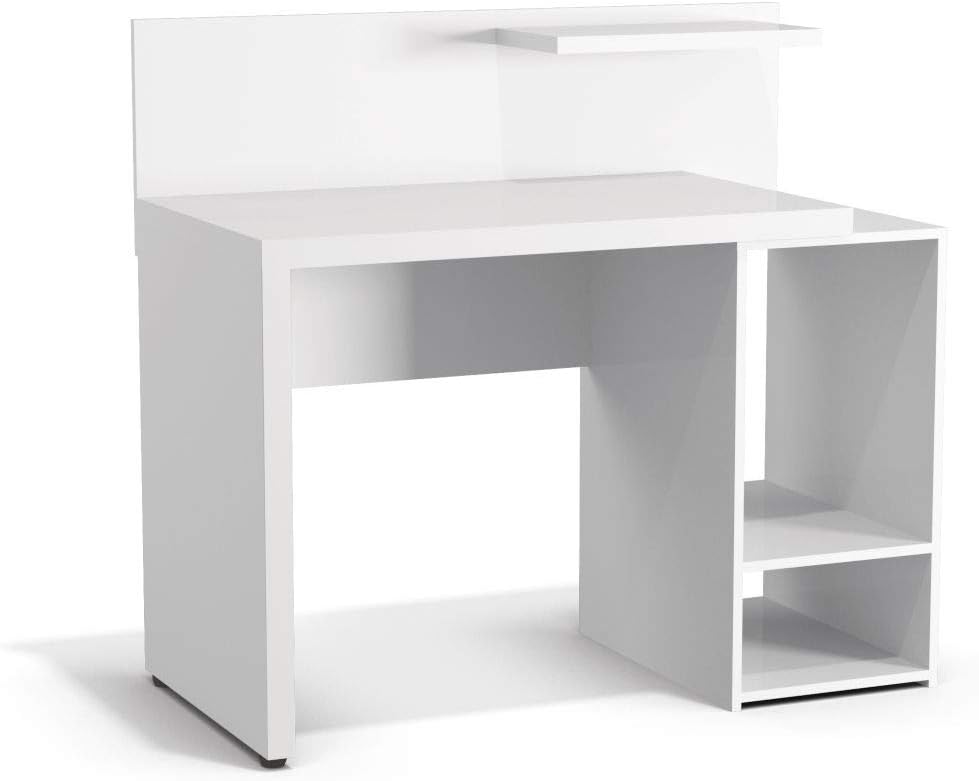
Figura 3.1: Frente view of the assembled desk structure, highlighting the integrated storage compartment.
Step 3: Attach the Desktop Surface
Carefully place the main desktop panel onto the assembled base structure, aligning the pre-drilled holes. Secure it using cam locks and studs, ensuring a tight fit.
Step 4: Install the Back Panel and Upper Shelf
Attach the back panel to the rear of the desk using small nails or screws. Then, install the small upper shelf above the main desktop, typically secured with L-brackets or dowels and cam locks.

Figura 3.2: Angulado view of the fully assembled desk, ready for use.
Paso 5: Comprobación final
Once all components are assembled, gently lift and move the desk to its desired location. Verify that all screws and fasteners are tight and that the desk is stable and level. Adjust plastic feet if necessary to prevent wobbling.

Figure 3.3: The Kappesberg S973 Office Desk in a typical usage scenario.
4. Funcionamiento y uso
The Kappesberg S973 Office Desk is designed for various office and home study applications. Its features include:
- Superficie principal del escritorio: Proporciona ample space for a computer monitor, keyboard, mouse, and writing tasks.
- Side Storage Compartment: Features two shelves, ideal for housing a CPU tower, printer, books, or other office supplies.
- Estante superior: A smaller shelf above the main desktop for decorative items, small speakers, or frequently accessed stationery.
Ensure that the weight distribution on the desk is balanced to maintain stability. Avoid placing excessively heavy items on the edges or on the upper shelf.
5. Mantenimiento y cuidado
To ensure the longevity and appearance of your Kappesberg S973 Office Desk, follow these maintenance guidelines:
- Limpieza: Limpie las superficies con un paño suave yamp cloth. For stubborn marks, use a mild, non-abrasive cleaner specifically designed for wood or laminate furniture. Dry immediately with a clean cloth.
- Evite los productos químicos agresivos: No utilice limpiadores abrasivos, disolventes o abrillantadores que contengan silicona, ya que pueden dañar el acabado.
- Proteger del calor y la humedad: Avoid placing hot items directly on the surface. Use coasters for drinks. Wipe up spills immediately.
- Exposición a la luz solar: La exposición prolongada a la luz solar directa puede provocar decoloración o decoloración.
- Comprobación del hardware: Revise periódicamente todos los tornillos y fijaciones para asegurarse de que estén bien apretados. Vuelva a apretarlos si es necesario.
6. Solución de problemas
Aquí encontrará soluciones a problemas comunes que podría encontrar:
- El escritorio se tambalea:
- Asegúrese de que todos los seguros y tornillos de leva estén completamente apretados.
- Check if the desk is on an uneven surface. Adjust the plastic feet or place shims under the legs if needed.
- Las piezas no encajan:
- Double-check the assembly diagram to ensure you are using the correct parts for each step.
- Asegúrese de que las piezas estén orientadas correctamente (por ejemplo, orificios pretaladrados orientados en la dirección correcta).
- Do not force parts. If a part does not fit, re-examine the instructions.
- Hardware faltante/piezas dañadas:
If you find any missing or damaged components upon unpacking, do not proceed with assembly. Contact Kappesberg customer support immediately for assistance.
7. Especificaciones del producto
| Número de modelo: | S973 |
| Marca: | Kappesberg |
| Material: | MDF, MDP |
| Color: | Blanco |
| Dimensiones del producto (L x An x Al): | 94 x 96 x 92 cm (aproximadamente 37 x 37.8 x 36.2 pulgadas) |
| Dimensiones del paquete: | 105 x 56 x 15 cm (aproximadamente 41.3 x 22 x 5.9 pulgadas) |
| Peso del producto: | 36.75 kg (aproximadamente 81 libras) |
| Requiere ensamblaje: | Sí |
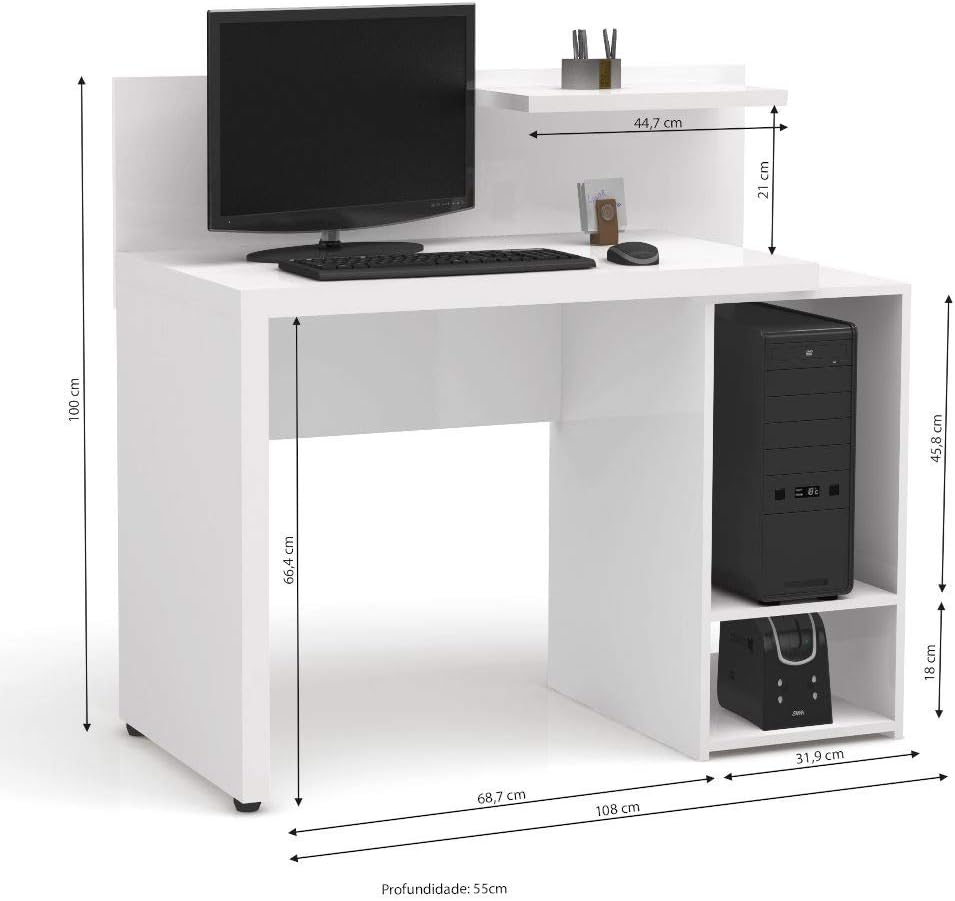
Figure 7.1: Detailed dimensions of the Kappesberg S973 Office Desk.
8. Garantía y atención al cliente
Kappesberg products are manufactured to high-quality standards. For information regarding warranty coverage, please refer to the warranty card included with your purchase or visit the official Kappesberg websitio.
If you have any questions, require assistance with assembly, or need to report missing/damaged parts, please contact Kappesberg customer support:
- Websitio: www.kappesberg.com.br (Por favor, consulte la información oficial) web(sitio para obtener información de contacto actualizada)
- Teléfono: Consulte el embalaje del producto o la información oficial. webSitio para números de contacto locales.
Tenga a mano el número de modelo (S973) y los detalles de la compra cuando se comunique con el soporte.


