Introducción
Thank you for choosing the Sephia A11 Portable Bluetooth Speaker. This manual provides essential information for setting up, operating, and maintaining your speaker to ensure optimal performance and longevity. The Sephia A11 offers versatile connectivity options, including Bluetooth, USB, Micro SD, and AUX input, delivering clear and powerful audio in a compact design.
¿Qué hay en la caja?
- Sephia A11 Bluetooth Speaker
- Cable de carga
- Cable auxiliar
- Manual de usuario (este documento)

Image: The Sephia A11 Portable Bluetooth Speaker, showcasing its sleek black design and front grille.
Producto terminadoview
Familiarize yourself with the buttons and ports on your Sephia A11 speaker.
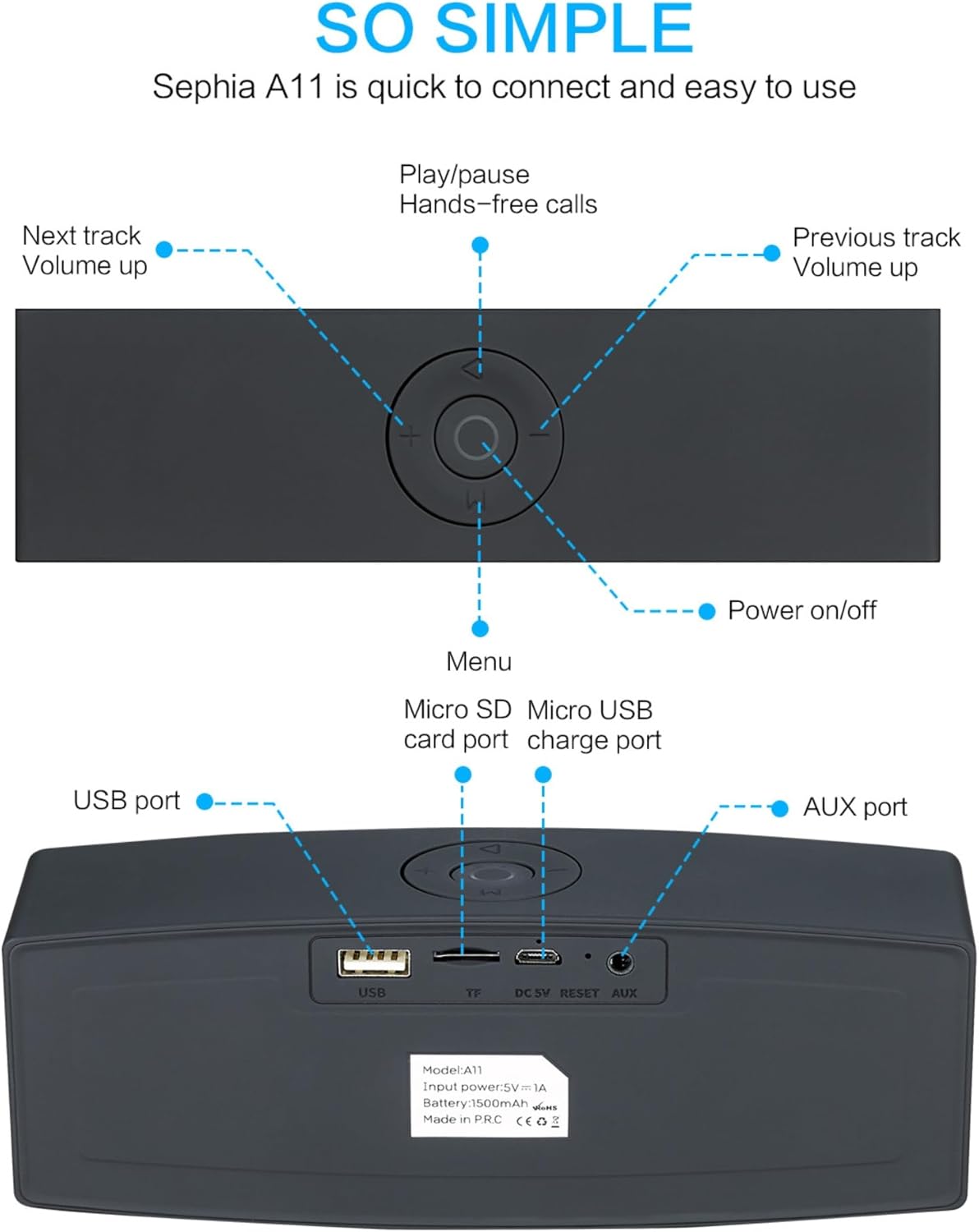
Image: Detailed diagram illustrating the top control panel and rear input/output ports of the Sephia A11 speaker.
Controles superiores:
- Botón de encendido / apagado: Mantenga presionado para encender o apagar el altavoz.
- Botón de reproducción/pausa: Press to play or pause audio. Also used for hands-free calls (answer/end).
- Botón de pista anterior / bajar volumen (-): Presione brevemente para ir a la pista anterior, presione prolongadamente para disminuir el volumen.
- Botón de pista siguiente / subir volumen (+): Presione brevemente para pasar a la siguiente pista, presione prolongadamente para aumentar el volumen.
- Botón de menú (M): Press to switch between input modes (Bluetooth, USB, Micro SD, AUX).
Puertos traseros:
- Puerto USB: Para reproducir audio desde una unidad USB o cargar dispositivos externos.
- Ranura para tarjeta Micro SD (TF): Para reproducir audio desde una tarjeta Micro SD.
- Micro USB Charge Port (DC 5V): Para cargar el altavoz.
- Botón de reinicio: Pequeño orificio para reiniciar el dispositivo en caso de ser necesario.
- Puerto AUX: Para conexión de audio por cable utilizando el cable AUX de 3.5 mm proporcionado.
Configuración
1. Carga del altavoz
- Connect the supplied charging cable to the Micro USB Charge Port (DC 5V) on the rear of the speaker.
- Conecte el otro extremo del cable de carga a un adaptador de corriente USB (no incluido) o al puerto USB de una computadora.
- The charging indicator light will illuminate. Once fully charged, the light will change or turn off (refer to specific model behavior if indicated by LED). A full charge provides up to 8 hours of playtime.
2. Encendido / apagado
- To power on, press and hold the Power On/Off button on the top panel until you hear an audible prompt or see an indicator light.
- To power off, press and hold the Power On/Off button again until the speaker shuts down.
3. Emparejamiento Bluetooth
- Ensure the speaker is powered on and in Bluetooth mode. If not, press the 'M' (Menu) button to switch to Bluetooth mode. The speaker will enter pairing mode, indicated by a flashing LED light and an audible prompt.
- En su dispositivo móvil (teléfono inteligente, tableta, computadora portátil), habilite Bluetooth y busque los dispositivos disponibles.
- Select "Sephia A11" from the list of found devices.
- Once successfully paired, the speaker will provide an audible confirmation, and the LED indicator will stop flashing.
- The speaker has a Bluetooth range of up to 10 meters (33 feet).
4. Wired Connections (AUX, USB, Micro SD)
- Entrada auxiliar: Connect one end of the supplied 3.5mm AUX cable to the AUX port on the speaker and the other end to the audio output of your device (e.g., MP3 player, computer). The speaker will automatically switch to AUX mode or can be selected using the 'M' button.
- Reproducción USB: Inserte una unidad flash USB que contenga audio files en el puerto USB. El altavoz detectará y reproducirá automáticamente el audio. files.
- Reproducción de tarjeta micro SD: Inserte una tarjeta Micro SD que contenga audio files into the Micro SD (TF) slot. The speaker will automatically detect and play the audio files.
Operar el altavoz
Reproducción de audio
- Reproducir/Pausa: Press the Play/Pause button to toggle between playing and pausing audio.
- Ajuste de volumen: Mantenga presionado el botón '+' para aumentar el volumen y mantenga presionado el botón '-' para disminuir el volumen.
- Pista siguiente / anterior: Short press the '+' button for the next track, and short press the '-' button for the previous track.

Image: A hand demonstrating how to interact with the top control buttons of the Sephia A11 speaker.
Llamadas manos libres
- When a call comes in while connected via Bluetooth, press the Play/Pause button to answer the call.
- Presione el botón Reproducir/Pausa nuevamente para finalizar la llamada.
- El micrófono incorporado permite una comunicación clara.
Mantenimiento
- Limpieza: Utilice un paño suave y seco para limpiar la superficie del altavoz. No utilice limpiadores abrasivos, alcohol ni disolventes químicos, ya que pueden dañar el acabado.
- Almacenamiento: Guarde el altavoz en un lugar fresco y seco, alejado de la luz solar directa y de temperaturas extremas.
- Cuidado de la batería: Para prolongar la vida útil de la batería, evite descargar completamente el altavoz con frecuencia. Cárguelo regularmente, incluso si no lo usa durante períodos prolongados.
- Resistencia al agua: Este altavoz no es resistente al agua. Evite la exposición al agua o a la humedad excesiva.
Solución de problemas
| Problema | Posible causa | Solución |
|---|---|---|
| El altavoz no se enciende. | Batería baja; el botón de encendido no se mantiene presionado el tiempo suficiente. | Cargue el altavoz por completo. Mantenga pulsado el botón de encendido durante 3-5 segundos. |
| No hay sonido desde el altavoz. | Volumen demasiado bajo; Modo de entrada incorrecto; Dispositivo no conectado correctamente. | Increase speaker and device volume. Press 'M' button to select correct input mode. Re-pair Bluetooth or re-connect AUX/USB/SD. |
| El emparejamiento de Bluetooth falla. | El altavoz no está en modo de emparejamiento; Dispositivo demasiado lejos; Interferencia. | Ensure speaker is in Bluetooth pairing mode (flashing LED). Move speaker closer to device. Turn off other Bluetooth devices. Try forgetting "Sephia A11" on your device and re-pairing. |
| Mala calidad de sonido. | Low battery; Device volume too high (distortion); Interference. | Charge the speaker. Adjust volume on both speaker and device. Move away from sources of interference. |
Presupuesto
| Nombre del modelo | A11 |
| Dimensiones | 18 x 7 x 5 cm |
| Peso | 426 gramos |
| Tecnología de conectividad | Bluetooth, USB, Micro SD, AUX |
| Potencia de salida del altavoz | 6 vatios (2 controladores de 3 W) |
| Respuesta de frecuencia | 20 Hz - 20 kHz |
| Tipo de batería | Iones de litio |
| Recreo | Hasta 8 horas |
| Alcance de Bluetooth | Hasta 10 metros (33 pies) |
| Características especiales | Bass Boost, Portable, Hi-Res Audio, Built-in Microphone, Shockproof |

Image: Visual representation of the Sephia A11 speaker's dimensions.
Garantía y soporte
The Sephia A11 Portable Bluetooth Speaker comes with a Garantía de 12 meses A partir de la fecha de compra, cubre defectos de fabricación. Conserve el comprobante de compra para reclamaciones de garantía.
For technical support, warranty inquiries, or further assistance, please refer to the contact information provided with your purchase or visit the official Sephia websitio.


