Introducción
This manual provides detailed instructions for the installation, operation, and maintenance of your FVTLED WiFi RGBW LED Controller. This controller is designed for wireless smart control of FVTLED RGBW LED Deck lights via a dedicated mobile application on Android and iOS devices. Please read this manual thoroughly before use to ensure proper functionality and safety.
Información de seguridad
- Asegúrese de que la fuente de alimentación esté desconectada antes de la instalación o el mantenimiento.
- This controller is designed for use with FVTLED RGBW LED Deck lights only. Do not connect to other lighting systems.
- Verifique el vol. correctotage (120 voltios) y wattage (15 watts) compatibility.
- Mantenga el dispositivo alejado del agua y la humedad excesiva.
- No intente desmontar ni modificar el controlador. Encargue cualquier reparación a personal cualificado.
Contenido del paquete
Por favor revise el paquete para ver los siguientes artículos:
- 1 x FVTLED WiFi RGBW LED Controller
- 1 x Remote Control (Batteries not included: Requires 2 AAA batteries)
- Manual de usuario (este documento)
Producto terminadoview
The FVTLED WiFi RGBW LED Controller allows you to manage your FVTLED RGBW deck lights with ease, offering both a physical remote control and a comprehensive mobile application for advanced features.

Image: FVTLED WiFi RGBW LED Controller and its accompanying remote control.

Image: Detailed layout of the remote control buttons, indicating functions such as ON/OFF, brightness adjustment, color temperature control, and RGB color cycling.
Configuración
1. Conexión del cableado
The controller features two connection ends:
- El 2-pin end connects to your power supply.
- El 5-pin end connects directly to your FVTLED RGBW LED deck lights.
Ensure all connections are secure and properly aligned before applying power.
2. Descarga de la aplicación móvil
To utilize the smart control features, download the official FVTLED application. Buscar "FVTLED" in your device's app store:
- Para dispositivos Android: Google Play Store
- For iOS devices: Apple App Store

Image: Visual guide for downloading the FVTLED application and an overview of its key features, including 16 million colors, music sync, voice control, and scheduling.
3. Connecting the Controller to Wi-Fi
Follow these steps within the FVTLED app to connect your controller to your home Wi-Fi network:
- Open the FVTLED app.
- Inscribirse for a new account or Acceso si ya tienes uno.
- From the main screen, tap the "Add device" button (often represented by a '+' icon).
- The app will automatically search for nearby devices. Select your controller (e.g., "DeviceBCF2").
- Ingrese el nombre y la contraseña de su red Wi-Fi cuando se le solicite.
- Once connected, you can name your device and assign it to a specific room for better organization.

Image: Step-by-step screenshots illustrating the process of signing up, logging in, adding a device, connecting to Wi-Fi, and organizing the device within the FVTLED app.
Operar el controlador
1. Uso del control remoto
The included remote control provides basic functions:
- ENCENDIDO/APAGADO: Encender o apagar las luces.
- Brillo: Adjust light intensity (10 levels of dimming).
- Temperatura de color: Adjust between warm white (3000K), neutral white (4000K), and cool white (6500K).
- Botones RGB: Cycle through various RGB colors and modes (three speeds for color cycling).
- Modo de luz nocturna: Activa una configuración de luz de baja intensidad.
2. Using the FVTLED Mobile App
The mobile app unlocks the full potential of your RGBW LED Controller:
- 16 millones de colores: Select any color from a vast spectrum.
- Brightness & Saturation Control: Ajuste la intensidad de la luz y la vitalidad del color.
- Modo música: Lights can synchronize with music played through your device.
- Control de voz: Integrate with smart home systems (Wi-Fi, Alexa, Google Assistant) for voice commands.
- Temporizador y programación: Set automated on/off times and lighting scenes.
- Modos múltiples: Access various pre-programmed lighting effects and scenes.

Image: A user demonstrating control of green deck lights using the FVTLED mobile application on a smartphone.
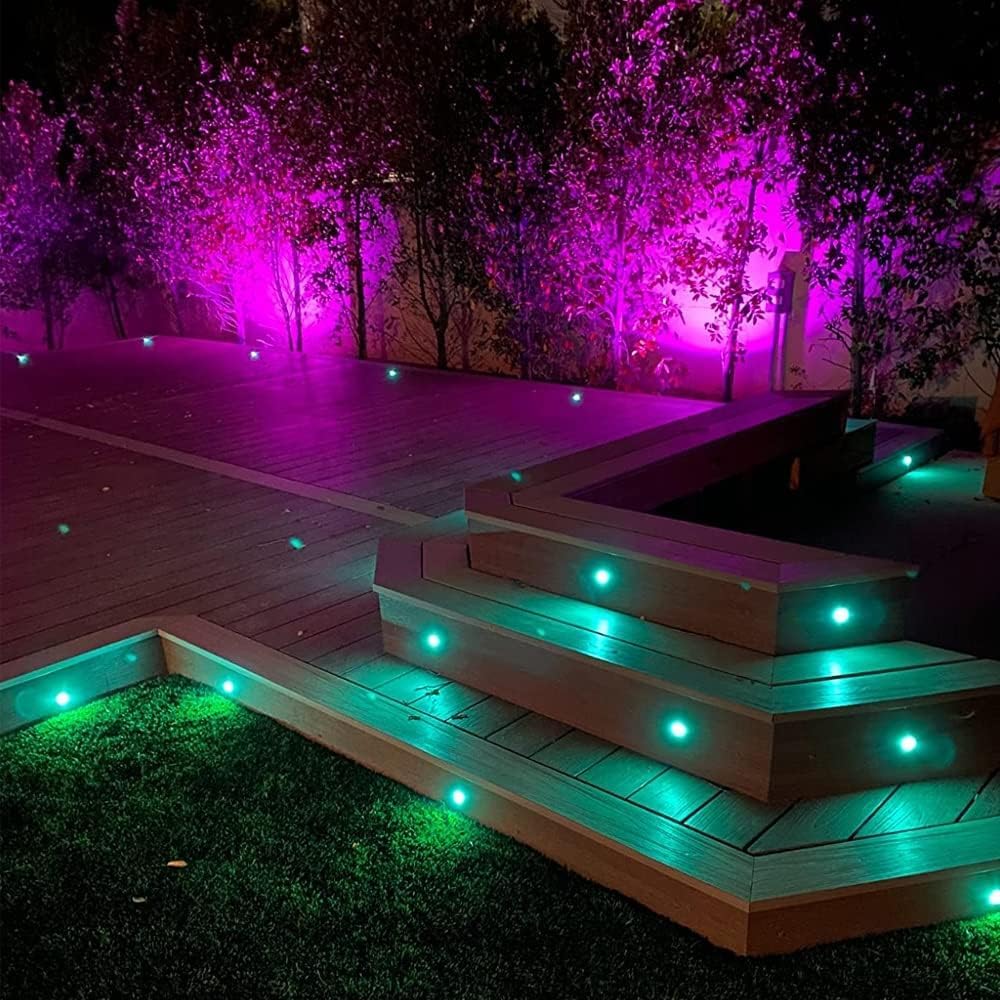
Image: An outdoor deck illuminated with FVTLED RGBW lights displaying vibrant purple and green colors, showcasing the controller's capabilities.

Image: An outdoor deck and stairs illuminated with warm white FVTLED deck lights, providing a cozy ambiance.

Image: A spacious outdoor deck area featuring FVTLED deck lights displaying a range of vibrant colors, demonstrating the RGB capabilities.
Mantenimiento
The FVTLED WiFi RGBW LED Controller requires minimal maintenance:
- Mantenga el controlador limpio y libre de polvo y residuos. Utilice un paño suave y seco para limpiarlo.
- Ensure the controller is installed in a location that is protected from direct exposure to harsh weather conditions, although it is designed for outdoor use with appropriate protection.
- Revise periódicamente las conexiones del cableado para detectar signos de desgaste o daños.
- Replace remote control batteries (2 x AAA) as needed to ensure proper function.
Solución de problemas
| Problema | Posible causa | Solución |
|---|---|---|
| Las luces no se encienden. | No power to controller; Loose connections; Incorrect wiring; Faulty lights. | Check power supply connection. Ensure 2-pin connector is secure. Verify 5-pin connector to lights is secure. Confirm lights are functional. |
| Controller not connecting to Wi-Fi. | Incorrect Wi-Fi password; Out of Wi-Fi range; Router issues. | Double-check Wi-Fi password. Move controller closer to router. Restart your Wi-Fi router. Ensure 2.4GHz network is used if applicable. |
| El control remoto no funciona. | Dead batteries; Remote out of range; Obstruction. | Replace AAA batteries. Ensure remote is within effective range of the controller. Remove any physical obstructions between remote and controller. |
| Lights not responding to app commands. | Controller offline; App glitch; Network interference. | Check app to confirm controller is online. Restart the app. Restart the controller by disconnecting and reconnecting power. Check for Wi-Fi interference. |
Presupuesto
| Característica | Detalle |
|---|---|
| Número de modelo | Z0039 |
| Marca | FVTLED |
| Fabricante | SEVEN COLORS LIGHTING TECHNOLOGY CO., LTD |
| Color | Wifi RGBW Controller |
| Fuente de poder | Fuente de alimentación DC |
| Volumentage | 120 voltios |
| Quétage | 15 vatios |
| Peso del artículo | 1.58 onzas |
| Dimensiones del paquete | 7 x 6.26 x 0.89 pulgadas |
| Conectividad | Wi-Fi |
| Compatibilidad | Android, iOS, Alexa, Google Assistant |
| Componentes incluidos | WiFi RGB controller and RGBW LED lights (controller only in this package) |
| Fecha de primera disponibilidad | 16 de octubre de 2015 |
Garantía y soporte
For warranty information and customer support, please refer to the official FVTLED website or contact the manufacturer directly. Details regarding product registration, warranty claims, and technical assistance can typically be found through these channels.
Fabricante: SEVEN COLORS LIGHTING TECHNOLOGY CO., LTD
Para obtener más ayuda, visite el sitio web FVTLED Store on Amazon.
