1. Introducción
Gracias por la compraasing the PNI Clementine 9545 Car MP5 Stereo Player. This manual provides essential information for the correct installation, operation, and maintenance of your new car stereo. Please read this manual thoroughly before using the device to ensure optimal performance and safety.
The PNI Clementine 9545 is a versatile 1DIN car multimedia player featuring a 4-inch color LCD screen, Bluetooth connectivity, FM/AM radio, USB and SD card playback, and video input/output capabilities. Enjoy your favorite music and videos on the go, make hands-free calls, and connect a reverse camera for enhanced safety.
2. Información de seguridad
- Instalación profesional recomendada: Para mayor seguridad y correcto funcionamiento, es muy recomendable que la instalación de este producto sea realizada por un profesional cualificado.
- Fuente de alimentación: Ensure the device is connected to a 12V DC power supply with proper grounding. Incorrect wiring can cause damage or fire.
- Evite las distracciones: Do not operate the device or watch videos while driving. This can lead to accidents. Always prioritize road safety.
- Temperatura: No exponga el dispositivo a temperaturas extremas, luz solar directa o humedad alta.
- Limpieza: Utilice un paño suave y seco para limpiar. Evite limpiadores abrasivos o disolventes.
- Ventilación: Asegúrese de que haya una ventilación adecuada alrededor de la unidad para evitar el sobrecalentamiento.
3. Producto terminadoview
3.1 Controles y puertos del panel frontal
The front panel of the PNI Clementine 9545 features a 4-inch LCD touchscreen display and various buttons and ports for easy operation.

Descripción de la imagen: This image displays a detailed, labeled diagram of the PNI Clementine 9545 car stereo's front panel. Key components include the power/mode/end call button, menu button, equalizer button, band/AMS button, a central main knob for volume control, and various numbered buttons for functions like pause, repeat, file list, and track navigation. On the right side, there's an IR receiver, microphone, Micro SD slot, USB port, AUX in, and a reset button. The central part is dominated by the 4-inch touchscreen display.

Descripción de la imagen: Un primer plano frontal view of the PNI Clementine 9545 car stereo. The left side features several control buttons and a prominent central rotary knob with red backlighting. The right side is dominated by the 4-inch color display, currently showing FM radio information with frequency 87.5 MHz. Below the display, there are touch-sensitive buttons for radio presets. The overall design is sleek and functional.
3.2 Contenido del paquete
El paquete normalmente incluye los siguientes elementos:
- PNI Clementine 9545 Car MP5 Stereo Player
- Barra de montaje
- Mando a distancia
- Cables de conexión
- Manual de usuario
4. Configuración e instalación
This device is designed for 1 DIN installation. Proper wiring is crucial for safe and correct operation. Refer to the wiring diagram below.
4.1 Diagrama de cableado

Descripción de la imagen: This image displays a detailed wiring diagram for the PNI Clementine 9545 car stereo. It shows color-coded wires for speaker connections (Right rear, Right front, Left front, Left rear, with positive and negative terminals), and power connections (Rear view camera sensor, positive pole, car antenna, negative pole, lighter plug). Each wire is clearly labeled with its function and corresponding color, facilitating correct installation.
4.2 Pasos generales de instalación
- Desconecte la batería: Antes de iniciar cualquier trabajo eléctrico, desconecte el terminal negativo de la batería del vehículo para evitar cortocircuitos.
- Montaje: Install the mounting bar into your car's dashboard opening (1 DIN size). Secure the player into the mounting bar.
- Alambrado: Connect the power wires (12V DC, ground), speaker wires (4 x 50W output), and any auxiliary inputs/outputs (RCA, AUX, USB, SD) according to the diagram.
- Reverse Camera (Optional): If installing a reverse camera, connect its video output to the dedicated RCA video input on the player. Connect the camera's power to the reverse light circuit.
- Vuelva a conectar la batería: Una vez que todas las conexiones estén seguras, vuelva a conectar el terminal negativo de la batería del vehículo.
- Funcionalidad de prueba: Turn on the car stereo and test all functions (radio, media playback, Bluetooth, camera) to ensure correct installation.
5. Instrucciones de funcionamiento
5.1 Controles básicos
- Power/Mode (PWR MOD): Press to turn the unit ON/OFF. Short press to switch between modes (Radio, USB, SD, AUX, Bluetooth).
- Volume Control (Main Knob): Gire la perilla central para ajustar el nivel de volumen.
- Menú: Press to access the main menu or settings.
- EQ (ecualizador): Press to cycle through preset equalizer settings or access custom EQ adjustments.
- Band/AMS (BND AMS): In radio mode, press to switch between FM bands (FM1, FM2, FM3) or AM bands. Long press for Automatic Memory Store (AMS).
- Navigation Buttons (◀◀ / ▶▶): Use to skip tracks, fast forward/rewind, or tune radio frequencies.
- 1/PAU (Pause): Play/Pause media playback.
- 2/LIST: In media mode, press to view el file lista.
- Reiniciar (RST): Use a thin object to press the reset button to restore factory settings if the unit malfunctions.
5.2 Funcionamiento de la radio
The unit supports FM (87.5 – 108.0 MHz) and AM (522 KHz - 1620 KHz) radio bands.
- Sintonización: Use the navigation buttons (◀◀ / ▶▶) to manually tune frequencies.
- Búsqueda automática: Long press the navigation buttons to automatically search for the next strong station.
- Estaciones preestablecidas: The unit can store up to 18 FM preset stations. Use the numbered buttons (1-6) to select or save presets. Long press a numbered button to save the current station to that preset.
5.3 Reproducción de medios (USB/SD)
Insert a USB drive into the USB port or an SD card into the SD card slot. The unit will automatically switch to USB/SD mode and begin playback of supported files (MP5, MP3, MP4, WMA, WAV, etc.).
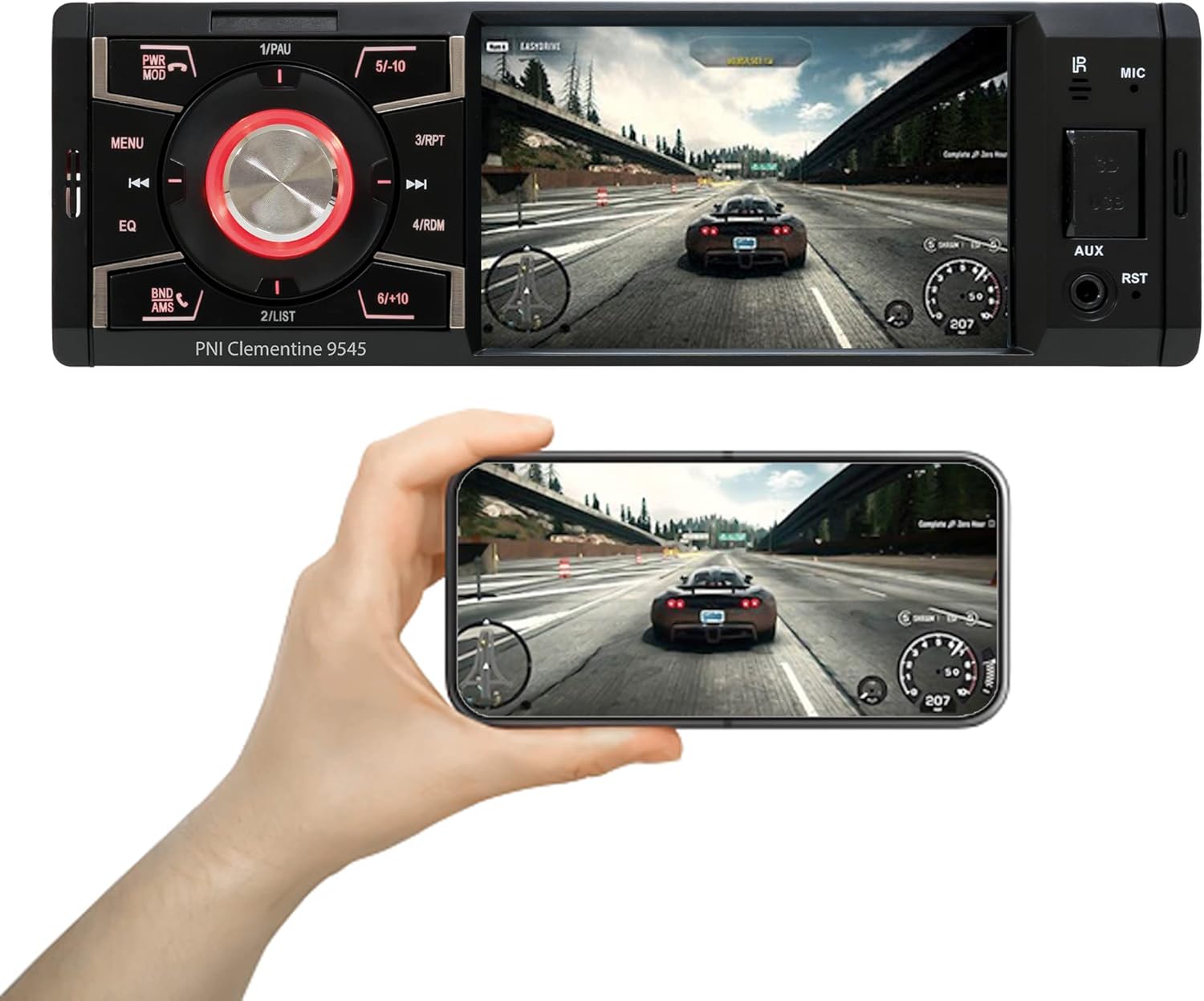
Descripción de la imagen: The PNI Clementine 9545 car stereo is shown playing a video game scene on its 4-inch display. Below the stereo, a hand holds a smartphone that mirrors the same video content, demonstrating the unit's video playback capabilities and potential for screen mirroring or external display connection.
5.4 Funcionalidad Bluetooth
The integrated Bluetooth feature allows for hands-free calling and audio streaming.
- Emparejamiento: Enable Bluetooth on your mobile device and search for "PNI Clementine 9545". Select it to pair.
- Llamadas manos libres: Once paired, you can make and receive calls directly through the car stereo. Use the PWR MOD button to answer/end calls.
- Transmisión auditiva: Play music from your paired phone through the car's audio system.
5.5 entrada auxiliar
Connect external audio devices (e.g., MP3 players, smartphones) to the 3.5mm AUX input jack on the front panel using an audio cable.
5.6 Funcionamiento de la pantalla táctil
The 4-inch LCD display is a touchscreen, allowing for intuitive control of various functions and settings.

Descripción de la imagen: A human finger is shown touching the 4-inch touchscreen display of the PNI Clementine 9545 car stereo. The screen displays a 'HOME' menu with various media and function icons, indicating the interactive nature of the display for navigating the stereo's features.
5.7 Función de cámara de marcha atrás
When an optional reverse camera is connected and the vehicle is put into reverse gear, the player's display will automatically switch to show the reverse camera feed, assisting with parking and maneuvering.

Descripción de la imagen: The PNI Clementine 9545 car stereo's display shows a reverse camera view of a parking garage, complete with colored parking guidelines (red, yellow, green) overlaid on the image. Below the stereo, a small image of an optional rear view camera is shown, indicating the unit's compatibility with such accessories.
6. Mantenimiento
- Limpieza de la unidad: Utilice un paño suave y seco para limpiar el panel frontal y la pantalla. Para la suciedad difícil, limpie ligeramenteampen the cloth with water. Do not use harsh chemicals, abrasive cleaners, or solvents as they may damage the finish or screen.
- Cleaning Ports: Periodically check USB and SD card slots for dust or debris. Use a can of compressed air to gently clear them if necessary.
- Cuidado general: Avoid placing heavy objects on the unit. Protect it from direct sunlight and extreme temperatures when the vehicle is parked for extended periods.
7. Solución de problemas
If you encounter issues with your PNI Clementine 9545, refer to the following common problems and solutions:
| Problema | Posible causa | Solución |
|---|---|---|
| Sin poder | Cableado incorrecto; fusible quemado; batería del vehículo baja. | Check power connections and fuses. Ensure battery voltage is sufficient. Consult a professional for wiring inspection. |
| Sin sonido | Volumen demasiado bajo; Silencio activado; Cables del altavoz desconectados; Fuente de audio incorrecta. | Sube el volumen. Comprueba si el sonido está activado. Verifica las conexiones de los altavoces. Selecciona la fuente de audio correcta. |
| Bluetooth no se conecta | Bluetooth no habilitado en el teléfono; Dispositivo no en modo de emparejamiento; Interferencia. | Ensure Bluetooth is active on your phone. Put the stereo in Bluetooth pairing mode. Try restarting both devices. |
| USB/SD no reproduce | Sin soporte file Formato; Medio dañado; Insertado incorrectamente. | Controlar file formats (MP5, MP3, MP4, WMA, WAV). Ensure media is not corrupted. Reinsert USB/SD card correctly. |
| Pantalla congelada/no responde | Fallo del software. | Press the RST (Reset) button with a thin object to restart the unit. |
Si el problema persiste después de probar estas soluciones, comuníquese con el servicio de atención al cliente o con un técnico de servicio calificado.
8. Especificaciones
| Característica | Especificación |
|---|---|
| Modelo | Clementine 9545 |
| Vol de suministrotage | 12 V CC |
| Impedancia | 4 ohmios |
| Salida de potencia de audio máxima | 4 x 50 W |
| FM Radio Frecuencia | 87.5-108.0 MHz |
| Radiofrecuencia AM | 522 kHz - 1620 kHz |
| Puerto USB | USB 2.0 |
| Ranura para tarjeta | Tarjeta SD |
| Relación señal / ruido | > 40 dB |
| Dimensiones (An x Al x Pr) | 178 x 50 x 110 mm |
| Peso | 0.627 kilogramos |
| Consumo de corriente máximo | 10 Amperes |
| Entrada de audio AUX | Miniconector de 3.5 mm |
| Tipo de instalación | 1 DIN |
| Mostrar | 4-inch LCD, 800 x 480 pixels, Red button illumination |
| Reproducción de vídeo | Full HD 1920 x 1080px (AVI format) |
| Reproducción de audio | MP5, MP3, MP4, WMA, WAV, etc. (Stereo output) |
| Temperatura de funcionamiento | -26 °C ~ +80 °C |
| Bluetooth | Integrated Bluetooth for calls and audio streaming |
| Entrada / salida de video | 1 x RCA Video Input/Output, 1 x RCA Video Input for Reverse Camera |
9. Garantía y soporte
9.1 Información de garantía
Your PNI Clementine 9545 Car MP5 Stereo Player is covered by a manufacturer's warranty. Please refer to the warranty card included in your package or contact your retailer for specific warranty terms and conditions. Keep your proof of purchase for any warranty claims.
9.2 Atención al cliente
For technical assistance, troubleshooting beyond this manual, or warranty inquiries, please contact the retailer where you purchased the product or visit the official PNI webSitio para recursos de soporte.


