1. Introducción
Gracias por la compraasing the Sharp HT-SBW110 2.1 Bluetooth Soundbar System. This manual provides essential information for setting up, operating, and maintaining your soundbar system. Please read it thoroughly before use to ensure proper functionality and safety.
The HT-SBW110 is a powerful 2.1 channel soundbar system designed to enhance your audio experience, featuring 180W total RMS power, a dedicated wireless subwoofer, and versatile connectivity options including Bluetooth, HDMI ARC, Optical, and AUX inputs.

Figure 1.1: Sharp HT-SBW110 Soundbar and Subwoofer
This image displays the Sharp HT-SBW110 soundbar and its accompanying separate subwoofer, showcasing su elegante diseño negro.
2. Contenido del paquete
Por favor, compruebe que todos los artículos estén presentes en el paquete:
- Sharp HT-SBW110 Soundbar
- Subwoofer inalámbrico
- Mando a distancia
- Cable de alimentación para barra de sonido
- Cable de alimentación para subwoofer
- Manual de usuario (este documento)
- Batteries for Remote Control (1 x CR2)
3. Información de seguridad
Always follow basic safety precautions when using this product to reduce the risk of fire, electric shock, or injury:
- No exponga este aparato a goteos ni salpicaduras.
- No coloque objetos llenos de líquido, como jarrones, sobre el aparato.
- Asegúrese de que haya una ventilación adecuada. No bloquee ninguna abertura de ventilación.
- Do not place the soundbar or subwoofer near heat sources such as radiators, heat registers, stoves, or other apparatus (including ampificadores) que producen calor.
- Utilice únicamente accesorios especificados por el fabricante.
- Desenchufe este aparato durante tormentas eléctricas o cuando no lo utilice durante períodos prolongados.
- Deje todo servicio a personal de servicio calificado.
4. Configuración
4.1 Colocación
Barra de sonido: Place the soundbar on a flat, stable surface directly in front of your TV, centered for optimal sound dispersion. Ensure there are no obstructions in front of the soundbar's speakers.
Subwoofer: The wireless subwoofer can be placed anywhere in the room, ideally within 5-10 meters of the soundbar, for best bass response. Avoid placing it in enclosed spaces that might muffle the sound.
The soundbar is also wall-mountable. Refer to the included wall-mounting template (if provided) for proper installation.
4.2 Conexiones
Conecte su barra de sonido a su televisor u otras fuentes de audio utilizando uno de los siguientes métodos:

Figura 4.1: Conexiones del panel trasero de la barra de sonido
This image shows the rear panel of the Sharp HT-SBW110 soundbar, highlighting the various input ports including HDMI ARC, Optical, and AUX.
- HDMI ARC (recomendado):
Connect an HDMI cable from the HDMI ARC port on your soundbar to the HDMI ARC port on your TV. This allows audio from your TV to be sent to the soundbar and enables control of the soundbar volume using your TV remote (if your TV supports HDMI CEC).
- Óptico:
Connect an optical audio cable from the OPTICAL input on your soundbar to the optical digital audio output on your TV or other audio source.
- Auxiliar:
Connect a 3.5mm audio cable from the AUX input on your soundbar to the headphone jack or audio output of your device (e.g., smartphone, MP3 player).
- Conexión de energía:
Connect the power cables to the soundbar and subwoofer, then plug them into a wall outlet (AC 220-240V, 50Hz).
The subwoofer will automatically pair with the soundbar once both are powered on. A blue indicator light on the subwoofer will confirm a successful connection.
5. Instrucciones de funcionamiento
5.1 control remoto sobreview
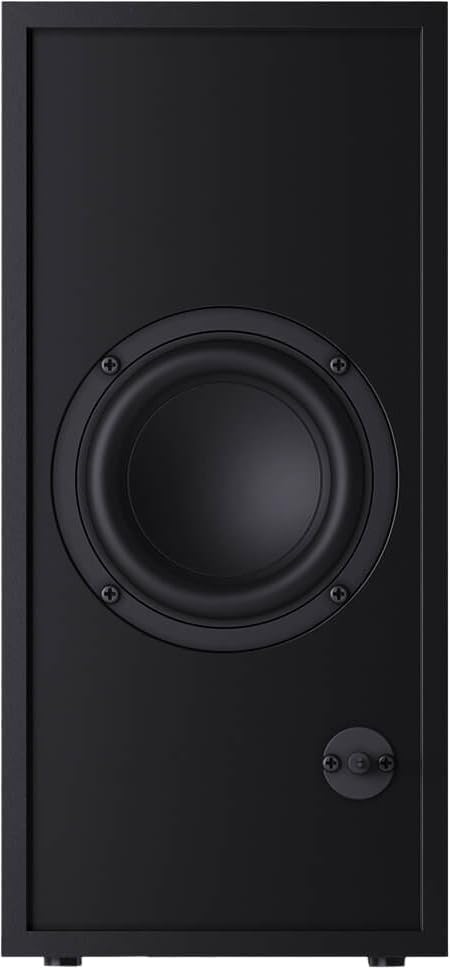
Figura 5.1: Control remoto
This image displays the sleek, minimalist remote control for the Sharp HT-SBW110 soundbar, showing its various buttons for power, input selection, volume, bass, treble, and EQ modes.
The remote control allows you to manage all functions of your soundbar system. Insert the provided CR2 battery into the remote control before first use.
- Botón de encendido (⏷): Turns the soundbar On/Off.
- Botón de entrada/fuente (↵): Switches between HDMI ARC, Optical, AUX, and Bluetooth inputs.
- Subir/bajar volumen (+/-): Ajusta el nivel del volumen principal.
- Botón de silencio (🔇): Silencia o reactiva el sonido.
- Graves +/-: Ajusta el nivel de graves del subwoofer.
- Agudos +/-: Ajusta el nivel de agudos.
- Botón EQ: Cycles through preset equalizer modes: Music, Film, Talk.
- Botón Bluetooth (Ⓘ): Ingresa al modo de emparejamiento Bluetooth.
5.2 Funcionamiento básico
- Encendido/apagado: Press the Power button on the remote or on the soundbar's top panel.
- Seleccionar entrada: Press the Input/Source button repeatedly to cycle through available inputs (HDMI ARC, Optical, AUX, Bluetooth). The LED indicator on the soundbar will change color to indicate the selected input.
- Ajustar el volumen: Use the Volume +/- buttons on the remote or the soundbar to adjust the listening level.
- Cambiar el modo de ecualización: Press the EQ button to select between Music, Film, or Talk sound modes.
5.3 Emparejamiento Bluetooth
- Press the Input/Source button on the soundbar or remote until the Bluetooth input is selected (usually indicated by a blue LED).
- The soundbar will automatically enter pairing mode, and the Bluetooth LED will flash.
- En su dispositivo Bluetooth (teléfono inteligente, tableta, etc.), habilite Bluetooth y busque los dispositivos disponibles.
- Select "SHARP HT-SBW110" from the list of devices.
- Once paired, the Bluetooth LED on the soundbar will stop flashing and remain solid blue. You can now play audio from your device through the soundbar.
6. Mantenimiento
- Limpieza: Utilice un paño suave y seco para limpiar las superficies de la barra de sonido y el subwoofer. No utilice limpiadores líquidos ni aerosoles.
- Ventilación: Ensure that the ventilation openings on the soundbar and subwoofer are not blocked by dust or debris.
- Almacenamiento: Si va a almacenar la unidad durante un período prolongado, desconéctela del tomacorriente y guárdela en un lugar fresco y seco.
7. Solución de problemas
| Problema | Posible causa | Solución |
|---|---|---|
| Sin poder | Cable de alimentación no conectado; toma de corriente no activa. | Ensure power cables are securely connected to the soundbar, subwoofer, and wall outlet. Try a different outlet. |
| Sin sonido | Entrada incorrecta seleccionada; Volumen demasiado bajo; Cables no conectados correctamente. | Seleccione la fuente de entrada correcta. Suba el volumen. Revise todas las conexiones de los cables de audio. Asegúrese de que la salida de audio del televisor esté configurada en altavoces externos. |
| El emparejamiento de Bluetooth falla | La barra de sonido no está en modo de emparejamiento; Dispositivo demasiado lejos; Interferencia. | Ensure soundbar is in Bluetooth pairing mode (flashing blue LED). Move device closer to soundbar. Avoid strong electromagnetic interference. Try unpairing and re-pairing. |
| El control remoto no funciona | Pilas agotadas; Obstrucción entre el control remoto y la barra de sonido. | Replace batteries. Ensure clear line of sight between remote and soundbar's IR receiver. |
Si el problema persiste, consulte la sección de Garantía y soporte para obtener más ayuda.
8. Especificaciones
| Canales de audio | 2.1 canales |
| Potencia RMS total | 180 W |
| Soundbar RMS Power | 30 W |
| Potencia RMS del subwoofer | 30 W |
| Rango de frecuencia | 60 - 20000 Hz |
| Tecnología de conectividad | Alámbrico e inalámbrico |
| Versión de Bluetooth | 4.2 |
| Puertos HDMI | 1 (ARCO) |
| Entrada de audio óptico | 1 |
| Entrada auxiliar | Sí |
| Vol de entrada de CAtage | 220 - 240 V |
| Frecuencia de entrada de CA | 50 Hz |
| Consumo de energía típico | 30 W |
| Consumo de energía en modo de espera | 0.5 W |
| Soundbar Dimensions (W x D x H) | 800 x 60 x 60 mm (31.5 x 2.4 x 2.4 pulgadas) |
| Peso de la barra de sonido | 1.3 kg (2.9 libras) |
| Subwoofer Dimensions (W x D x H) | 150 x 320 x 220 mm (5.9 x 12.6 x 8.7 pulgadas) |
| Peso del subwoofer | 2.7 kg (6 libras) |
| Color | Negro |
| Montaje en pared | Sí |
| Mando a distancia | Incluido |
| Certificaciones | CE (EMC), CB (Safety), ErP (Energy) |
9. Garantía y soporte
This Sharp HT-SBW110 Soundbar System comes with a limited warranty. Please refer to the warranty card included in your package for specific terms and conditions.
Spare parts availability is guaranteed for 1 year from the date of purchase.
For technical support, troubleshooting beyond this manual, or warranty claims, please contact Sharp customer service or visit the official Sharp website for your region. Contact information can typically be found on the product packaging or Sharp's official websitio.


