Introducción
The REVO America RTCB30-1 Aero HD 1080p Indoor/Outdoor IR Bullet Camera is designed to provide high-definition video surveillance for both indoor and outdoor environments. Featuring a 2.1 Megapixel sensor, 1080p resolution, and 30 IR LEDs for night vision up to 100 feet, this camera offers reliable monitoring capabilities. Its IP66 weather-resistant rating ensures durability in various conditions, and the 3D rotary bracket simplifies installation and positioning.
Contenido del paquete
- 1x REVO America Aero HD 1080p Indoor/Outdoor IR Bullet Camera (White)
- 1x 60' Premium Quality BNC Cable
Características principales
- Resolución de video Full HD 1080p
- Indoor/Outdoor Usage with IP66 Weather Resistance
- Lente fija 3.6mm
- 30 IR LEDs for up to 100' Night Vision
- Automatic IR Cut Filter Removal (ICR) for enhanced day/night performance
- 3D Rotary Bracket for easy mounting and positioning
- Wired Connectivity via BNC Cable
Configuración e instalación
1. Montaje de la cámara
The REVO Aero Bullet Camera is designed for wall mounting. The integrated 3D rotary bracket allows for flexible positioning to achieve the desired viewing angle. Ensure the mounting surface is stable and can support the camera's weight. The camera is rated IP66 weather resistant, making it suitable for outdoor installation.
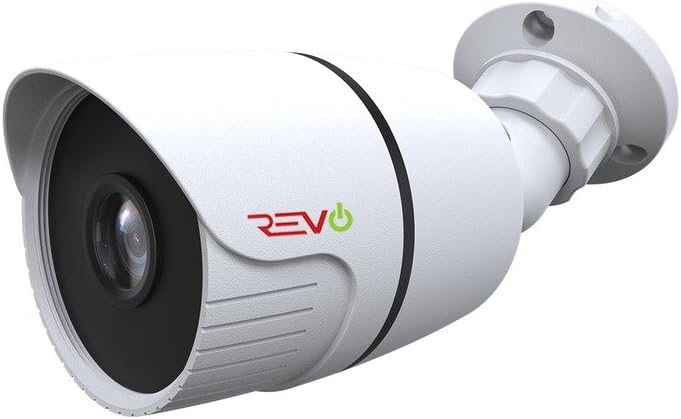
Figura 1: Frente view of the REVO America RTCB30-1 Aero HD 1080p Bullet Camera, showing the lens and IR LEDs.
2. Conexión de la cámara
This camera uses a wired BNC connection for video transmission and a separate power connection. Connect the included 60' BNC cable to the camera's BNC port and to your compatible DVR/NVR system. Ensure all connections are secure to prevent signal loss. Power the camera using a compatible 12V DC power adapter (not included unless part of a kit).

Figura 2: Lado view of the REVO America RTCB30-1 Aero HD 1080p Bullet Camera, illustrating the mounting bracket and cable entry point.
For optimal video quality, it is recommended to use high-quality BNC cables. After installation, ensure no wires are exposed to maintain safety and reliability.
Instrucciones de funcionamiento
1. Encendido
Once the camera is securely mounted and connected to your DVR/NVR system and power source, it will automatically power on. The camera will begin transmitting video feed to your recording device.
2. Monitoreo remoto
To access live feed, review foo pasadotage, and manage settings remotely, utilize the REVO Aero Mobile App or Browser Login. These platforms allow you to receive instant notifications, adjust camera settings, set alarms, check motion events, and view Varias cámaras simultáneamente.
3. Visión nocturna
The camera is equipped with 30 IR LEDs, providing night vision capabilities up to 100 feet in low-light conditions. The automatic IR Cut Filter Removal (ICR) function ensures optimal image clarity by switching between day and night modes as ambient light changes.
Mantenimiento
El mantenimiento regular ayuda a garantizar un rendimiento óptimo y la longevidad de su cámara.
- Limpieza: Limpie periódicamente la lente y la carcasa de la cámara con un paño suave.amp Paño. Evite los limpiadores abrasivos que podrían rayar la lente.
- Inspección de cables: Regularly check BNC and power cable connections for any signs of wear, damage, or corrosion, especially for outdoor installations.
- Actualizaciones de firmware: Check the REVO America website for any available firmware updates for your DVR/NVR system, which may improve camera compatibility and performance.
Solución de problemas
If you encounter issues with your REVO America RTCB30-1 camera, refer to the following common troubleshooting steps:
- Sin señal de vídeo:
- Asegúrese de que la cámara esté correctamente alimentada.
- Verify that the BNC cable is securely connected at both the camera and DVR/NVR ends.
- Check the BNC cable for any damage or breaks.
- Confirm that your DVR/NVR system is compatible with 1080p HD analog cameras.
- Mala calidad de imagen:
- Limpie la lente de la cámara para eliminar suciedad o manchas.
- Ensure the camera's protective film (if any) has been removed.
- Compruebe que no haya fuentes de luz fuertes orientadas directamente hacia la cámara, ya que pueden provocar deslumbramiento.
- Verify the BNC cable quality; a damaged or low-quality cable can degrade video.
- La visión nocturna no funciona:
- Ensure there is sufficient power to the camera for the IR LEDs to activate.
- Check for obstructions in front of the camera that might block the IR light.
- Confirm that the camera is in a dark environment, as the IR LEDs only activate in low light.
Especificaciones técnicas
| Número de modelo | RTCB30-1 |
| Marca | REVO América |
| Resolución de captura de video | 1080p (2.1 megapíxeles) |
| Lente | Lente fija 3.6mm |
| Visión nocturna | Up to 100' (30 IR LEDs) |
| Uso en interiores y exteriores | Sí |
| Calificación de protección internacional | IP66 (resistente a la intemperie) |
| Tecnología de conectividad | Cableado (BNC) |
| Fuente de poder | Eléctrico con cable (12 V CC) |
| Tipo de montaje | Montaje en pared |
| Color | Blanco |
| Dimensiones del artículo (largo x ancho x alto) | 9 x 9 x 9 pulgadas |
| Peso del artículo | 16 onzas |
| Código Postal | 045924597953 |
Soporte y garantía
For technical assistance, product support, or warranty information, please refer to the official REVO America website or contact their customer service department. Warranty terms and conditions may vary and are typically provided with your purchase documentation or available on the manufacturer's websitio.
REVO America provides necessary materials such as videos and manuals to assist with self-installation and setup. For further assistance, please consult these resources or contact their support team directly.