Introducción
The Akuvox SP-R50 is a business IP phone designed to provide high-quality, cost-effective communication solutions. It features HD Voice, a 2.3-inch 132x64 graphical LCD with backlight, and supports 3-way conferencing. This manual provides essential information for setting up, operating, maintaining, and troubleshooting your SP-R50 IP phone.
Contenido del paquete
Antes de comenzar, verifique que todos los artículos estén presentes en el paquete:
- IP Phone (Akuvox SP-R50) x 1
- Soporte x 1
- Handset with Cord x 1
- Cable Ethernet x 1
- Adaptador de corriente x 1
Configuración
Follow these steps to set up your Akuvox SP-R50 IP Phone:
- Coloque el soporte: Securely attach the stand to the back of the IP phone.
- Conectar el teléfono: Conecte un extremo del cable enrollado del auricular al auricular y el otro extremo al puerto del auricular en la base del teléfono.
- Conectarse a la red:
- If using Power over Ethernet (PoE), connect one end of the Ethernet cable to the LAN port on the phone and the other end to a PoE-enabled network switch or router.
- If not using PoE, connect one end of the Ethernet cable to the LAN port on the phone and the other end to your network switch or router. Then, connect the power adapter to the phone's power port and plug it into a power outlet.
- Arranque inicial: The phone will power on automatically. The LCD screen will display the boot-up sequence. Once complete, it will attempt to obtain an IP address and register with your SIP server.
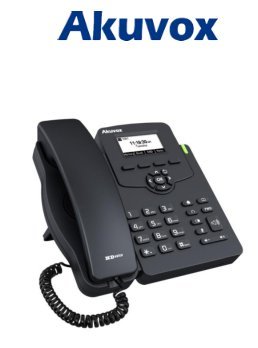
Image: Akuvox SP-R50 Business IP Phone, showing the main unit with the handset resting on its cradle and the stand attached, ready for setup.
Instrucciones de funcionamiento
This section covers the basic operation of your Akuvox SP-R50 IP Phone.
Realizar y recibir llamadas
- Hacer una llamada: Pick up the handset or press the Speaker button. Dial the desired number and press the Marcar or # llave.
- Para recibir una llamada: Levante el auricular o presione el Vocero Botón cuando suena el teléfono.
- Para finalizar una llamada: Cuelgue el auricular o presione el botón Vocero botón.
Funciones de llamada
- Llamada en espera: Allows you to answer a second incoming call while on an active call.
- Desvío de llamadas: Redirects incoming calls to another number.
- Transferencia de llamada: Transfiere una llamada activa a otra parte.
- Llamada en espera: Puts an active call on hold.
- Silenciar: Silencia el micrófono durante una llamada.
- Respuesta automática: Configures the phone to automatically answer incoming calls.
- Rellamada Marca el último número llamado.
- No molestar (DND): Blocks all incoming calls.
- Local 3-Way Conference: Allows you to conduct a three-way conference call.
Phonebook and Settings
- Directorio telefónico: The phone supports a phonebook of up to 500 groups and 5 remote phone book URLs. Access and manage contacts through the menu.
- Ajuste de volumen: Use the volume keys on the phone to adjust the handset, speaker, or ringer volume.
- Tonos de timbre: Select from various ring tones through the phone's settings menu.
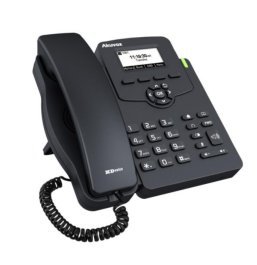
Image: Akuvox SP-R50 Business IP Phone, showcasing its ergonomic design and key layout from a slightly elevated angle, highlighting the display and navigation buttons.
Mantenimiento
Un mantenimiento adecuado garantiza la longevidad y el rendimiento óptimo de su teléfono IP.
- Limpieza: Utilice un paño suave y seco para limpiar la superficie del teléfono. Para manchas difíciles, limpie ligeramenteampEnjuague el paño con agua. No utilice productos químicos agresivos, limpiadores abrasivos ni disolventes.
- Ambiente: Keep the phone away from direct sunlight, excessive heat sources, and moisture. Ensure it is placed on a stable surface to prevent accidental falls.
- cables: Revise periódicamente todos los cables conectados (auricular, Ethernet, alimentación) para detectar cualquier signo de desgaste o daño. Reemplace los cables dañados inmediatamente.
Solución de problemas
If you encounter issues with your Akuvox SP-R50, refer to the following common problems and solutions:
| Problema | Posible causa | Solución |
|---|---|---|
| El teléfono no se enciende. | No power connection or faulty power adapter/PoE. | Check if the power adapter is securely plugged in or if the Ethernet cable is connected to a PoE-enabled port. Try a different power outlet or PoE port. |
| No hay tono de marcado. | Network connection issue or SIP registration failure. | Verify the Ethernet cable is properly connected. Check the network status on the phone's display. Contact your network administrator or SIP service provider if the issue persists. |
| No puedo realizar ni recibir llamadas. | SIP registration failed, DND enabled, or network problem. | Ensure the phone is registered (check display). Disable DND if active. Confirm network connectivity. |
| Mala calidad de llamada (eco, estática). | Congestión o interferencia de la red. | Ensure your network has sufficient bandwidth. Avoid placing the phone near other electronic devices that may cause interference. |
Presupuesto
Key technical specifications for the Akuvox SP-R50 Business IP Phone:
| Característica | Descripción |
|---|---|
| Marca | akuvox |
| Modelo | Akuvox SP-R50 |
| Mostrar | 2.3'' 132*64 Graphical LCD with Backlight |
| Cuentas SIP | 1 línea (compatible con 1 cuenta SIP) |
| Funciones de voz | HD Voice, 3-Way Conference |
| Capacidad de la agenda telefónica | 500 groups, 5 Remote Phone Book URL Apoyado |
| Registros de llamadas | 100 entradas |
| Fuerza | PoE Support, Power Adapter (included) |
| Características especiales | Call Waiting, Call Forward, Call Transfer, Call on Hold, Mute, Auto-answer, Redial, DND, Speed Dial, Hotline, Direct IP call, Music on hold, Intercom, Call Pickup, Group Call Pickup, Anonymous Call, Anonymous Call Rejection |
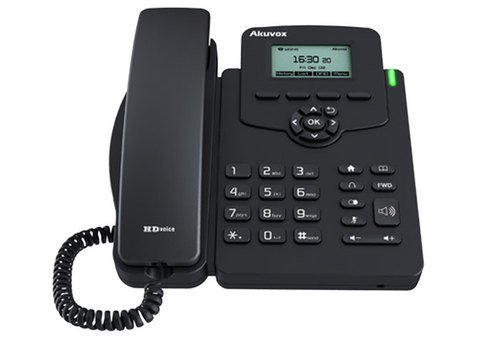
Imagen: Frente view of the Akuvox SP-R50 Business IP Phone, clearly showing the display, navigation keys, and numeric keypad.
Información de garantía
The Akuvox SP-R50 Business IP Phone comes with a Garantía de 2 años from the date of purchase. This warranty covers manufacturing defects and malfunctions under normal use. Please retain your proof of purchase for warranty claims. For detailed terms and conditions, refer to the warranty card included with your product or contact Akuvox customer support.
Apoyo
If you require further assistance or have questions not covered in this manual, please contact your vendor or Akuvox customer support. You may also visit the official Akuvox webSitio para obtener recursos adicionales y preguntas frecuentes.


