1. Introducción
1.1 producto másview
The ELRO AS8000 Surveillance Camera System offers advanced security features for your home or business. This kit includes two high-definition cameras designed to integrate seamlessly with your existing ELRO AS8000 alarm system. When your alarm system is triggered, you receive instant notifications on your smartphone, allowing you to access live camera feeds via the ELRO Smart Alarm application.
Las características principales incluyen:
- Resolución HD de 1080p: Proporciona información de video clara y detallada.tage.
- 100° Viewángulo de inclinación: Captures a wide area, ideal for corner mounting.
- Audio bidireccional: Built-in microphone and speaker for communication via the ELRO Smart Alarm app.
- Visión nocturna: Infrared LEDs ensure visibility even in complete darkness.
- Integración de teléfonos inteligentes: Remote access and control through the ELRO Smart Alarm app.
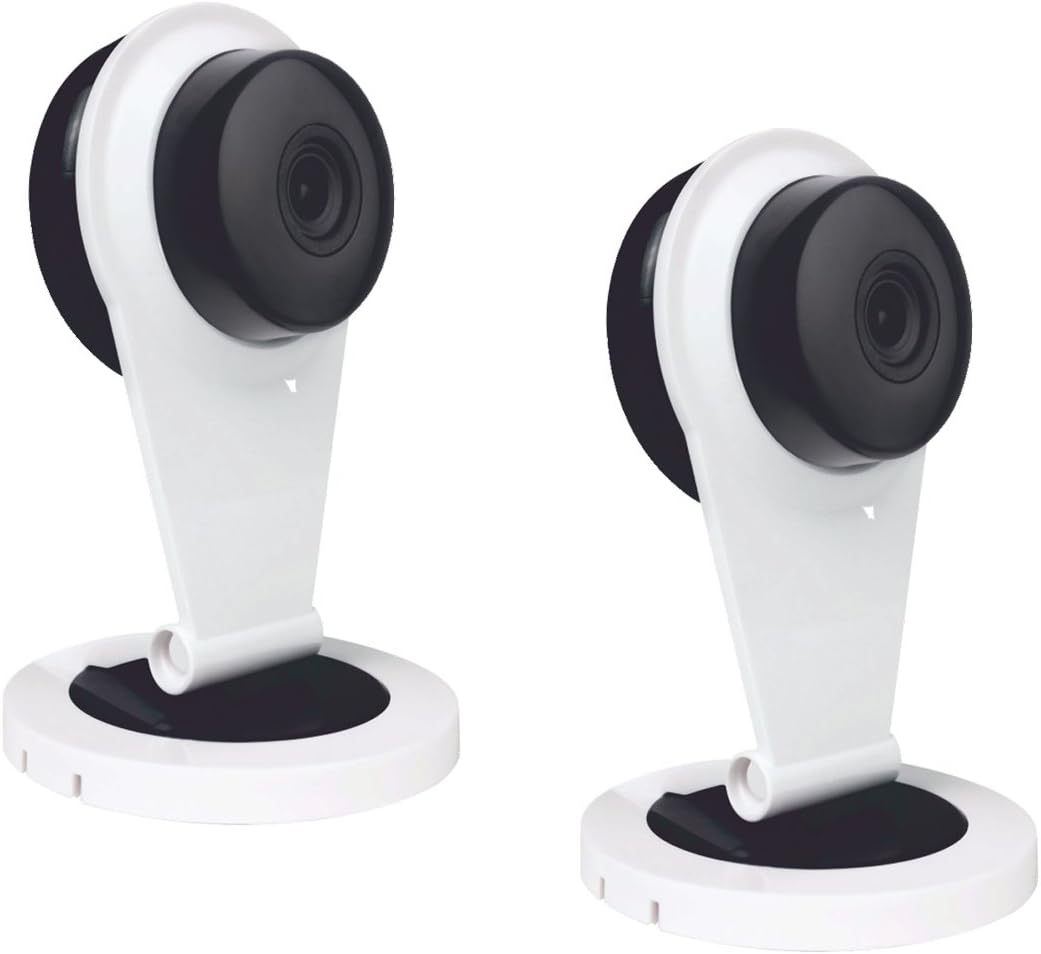
Figure 1: Two ELRO AS8000 Surveillance Cameras. These cameras provide high-definition video and are designed for indoor use.
1.2 Contenido del paquete
Por favor, compruebe que todos los artículos estén presentes y en buen estado:
- 2 x ELRO AS8000 Surveillance Cameras
- 2 x adaptadores de corriente
- Manual de usuario (este documento)
2. Información de seguridad
Read all safety instructions before using the product. Failure to follow these instructions may result in electric shock, fire, or other hazards.
- Use only the power adapters supplied with the cameras.
- Do not expose the cameras to water or moisture. This product is designed for indoor use only.
- Avoid placing cameras near heat sources or in direct sunlight.
- No intente abrir ni reparar la cámara usted mismo. Deje todas las reparaciones a personal cualificado.
- Mantener fuera del alcance de los niños.
3. Configuración
3.1 Desembalaje
Retire con cuidado todos los componentes del embalaje. Conserve el embalaje para su posterior almacenamiento o transporte.
3.2 Instalación
The ELRO AS8000 cameras are designed for easy installation. They are suitable for indoor use and can be mounted on a ceiling or placed on a flat surface.
- Elija una ubicación adecuada: Seleccione una ubicación interior que proporcione el resultado deseado viewing angle and is within reach of a power outlet. For optimal coverage, consider corner mounting to utilize the 100° viewángulo de ing.
- Conectar la energía: Plug the supplied power adapter into the camera and then into a wall outlet. The camera will power on.
3.3 Connecting to the ELRO AS8000 System
To integrate the cameras with your ELRO AS8000 alarm system, follow these steps:
- Download the ELRO Smart Alarm App: If you haven't already, download the ELRO Smart Alarm application from your smartphone's app store (available for iOS and Android).
- Abra la aplicación e inicie sesión: Launch the ELRO Smart Alarm app and log in to your account associated with your ELRO AS8000 alarm system.
- Agrega un nuevo dispositivo: Navigate to the device management section within the app. Select the option to "Add New Device" or "Add Camera."
- Siga las instrucciones en pantalla: The app will guide you through the process of pairing the camera with your alarm system. This typically involves scanning a QR code on the camera or entering a device ID.
- Configure los ajustes de la cámara: Once connected, you can configure settings such as motion detection zones, recording preferences, and notification alerts within the app.
4. Instrucciones de funcionamiento
4.1 Using the ELRO Smart Alarm App
The ELRO Smart Alarm app is your primary interface for managing and monitoring your surveillance cameras. Ensure your smartphone has an active internet connection.
- Acceder en vivo View: From the app's main dashboard, select the desired camera to view Su transmisión en vivo.
- Recibir notificaciones: When your ELRO AS8000 alarm system is triggered, or if motion is detected (if configured), you will receive push notifications on your smartphone. Tap the notification to quickly access the camera feed.

Figure 2: ELRO AS8000 Cameras highlighting key features: Camera function, Night Vision, and Live View a través de la aplicación.
4.2 Audio bidireccional
The cameras are equipped with a microphone and speaker, enabling two-way communication:
- Mientras viewing the live feed in the ELRO Smart Alarm app, locate the microphone icon.
- Mantén pulsado el icono del micrófono para hablar. Tu voz se transmitirá por el altavoz de la cámara.
- Release the icon to listen through the camera's microphone.
4.3 Visión nocturna
The integrated infrared LEDs automatically activate in low-light conditions, providing clear black-and-white video footage up to a certain range. This ensures continuous surveillance 24/7.
5. Mantenimiento
Regular maintenance helps ensure optimal performance and longevity of your cameras.
- Limpieza: Limpie suavemente la lente y el cuerpo de la cámara con un paño suave y seco. No utilice productos químicos agresivos ni limpiadores abrasivos.
- Actualizaciones de firmware: Periodically check the ELRO Smart Alarm app for available firmware updates for your cameras. Keeping the firmware updated ensures you have the latest features and security enhancements.
- Ciclo de energía: If a camera becomes unresponsive, try unplugging its power adapter for 10 seconds and then plugging it back in.
6. Solución de problemas
If you encounter issues with your ELRO AS8000 cameras, refer to the following common solutions:
| Problema | Posible causa | Solución |
|---|---|---|
| La cámara no se conecta a la aplicación | Incorrect Wi-Fi password, camera too far from router, app not updated, camera not powered on. | Verify Wi-Fi credentials. Move camera closer to router. Update ELRO Smart Alarm app. Ensure camera is powered and indicator light is on. Try resetting the camera (refer to app for specific reset instructions). |
| Sin vida view | Internet connection issues (phone or camera), camera offline. | Check your phone's internet connection. Verify the camera's status in the app. Power cycle the camera. Check your home internet connection. |
| Mala calidad de video | Lente sucia, ancho de banda bajo, mala iluminación. | Clean the camera lens. Ensure stable and sufficient internet bandwidth. Adjust lighting conditions or rely on night vision. |
| El audio bidireccional no funciona | Microphone/speaker muted in app, app permissions, internet delay. | Check audio settings in the ELRO Smart Alarm app. Ensure the app has microphone permissions on your phone. Verify stable internet connection. |
If the problem persists, please contact ELRO customer support.
7. Especificaciones
| Característica | Detalle |
|---|---|
| Número de modelo | SAS80CA11A |
| Resolución de vídeo | Alta definición 1080p |
| Viewángulo de ing | 100 grados |
| Tecnología de conectividad | Inalámbrico |
| Características especiales | HD Resolution, Night Vision, Two-Way Audio |
| Dispositivos compatibles | Smartphone (via ELRO Smart Alarm App) |
| Fuente de poder | Eléctrico con cable |
| Tipo de montaje | Ceiling Mount (also suitable for flat surface placement) |
| Material | Metal |
| Usos recomendados | Home Security, Night Vision Surveillance |
| Factor de forma | Cúpula |
8. Garantía y soporte
8.1 Información de garantía
ELRO products are designed and manufactured to the highest quality standards. For specific warranty details, please refer to the warranty card included with your product or visit the official ELRO webSitio. Conserve su comprobante de compra para reclamaciones de garantía.
8.2 Atención al cliente
If you require further assistance or have questions not covered in this manual, please contact ELRO customer support. Contact information can typically be found on the ELRO website or within the ELRO Smart Alarm application.
Recursos en línea: For FAQs, additional guides, and software downloads, visit the official ELRO support page.


