1. Introducción
The Verizon MiFi 7730L Jetpack Mobile Hotspot provides portable high-speed internet access, allowing you to connect multiple Wi-Fi-enabled devices to the Verizon 4G LTE network. This device is designed for optimal upload and download speeds, offering a secure and reliable mobile broadband experience.
Las características principales incluyen:
- High-speed 4G LTE connectivity.
- Intuitive onscreen information and controls via a color touchscreen.
- Advanced network and information security protocols.
- Ability to connect multiple devices simultaneously.
2. Configuración inicial
2.1 Contenido del paquete
Verify that your package contains the Verizon MiFi 7730L Jetpack, a battery, and a charging cable. A power adapter may or may not be included, depending on the specific product offering.
2.2 Instalación y carga de la batería
- Remove the back cover of the MiFi 7730L.
- Inserte la batería en su compartimento, asegurándose de que los contactos estén alineados correctamente.
- Reemplace la cubierta trasera.
- Connect the charging cable to the MiFi 7730L and then to a compatible USB power source. Allow the device to fully charge before initial use.
Note: Use a compatible power adapter for efficient charging. Incompatible or faulty cables/adapters may prevent a full charge.
2.3 Encendido / Apagado
- Para encender: Mantenga presionado el botón de encendido ubicado en el costado del dispositivo hasta que la pantalla se ilumine.
- To power off: Press and hold the Power button until the power-off option appears on the screen, then confirm.
2.4 Conexión al punto de acceso
Once powered on, the MiFi 7730L will display its Wi-Fi network name (SSID) and password on the screen. Follow these steps to connect your devices:
- On your Wi-Fi-enabled device (smartphone, tablet, laptop), open the Wi-Fi settings.
- Select the network name (SSID) displayed on your MiFi 7730L screen.
- Ingrese la contraseña de Wi-Fi cuando se le solicite.
- Su dispositivo ahora debería estar conectado a Internet.
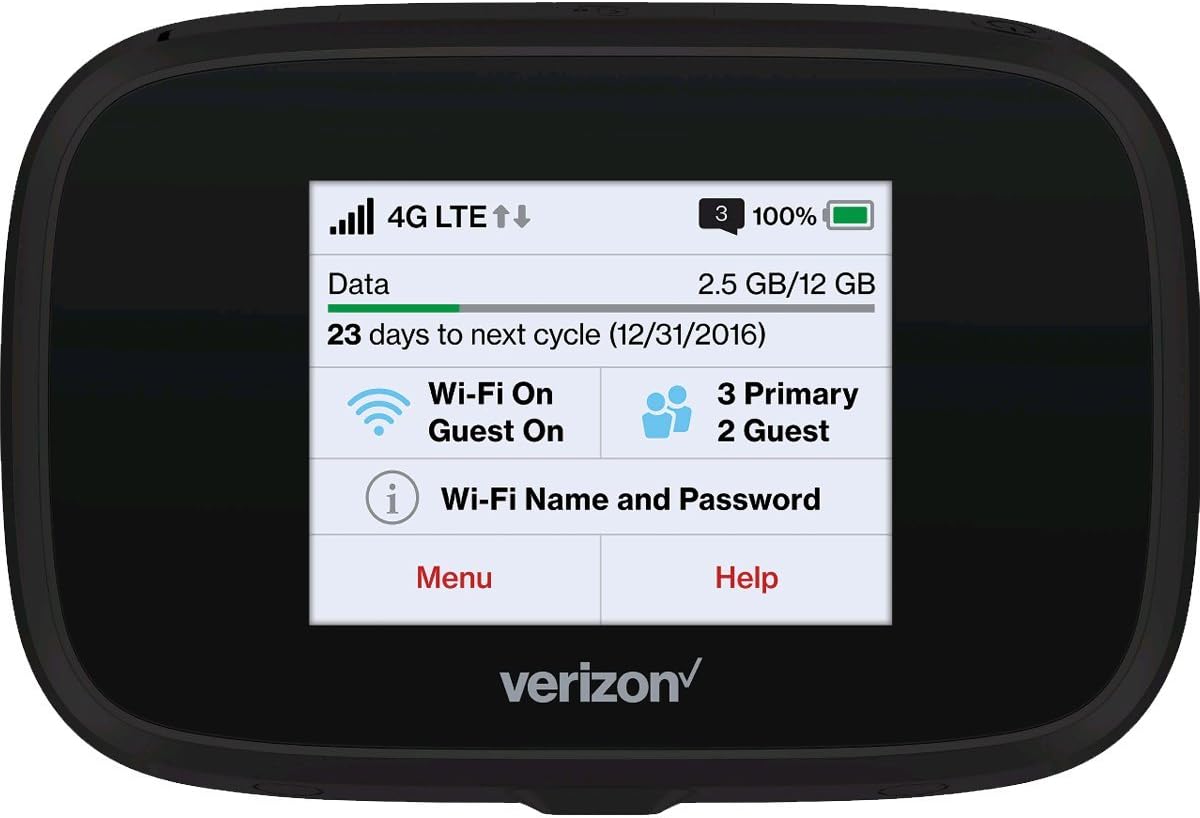
Figura 2.4.1: Frente view of the MiFi 7730L, showing the touchscreen interface with network status, data usage, and Wi-Fi details.
3. Operación
3.1 Navegación por la pantalla táctil
The MiFi 7730L features a color touchscreen for easy navigation. Swipe left or right to access different menus and settings. Tap on icons to select options or view Información detallada.
3.2 Checking Data Usage
The main screen typically displays your current data usage and the remaining data for your billing cycle. You can access more detailed usage statistics through the device's menu.
3.3 Administrar la configuración de Wi-Fi
From the device's menu, you can:
- Cambiar el nombre de la red Wi-Fi (SSID) y la contraseña.
- Enable or disable the guest Wi-Fi network.
- Adjust security settings (WPA2, etc.).
- View dispositivos conectados.
3.4 Funciones avanzadas
The MiFi 7730L may offer additional features such as:
- USB tethering for direct connection to a computer.
- File sharing via microSD card (if supported).
- VPN passthrough.
4. Mantenimiento
4.1 Cuidado de la batería
Para prolongar la vida útil de la batería y garantizar un funcionamiento seguro:
- Evite exponer el dispositivo a temperaturas extremas.
- No perfore ni dañe la batería.
- If the device or battery becomes excessively hot or shows signs of swelling, discontinue use immediately and contact support.
- Utilice únicamente accesorios de carga aprobados.
4.2 Limpieza
Limpie el dispositivo con un paño suave y seco. Evite usar limpiadores líquidos o materiales abrasivos que puedan dañar la pantalla o el cristal.asing.
4.3 Actualizaciones de software
Periodically check for software updates through the device's menu or by connecting to the web interface. Updates can improve performance, add features, and enhance security.
5. Solución de problemas
5.1 Sin conexión a Internet
- Ensure the device is powered on and has a strong 4G LTE signal.
- Verify that your connected device is properly linked to the MiFi's Wi-Fi network.
- Check your data plan status and usage to ensure you have available data.
- Restart both the MiFi 7730L and your connected device.
5.2 Velocidad de Wi-Fi lenta
- Move closer to the MiFi 7730L to improve signal strength.
- Reducir el número de dispositivos conectados.
- Verifique la congestión de la red en su área.
- Restart the MiFi 7730L.
5.3 Device Not Charging / Battery Issues
- Ensure the charging cable and power adapter are fully functional and correctly connected.
- Try a different compatible charging cable and power adapter.
- If the battery appears swollen or the device overheats significantly during charging, discontinue use and seek professional assistance.
5.4 Frequent Reboots
If the device reboots frequently, try the following:
- Asegúrese de que la batería esté instalada de forma segura y completamente cargada.
- Perform a factory reset (refer to the device's onscreen menu for this option, noting it will erase custom settings).
- If the issue persists, contact Verizon customer support.
6. Especificaciones
| Característica | Detalle |
|---|---|
| Marca | Verizon |
| Nombre del modelo | MIFI7730L |
| Tipo inalámbrico | 802.11ac |
| Clase de banda de frecuencia | Doble banda |
| Tecnología de conectividad | Wifi |
| Sistema operativo | Verizon MiFi OS |
| Protocolo de seguridad | WPS |
| Peso del artículo | 8.1 onzas |
| Dimensiones del producto (LxAnxAl) | 0.7 x 4.29 x 2.64 pulgadas |
| Baterías | Se requiere 1 batería específica del producto |
7. Garantía y soporte
7.1 Garantía renovada de Amazon
This product is covered by the Amazon Renewed Guarantee. If you are not satisfied with your purchase, renewed products are eligible for replacement or refund under the terms of this guarantee. Please refer to the Amazon Renewed program details for specific coverage and duration.
7.2 Atención al cliente
For technical assistance, service inquiries, or further support, please contact Verizon customer service or refer to the official Verizon support website. For issues related to your Amazon Renewed purchase, contact Amazon customer support.


