Introducción
The GameSir M2 MFi Wireless Gamepad is an Apple MFi certified gaming controller designed for an enhanced gaming experience across various Apple devices. This controller is compatible with Apple TV, iPhone, iPad, iPod touch, and Mac, requiring iOS 7 or later, or Mac OS 10.6 or later. It offers a professional gaming experience for various game genres including shooting, fighting, action, and sports. The M2 controller features Bluetooth 4.0 connectivity for lag-free performance and pressure-sensitive buttons for precise control.
This manual provides detailed instructions for setting up, operating, maintaining, and troubleshooting your GameSir M2 gamepad.

Configuración
¿Qué hay en la caja?
- GameSir M2 MFi Wireless Gamepad
Please note that a charging cable is not included in the box. The controller uses a Lightning cable for charging.
Carga del controlador
Before initial use, ensure the GameSir M2 controller is fully charged. The controller is powered by a Lithium Polymer battery (included).
- Locate the Apple Lightning charging port on the controller.
- Connect a standard Apple Lightning cable (not included) to the controller's charging port and a power source.
- El indicador LED del controlador mostrará el estado de carga. Consulte la sección sobre indicadores LED para obtener más información.

Emparejamiento con su dispositivo
The GameSir M2 uses Bluetooth 4.0 for wireless connectivity. Follow these steps to pair it with your Apple device:
- Ensure your Apple device (iPhone, iPad, Apple TV, Mac) has Bluetooth enabled.
- Turn on the GameSir M2 controller.
- On your Apple device, navigate to the Bluetooth settings.
- Select the GameSir M2 from the list of available devices to pair.
- Once paired, the controller's indicator light will confirm the connection.

Operar el controlador
Disposición y funciones del controlador
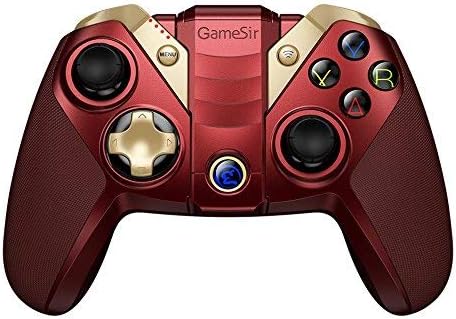
The GameSir M2 features a standard gamepad layout with dual analog sticks, a D-pad, action buttons (A, B, X, Y), and shoulder buttons (L1, L2, R1, R2). The controller also includes an overmolding LED crystal logo button.

Using the Built-in Smartphone Holder
The GameSir M2 includes a built-in adjustable bracket to securely hold your smartphone, allowing for portable gaming.
- Gently extend the adjustable bracket located on the top of the controller.
- Carefully place your smartphone into the bracket, ensuring it is securely held without obstructing the screen or buttons.
- Ajuste el ángulo para obtener una óptima viewing durante el juego.

Compatibilidad de juegos
The GameSir M2 is compatible with games that are MFi (Made for iPhone/iPad/iPod) gamepad-supported and certified by Apple. It fully supports games like Fortnite. However, it does not support games such as PUBG.
The controller also supports Tello Drones, enhancing the control experience for drone operation.

Vídeo oficial del producto
Watch the official product video for a visual guide on the GameSir M2 controller's features and usage.
Mantenimiento
To ensure the longevity and optimal performance of your GameSir M2 controller, follow these maintenance guidelines:
- Limpieza: Utilice un paño suave y seco para limpiar el mando. Evite utilizar productos químicos agresivos o materiales abrasivos que puedan dañar la superficie.
- Almacenamiento: Guarde el controlador en un lugar fresco y seco, alejado de la luz solar directa y de temperaturas extremas.
- Cuidado de la batería: For extended storage, charge the battery to approximately 50% to prevent deep discharge. Avoid fully discharging the battery frequently.
- Manejo: Evite dejar caer el controlador o someterlo a impactos fuertes, ya que esto puede dañar los componentes internos.
Solución de problemas
If you encounter issues with your GameSir M2 controller, refer to the following common troubleshooting steps:
- El controlador no se conecta:
- Asegúrese de que el controlador esté cargado.
- Verify Bluetooth is enabled on your Apple device.
- Try unpairing and re-pairing the controller in your device's Bluetooth settings.
- Restart both the controller and your Apple device.
- Buttons Unresponsive or Laggy:
- Ensure the controller is within range of your device and there are no significant obstructions.
- Check for any firmware updates for the controller (refer to GameSir's official website for information).
- Confirm the game you are playing supports MFi controllers.
- Shoulder Buttons (L1/R1, L2/R2) Issues:
- Some users report that shoulder buttons may require pressing closer to the bottom edge to register input. Adjust your grip if necessary.
- Analog Stick Drift/Incorrect Input:
- If an analog stick consistently registers input in one direction (e.g., down-left), this may indicate stick drift. Try recalibrating the controller if an option is available through GameSir software, or contact support if the issue persists.
- Sin retroalimentación de vibración:
- The GameSir M2 controller does not feature vibration feedback. This is a design characteristic, not a malfunction.
Presupuesto
| Marca | Señor del juego |
| Serie | M2-RD |
| Número de modelo | M2-RD |
| Plataforma de hardware | Impermeable |
| Compatibilidad del sistema operativo | iOS 7 or later, Mac OS 10.6 or later |
| Peso del artículo | 0.528 onzas |
| Dimensiones del producto (LxAnxAl) | 0.31 x 0.2 x 0.51 pulgadas |
| Color | M2 controller (Red) |
| Fuente de poder | Funciona con pilas |
| Baterías | 1 batería de polímero de litio (incluida) |
| Tecnología de conectividad | Bluetooth |
| Dispositivos compatibles | Smartphone, TV, Tablet (Apple devices) |
Garantía y soporte
For warranty information, product registration, or technical support, please visit the official GameSir webSitio web o contacte con el servicio de atención al cliente. Conserve su recibo de compra como comprobante para cualquier reclamación de garantía.
GameSir Oficial Websitio: www.gamesir.hk


