1. Introducción
The ZdalaMit XRT020 is a pre-programmed replacement remote control designed for various Vizio TV models. This remote offers a straightforward, ready-to-use solution without the need for complex programming or pairing procedures. Simply insert the batteries, and it is ready for operation.
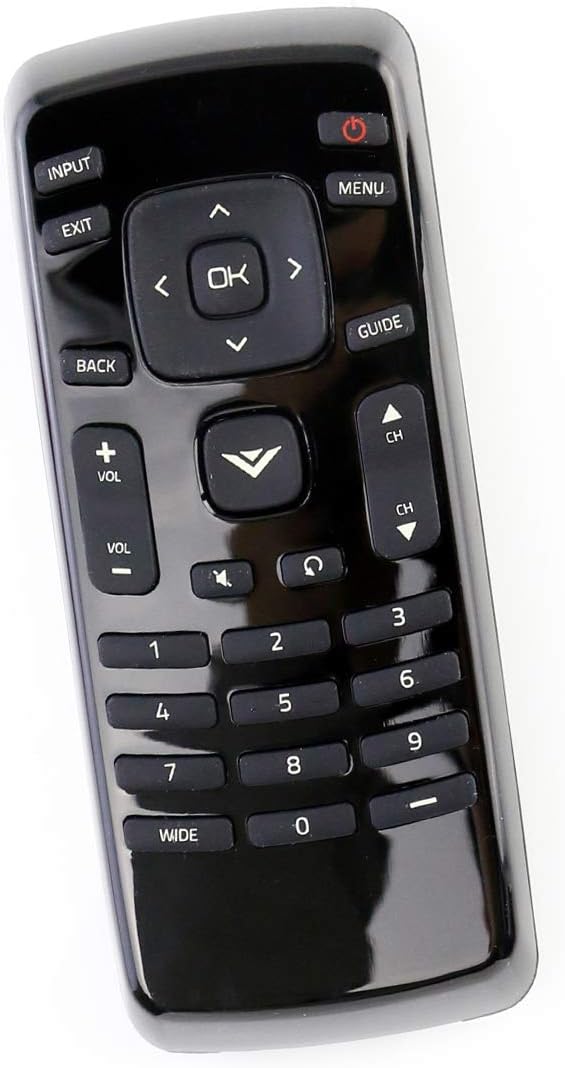
Figura 1: Frente view of the XRT020 Remote Control.
Características principales:
- Preprogramado: No setup required, ready to use out of the box.
- Construcción duradera: Hecho de material ABS de alta calidad.
- Rango extendido: Operates effectively up to 30 feet (10 meters).
- Botones responsivos: Designed for quick response times (0.2 seconds) and long-lasting use (over 160,000 clicks).
2. Configuración
Instalación de la batería:
- Ubique el compartimiento de la batería en la parte posterior del control remoto.
- Deslice la tapa del compartimento de la batería para abrirla.
- Inserte dos (2) baterías alcalinas AAA de 1.5 V, asegurándose de la polaridad correcta (+ y -) como se indica dentro del compartimiento.
- Cierre bien la tapa del compartimento de la batería.
The remote control is now ready for immediate use with your compatible Vizio TV. No additional programming or pairing is necessary.

Figura 2: Compartimento de batería para baterías AAA.
3. Instrucciones de funcionamiento
The XRT020 remote control provides standard functions for your Vizio TV. Below are the primary buttons and their uses:
| Botón | Función |
|---|---|
| Fuerza (●) | Enciende o apaga el televisor. |
| Aporte | Selects the video input source (e.g., HDMI 1, AV). |
| Menú | Accede al menú principal del televisor. |
| OK / Flechas de navegación | Confirma selecciones y navega por los menús. |
| Atrás / Salir | Regresa a la pantalla anterior o sale del menú actual. |
| Volumen (+/-) | Adjusts the sound volume up or down. |
| Channel (CH ▲ / ▼) | Cambia el canal de TV hacia arriba o hacia abajo. |
| Silenciar | Silencia o activa el sonido del televisor. |
| Teclado numérico (0-9) | Ingresa directamente los números de canal. |
4. Mantenimiento
To ensure the longevity and optimal performance of your ZdalaMit XRT020 remote control, follow these maintenance guidelines:
- Limpieza: Wipe the remote with a soft, dry cloth. Avoid using liquid cleaners or abrasive materials, as they may damage the surface or internal components.
- Reemplazo de batería: Replace batteries promptly when the remote's performance degrades. Always use new AAA alkaline batteries and dispose of old batteries responsibly.
- Almacenamiento: Guarde el control remoto en un lugar fresco y seco, alejado de la luz solar directa, temperaturas extremas y alta humedad.
- Protección: Avoid dropping the remote or subjecting it to strong impacts, which can cause internal damage or breakage.
5. Solución de problemas
If you encounter issues with your XRT020 remote control, please refer to the following common troubleshooting steps:
- El control remoto no responde:
- Asegúrese de que las baterías estén insertadas correctamente con la polaridad correcta.
- Reemplace las baterías viejas con baterías alcalinas AAA nuevas de 1.5 V.
- Verifique si hay obstrucciones entre el control remoto y el sensor infrarrojo del televisor.
- Funcionalidad intermitente:
- Verify that the remote is within the operational range (up to 30 feet / 10 meters) of the TV.
- Ensure there are no strong light sources or other electronic devices interfering with the remote's signal.
- Botones específicos que no funcionan:
- Inspect the buttons for any physical damage or debris that might be preventing them from pressing correctly.
Since this remote is pre-programmed, no manual programming or pairing is required. If issues persist after following these steps, please contact customer support.
6. Especificaciones
| Característica | Detalle |
|---|---|
| Número de modelo | XRT020 |
| Marca | ZdalaMit |
| Dimensiones del producto | 5 x 1.5 x 0.6 pulgadas |
| Peso del artículo | 1.59 onzas |
| Fuente de alimentación | 2 pilas alcalinas AAA de 1.5 V (no incluidas) |
| Característica especial | Preprogramado, no requiere configuración |
| Color | Negro |
| Máximo de dispositivos compatibles | 1 (Televisión) |
| Rango de operación | Hasta 30 pies / 10 metros |

Figure 3: XRT020 Remote Control dimensions.
7. Compatible Vizio TV Models
The ZdalaMit XRT020 remote control is compatible with a wide range of Vizio TV models, including but not limited to:
- D32hn-E0
- D39hn-E0
- D48n-E0
- D24H-C1
- E390-A1
- E280-A1
- E280-B1
- E291-A1
- D32hnx-E1
- D50n-E1
- D32hn-D0
- D39hn-D0
- D40n-E3
- D60n-E3
- D320-B1
- E241-A1
- D28H-C1
- D390-B0
- D32H-C1
- E221-A1
- E231-B1
- E320-A1
- E320-B0E
- E241-B1
- E320-B0
- E320-B2
- E320-B1
- E320-B1E
- E390-B1
- D32hn-E1
- E390-B1E
- D43n-E1

Figure 4: Partial list of compatible Vizio TV models.
8. Soporte y garantía
For any questions, concerns, or support regarding your ZdalaMit XRT020 remote control, please refer to the seller's contact information provided at the point of purchase. While specific warranty details are not included in this manual, please retain your purchase receipt for any potential warranty claims.
"No dudes en contactarnos si tienes alguna consulta. ¡Gracias!"


