Introducción
The Darkglass Hyper Luminal Bass Compressor Pedal is a state-of-the-art hybrid compressor designed for bass guitarists. It combines an analog VCA with a digital side-chain, allowing it to emulate the characteristics of legendary compressors while maintaining a pure analog signal path. This manual provides essential information for setting up, operating, maintaining, and troubleshooting your Hyper Luminal pedal.
Producto terminadoview

Figura 1: Arriba view of the Hyper Luminal pedal, highlighting its primary controls and indicators.

Figura 2: Lado view of the pedal, illustrating the micro-USB port for connectivity.
Características principales:
- Diseño híbrido: Analog VCA with digital side-chain for versatile compression.
- Three Compression Modes: BUS (SSL Bus compressor emulation), FET (1176 emulation), and SYM (Super Symmetry emulation).
- Control de mezcla: Mixes clean and compressed signals for transparent results.
- Control de tiempo: Adjusts attack and release settings for dynamic response.
- Compression Control: Sets the amount of compression applied.
- Ratio Control: Adjustable compression ratio from 2:1 to 20:1 via touch sensor.
- Medidor de reducción de ganancia: 10-segment LED meter for visual feedback.
- Interfaz USB: For firmware updates and Darkglass Suite software integration.
- Diseño compacto: Lightweight and pedalboard-friendly.
Configuración
Requisitos de energía:
The Hyper Luminal pedal requires a 9V DC power supply (center negative). Ensure the power supply provides sufficient current for stable operation. The pedal does not operate on internal batteries.
Conexiones:
- Connect your instrument (bass guitar) to the APORTE Jack en el lado derecho del pedal.
- Conectar el PRODUCCIÓN conector en el lado izquierdo del pedal a su amplificador o siguiente pedal en la cadena de señal.
- Connect a 9V DC power supply to the 9 V CC aporte.
- (Optional) Connect a micro-USB cable from the pedal's USB port to your computer for firmware updates and Darkglass Suite software integration.
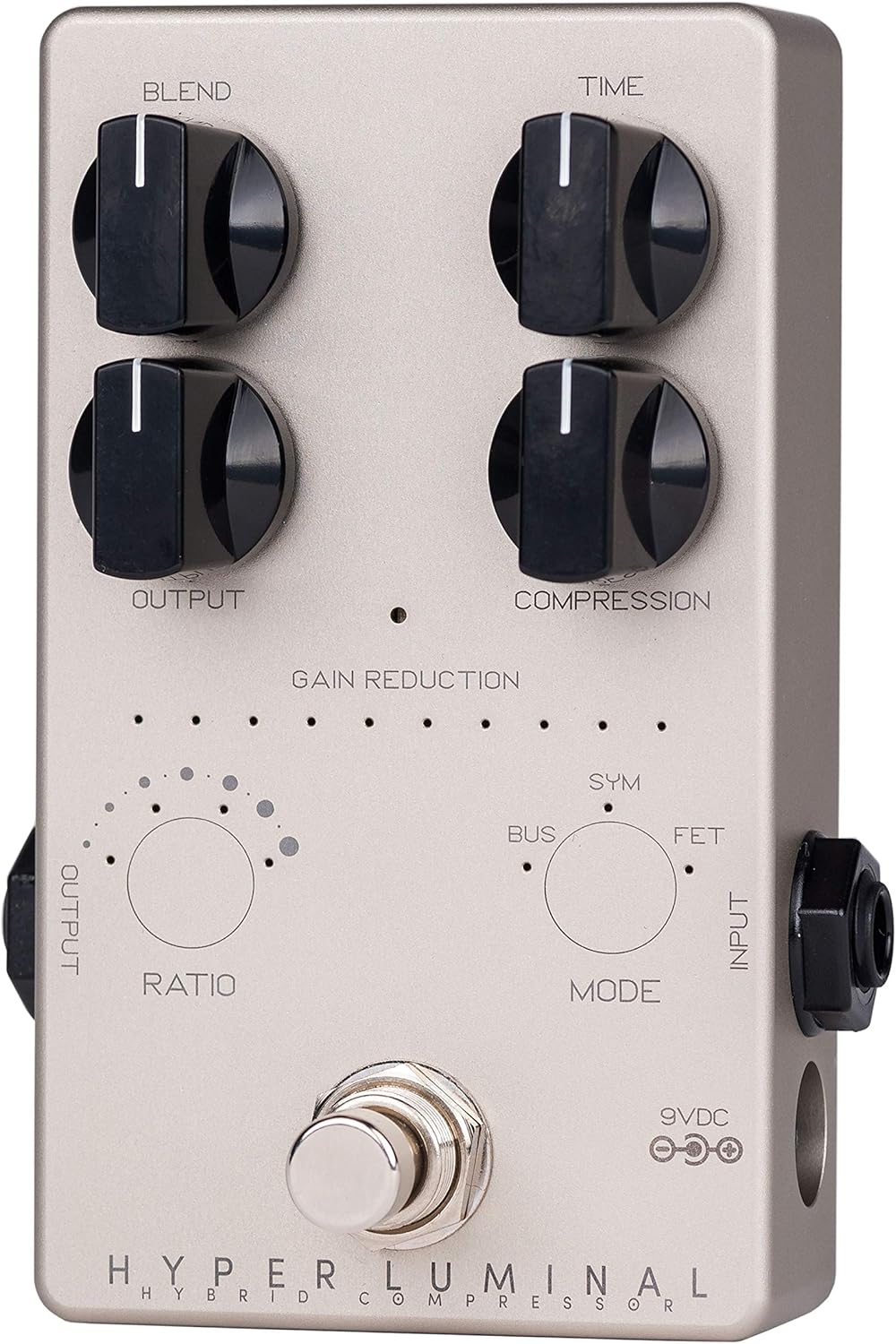
Figure 3: Input, Output, and Power connections.
Operar el pedal
Controles:
- mezclar: Controls the mix between the clean (uncompressed) signal and the compressed signal. Turn clockwise for more compressed signal, counter-clockwise for more clean signal.
- Tiempo: Adjusts the attack and release characteristics of the compressor. This control dynamically adapts based on the selected compression mode.
- Producción: Sets the overall output volume of the pedal.
- Compresión: Determines the amount of gain reduction applied. Turn clockwise for more compression.
- Ratio (Touch Sensor): Tap this sensor to cycle through different compression ratios. The available ratios depend on the selected compression mode.
- Mode (Touch Sensor): Tap this sensor to select one of the three compression modes: BUS, FET, or SYM.
Compression Modes:
- AUTOBÚS: Modeled after the classic SSL Bus compressor, known for its transparent and glue-like compression.
- FET: Inspired by the iconic 1176 compressor, offering fast attack and release times with a distinct character. This mode also supports the "all-button" or "British" mode by tapping the Ratio sensor four times until all four LEDs are lit.
- SYM: Based on Darkglass's own Super Symmetry compressor, providing a unique and modern compression feel.
Medidor de reducción de ganancia:
The 10-segment LED meter visually indicates the amount of gain reduction occurring. More LEDs lit signifies greater compression.
Darkglass Suite Software:
Connect the pedal to your computer via the micro-USB port to access the Darkglass Suite software. This software allows for firmware updates and advanced configuration of the pedal's parameters, including custom compression settings and future model additions.
Mantenimiento
- Keep the pedal clean by wiping it with a soft, dry cloth. Avoid abrasive cleaners or solvents.
- Guarde el pedal en un ambiente seco, alejado de temperaturas extremas y humedad.
- Ensure all cable connections are secure to prevent signal loss or damage.
- Regularly check for firmware updates via the Darkglass Suite software to ensure optimal performance and access to new features.
Solución de problemas
| Problema | Posible causa | Solución |
|---|---|---|
| No hay sonido del pedal. | Incorrect power supply; incorrect cable connections; faulty cables. | Verify 9V DC center-negative power supply is connected and functioning. Check input/output cable connections. Test with different cables. |
| Pedal not compressing signal. | Compression knob set too low; incorrect mode/ratio selected; low input signal. | Aumentar la Compresión knob setting. Experiment with different Modo y Relación settings. Ensure adequate input signal from your instrument. |
| Unwanted noise or hiss. | High gain settings; ground loop; faulty power supply. | Reducir Producción or Compresión settings. Use a high-quality, isolated power supply. Check for ground loop issues in your setup. |
| Problemas de conexión USB. | Incorrect USB cable; driver issues; Darkglass Suite software not running. | Ensure you are using a standard micro-USB data cable. Install necessary drivers. Launch Darkglass Suite software before connecting. |
Presupuesto
- Modelo: HYL (Hyper Luminal)
- Dimensiones (L x An x Al): Aproximadamente 10 x 7 x 5 pulgadas
- Peso: 8.1 onzas (230 gramos)
- Requisito de energía: 9V DC (center negative), 100mA minimum (Alkaline battery not applicable for operation, external power required)
- Formato de señal: Cosa análoga
- Interfaz de hardware: USB (Micro-USB)
- Color: Plata
Garantía y soporte
For warranty information and technical support, please refer to the official Darkglass Electronics webSitio web o contacte directamente con el servicio de atención al cliente. Conserve su recibo de compra como comprobante para reclamaciones de garantía.
Darkglass Electronics Official Websitio: www.darkglass.com


