1. Introducción
The Optex ORT 8930-HD is a digital terrestrial receiver designed to receive free-to-air digital programs broadcast in MPEG2/MPEG4 format, compatible with DVB-T2 and HEVC/H.265 standards. This device connects to your television via HDMI or SCART. It features a USB input for future software updates, multimedia file playback (photos, music, videos), and direct recording to an external USB storage device (not included).
This manual provides detailed instructions for the proper installation, operation, and maintenance of your Optex ORT 8930-HD receiver. Please read it thoroughly before use to ensure optimal performance and to prevent damage.
2. Información de seguridad
- Asegúrese de que haya una ventilación adecuada alrededor del dispositivo para evitar el sobrecalentamiento.
- Do not expose the receiver to rain, moisture, or extreme temperatures.
- Evite colocar el dispositivo cerca de fuentes de calor como radiadores o estufas.
- Utilice únicamente el adaptador de corriente suministrado con la unidad.
- No abra la casing; delegue cualquier servicio a personal calificado.
- Desconecte el enchufe de alimentación de la toma de pared durante tormentas eléctricas o cuando no vaya a utilizarlo durante períodos prolongados.
3. Contenido del paquete
Verifique que todos los artículos estén presentes en el paquete:
- 1 x Optex ORT 8930-HD Digital Receiver
- 1 x control remoto
- 1 x Manual de usuario
4. Producto terminadoview
4.1 Panel frontal

Imagen 1: Frente view of the Optex ORT 8930-HD receiver, showing the display, USB port, and control buttons.
The front panel includes a digital display for channel numbers, a USB 2.0 port for external storage, and basic control buttons (CH+, CH-, Power).
4.2 Panel trasero
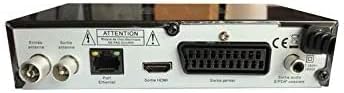
Imagen 2: Trasero view of the Optex ORT 8930-HD receiver, displaying various connectivity ports.
El panel trasero proporciona las siguientes conexiones:
- Entrada/Salida de antena: IEC 9.52 mm connectors for terrestrial antenna.
- Salida HDMI: For connecting to an HD television.
- SCART Connector: For connecting to older televisions.
- S/PDIF Coaxial Audio: Salida de audio digital.
- Entrada de energía: For the external power adapter.
4.3 control remoto

Imagen 3: The remote control unit for the Optex ORT 8930-HD receiver.
The remote control allows full operation of the receiver, including power, channel selection, volume, menu navigation, recording functions, and multimedia playback controls.
5. Configuración
5.1 Conexión de la antena
- Connect your terrestrial antenna cable to the "Antenna In" port on the rear panel of the receiver.
- If you wish to loop the antenna signal to another device, connect a coaxial cable from the "Antenna Out" port to the input of the next device.
5.2 Conexión a su televisor
Elija uno de los siguientes métodos de conexión:
- HDMI (recomendado para HD): Connect an HDMI cable from the "HDMI Output" port on the receiver to an available HDMI input on your television.
- Euroconector: Connect a SCART cable from the "SCART Connector" on the receiver to the SCART input on your television.
5.3 Conexión de alimentación
- Connect the power adapter to the power input port on the receiver.
- Conecte el adaptador de corriente a una toma de pared adecuada.
5.4 Escaneo de canal inicial
- Encienda su televisor y seleccione la fuente de entrada correcta (HDMI o SCART) correspondiente a su conexión.
- Power on the Optex ORT 8930-HD receiver.
- The first-time setup wizard should appear. Follow the on-screen instructions to perform an automatic channel search. This will scan for all available digital terrestrial channels in your area.
- If the wizard does not appear, navigate to the "Menu" > "Installation" > "Automatic Search" using the remote control.
6. Instrucciones de funcionamiento
6.1 Funcionamiento básico
- Encendido/apagado: Presione el FUERZA en el mando a distancia o en el panel frontal.
- Selección de canal: Utilice el CH+ / CH- botones o ingrese el número de canal directamente usando el teclado numérico.
- Control de volumen: Utilice el VOL+ / vol- botones.
- Silenciar: Presione el MUTE Botón para silenciar temporalmente el audio.
6.2 Gestión de canales
- Búsqueda automática/manual: Acceso a través de Menú > Instalación to rescan for channels.
- Función LCN: The Logical Channel Numbering (LCN) function automatically sorts channels into a logical order. This can usually be enabled/disabled in the installation menu.
- Lista de favoritos: Create personalized lists of your preferred channels for quick access. Refer to the on-screen menu for instructions on adding and managing favorite channels.
6.3 Grabación y reproducción
To use recording and multimedia playback features, connect a USB storage device (e.g., USB flash drive or external hard drive) to the USB port on the front panel.
- Grabación USB: Presione el REC Botón del control remoto para iniciar la grabación del programa actual. Presione DETENER para finalizar la grabación.
- Función de cambio de tiempo: This allows you to pause live TV and resume watching later. Activate Timeshift via the remote control (usually a dedicated button or through the menu).
- Reproducción multimedia: Access the multimedia player via the Menú. You can browse and play music, photo, and video files stored on your connected USB device.
6.4 Guía electrónica de programas (EPG)
Presione el Guía electrónica de programas en el mando a distancia para view the Electronic Program Guide, which displays program schedules for upcoming broadcasts.
6.5 Bloqueo paterno
Set up a parental lock to restrict access to certain channels or programs. This feature is typically found in the Menú > Configuración del sistema > Control parental sección.
6.6 Función de temporizador
The timer function allows you to schedule the receiver to turn on/off or record a specific program at a set time. Access this feature through the Menú.
6.7 Software Update via USB
Revise periódicamente las instrucciones del fabricante. website for available software updates. Download the update file to a USB drive and follow the instructions in the Menú > Configuración del sistema > Actualización de software section to install it.
7. Mantenimiento
- Limpieza: Utilice un paño suave y seco para limpiar el exterior del receptor. No utilice limpiadores líquidos ni en aerosol.
- Ventilación: Asegúrese de que las ranuras de ventilación del dispositivo no estén bloqueadas para evitar el sobrecalentamiento.
- Software: Keep the receiver's software updated to ensure optimal performance and access to the latest features.
8. Solución de problemas
| Problema | Posible causa | Solución |
|---|---|---|
| Sin poder | Cable de alimentación desconectado; toma de corriente defectuosa. | Verifique la conexión del cable de alimentación; pruebe con una toma de corriente diferente. |
| Sin señal / Sin canales | Antenna not connected; incorrect input source on TV; no channel scan performed. | Check antenna connection; select correct TV input; perform an automatic channel scan. |
| El control remoto no funciona | Batteries depleted; obstruction between remote and receiver. | Replace batteries; ensure clear line of sight to the receiver's IR sensor. |
| La grabación USB no funciona | USB device not connected or formatted incorrectly; insufficient storage space. | Ensure USB device is properly connected; format USB device (FAT32/NTFS); check available space. |
| El dispositivo se congela o no responde | Fallo temporal del software. | Disconnect power for a few seconds, then reconnect. If problem persists, check for software updates. |
9. Especificaciones
| Característica | Detalle |
|---|---|
| Modelo | ORT 8930-HD |
| Marca | Optex |
| Tipo de sintonizador | Terrestre (DVB-T2) |
| Descodificación de vídeo | HEVC/H.265, MPEG-2.5 |
| Conectividad | 1x HDMI, 1x SCART, 1x USB 2.0, 1x S/PDIF Coaxial Audio, Antenna In/Out |
| Capacidad del canal | Más de 1000 canales |
| Grabación | External USB media (PVR function) |
| Reproducción multimedia | Music, Photos, Videos |
| Características especiales | Timeshift, EPG, Parental Lock, Favorite List, Multi-language Menu, LCN, 5V Antenna Power, Timer Function, Dolby Digital+ compatible |
| Modo de salida de audio | [SOM] |
| Configuración de sonido envolvente de los altavoces | 5.1 |
| Potencia de salida | 5 vatios |
| Peso del producto | 600 gramos |
10. Garantía y soporte
Specific warranty information is not provided within this manual. Please refer to the warranty card included with your purchase, contact your retailer, or visit the official Optex webSitio para conocer los términos y condiciones detallados de la garantía.
For technical support or service inquiries, please contact your local Optex distributor or the customer service department as indicated on the product packaging or manufacturer's websitio.


