1. Introducción
Gracias por la compraasing the Alpha EK-60 61-Key Electronic Piano Keyboard. This manual provides detailed instructions for the proper setup, operation, and maintenance of your new instrument. The EK-60 is designed to offer a rich musical experience with its versatile features, including a wide range of tones and rhythms, intelligent teaching functions, and various connectivity options. Please read this manual thoroughly before using the product to ensure optimal performance and longevity.
2. Información de seguridad
To prevent electric shock, fire, or damage to the unit, please observe the following precautions:
- No exponga el teclado a la lluvia ni a la humedad.
- No coloque objetos llenos de líquidos, como jarrones, sobre el teclado.
- No bloquee ninguna abertura de ventilación.
- Utilice únicamente el adaptador de corriente especificado.
- No desmonte ni modifique la unidad. Encargue cualquier reparación a personal cualificado.
- Mantener fuera del alcance de los niños pequeños.
3. Contenido del paquete
Por favor, compruebe que todos los siguientes elementos estén incluidos en su paquete:
- 1 x Alpha 61-Key Standard Keyboard EK-60
- 1 x soporte ajustable
- 1 soporte para partituras.
- 1 x adaptador de corriente
- 1 x Manual de usuario (este documento)
4. Producto terminadoview
Familiarize yourself with the components of your Alpha EK-60 keyboard.
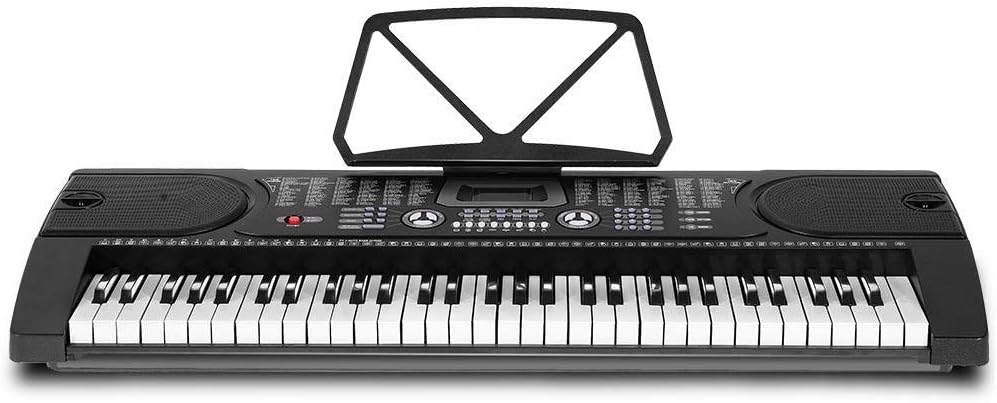
Figura 4.1: De arriba hacia abajo view of the Alpha EK-60 keyboard, highlighting the control panel, integrated speakers, and the 61 standard piano keys.

Figure 4.2: Detail of the LED display for convenient settings adjustment and the battery compartment for portable use.

Figura 4.3: View of the multiple jacks including Audio Input, Microphone Input, and Headphone Output for versatile connectivity.
Características principales:
- 61-Key Standard Piano Keyboard
- LED display for easy navigation
- 24 canciones de demostración
- 255 timbres (instrument sounds)
- 255 rhythms (accompaniment styles)
- 61 kinds of keyboard percussions
- 8 Panel Percussions
- Master volume, accompaniment volume, and tempo control
- Intelligent teaching function: one-key, follow and ensemble function
- Función de programación del ritmo
- Auto chord and chord timbre option
- Funcionalidad de grabación y reproducción
- Sustain and vibrato effects
- Microphone input and speaker output
- Headphone jack for silent practice
- Battery powered option (6 x AA-size batteries, not included)
5. Configuración
5.1 Montaje del soporte
- Unpack all components of the adjustable stand.
- Connect the horizontal support bars to the vertical legs, ensuring they are securely fastened.
- Adjust the height of the stand to your preferred playing position using the adjustment knobs. The stand is adjustable from 59cm to 79cm in height.
- Place the keyboard securely on top of the assembled stand.
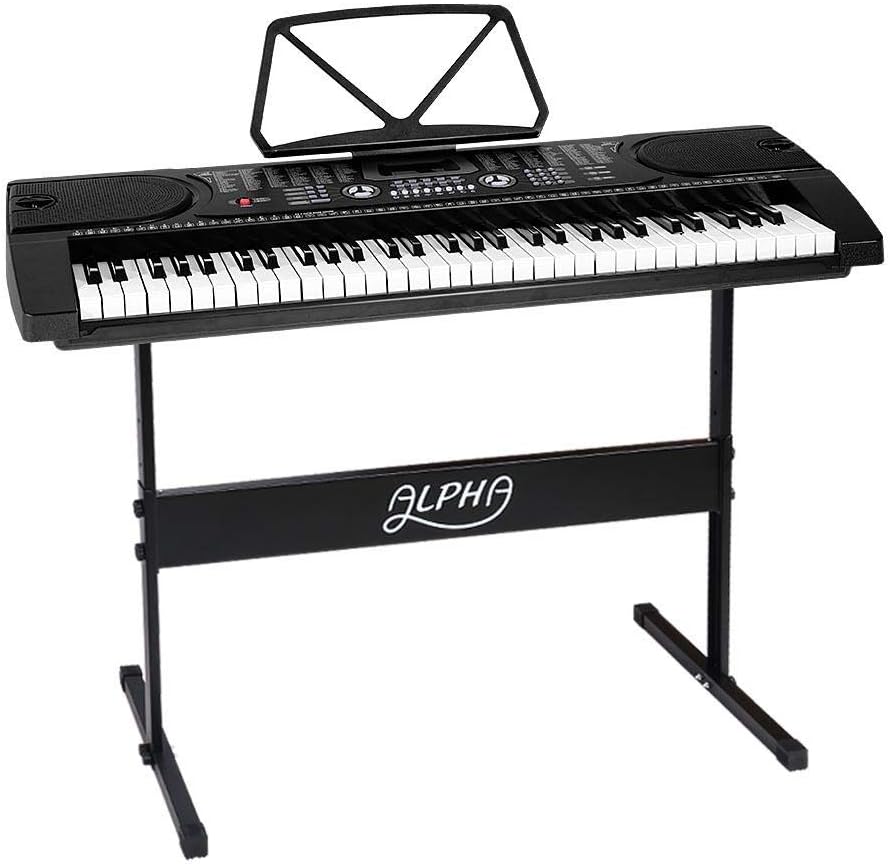
Figure 5.1: The Alpha EK-60 keyboard fully assembled on its adjustable stand, ready for use.
5.2 Encendido del teclado
The Alpha EK-60 can be powered by the included AC adaptor or by batteries.
Usando el adaptador de CA:
- Connect the DC plug of the power adaptor to the DC 9V input jack on the rear of the keyboard.
- Conecte el adaptador de CA a una toma de pared estándar.
Usando baterías:
- Localice el compartimento de la batería en la parte inferior del teclado.
- Abra la tapa del compartimiento de la batería.
- Insert 6 x AA-size batteries (not included), ensuring correct polarity (+/-).
- Cierre bien la tapa del compartimento de la batería.
Note: When using batteries, disconnect the AC adaptor. The keyboard will automatically switch to battery power if the adaptor is removed.
6. Instrucciones de funcionamiento
6.1 Funcionamiento básico
- Encendido/apagado: Presione el FUERZA Botón para encender o apagar el teclado.
- Control de volumen: Utilice el VOLUMEN PRINCIPAL Perilla para ajustar el nivel de sonido general.
- Control de tempo: Utilice el TEMPO Botones para ajustar la velocidad de los ritmos y canciones de demostración.
6.2 Selección de tonos y ritmos
- Tones (Timbre): Presione el ESTAMPILLA button, then use the number pad or +/- buttons to select from 255 different instrument sounds. The selected timbre number will appear on the LED display.
- Ritmos: Presione el RITMO button, then use the number pad or +/- buttons to select from 255 accompaniment rhythms. Press INICIAR/DETENER para comenzar o finalizar el ritmo.
6.3 Intelligent Teaching Function
The EK-60 features a 3-step intelligent teaching system to help you learn to play.
- Una llave: Plays the melody of a demo song by pressing any key.
- Seguir: Waits for you to play the correct note before proceeding with the melody.
- Juntos: Plays the accompaniment while you play the melody.
To use, select a demo song, then press the desired teaching mode button (UNA LLAVE, SEGUIR, o CONJUNTO).
6.4 Grabación y reproducción
El teclado te permite grabar tus interpretaciones.
- Presione el REC button to start recording. The LED display will indicate recording mode.
- Reproduce la melodía deseada.
- Presione el JUGAR Botón para detener la grabación y reproducir la interpretación grabada.
6.5 Conectividad
- Toma de auriculares: Conecte los auriculares al AURICULAR Jack para práctica silenciosa.
- Entrada de micrófono: Conecte un micrófono al ENTRADA MIC Jack para cantar mientras juegas.
- Entrada/salida de audio: Utilice el ENTRADA DE AUDIO to connect external audio devices (e.g., MP3 player) and the SALIDA DE AUDIO to connect to external speakers or an ampmás duradero.
7. Mantenimiento
Proper care will ensure the longevity of your Alpha EK-60 keyboard.
- Limpieza: Limpie el teclado con un paño suave y seco. Para la suciedad difícil, utilice un paño ligeramente seco.amp cloth and then wipe dry immediately. Do not use abrasive cleaners, waxes, or solvents.
- Almacenamiento: Si no lo utiliza durante un periodo prolongado, guarde el teclado en un lugar fresco y seco, alejado de la luz solar directa y de temperaturas extremas. Si utiliza pilas, retírelas antes de guardarlo durante un periodo prolongado para evitar fugas.
- Manejo: Evite dejar caer el teclado o someterlo a impactos fuertes.
8. Solución de problemas
If you encounter any issues with your keyboard, refer to the following table for common problems and solutions.
| Problema | Posible causa | Solución |
|---|---|---|
| Sin sonido | Volume is too low; Power is off; Headphones connected; Faulty power connection. | Increase master volume; Turn on power; Disconnect headphones; Check power adaptor or replace batteries. |
| Las teclas no responden | Keyboard is in a teaching mode; Internal malfunction. | Exit teaching mode; Power cycle the keyboard. If issue persists, contact support. |
| La canción de ritmo/demo no se reproduce | Rhythm/Demo song not selected; START/STOP button not pressed. | Select a rhythm/demo song; Press START/STOP. |
| Sonido distorsionado | Volume too high; External device connected incorrectly. | Reduce volume; Check connections of external devices. |
Si el problema persiste después de probar estas soluciones, comuníquese con el servicio de atención al cliente.
9. Especificaciones
| Característica | Descripción |
|---|---|
| Modelo | EK-60 |
| Llaves | 61 teclas de piano estándar |
| Key Width | 1.9 centímetros |
| Tones (Timbres) | 255 |
| ritmos | 255 |
| Canciones de demostración | 24 |
| Polifonia maxima | 8 |
| Conectividad | Audio Input, Audio Output, Headphone Jack (3.5mm), Microphone Input (3.5mm) |
| Fuente de alimentación | AC Adaptor (DC 9V) or 6 x AA-size batteries (not included) |
| Dimensiones (Teclado) | 86 cm (largo) x 32.5 cm (ancho) |
| Dimensions (Overall with Stand) | 86 cm (largo) x 32.5 cm (ancho) x 59-79 cm (alto) |
| Peso | 6.2 kilogramos |
| Color | Negro |

Figure 9.1: Detailed dimensions of the Alpha EK-60 keyboard and its adjustable stand.
10. Garantía y soporte
10.1 Información de garantía
The Alpha EK-60 keyboard comes with a 1 año de garantía from the date of purchase. This warranty covers manufacturing defects and ensures the product is free from defects in material and workmanship under normal use. It does not cover damage caused by misuse, accident, unauthorized modification, or normal wear and tear.
10.2 Atención al cliente
For any queries, technical assistance, or warranty claims, please contact the seller or manufacturer directly. Please have your purchase receipt and product model number (EK-60) ready when contacting support.


