1. Introducción
This user manual provides comprehensive instructions for the setup, operation, and maintenance of your SHARP LC-32HI5012E HD Ready Smart LED TV. Please read this manual thoroughly before using your television to ensure proper functionality and safety.
The SHARP LC-32HI5012E is an 81 cm (32-inch) HD Ready Smart LED TV featuring Active Motion 200 technology for enhanced picture quality and a Triple Tuner for versatile reception options. It includes integrated Wi-Fi and a Harman/Kardon sound system for a complete entertainment experience.
2. Contenido del paquete
Al abrir el paquete, verifique que estén incluidos todos los siguientes elementos:
- SHARP LC-32HI5012E Main Unit
- Mando a distancia (con pilas)
- Manual de usuario (este documento)

Imagen: Frente view of the SHARP LC-32HI5012E television, displaying a vibrant city skyline on its screen. This image shows the slim bezel design and the central SHARP logo.
3. Configuración
3.1 Montaje del soporte
Carefully place the TV screen-down on a soft, flat surface to prevent damage. Attach the two stand feet to the designated slots at the bottom of the TV, securing them with the provided screws. Ensure the stand is firmly attached before proceeding.
3.2 Conexión de periféricos
Su televisor ofrece varias opciones de conexión para dispositivos externos:
- Puertos HDMI (x3): Conecte reproductores de Blu-ray, consolas de juegos o decodificadores.
- Puertos USB (x2): Para reproducción de medios desde unidades USB.
- Antenna In (RF): Connect your terrestrial antenna for DVB-T/T2HD reception.
- Sentado en: Connect your satellite dish for DVB-S/S2 reception.
- RJ45 (LAN): Para conexión a Internet por cable.
- Puerto CI+: Para módulos de acceso condicional (CAM) view canales cifrados.
- Mini Component/YPbPr, Mini AV Composite: Para dispositivos analógicos más antiguos.
- Salida de audio óptico digital: Para conectar a sistemas de audio externos.
- Audio out / Headphone: Para auriculares o altavoces externos.

Imagen: Trasera view of the SHARP LC-32HI5012E television, highlighting the arrangement of various input and output ports for connecting external devices.
3.3 Encendido inicial y configuración inicial
After connecting all necessary cables, plug the power cord into an electrical outlet. Press the power button on the remote control or the TV. The first-time setup wizard will guide you through:
- Selección de idioma.
- Conexión de red (Wi-Fi o LAN cableada).
- Channel scanning for DVB-C, DVB-S/S2, or DVB-T/T2HD.
- Zona horaria y otras configuraciones básicas.
4. Instrucciones de funcionamiento
4.1 Funciones básicas del televisor
- Encendido/apagado: Utilice el botón de encendido del control remoto o del televisor.
- Control de volumen: Utilice los botones VOL +/-.
- Selección de canal: Use CH +/- or number buttons.
- Fuente de entrada: Press the SOURCE button to switch between HDMI, AV, TV, etc.
- Navegación por el menú: Use arrow keys and OK button to navigate menus.
4.2 Funciones de Smart TV
Your SHARP LC-32HI5012E is equipped with integrated Wi-Fi and offers access to various smart features:
- Aplicaciones preinstaladas: Access popular streaming services like Netflix and YouTube directly.
- Web Navegador: Navega por Internet directamente desde tu TV.
- Aquos Net+: Access additional online content and services provided by Sharp.
Asegúrese de que su televisor esté conectado a Internet para obtener la funcionalidad completa de Smart TV.
Sistema de audio 4.3
The integrated Harman/Kardon sound system provides a high-quality audio experience with excellent dynamics and clarity. Adjust audio settings in the TV menu to customize your sound preferences.
5. Mantenimiento
5.1 Limpieza de la pantalla
Para limpiar la pantalla, límpiela suavemente con un paño suave que no deje pelusa. Para manchas difíciles, límpiela ligeramente.ampEn el paño con agua o un limpiador de pantallas especializado. No Rocíe líquido directamente sobre la pantalla.
5.2 Cuidados generales
- Mantenga el televisor alejado de la luz solar directa y de fuentes de calor.
- Asegúrese de que haya una ventilación adecuada alrededor del televisor.
- Desconecte el televisor del tomacorriente durante tormentas eléctricas o cuando lo deje desatendido durante períodos prolongados.
6. Solución de problemas
If you encounter any issues with your TV, please refer to the following common problems and solutions before contacting support.
| Problema | Posible causa | Solución |
|---|---|---|
| Sin poder | Power cord unplugged, power outlet issue. | Verifique la conexión del cable de alimentación. Pruebe con otra toma de corriente. |
| No hay imagen, pero hay sonido | Incorrect input source, faulty cable. | Verifique la fuente de entrada correcta. Verifique las conexiones del cable HDMI/AV. |
| Sin sonido | Volumen silenciado o demasiado bajo, problema del sistema de audio externo. | Unmute volume, increase volume. Check external audio connections. |
| No se puede conectar al Wi-Fi | Incorrect password, router issue, TV too far from router. | Re-enter password. Restart router. Move TV closer or use wired connection. |
7. Especificaciones
| Característica | Detalle |
|---|---|
| Marca | AFILADO |
| Número de modelo | LC-32HI5012E |
| Tecnología de pantalla | CONDUJO |
| Resolución | Preparado para HD (1366 x 768 píxeles) |
| Diagonal de la pantalla | 81.3 cm (32 pulgadas) |
| Frecuencia de actualización | 60 Hz |
| Característica especial | Internet (Smart TV) |
| Servicios de Internet compatibles | Netflix, YouTube, navegador |
| Tecnología de conectividad | USB, HDMI, LAN, Wi-Fi |
| Sintonizadores | DVB-C, DVB-S/S2, DVB-T/T2HD |
| Sistema de audio | Harman/Kardon |
| Dimensiones del producto (ancho x alto x profundidad) | 74 x 49.1 x 18 cm (con soporte) |
| Peso | 4.8 kilogramos |
| Tipo de montaje | Montaje de mesa |
7.1 Eficiencia energética
The SHARP LC-32HI5012E has an energy efficiency rating of F. For detailed energy consumption information, please refer to the energy label and product information sheet.

Image: Energy efficiency label for the SHARP LC-32HI5012E television, showing its energy class F and power consumption details.
Para obtener más detalles, visite la base de datos oficial de EPREL: https://eprel.ec.europa.eu/qr/402565
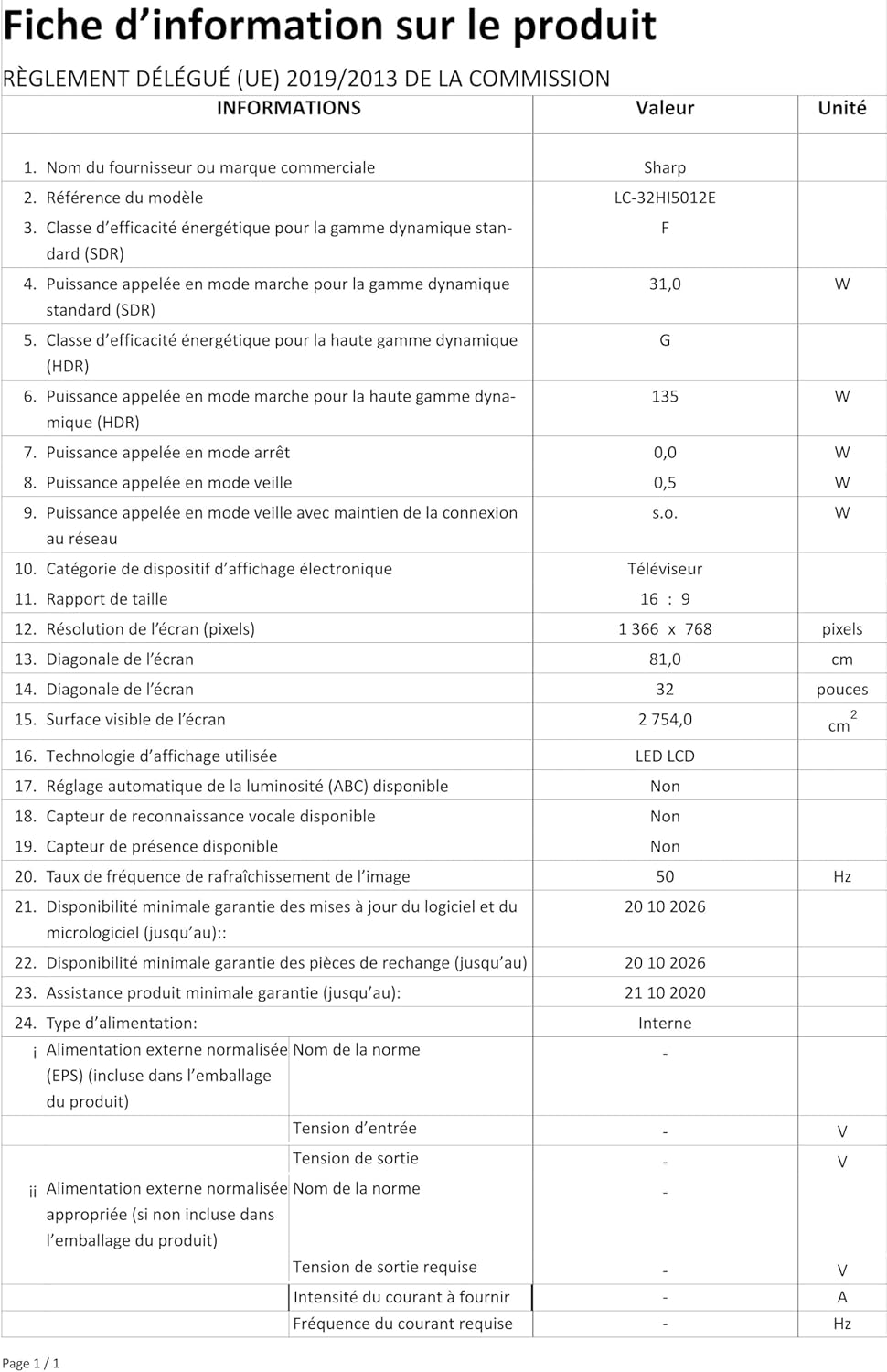
Image: Product information sheet detailing technical specifications and compliance information for the SHARP LC-32HI5012E television.
8. Garantía y soporte
For warranty information, please refer to the warranty card included with your product or visit the official SHARP webSitio. Conserve su recibo de compra como comprobante de compra para cualquier reclamación de garantía.
For technical support or service inquiries, please contact SHARP customer service. Contact details can typically be found on the SHARP official websitio o en el embalaje del producto.


