1. Introducción
Thank you for choosing the MIATONE BOOMBOX Bluetooth Speaker. This portable and waterproof wireless speaker is designed to deliver high-quality audio for various environments, from indoor relaxation to outdoor adventures. Please read this manual carefully before using the product to ensure proper operation and to maximize its lifespan.

Audio de alta resolución: Experience crisp highs, rich mids, and deep bass with advanced DSP-enhanced sound technology.
2. Información de seguridad
- Do not expose the speaker to extreme temperatures (heat or cold) or high humidity.
- Evite dejar caer o someter el altavoz a impactos fuertes.
- No desmonte, repare ni modifique el altavoz usted mismo. Consulte a personal de servicio técnico cualificado.
- Mantenga el altavoz alejado de dispositivos médicos, ya que su campo magnético puede interferir con su funcionamiento.
- Ensure the charging port cover is securely closed when using the speaker near water to maintain its waterproof rating.
- Utilice únicamente el cable de carga proporcionado o un equivalente certificado.
- No escuche a volúmenes excesivamente altos durante períodos prolongados para evitar daños auditivos.
3. Contenido del paquete
Por favor revise el paquete para ver los siguientes artículos:
- MIATONE BOOMBOX Bluetooth Speaker
- Cable de carga micro USB
- Cable de entrada auxiliar
- Guía del usuario
4. Producto terminadoview
Familiarize yourself with the various parts and controls of your MIATONE BOOMBOX speaker.
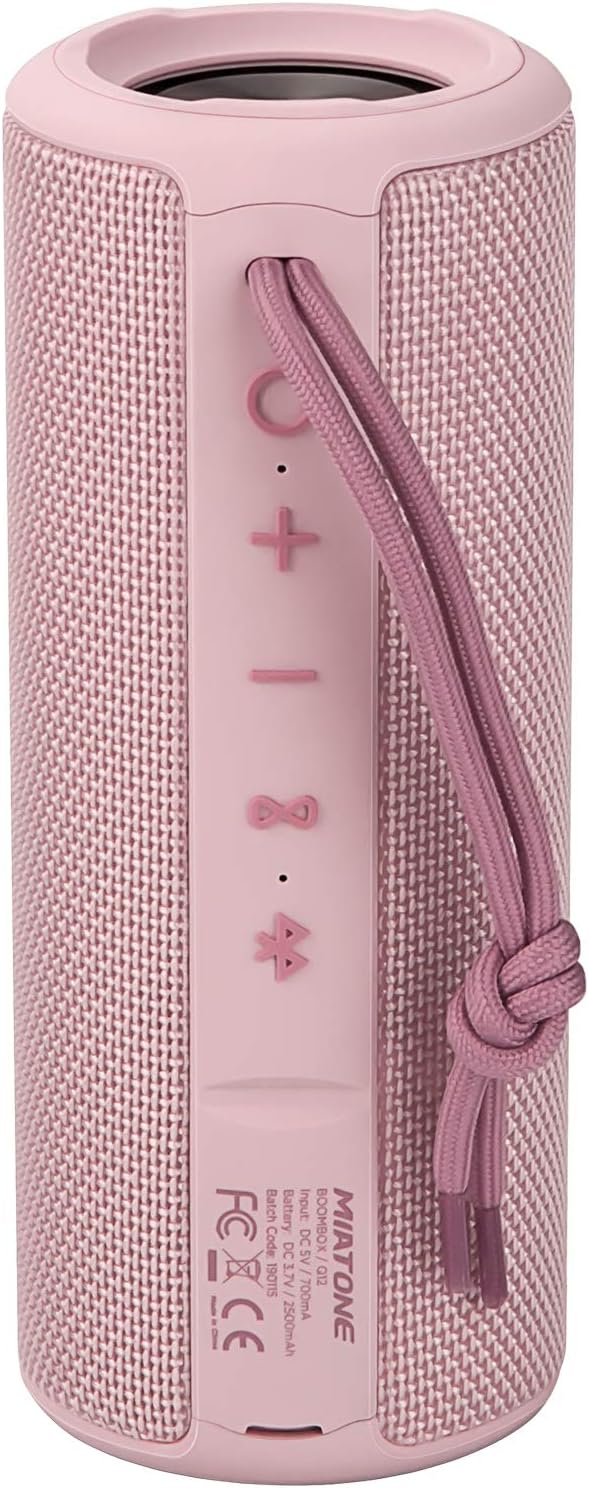
Frente View: Shows the speaker grille and the MIATONE logo.

Trasero View: Displays the control buttons (+, -, Play/Pause, Bluetooth, TWS) and the charging/AUX ports under a protective flap.

Reinforced Silicone End Caps: The speaker features durable silicone bumpers on both ends to absorb impact and prevent slipping.
Funciones de los botones:
| Botón | Función |
|---|---|
| + | Short press: Volume Up; Long press: Next Track |
| - | Short press: Volume Down; Long press: Previous Track |
| Reproducir/Pausa | Short press: Play/Pause; Short press (incoming call): Answer/End Call; Long press (incoming call): Reject Call |
| Icono de Bluetooth | Long press: Disconnect current Bluetooth device and enter pairing mode |
| Icono de TWS | Short press: Initiate TWS pairing (True Wireless Stereo) |
| Botón de encendido | Pulsación larga: encendido/apagado |
5. Configuración
5.1 Carga del altavoz
- Open the protective flap on the back of the speaker to reveal the charging port.
- Connect the Micro USB charging cable to the speaker's charging port and the other end to a USB power adapter (not included) or a computer's USB port.
- El indicador LED mostrará el estado de carga (por ejemplo, rojo para cargarse, apagado cuando esté completamente cargado).
- A full charge takes approximately 12 hours. Ensure the protective flap is sealed after charging.
5.2 Encendido / Apagado
- Encendido: Long press the Power button until you hear a power-on prompt.
- Apagado: Long press the Power button until you hear a power-off prompt.
5.3 Emparejamiento Bluetooth
- Ensure the speaker is powered on and in Bluetooth pairing mode (indicated by a flashing blue LED). If not, long press the Bluetooth icon button.
- Habilite Bluetooth en su dispositivo (teléfono inteligente, tableta, computadora).
- Buscar "BOOMBOX" in your device's Bluetooth list.
- Select "BOOMBOX" to connect. You will hear a confirmation sound once paired.
- El altavoz se volverá a conectar automáticamente al último dispositivo emparejado cuando se encienda, si está dentro del alcance.

Bluetooth 5.3 mejorado: Provides faster and more stable wireless connections.
5.4 Emparejamiento TWS (estéreo inalámbrico verdadero)
TWS allows you to pair two MIATONE BOOMBOX speakers together for a true stereo sound experience.
- Ensure both BOOMBOX speakers are powered on and not connected to any Bluetooth device.
- On one speaker (this will be the primary speaker), short press the TWS icon button. It will enter TWS pairing mode.
- Los dos altavoces se conectarán automáticamente. Escuchará un sonido de confirmación una vez que el emparejamiento TWS se haya realizado correctamente.
- Una vez emparejado TWS, conecte su dispositivo al altavoz principal a través de Bluetooth como se describe en la sección 5.3.
- To disconnect TWS, short press the TWS icon button on either speaker.
6. Instrucciones de funcionamiento
6.1 Reproducción de música
- Reproducir/Pausa: Presione brevemente el botón Reproducir/Pausar.
- Sube el volumen: Presione brevemente el + botón.
- Bajar volumen: Presione brevemente el - botón.
- Pista siguiente: Mantenga pulsado el + botón.
- Pista anterior: Mantenga pulsado el - botón.
6.2 Llamadas manos libres
- Responder llamada: Presione brevemente el botón Reproducir/Pausa cuando suene una llamada entrante.
- Finalizar llamada: Presione brevemente el botón Reproducir/Pausa durante una llamada.
- Rechazar llamada: Mantenga presionado el botón Reproducir/Pausa cuando suene una llamada entrante.
6.3 Auxiliary Input (AUX Mode)
You can connect non-Bluetooth devices to the speaker using the provided 3.5mm auxiliary cable.
- Abra la solapa protectora en la parte posterior del altavoz.
- Conecte un extremo del cable AUX de 3.5 mm al puerto AUX del altavoz y el otro extremo al conector de auriculares de su dispositivo de audio.
- El altavoz cambiará automáticamente al modo AUX.
- Controle la reproducción y el volumen desde su dispositivo conectado.
- Ensure the protective flap is sealed after use to maintain water resistance.
7. Mantenimiento
7.1 Limpieza
- Limpie el altavoz con un paño suave, damp paño.
- No utilice limpiadores abrasivos, alcohol ni disolventes químicos.
- Asegúrese de que el altavoz esté completamente seco antes de cargarlo o guardarlo.
7.2 Almacenamiento
- Guarde el altavoz en un lugar fresco y seco, alejado de la luz solar directa y de temperaturas extremas.
- If storing for a long period, charge the battery to about 50% every few months to preserve battery life.
7.3 Cuidado a prueba de agua (IPX6)
The MIATONE BOOMBOX is IPX6 waterproof, meaning it can withstand powerful water jets. It is not designed for submersion.
- Always ensure the charging port and AUX port protective flap is securely closed before exposing the speaker to water.
- If the speaker gets wet, wipe it dry with a clean cloth before opening the port flap or charging.
- No cargue el altavoz si los puertos están mojados.

IPX6 Waterproof Speaker: Designed to float and withstand water splashes, making it ideal for poolside or beach use.
8. Solución de problemas
| Problema | Posible causa | Solución |
|---|---|---|
| El altavoz no se enciende. | La batería está baja o muerta. | Cargue el altavoz completamente. |
| No se puede emparejar con un dispositivo Bluetooth. | Speaker is not in pairing mode; device's Bluetooth is off; speaker is already connected to another device; device list needs refresh. | Ensure speaker is in pairing mode (flashing blue LED). Turn device's Bluetooth off and on. Disconnect from other devices. Forget "BOOMBOX" on your device and re-scan. |
| No hay sonido o volumen bajo. | Volumen demasiado bajo en el altavoz o dispositivo; modo de entrada incorrecto; altavoz no conectado. | Increase volume on both speaker and device. Ensure correct input mode (Bluetooth/AUX). Re-establish Bluetooth connection. |
| Distorsión de sonido. | Volumen demasiado alto; batería baja; interferencia. | Reduce volume. Charge the speaker. Move speaker closer to the device or away from other electronic devices. |
| El emparejamiento de TWS falló. | Los altavoces están demasiado separados; uno de ellos ya está conectado a un dispositivo. | Asegúrese de que ambos altavoces estén cerca uno del otro y no estén conectados a ningún dispositivo Bluetooth antes de iniciar el emparejamiento TWS. |
9. Especificaciones
| Característica | Detalle |
|---|---|
| Nombre del modelo | BOOMBOX (Q12) |
| Tecnología de conectividad | Bluetooth 5.3, USB, AUX |
| Tipo de altavoz | Portable Speaker, Bluetooth Speaker |
| Potencia máxima de salida | 20 vatios |
| Respuesta de frecuencia | 20 kHz |
| Duración de la batería | Hasta 17 horas (al 50% del volumen) |
| Tiempo de carga | 12 horas |
| Clasificación de impermeabilidad | IPX6 |
| Alcance de Bluetooth | Hasta 100 pies (30.5 metros) |
| Dimensiones (L x An x Al) | 7.11 x 7.11 x 18.54 cm (2.8 x 2.8 x 7.3 pulgadas) |
| Peso | 421.84 gramos (0.93 lbs) |
| Material | Aluminio |
| Dispositivos compatibles | Personal Computer, Laptop, Tablet, Smartphone |

Tiempo de juego duradero: Enjoy up to 17 hours of playback at 50% volume.
10. Garantía y soporte
MIATONE products are designed and manufactured to the highest quality standards. For information regarding warranty coverage, technical support, or service inquiries, please refer to the contact information provided on the product packaging or visit the official MIATONE websitio.
Conserve su comprobante de compra para reclamos de garantía.


