1. Introducción
The TROTEC TP10 is a high-precision infrared thermometer designed for non-contact surface temperature measurements across a wide range. This device is suitable for various applications, including industrial diagnostics, HVAC system maintenance, and general temperature monitoring. Its advanced features ensure accurate and reliable readings, even for small or distant objects.
This manual provides essential information for the safe and effective use of your TP10 infrared thermometer. Please read it thoroughly before operating the device and keep it for future reference.
2. Instrucciones de seguridad
Tenga en cuenta las siguientes precauciones de seguridad para evitar lesiones y daños al dispositivo:
- Seguridad láser: The TP10 uses a Class 2 laser. Do not stare directly into the laser beam or direct it at other people's eyes. Avoid prolonged exposure.
- Entorno operativo: Do not use the device in explosive atmospheres or near flammable materials.
- Límites de temperatura: No exponga el dispositivo a temperaturas extremas fuera de su rango operativo especificado.
- Seguridad eléctrica: No intente abrir ni modificar el dispositivo. Todas las reparaciones deben ser realizadas por personal cualificado.
- Manejo de superficies calientes: When measuring hot surfaces, be aware of potential burns from contact. The infrared thermometer measures surface temperature only.
- Limpieza: Utilice un paño suave y seco para limpiar. No utilice limpiadores abrasivos ni disolventes.
3. Producto terminadoview
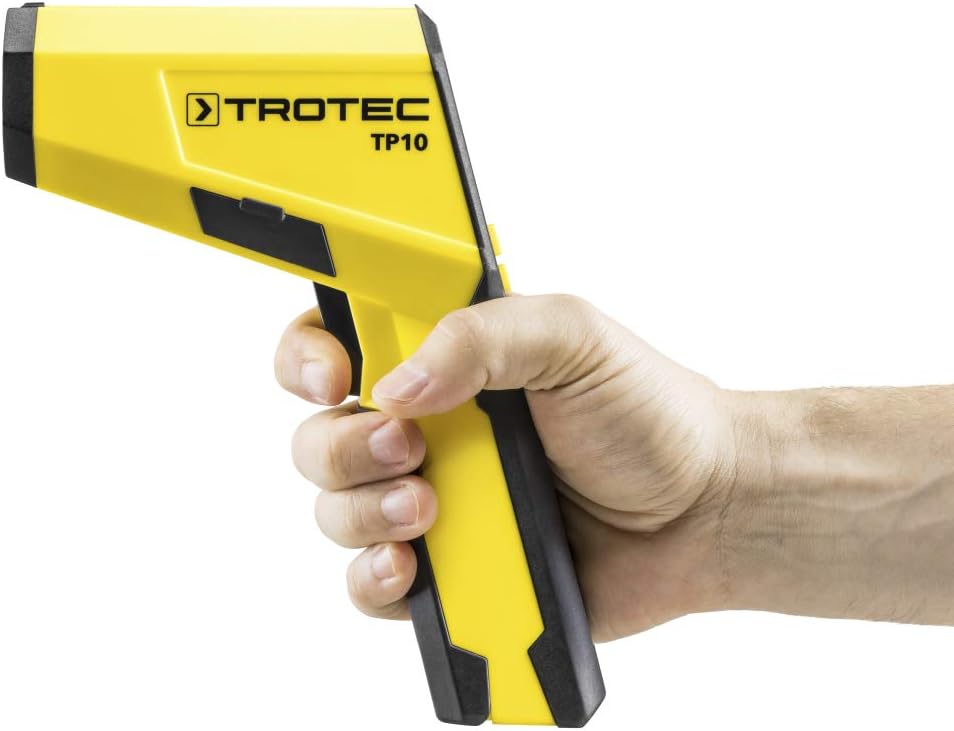
The TROTEC TP10 is a robust and ergonomic infrared thermometer designed for ease of use and high accuracy. It features a clear digital display and intuitive controls.
Características principales:
- Wide temperature measurement range: -50°C to +1850°C (-58°F to +3362°F).
- High optical resolution of 75:1 for precise measurements of small or distant objects.
- Adjustable emissivity for accurate readings on various surface types.
- Integrated data logging function for storing up to 30 measurement points.
- Automatic display of Minimum, Maximum, Differential, and Average values.
- Clear, high-resolution digital display with backlight.
- Laser targeting for precise aiming.
- Función de apagado automático para conservar la vida útil de la batería.
- Indicación del estado de la batería.
Componentes del dispositivo:

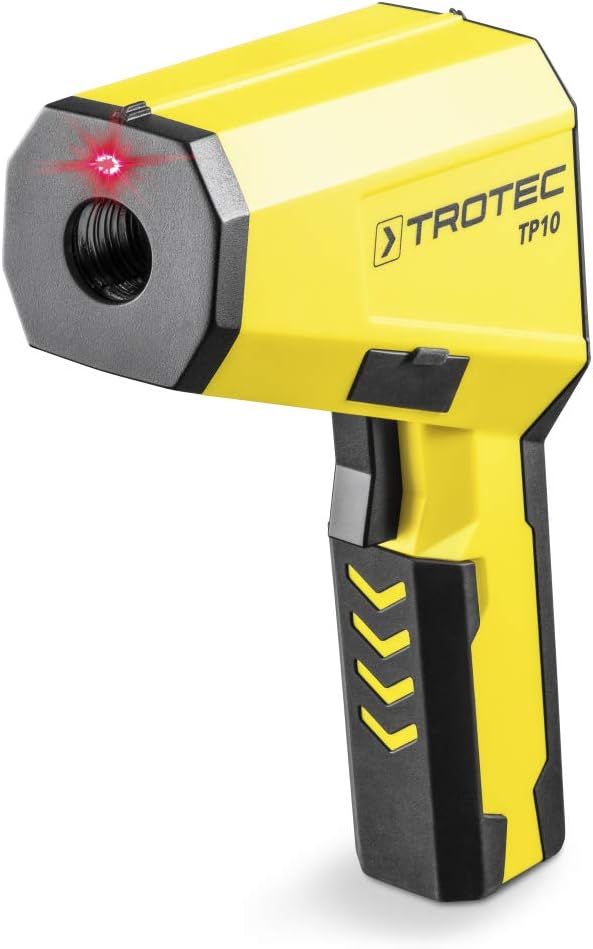
The device features a pistol-grip design for comfortable handling. The main body houses the infrared sensor and laser emitter at the front, with the trigger located on the underside of the handle. The digital display is positioned at the rear, providing clear visibility of measurement data and settings.
4. Configuración
4.1 Instalación de la batería
- Localice la tapa del compartimiento de la batería en el mango del dispositivo.
- Abra la cubierta deslizándola o desenganchándola.
- Insert the required batteries (e.g., 9V battery, not specified in data, assuming common type) according to the polarity indicators (+/-).
- Cierre bien la tapa del compartimento de la batería.
4.2 Encendido / Apagado
Press the trigger to power on the device. The device will automatically power off after a period of inactivity to save battery life.
4.3 Selección de unidad (°C/°F)
The device allows selection between Celsius (°C) and Fahrenheit (°F). Refer to the on-screen menu or dedicated button (if available) to switch between units. This setting is usually found within the 'MODE' options.
4.4 Ajuste de emisividad
Emissivity (ε) is a crucial setting for accurate infrared temperature measurement. Different materials emit infrared energy differently. The TP10 allows for adjustable emissivity to match the surface being measured. Consult an emissivity table for common materials. Adjust the emissivity value using the device's menu buttons (e.g., F1, F2, F3, MODE) to ensure accurate readings.
5. Instrucciones de funcionamiento
5.1 Realización de una medición
- Point the infrared sensor (front of the device) towards the target surface.
- Press and hold the trigger. The laser pointer will activate to indicate the measurement spot.
- The current surface temperature will be displayed on the screen.
- Release the trigger to hold the measurement on the display.
5.2 Comprender la pantalla
The TP10's digital display provides comprehensive information:
- Temperatura actual: The primary reading in the selected unit (°C or °F).
- Valores mínimos y máximos: Displays the minimum and maximum temperatures recorded during a continuous measurement.
- Diff (Differential) Value: Shows the difference between the maximum and minimum recorded temperatures.
- Avg (Average) Value: Calculates the average temperature over a measurement period.
- Emissivity Setting (E): Indicates the currently set emissivity value.
- Estado de la batería: An icon indicating the remaining battery life.

5.3 Registro de datos
The TP10 can store up to 30 measurement points. To use the data logging function:
- Initiate a measurement as described above.
- While holding the trigger or after releasing it (depending on mode), press the 'SAVE' button (often F2 or F3) to store the current reading.
- To recall stored data, navigate through the menu using the 'MODE' button and select the data logging review opción.
5.4 Relación distancia-punto (D:S)
The TP10 has a D:S ratio of 75:1. This means that at a distance of 75 units, the measurement spot diameter is 1 unit. For example, at 75 cm distance, the spot size is 1 cm. Maintain an appropriate distance to ensure the target completely fills the measurement spot for accurate readings.

6. Mantenimiento
6.1 Limpieza
Keep the device clean to ensure optimal performance. Wipe the casing con un suave, damp cloth. Do not use harsh chemicals or abrasive materials. Pay special attention to keeping the infrared lens and laser aperture clean and free of dust or debris.
6.2 Almacenamiento
Si no lo utiliza durante un período prolongado, retire las pilas para evitar fugas. Guarde el dispositivo en un lugar fresco y seco, alejado de la luz solar directa y de temperaturas extremas.
6.3 Reemplazo de batería
When the battery indicator shows low power, replace the batteries promptly to avoid interruption of operation. Follow the battery installation steps in Section 4.1.
7. Solución de problemas
| Problema | Posible causa | Solución |
|---|---|---|
| El dispositivo no se enciende. | Baterías muertas o instaladas incorrectamente. | Reemplace las baterías o verifique la polaridad. |
| Las lecturas son inconsistentes o inexactas. | Incorrect emissivity setting; lens is dirty; target is too small or too far. | Adjust emissivity; clean lens; ensure target fills measurement spot (D:S ratio). |
| La pantalla muestra "Lo" o "Hi". | La temperatura está fuera del rango de medición del dispositivo. | Ensure the target temperature is within -50°C to +1850°C. |
| El láser no se activa. | Laser function is disabled or device malfunction. | Verifique la configuración del dispositivo para la activación del láser. Si el problema persiste, contacte con el soporte técnico. |
8. Especificaciones
| Característica | Detalle |
|---|---|
| Marca | TROTEC |
| Número de modelo | 3510003046 (TP10) |
| Rango de medición | -50 °C a +1850 °C (-58 °F a +3362 °F) |
| Resolución óptica (D:S) | 75:1 |
| Emisividad | Ajustable |
| Registro de datos | Up to 30 measurement points |
| Tipo de pantalla | Digital, High-resolution |
| Conectividad | USB |
| Características especiales | High-resolution display, Min/Max/Diff/Avg functions, Laser targeting, Auto Power Off |
| Dimensiones del producto | 16.8 x 5.6 x 22.5 cm |
| Peso del artículo | 1.19 kilogramos |
| Material | Plástico |
| Certificaciones | CE |
9. Garantía y soporte
For warranty information, technical support, or service inquiries, please refer to the documentation included with your product or visit the official TROTEC webSitio. Conserve su recibo de compra como comprobante de compra para cualquier reclamación de garantía.
Fabricante: TROTEC
Modelo: TP10 (3510003046)


