1. Introducción
The Edifier S3000Pro Audiophile Active Speakers are designed to deliver high-fidelity audio with versatile connectivity options. Featuring Bluetooth 5.0 with aptX HD, USB audio, planar diaphragm tweeters, and 6.5-inch woofers, these speakers offer a premium listening experience. The innovative KleerNet wireless technology allows for a wire-free connection between the left and right speakers, providing flexible placement without compromising sound quality.
2. Contenido del paquete
Asegúrese de que todos los artículos estén presentes en el paquete:
- Edifier S3000Pro Speakers (1 pair)
- Mando a distancia
- Cable de alimentación
- Cable USB
- Cable óptico
- Cable de audio RCA a RCA
- Cable de audio de 3.5 mm a RCA
- Manual de usuario
3. Configuración y conexiones
The Edifier S3000Pro speakers are designed for easy setup. The left and right speakers connect wirelessly to each other, eliminating the need for a speaker cable between them. Each speaker requires its own power connection.
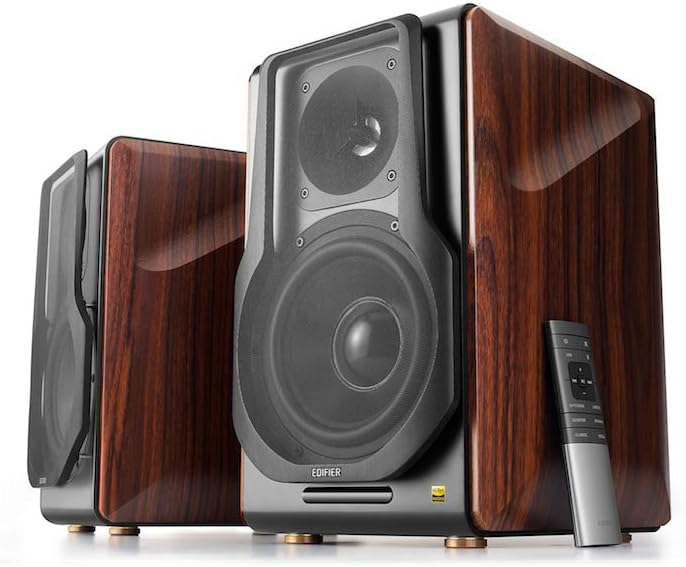
Figure 3.1: Edifier S3000Pro Speakers and Remote Control.
3.1 Ubicación de los altavoces
Place the speakers in your desired listening area. Due to their wireless inter-speaker connection, you have flexibility in positioning them. Ensure each speaker is near a power outlet.

Figura 3.2: Example placement of Edifier S3000Pro speakers in a room.
3.2 Conexión de alimentación
Connect the included power cables to each speaker and then to a wall outlet. The speakers will automatically attempt to pair with each other upon power-on.
3.3 Conexiones de entrada de audio
The active (right) speaker features a variety of input ports:
- Bluetooth 5.0 con aptX HD: Para transmisión de audio inalámbrica desde dispositivos compatibles.
- Audio USB: Connect directly to a computer for high-resolution audio playback.
- Óptico: For digital audio connection from TVs, game consoles, etc.
- Coaxial: Otra opción de entrada de audio digital.
- Entrada de línea (RCA): Standard analog input for various audio sources.
- Balanceado (XLR): Professional-grade input for balanced audio signals.

Figure 3.3: Rear panel of the active speaker with various input options.
3.4 Wireless Inter-Speaker Connection
The S3000Pro utilizes KleerNet wireless technology for lossless audio transmission between the left and right speakers. This connection is established automatically. If re-pairing is ever needed, refer to the troubleshooting section.
Video 3.1: Official Edifier S3000Pro Audiophile Active Speakers overview, demostrando características clave y conectividad.
4. Instrucciones de funcionamiento
Control your S3000Pro speakers using the included wireless remote or the controls located on the active (right) speaker.
4.1 Funciones de control remoto

Figure 4.1: The wireless remote control for Edifier S3000Pro speakers.
- Botón de encendido: Enciende o apaga los altavoces.
- Control de volumen: Ajusta el nivel de volumen general.
- Silenciar: Silencia o reactiva la salida de audio.
- Selección de entrada: Dedicated buttons for USB, Bluetooth, Optical/Coaxial, and Line/Balanced inputs.
- Controles de reproducción: Play/Pause, Skip Forward, Skip Backward (for Bluetooth and USB modes).
- Modos de sonido: Buttons for Monitor, Dynamic, Classic, and Vocal sound profiles.
4.2 On-Speaker Controls
The active speaker features rotary knobs for direct control:
- Volume/Input Selection: Rotate to adjust volume; press to cycle through inputs.
- Control de agudos: Ajusta la salida de alta frecuencia.
- Control de graves: Ajusta la salida de baja frecuencia.
5. Características y diseño
The S3000Pro speakers are crafted with both acoustic performance and aesthetic appeal in mind.
5.1 Diseño acústico
- Planar Diaphragm Tweeters: Deliver clear, detailed high frequencies.
- 6.5-inch Aluminum Alloy Woofers: Provide powerful and accurate bass response.
- Incorporado Ampmás duradero: Each speaker features a 78 watts amplificador, eliminando la necesidad de externo amplificación.
- Audio de alta resolución: Supports higher bit depth and sample rates (96 kHz or higher) for superior sound quality.
5.2 Construction and Aesthetics
The speaker cabinets are constructed from high-quality MDF (Medium-Density Fiberboard) with a brown wood finish, offering both durability and a classic aesthetic. The front features a matt black finish with removable cloth grilles.

Figura 5.1: Frente view highlighting the drivers and finish.

Figura 5.2: Lado view mostrarasing the wood finish.
6. Mantenimiento
To ensure the longevity and optimal performance of your Edifier S3000Pro speakers, follow these maintenance guidelines:
- Limpieza: Use a soft, dry cloth to wipe down the speaker cabinets. Avoid using abrasive cleaners, waxes, or solvents.
- Limpiar el polvo: Regularly dust the speaker grilles and drivers with a soft brush or vacuum cleaner with a brush attachment.
- Colocación: Evite colocar los altavoces bajo la luz solar directa, cerca de fuentes de calor o en zonas con mucha humedad. Asegúrese de que haya una ventilación adecuada alrededor de los altavoces.
- Manejo: Handle the speakers with care. Avoid pressing on the speaker cones or tweeters.
7. Solución de problemas
If you encounter issues with your S3000Pro speakers, refer to the following common solutions:
- Sin sonido:
- Ensure both speakers are powered on and connected to an electrical outlet.
- Verify the correct input source is selected on the active speaker or remote.
- Compruebe todos los cables de audio para comprobar que las conexiones sean seguras.
- Increase the volume on both the speakers and the audio source.
- Speakers Not Pairing Wirelessly:
- Ensure both speakers are powered on. The wireless connection between them is factory-paired and should resume automatically.
- If the wireless connection fails, locate the small "Pair" button on the back panel of both the active (R) and passive (L) speakers. Press and hold the "Pair" button on the active speaker first, then on the passive speaker. The LED indicator on the passive speaker will blink rapidly during pairing.
- Problemas de conectividad Bluetooth:
- Ensure the speakers are in Bluetooth input mode.
- Delete the "Edifier S3000Pro" from your device's Bluetooth list and attempt to re-pair.
- Move your Bluetooth device closer to the speakers to reduce interference.
- Sonido distorsionado:
- Reduce el volumen tanto de los altavoces como de la fuente de audio.
- Revise los cables de audio para detectar daños o conexiones sueltas.
- Asegúrese de que la fuente de audio no sature la entrada.
8. Especificaciones
| Característica | Especificación |
|---|---|
| Marca | Edificador |
| Nombre del modelo | S3000PRO |
| Tipo de altavoz | Estante para libros |
| Material | MDF |
| Tecnología de conectividad | Bluetooth, USB |
| Tecnología de comunicación inalámbrica | Bluetooth |
| Versión de Bluetooth | 5.0 con aptX HD |
| Diámetro del woofer | 6.5 pulgadas |
| Tipo de tweeter | Planar Diaphragm |
| Potencia máxima de salida del altavoz | 256 vatios |
| Relación señal a ruido | 85 dB |
| Dimensiones del producto | 21.6" de profundidad x 13.4" de ancho x 17.3" de alto |
| Peso del artículo | 3.3 libras (1.5 kilogramos) |
| Componentes incluidos | manual del producto |
9. Garantía y soporte
The Edifier S3000Pro speakers come with a full warranty. For detailed warranty information, product registration, or technical support, please visit the official Edifier webSitio web o contacte con el servicio de atención al cliente. Conserve el recibo de compra para reclamaciones de garantía.
Para obtener más ayuda, puede visitar el Tienda Edifier en Amazon.


