1. Introducción
This manual provides instructions for the installation, setup, and operation of your Lepro Smart GU10 LED Bulbs. These bulbs offer advanced features including tunable white light, dimming capabilities, and smart control via app or voice assistants.
Características principales:
- Luz blanca sintonizable: Ajuste la temperatura del color de blanco cálido (2700 K) a blanco frío (6500 K).
- Regulable: Adjust brightness via the app or voice control. Note: Do not use with external dimmer switches.
- Control de voz: Compatible con Amazon Alexa y Google Assistant para operación manos libres.
- Control de la aplicación: Manage lights from anywhere using the 'Smart Life' app.
- Programación: Set timers and schedules for automatic light control.
- No se requiere concentrador: Se conecta directamente a su red Wi-Fi de 2.4 GHz.

Imagen 1.1: Másview of Lepro Smart GU10 LED Bulb capabilities, including dimming, tunable white light, scheduling, and smart control options.
2. Información importante de seguridad
Please read and follow all safety instructions carefully before installation and use. Failure to do so may result in electric shock, fire, or other injuries.
- Seguridad eléctrica: Always turn off power at the circuit breaker before installing or removing the bulb.
- Compatibilidad del regulador de intensidad: These smart bulbs are No compatible con interruptores de atenuación tradicionales. Using them with a dimmer switch will cause flickering and may damage the bulb. Control dimming exclusively through the 'Smart Life' app or voice commands.
- Uso exclusivo en interiores: Este producto está diseñado para uso en interiores en lugares secos.
- Vol de funcionamientotage: Ensure your fixture provides 120 Volts, 60 Hertz.
- Instalación correcta: Install the bulb securely into a GU10 base fixture.
- Evite el sobrecalentamiento: Do not enclose the bulb in fixtures that restrict airflow excessively, as this can lead to overheating and reduced lifespan.
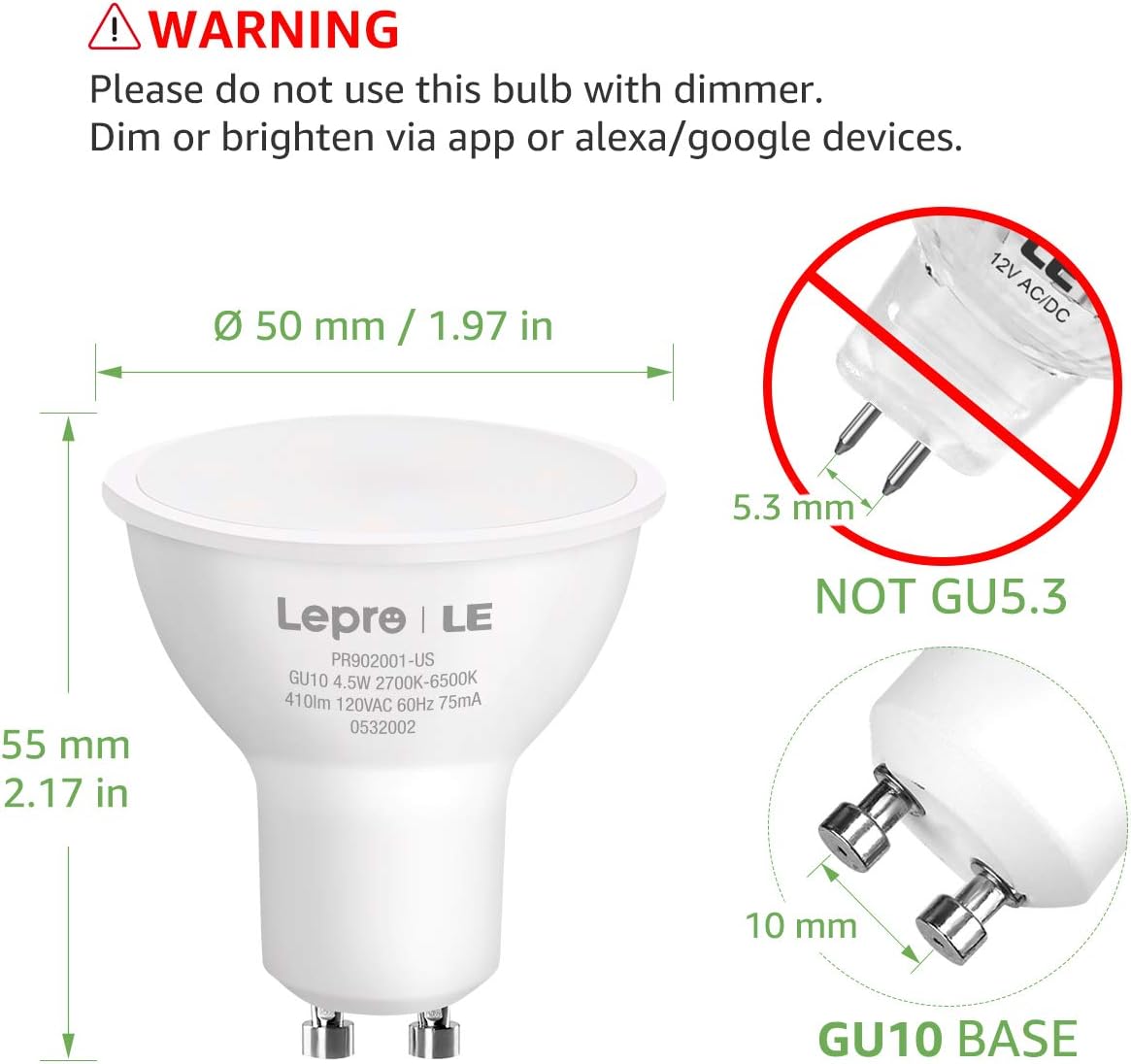
Image 2.1: Important warning regarding dimmer switch incompatibility and correct GU10 base identification.
3. Contenido del paquete
Verifique que todos los artículos estén presentes en su paquete:
- Lepro Smart GU10 LED Bulb(s) (Quantity as purchased, e.g., 2-pack)
- Manual de usuario (este documento)

Image 3.1: Lepro Smart GU10 LED Bulbs and packaging.
4. Especificaciones del producto
| Especificación | Detalle |
|---|---|
| Marca | Lepro |
| Nombre del modelo | LampUX GU10 WiFi Smart Light Bulbs |
| Tipo de luz | CONDUJO |
| Base de la bombilla | GU10 |
| Quétage | 4.5 vatios |
| Equivalente incandescente | 50 vatios |
| Brillo | 350 lúmenes |
| Temperatura de color | 2700K - 6500K (blanco sintonizable) |
| Volumentage | 120 voltios |
| Frecuencia | 60 hercios |
| Conectividad | Solo Wi-Fi de 2.4 GHz |
| Método de control | Aplicación (Smart Life), Voz (Alexa, Asistente de Google) |
| Vida media | 25,000 horas |
| Dimensiones del producto | 1.97" de ancho x 2.17" de alto |
| Material | Aluminio, Plástico |
| Proceso de dar un título | Comisión Federal de Comunicaciones (FCC) |
5. Guía de configuración
5.1 Instalación física
- Apague la energía: Antes de la instalación, asegúrese de que la energía que alimenta la luminaria esté apagada en el disyuntor para evitar descargas eléctricas.
- Quitar la bombilla vieja: Carefully remove the existing GU10 bulb from the fixture.
- Instalar bombilla inteligente: Insert the Lepro Smart GU10 LED Bulb into the GU10 base. Push and twist clockwise until it is securely seated.
- Restaurar energía: Turn the power back on at the circuit breaker. The bulb should flash, indicating it is in pairing mode. If it does not flash, turn the light switch off and on 3-5 times until it begins to flash rapidly.
5.2 Descarga de la aplicación y creación de una cuenta
- Descargar aplicación: Scan the QR code provided in the packaging or search for 'Smart Life' in your smartphone's app store (iOS or Android).
- Registrarse/Iniciar sesión: Open the 'Smart Life' app and register for a new account or log in if you already have one.
5.3 Conexión a wifi
Asegúrese de que su red Wi-Fi esté 2.4 GHz. These bulbs do not support 5GHz Wi-Fi networks.
- Agregar dispositivo: En la aplicación 'Smart Life', toque el ícono '+' en la esquina superior derecha para agregar un dispositivo.
- Seleccionar iluminación: Choose 'Lighting' or 'Light Source (Wi-Fi)' from the device list.
- Confirmar parpadeo: Confirm that the bulb is flashing rapidly. If not, cycle the power (off-on 3-5 times) until it flashes.
- Introduzca los detalles de Wi-Fi: Seleccione su red Wi-Fi de 2.4 GHz e ingrese la contraseña.
- Emparejamiento: The app will begin connecting to the bulb. Once connected, the bulb will stop flashing and glow steadily.
- Cambiar nombre del dispositivo: You can rename the bulb for easier control (e.g., "Living Room Spotlight 1").

Image 5.1: Illustration of easy setup, highlighting physical installation and 2.4GHz Wi-Fi requirement.
6. Instrucciones de funcionamiento
6.1 Control de aplicaciones
Once connected, you can control your bulb(s) through the 'Smart Life' app:
- Encendido/apagado: Toque el icono de encendido para encender o apagar la bombilla.
- Atenuación: Utilice el control deslizante de brillo para ajustar la intensidad de la luz.
- Temperatura de color: Select the 'White' mode and use the slider or color wheel to choose any shade from warm white (2700K) to cool white (6500K).
- Escenas: The app offers pre-set scenes for different moods or activities. You can also create custom scenes.

Image 6.1: Adjusting color temperature via the 'Smart Life' app, showing warm, natural, and cool white light exampLes.
6.2 Control por voz (Alexa/Asistente de Google)
Para habilitar el control por voz:
- Cuenta de enlace: In your Amazon Alexa or Google Home app, enable the 'Smart Life' skill/action and link your 'Smart Life' account.
- Descubrir dispositivos: Pídale a su asistente de voz que "Descubra dispositivos".
- Comandos de voz: Utilice comandos como:
"Alexa, turn on Living Room Spotlight."
"Ok Google, atenúa la luz de la cocina al 50%".
"Alexa, configura la luz del dormitorio en blanco cálido".
6.3 Programación y temporizadores
Set up automated schedules for your lights:
- In the 'Smart Life' app, select your bulb and navigate to the 'Schedule' or 'Timer' section.
- Set desired times for turning lights on/off, or for activating specific scenes.
- Repeat for specific days of the week as needed.
6.4 Control de grupo
Control multiple bulbs simultaneously:
- In the 'Smart Life' app, select one of your bulbs.
- Tap the pencil icon (edit) or 'Settings' and look for 'Create Group'.
- Select all bulbs you wish to include in the group and confirm.
- You can now control the entire group with a single command or app action.

Imagen 6.2: Examples of scheduling and group control features.
7. Mantenimiento
To ensure optimal performance and longevity of your Lepro Smart GU10 LED Bulbs:
- Limpieza: Asegúrese de que la bombilla esté apagada y fría antes de limpiarla. Límpiela con un paño suave y seco. No utilice limpiadores líquidos ni abrasivos.
- Almacenamiento: If storing the bulbs for an extended period, keep them in a cool, dry place away from direct sunlight.
- Evite entornos hostiles: Do not expose the bulbs to extreme temperatures, high humidity, or corrosive substances.
8. Guía de solución de problemas
If you encounter issues with your Lepro Smart GU10 LED Bulbs, refer to the following common problems and solutions:
| Problema | Posible causa | Solución |
|---|---|---|
| La bombilla no se conecta al wifi | Incorrect Wi-Fi band (5GHz), incorrect password, bulb not in pairing mode, weak Wi-Fi signal. | Ensure your router is broadcasting a 2.4GHz network. Confirm Wi-Fi password. Cycle power to the bulb (off-on 3-5 times) until it flashes rapidly to enter pairing mode. Move closer to the router. |
| Bulb flickering or not working correctly | Se utiliza con un interruptor de regulación tradicional. | Remove the bulb from any fixture connected to a traditional dimmer switch. These bulbs require a constant power supply and are dimmed via the app or voice control. |
| Bulb appears "Offline" in the app | Pérdida de conexión Wi-Fi, corte de energíatage, problemas con el enrutador. | Check your Wi-Fi router and internet connection. Ensure the bulb has constant power. Try restarting the bulb by turning its power off and on at the switch. If the issue persists, re-pair the bulb. |
| El control de voz no responde | 'Smart Life' skill/action not enabled or linked, incorrect device name, internet connectivity issues. | Verify that the 'Smart Life' skill/action is enabled and linked in your Alexa/Google Home app. Ensure the device name used in voice commands matches the name in the app. Check your internet connection. |
| Multiple bulbs not working together in a group | One or more bulbs are offline, group not properly configured. | Check individual bulb status in the app. Ensure all bulbs are online. Recreate the group in the 'Smart Life' app. |
9. Garantía y soporte
9.1 Información de garantía
Lepro Smart GU10 LED Bulbs come with a 2 año de garantía from the date of purchase. This warranty covers manufacturing defects and malfunctions under normal use. It does not cover damage caused by misuse, improper installation, or external factors.
9.2 Atención al cliente
For technical assistance, warranty claims, or further inquiries, please contact Lepro customer support through their official webSitio web o la información de contacto proporcionada con su compra. Tenga a mano el modelo de su producto y los detalles de compra al contactar con el servicio de asistencia.


