Encimaview
The Marantz NR1510 is a slim 5.2 channel 4K Ultra HD AV receiver designed to deliver exceptional audio performance and high-fidelity surround sound from a compact chassis. It features advanced HDMI connectivity, support for Dolby TrueHD and DTS-HD Master Audio, and integrates seamlessly with modern smart home systems. Enjoy versatile music streaming options via Wi-Fi, Bluetooth, and HEOS Built-in, along with convenient voice control compatibility.
¿Qué hay en la caja?
- Marantz NR1510 AV Receiver
- Guía de inicio rápido
- Control remoto
- Configuración del micrófono (para calibración de Audyssey)
- 2 pilas AA
Características principales
- Diseño compacto: At just 4-inches tall, this 5.2 channel stereo receiver offers a complete home entertainment solution in a slim profile.
- 4K Ultra HD Compatibility: Supports 60Hz full-rate content, pure color sub-sampling, BT.2020, HDR, HLG, eARC, and Dolby Vision for an impactful home theater experience.
- Poderoso Amplificación: Features a 5 channel discrete power amplifier (50W per channel) for robust audio delivery.
- Amplia conectividad: Equipped with 6 HDMI inputs (including one on the front panel) and 1 output, all with full HDCP 2.2 support.
- Control de voz: Compatible with Amazon Alexa, Google Assistant, and Apple Siri for hands-free operation and music streaming.
- Transmisión inalámbrica: Stream music from popular online sources via Built-in HEOS, Bluetooth, or Wi-Fi.
- Configuración fácil de usar: An easy-to-understand setup assistant with an advanced graphical user interface guides you through the connection process.
- Integración de casa inteligente: Seamlessly integrates with smart home automation systems like Josh or Control4, allowing for remote monitoring.
- Audio multisala: Utilize the HEOS Home Entertainment App to play the same song in every room or different songs in various rooms with connected HEOS speakers.
- Entrada de fono: Connect your analog turntable to the built-in MM phono preamp to enjoy your vinyl collection.
Producto Views

Frente view of the Marantz NR1510 AV Receiver, showcasing its slim design, central display, and control knobs.
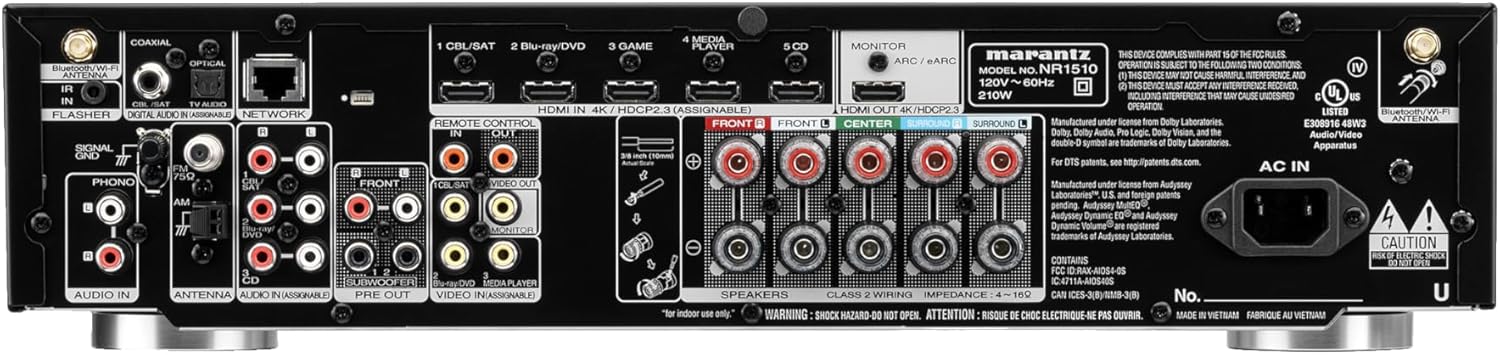
Rear panel of the Marantz NR1510, displaying various input and output ports including HDMI, optical, coaxial, and speaker terminals.
Guía de configuración
Setting up your Marantz NR1510 is made easy with the included Setup Assistant. Follow these general steps:
- Colocación: Position the receiver in a well-ventilated area, ensuring adequate space around it for heat dissipation.
- Conexión de altavoz: Connect your speakers to the appropriate terminals on the rear panel. The NR1510 supports a 5.2 channel configuration. Ensure correct polarity (+ to + and - to -).
- Conexiones HDMI: Connect your video sources (e.g., Blu-ray player, gaming console, cable/satellite box) to the HDMI IN ports. Connect your TV to the HDMI OUT (ARC/eARC) port.
- Conexiones de audio: For non-HDMI audio sources, use the optical, coaxial, or analog audio inputs. The dedicated PHONO input is available for turntables.
- Conexión de red: Connect the receiver to your home network via Ethernet cable or Wi-Fi for streaming and firmware updates.
- Power On & Initial Setup: Connect the power cord and turn on the receiver. The Setup Assistant will appear on your TV screen, guiding you through speaker calibration using the supplied setup microphone, input assignment, and network configuration.
Para obtener instrucciones detalladas paso a paso, consulte el sitio web oficial. Marantz NR1510 User Guide (PDF).
Operating Your Receiver
Operación básica
- Fuerza: Use the power button on the front panel or remote control to turn the unit on/off.
- Selección de entrada: Use the INPUT SELECTOR knob or dedicated buttons on the remote to switch between connected sources (e.g., CBL/SAT, Blu-ray/DVD, Game, CD).
- Control de volumen: Adjust the master volume using the large VOLUME knob on the front or the +/- buttons on the remote.
- Modos de sonido: Select various sound modes (e.g., Stereo, Multi-Channel Stereo, Dolby TrueHD, DTS-HD Master Audio) to optimize your listening experience for different content.
Music Streaming & Connectivity
The NR1510 offers multiple ways to enjoy your music:
- HEOS integrado: Access popular music services like Spotify, TuneIn, and more. Create a multi-room audio system by grouping with other HEOS-enabled devices. Control via the HEOS app.
- Bluetooth: Easily pair your smartphone, tablet, or other Bluetooth-enabled devices to stream audio wirelessly.
- Wi-Fi & AirPlay 2: Connect to your home Wi-Fi network for stable streaming and use Apple AirPlay 2 for seamless audio playback from Apple devices.
- USB: Reproducir audio files directly from a USB drive connected to the front or rear USB ports.
Control de voz
Control your Marantz NR1510 with your voice using compatible smart assistants:
- Amazon Alexa: Enable the Marantz HEOS skill in the Alexa app to control power, volume, input, and music playback.
- Asistente de Google: Link your Marantz account in the Google Home app to use voice commands for basic functions and streaming.
- Siri de Apple: Utilize AirPlay 2 for Siri voice control over music playback from your Apple devices.
Vídeo oficial del producto
Este video proporciona un resumenview of the Marantz NR1510 UHD AV Receiver, highlighting its slim design, 5.2 channel home theater capabilities, and support for Dolby TrueHD. It showcases the unit's features and connectivity options.
Mantenimiento
To ensure the longevity and optimal performance of your Marantz NR1510, follow these maintenance guidelines:
- Limpieza: Gently wipe the exterior with a soft, dry cloth. Avoid using abrasive cleaners, solvents, or chemical sprays.
- Ventilación: Asegúrese de que las aberturas de ventilación en la parte superior y los laterales del receptor no estén obstruidas. Un flujo de aire adecuado es crucial para evitar el sobrecalentamiento.
- Cable de alimentación: Periodically check the power cord for any damage. Disconnect the power cord from the wall outlet if the unit will not be used for an extended period.
- Actualizaciones de firmware: Regularly check for and install firmware updates to ensure your receiver has the latest features and performance enhancements. This can usually be done through the receiver's network settings.
Solución de problemas
If you encounter issues with your Marantz NR1510, try the following basic troubleshooting steps:
- Sin energía: Compruebe que el cable de alimentación esté bien enchufado a la toma de corriente y al receptor. Asegúrese de que la toma de corriente funcione.
- Sin sonido: Verify that the correct input source is selected. Check speaker connections and ensure speaker wires are securely attached. Confirm that the volume is not muted or set too low.
- Sin imagen: Ensure HDMI cables are securely connected to both the receiver and the TV/source device. Confirm the correct HDMI input is selected on your TV.
- Problemas de red: If experiencing problems with Wi-Fi or streaming, check your home network connection. Restart your router and the receiver.
- El control remoto no funciona: Revise y reemplace las pilas del control remoto. Asegúrese de que no haya obstrucciones entre el control remoto y el sensor infrarrojo del receptor.
For more comprehensive troubleshooting and advanced solutions, please consult the detailed Marantz NR1510 User Guide (PDF).
Especificaciones técnicas
| Característica | Especificación |
|---|---|
| Dimensiones del producto | 14.5 x 17.3 x 4.1 pulgadas |
| Peso del artículo | 22.8 libras |
| Número de modelo del artículo | NR1510 |
| Baterías | Se requieren 2 pila AA (incluida) |
| Fabricante | Marantz |
| Tecnología de conectividad | Wi-Fi, Bluetooth |
| Tipo de controlador | Amazon Alexa, Asistente de Google, Siri de Apple |
| Característica especial | Control de voz |
| Dispositivos compatibles | Televisión, Altavoces |
| Puertos HDMI totales | 7 (6 entradas / 1 salida) |
| Tipo de conector | USB, HDMI, Optical, Coaxial, RCA |
| Codificación de audio | Dolby TrueHD, audio maestro DTS-HD |
| Modo de salida de audio | Estéreo, sonido envolvente |
| Configuración de canales de sonido envolvente | Canal 5.2 |
| Fecha de primera disponibilidad | 14 de mayo de 2019 |
Garantía y soporte
Marantz products are designed for reliability and performance. For information regarding your product's warranty, please refer to the warranty card included in the product packaging or the official Marantz websitio.
For comprehensive support, including detailed operating instructions, advanced troubleshooting, and service information, please download the full user guide:
Descargar la guía completa del usuario (PDF)
También puedes visitar la página oficial Tienda Marantz en Amazon Para obtener más información sobre el producto y los accesorios.


