1. Introducción
This manual provides essential information for the safe and efficient operation of your Muse M-1990 DJ Bluetooth Party Speaker. Please read these instructions thoroughly before using the device and retain them for future reference.
The Muse M-1990 DJ is a powerful party speaker designed to deliver high-quality audio with dynamic light effects. It features multiple connectivity options including Bluetooth, CD player, USB, and AUX inputs, making it versatile for various audio sources.

Image 1.1: The Muse M-1990 DJ Bluetooth Party Speaker showcasing its integrated light effects.
2. Información de seguridad
Observe las siguientes precauciones de seguridad para evitar descargas eléctricas, incendios o daños a la unidad:
- No exponga la unidad a la lluvia ni a la humedad.
- No abra la casing. Deje todo servicio a personal cualificado.
- Asegúrese de que la fuente de alimentación voltage coincide con la etiqueta de clasificación de la unidad.
- Mantenga la unidad alejada de la luz solar directa, fuentes de calor y polvo excesivo.
- Asegúrese de que haya una ventilación adecuada alrededor de la unidad.
- No coloque objetos pesados sobre la unidad.
- Desenchufe la unidad durante tormentas eléctricas o cuando no la utilice durante períodos prolongados.
3. Contenido del paquete
Verifique que todos los artículos estén presentes en el embalaje:
- Muse M-1990 DJ Party Speaker Unit
- Control remoto (requiere 2 pilas AA, incluidas)
- Micrófono con cable
- AUX IN Cable (3.5mm jack)
- Cable de alimentación (CA 100-240 V, 50/60 Hz)

Image 3.1: Included accessories: remote control, wired microphone, and AUX cable.
4. Producto terminadoview
Familiarize yourself with the main components and controls of your M-1990 DJ speaker.
4.1 Panel de control superior
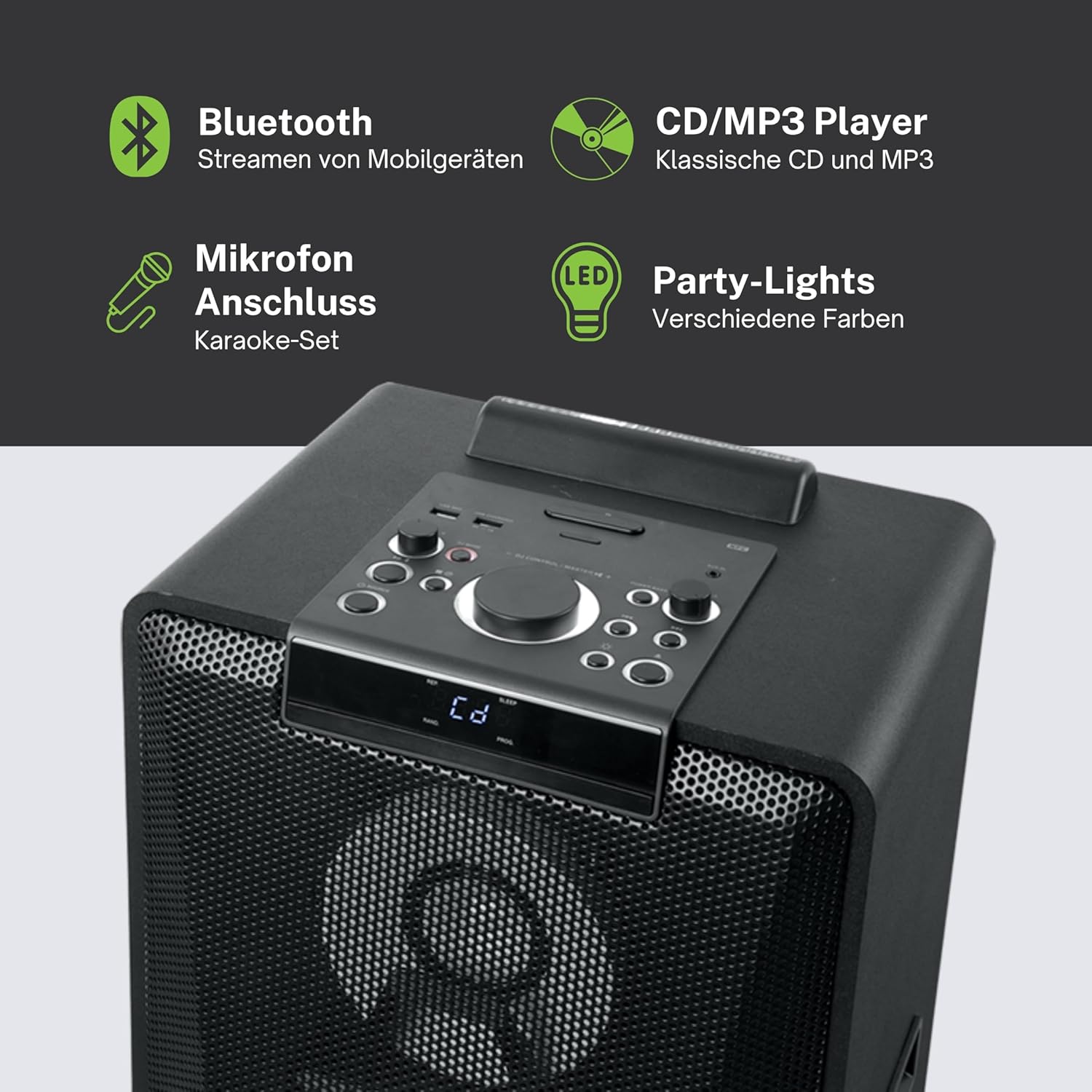
Imagen 4.1: Detallada view of the top control panel, showing various buttons and the LED display.
The top panel features controls for power, volume, source selection, playback, light effects, and a white LED display. It also includes a built-in cradle for a tablet or smartphone.
4.2 Rear Connectivity Ports
El panel trasero ofrece varias opciones de entrada y salida:
- USB 2.0 Port (for MP3 playback and charging)
- AUX IN 1 (2 x RCA jacks)
- AUX IN 2 (3.5mm jack)
- Microphone Inputs (2 jacks)
- Guitar Input (1 jack)
- AC Power Input (100-240V, 50/60Hz)
5. Configuración
5.1 Colocación
Place the speaker on a stable, flat surface. Ensure there is adequate space around the unit for ventilation. The unit is designed for floor mounting.
5.2 Conexión de alimentación
- Connect the supplied power cable to the AC power input on the rear of the speaker.
- Conecte el otro extremo del cable de alimentación a una toma de pared estándar (CA 100-240 V, 50/60 Hz).
- The unit does not contain a rechargeable battery and must be connected to a power source for operation.
6. Instrucciones de funcionamiento
6.1 Encendido y apagado
Press the Power button on the top control panel or the remote control to turn the unit on or off.
6.2 Emparejamiento Bluetooth
- Press the Source button to select Bluetooth mode. The LED display will show 'BT' and the Bluetooth indicator will flash.
- Habilite Bluetooth en su teléfono inteligente, tableta u otro dispositivo compatible.
- Buscar 'M-1990 DJ' in your device's Bluetooth list and select it to pair.
- Once paired, the Bluetooth indicator will stop flashing, and you can begin streaming audio.
- For NFC-enabled devices, simply tap your device on the NFC area of the speaker for automatic pairing.
6.3 Reproducción de CD
- Presione el botón Fuente para seleccionar el modo CD.
- Open the CD tray and place a CD (CD, CD-R/RW, MP3 compatible) with the label side up.
- Close the CD tray. Playback will start automatically or can be initiated using the Play/Pause button.
Reproducción USB 6.4
- Inserte una unidad flash USB que contenga MP3 files into the USB 2.0 port.
- Press the Source button to select USB mode.
- Playback will start automatically or can be controlled using the playback buttons.
- The USB port also functions as a charging port for external devices.
6.5 entrada auxiliar
- Connect your external audio device to either the AUX IN 1 (RCA jacks) or AUX IN 2 (3.5mm jack) using the appropriate cable.
- Press the Source button to select the corresponding AUX input.
- Controle la reproducción desde su dispositivo conectado.
6.6 Entradas de micrófono y guitarra
- Plug your microphone(s) into the Microphone input jacks.
- Plug your guitar into the Guitar input jack.
- Adjust the microphone/guitar volume using the dedicated controls on the top panel.
6.7 Efectos de luz
The M-1990 DJ features color-changing lights and strobe effects. Use the dedicated Light Effects button on the control panel or remote to cycle through different modes or turn the lights off.
6.8 Stereo Pairing (Dual Bluetooth)
If you have two M-1990 DJ units, you can pair them wirelessly for a stereo sound experience. Refer to the specific instructions for stereo pairing in the full manual (if provided by manufacturer) or on the manufacturer's websitio.
7. Mantenimiento
7.1 Limpieza
- Desenchufe siempre la unidad de la toma de corriente antes de limpiarla.
- Utilice un paño suave y seco para limpiar las superficies exteriores.
- No utilice limpiadores abrasivos, ceras o disolventes ya que pueden dañar el acabado.
7.2 Almacenamiento
Cuando no utilice el altavoz durante períodos prolongados, guarde el altavoz en un lugar fresco y seco, alejado de la luz solar directa y de temperaturas extremas.
8. Solución de problemas
If you encounter issues with your M-1990 DJ speaker, refer to the following common problems and solutions:
| Problema | Posible causa | Solución |
|---|---|---|
| Sin poder | Cable de alimentación no conectado; toma de corriente no activa | Asegúrese de que el cable de alimentación esté conectado de forma segura; Pruebe con una toma de corriente diferente |
| Sin sonido | Volume too low; Incorrect source selected; Audio cable not connected | Increase volume; Select correct input source; Check audio cable connections |
| Bluetooth no emparejado | El altavoz no está en modo de emparejamiento; el Bluetooth del dispositivo está desactivado; el dispositivo está demasiado lejos | Ensure speaker is in BT mode and flashing; Enable Bluetooth on device; Move device closer (within 10m) |
| El CD no se reproduce | CD inserted incorrectly; CD scratched/dirty; Incorrect format | Reinsert CD correctly; Clean CD; Ensure CD is audio CD or MP3 compatible |
| USB no se reproduce | La unidad USB no se insertó correctamente; Files not MP3 format; USB drive corrupted | Vuelva a insertar la unidad USB; asegúrese files are MP3; Try a different USB drive |
Si el problema persiste después de intentar estas soluciones, comuníquese con el servicio de atención al cliente.
9. Especificaciones
Detailed technical specifications for the Muse M-1990 DJ Party Speaker:
- Número de modelo: DJ M-1990
- Marca: MUSA
- Potencia de salida: 1000 vatios
- Número de canales: 2
- Tecnología de conectividad: Bluetooth V4.2
- Dispositivos compatibles: Teléfono inteligente, tableta
- Entradas de audio: 2 x Microphone jacks, 1 x Guitar jack, 2 x RCA AUX IN, 1 x 3.5mm AUX IN
- Puerto USB: 1 x USB 2.0 (for MP3 playback and charging)
- Reproductor de CD: Compatible con CD, CD-R/RW y MP3
- Efectos de luz: Color changing lights, Strobe effects, Light projection
- Fuente de energía: AC 100-240V, 50/60Hz (Electric Cable)
- Batería recargable: No
- Material: Madera (gabinete)
- Color: Negro
- Peso del artículo: 17.9 kilogramos
- Dimensiones (L x An x Al): 35.6 x 34.8 x 105.7 centímetros
- Uso recomendado: Party and entertainment
- Tipo de montaje: Montaje en el piso
- Baterías incluidas: 2 AA (for remote control)

Image 9.1: Dimensional drawing of the Muse M-1990 DJ speaker.
10. Garantía y soporte
10.1 Información de garantía
Warranty terms and conditions for the Muse M-1990 DJ speaker are typically provided with the product packaging or can be found on the official Muse webSitio web. Conserve su comprobante de compra para cualquier reclamación de garantía.
10.2 Atención al cliente
For further assistance, technical support, or service inquiries, please refer to the contact information provided in your product documentation or visit the official Muse customer support websitio.


