Introducción
This manual provides detailed instructions for the setup, operation, and maintenance of your JENSEN JTA-230R 3-Speed Stereo Turntable with Built-in Speakers. Please read this manual thoroughly before using the product to ensure proper function and longevity.
Características principales
- Belt-driven 3-speed stereo turntable: Supports 33-1/3, 45, and 78 RPM records.
- USB port with included cable and software: Enables recording, editing, and converting vinyl records to digital MP3 format.
- Auxiliary input: Allows connection of external audio devices such as iPods, MP3 players, or other digital audio players.
- Stereo headphone output: For private listening.
- RCA line outputs: For connecting the turntable to an external home music system or ampmás duradero.
- Built-in stereo speakers: Provides integrated audio playback.
- Front-mounted pitch control: For fine-tuning record speed.
- Tone control: For adjusting sound quality.
Configuración
- Desembalaje: Carefully remove the turntable from its packaging. Retain all packing materials for future transport or storage.
- Colocación: Coloque el plato giratorio sobre una superficie estable y nivelada, lejos de la luz solar directa, fuentes de calor y polvo o vibraciones excesivas.
- Guardapolvo: The unit includes a clear dust cover to protect the platter and tonearm when not in use. Ensure it is properly hinged.
- Conexión de energía: Connect the AC power adapter to the DC input jack on the rear of the unit, then plug the adapter into a standard wall outlet.
- Protección del lápiz: Remove the clear plastic stylus protector from the needle before first use.

Instrucciones de funcionamiento
Reproducir un disco de vinilo
- Encendido: Turn the POWER/VOLUME knob clockwise to power on the unit. The power indicator light will illuminate.
- Seleccionar función: Set the FUNCTION switch to 'PHONO'.
- Registro de lugar: Open the dust cover and carefully place a vinyl record on the turntable platter.
- Seleccionar velocidad: Set the SPEED SELECTOR switch (33/45/78) to match the playback speed of your record. For 45 RPM records, place the included 45 RPM adapter on the center spindle.
- Brazo elevador: Levante suavemente el brazo utilizando la palanca de señalización.
- Posición del brazo: Move the tonearm over the desired track of the record.
- Brazo inferior: Slowly lower the tonearm onto the record using the cueing lever. The record will begin to play.
- Ajustar el volumen: Adjust the volume using the POWER/VOLUME knob.
- Parada automática: The AUTO STOP switch can be set to ON or OFF. When ON, the turntable will automatically stop spinning when the record finishes. When OFF, the turntable will continue to spin.
- Finalizar reproducción: At the end of the record, lift the tonearm, return it to the tonearm rest, and lower the cueing lever. Turn the POWER/VOLUME knob counter-clockwise to power off the unit.

Usando la radio
- Encendido: Gire la perilla de ENCENDIDO/VOLUMEN en el sentido de las agujas del reloj.
- Seleccionar función: Set the FUNCTION switch to 'AM' or 'FM' for radio playback.
- Sintonizar estación: Gire la perilla TUNING para seleccionar la estación de radio deseada.
- Ajustar el volumen: Adjust the volume using the POWER/VOLUME knob.
Connecting External Devices (AUX Input)
- Conectar dispositivo: Use an audio cable (not included) to connect your external audio device (e.g., MP3 player, smartphone) to the AUX IN jack on the front of the turntable.
- Seleccionar función: Set the FUNCTION switch to 'AUX'.
- Reproducir audio: Start playback on your external device. The audio will play through the turntable's built-in speakers.
- Ajustar el volumen: Adjust the volume using the POWER/VOLUME knob on the turntable and/or the volume control on your external device.
Uso de auriculares
Plug your headphones into the HEADPHONE jack on the front of the unit for private listening. The built-in speakers will be muted when headphones are connected.
Connecting to an External Audio System (RCA Line Out)
Use RCA cables (not included) to connect the RCA LINE OUT jacks on the rear of the turntable to an available audio input on your home stereo system or powered speakers. This allows you to play vinyl records through a larger sound system.
Converting Vinyl to MP3 (USB Recording)
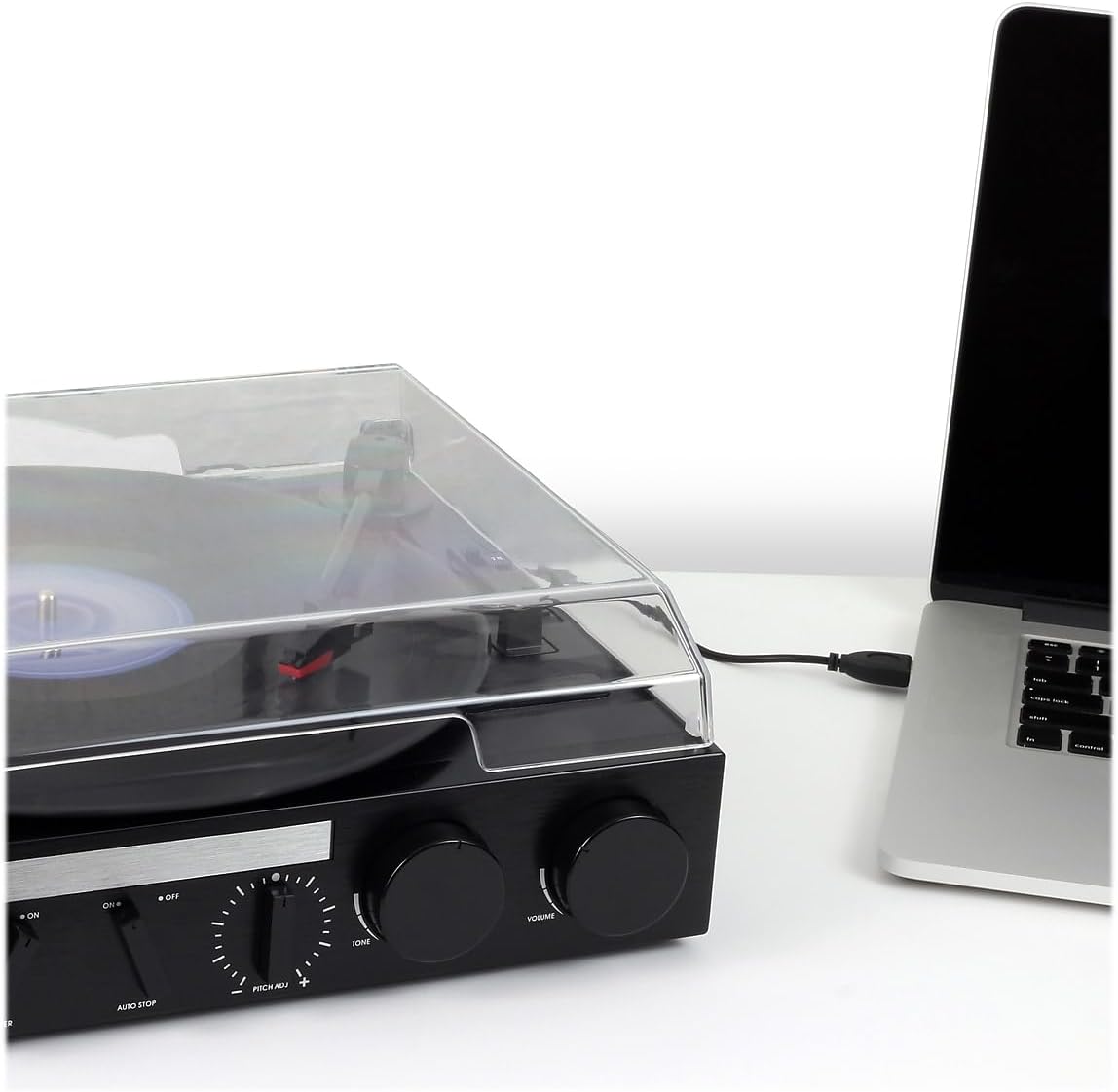
The JTA-230R includes a USB port and software for converting your vinyl records to digital MP3 files. Sigue estos pasos:
- Instalar software: Install the provided software (e.g., Audacity) onto your computer.
- Conecte USB: Conecte el tocadiscos a su computadora mediante el cable USB suministrado.
- Prepárese para la grabación: Open the software on your computer and follow its instructions to prepare for recording.
- Reproducir registro: Start playing your vinyl record on the turntable as described in the 'Playing a Vinyl Record' section.
- Record and Save: Use the software to record the audio. Once recorded, you can edit and save the tracks as MP3 files on your computer for playback on digital devices.
Mantenimiento
Limpieza de la unidad
- Limpie el exterior de la unidad con un paño suave yamp Paño. No utilice limpiadores abrasivos ni disolventes.
- Mantenga la cubierta antipolvo cerrada cuando no esté en uso para evitar la acumulación de polvo en el plato y la aguja.
Cuidado de la aguja
- La aguja es un componente delicado. Manéjela con cuidado.
- Limpie el lápiz periódicamente utilizando un cepillo suave, cepillándolo suavemente de atrás hacia adelante.
- A worn or damaged stylus can harm your records and degrade sound quality. Replace the stylus if it appears bent, chipped, or if sound quality diminishes significantly.
Solución de problemas
| Problema | Posible causa | Solución |
|---|---|---|
| Sin poder | Cable de alimentación no conectado; toma de corriente no activa; unidad no encendida. | Ensure power cord is securely plugged in; Check power outlet; Turn POWER/VOLUME knob clockwise. |
| No hay sonido de los altavoces | Volume too low; Function switch incorrect; Headphones connected. | Increase volume; Set FUNCTION switch to 'PHONO', 'AM', 'FM', or 'AUX' as appropriate; Disconnect headphones. |
| Sonido distorsionado | Dirty record; Worn stylus; Incorrect speed; Tone control setting. | Clean record; Replace stylus; Verify correct speed (33/45/78 RPM); Adjust TONE control. |
| Record speed too fast or too slow | Incorrect speed selector setting; Pitch control adjustment. | Set SPEED SELECTOR to match record (33-1/3, 45, or 78 RPM); Adjust PITCH ADJ. knob for fine-tuning. |
| Salto de récord | Dirty or scratched record; Turntable not level; Stylus worn or damaged. | Clean record; Ensure turntable is on a stable, level surface; Replace stylus. |
Presupuesto
- Número de modelo: JTA-230R
- Dimensiones del producto: 11.34 x 12 x 4.96 pulgadas
- Peso del artículo: 1 libras (454 gramos)
- Marca: Jensen
- Velocidad máxima de rotación: 78 RPM
- Material: Plástico
- Color: Negro
- Característica especial: Portátil
- Dispositivos compatibles: Auriculares, reproductor de MP3, altavoz, tableta
- Componentes incluidos: Producto, Manual
Garantía y soporte
Information regarding product warranty and customer support is not available in the provided data. Please refer to the product packaging or manufacturer's websitio para más detalles.


