1. Introducción
The AIWA KSTB6043 Network Video Player is designed to transform your existing television into a smart Android TV. This device allows you to access various network video services and play media content from external storage devices. It operates on Android 8.0 Oreo and supports HDMI 2.0 for high-definition video output.
Included accessories are a Bluetooth remote control, a 1.5m Premium HDMI cable, an instruction manual, and a warranty card.
2. Producto terminadoview
2.1. Componentes del dispositivo
Familiarize yourself with the various ports and components of your AIWA KSTB6043 Network Video Player.
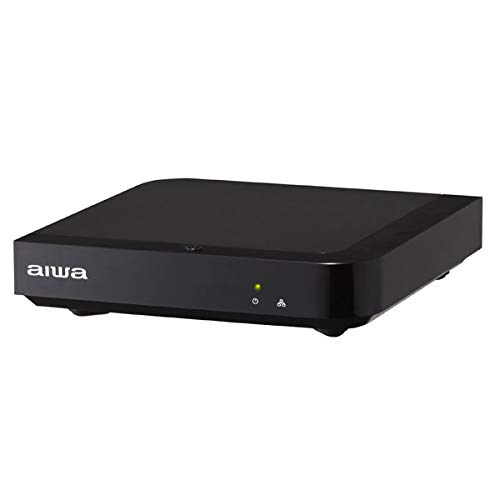
Imagen 1: Frente View. This image displays the front of the AIWA KSTB6043 unit, featuring the AIWA logo and indicator lights.

Imagen 2: Lateral View. This image shows the side of the device, highlighting a USB port for connecting external storage.
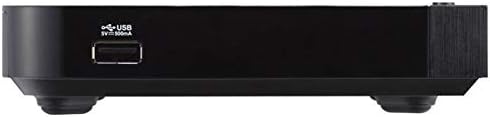
Imagen 3: Trasera View. This image illustrates the rear panel of the player, featuring the LAN port, HDMI output, S/PDIF port, power input (12V=1.5A IN), and a reset button.

Image 4: Setup Exampel. The player is shown connected to a television, with the remote control placed nearby, demonstrating a typical setup.
2.2. Control remoto
The included Bluetooth remote control allows for easy navigation and control of the network video player. Refer to the remote control diagram in the included physical manual for specific button functions.
3. Configuración
Follow these steps to set up your AIWA KSTB6043 Network Video Player:
- Conectar al televisor: Use the provided Premium HDMI cable to connect the HDMI OUT port on the network video player to an HDMI input port on your television.
- Conecte la electricidad: Plug the power adapter into the 12V=1.5A IN port on the back of the player, then plug the adapter into a wall outlet.
- Encendido: Press the power button on the remote control or the device. The indicator light on the front of the player will illuminate.
- Seleccionar entrada: On your TV, select the corresponding HDMI input source using your TV's remote control.
- Configuración inicial: Follow the on-screen prompts for initial Android TV setup, including language selection, network connection (Wi-Fi or Ethernet), and Google account login.
3.1. Connection Demonstration Video
Video 1: Basic Connection and Media Playback. This video demonstrates how to connect a media player to a TV and play content from an SD card or USB drive. Note: The specific product shown in this video may differ from the AIWA KSTB6043, but the connection principles are similar.
Video 2: Detailed Port Overview y configuración. This video provides a closer look at the ports on a media player, including HDMI, USB, and power, and shows the connection process. It also demonstrates basic menu navigation. Note: The specific product shown in this video may differ from the AIWA KSTB6043, but the connection principles and interface navigation are generally applicable.
4. Instrucciones de funcionamiento
4.1. Navegación por la interfaz de Android TV
Once powered on and connected, the Android TV home screen will appear. Use the directional buttons (up, down, left, right) and the OK button on your remote control to navigate through apps, settings, and content.
- Pantalla de inicio: Access your installed apps, recommended content, and system settings.
- Aplicaciones: Select the 'Apps' icon to view y ejecutar todas las aplicaciones instaladas.
- Ajustes: Access network settings, display options, audio settings, and device preferences.
4.2. Playing Media from External Storage
The AIWA KSTB6043 supports playback of video, image, and music files desde unidades USB o tarjetas SD.
- Insertar almacenamiento: Insert your USB drive into a USB port or your SD card into the SD card slot on the device.
- Acceso Files: Navegar hasta 'File Manager' or 'Media Player' app on the Android TV interface.
- Seleccionar contenido: Browse your external storage for the desired video, image, or music files y seleccionarlos para reproducirlos.
4.3. Using Network Services
With an internet connection, you can access various streaming services. The device supports Netflix, among others.
- Conectarse a la red: Ensure your device is connected to Wi-Fi or via an Ethernet cable.
- Ejecutar aplicación: Select the desired streaming app (e.g., Netflix) from the home screen or app list.
- Login/Subscribe: Log in with your existing account or follow the prompts to subscribe to the service.
5. Mantenimiento
- Limpieza: Utilice un paño suave y seco para limpiar el exterior del dispositivo. No utilice limpiadores líquidos ni productos abrasivos.
- Actualizaciones de software: Compruebe periódicamente si hay actualizaciones del sistema en el menú de configuración para garantizar un rendimiento óptimo y acceso a las últimas funciones.
- Ventilación: Asegúrese de colocar el dispositivo en un área bien ventilada para evitar el sobrecalentamiento. No bloquee las aberturas de ventilación.
6. Solución de problemas
| Problema | Posible causa | Solución |
|---|---|---|
| Sin poder | El cable de alimentación no está conectado; la toma de corriente no funciona | Verifique la conexión del cable de alimentación; Pruebe con una toma de corriente diferente |
| No hay señal en la TV | Incorrect HDMI input selected; HDMI cable loose or faulty | Select correct HDMI input on TV; Reconnect or replace HDMI cable |
| El control remoto no funciona | Batteries depleted; Obstruction between remote and device | Replace batteries; Ensure clear line of sight to the device |
| No se puede conectar al wifi | Contraseña incorrecta; Problema con el enrutador; Dispositivo demasiado lejos del enrutador | Verify Wi-Fi password; Restart router; Move device closer to router |
7. Especificaciones
| Característica | Detalle |
|---|---|
| Número de modelo | KSTB6043 |
| Sistema operativo | Android 8.0 Oreo |
| Versión HDMI | 2.0 |
| HDMI Port Count | 1 |
| Tecnología de conectividad | Bluetooth, HDMI |
| Formatos de audio compatibles | Dolby Digital, DTS, PCM |
| Servicios de Internet | Netflix (y otros a través de aplicaciones de Android) |
| Resolución | 1920 x 1080 píxeles (Full HD) |
| Dimensiones del producto | 12.5 cm (largo) x 12.5 cm (ancho) x 3 cm (alto) |
| Peso | Aprox. 760 g (envasado) |
| Características | High-definition video output, Android TV compatible |
8. Garantía y soporte
The AIWA KSTB6043 Network Video Player comes with a warranty. Please refer to the warranty card included in the product packaging for detailed terms and conditions, including the warranty period and coverage.
For technical support or inquiries, please contact AIWA customer service through the contact information provided in your warranty documentation or on the official AIWA websitio.


