1. Introducción
This manual provides essential information for the installation, operation, and maintenance of the HP 5412-92G-PoE+-2XG v2 zl Switch. Please read this manual thoroughly before using the device to ensure proper functionality and safety. This product is a high-performance, modular network switch designed for enterprise-level networking environments, offering extensive Power over Ethernet (PoE+) capabilities and high-speed uplink options.
2. Producto terminadoview
The HP 5412-92G-PoE+-2XG v2 zl Switch is a robust, manageable network switch chassis featuring 92 PoE+ ports and 10 expansion slots. It supports 10/100/1000BASE-T connectivity and is designed for demanding network infrastructures.
Características principales:
- 92 Gigabit Ethernet ports with Power over Ethernet Plus (PoE+) support.
- 10 expansion slots for flexible network configuration.
- Manageable switch chassis for advanced network control.
- Supports 10/100/1000BASE-T connectivity.
- RoHS Compliance for environmental standards.
Producto Views:
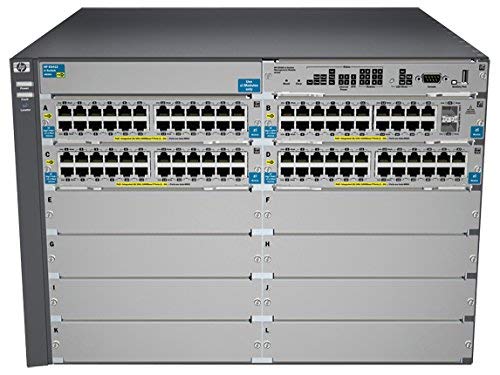
Figura 2.1: Frente view of the HP 5412-92G-PoE+-2XG v2 zl Switch, showing the modular chassis with multiple port modules installed.

Figura 2.2: Frente en ángulo view of the switch, highlighting the port density and modular design.

Figura 2.3: A slightly different angled front view, providing another perspective of the switch's physical layout.

Figura 2.4: Trasero view of the switch, illustrating the dual power supply bays and ventilation.
3. Configuración e instalación
Proper installation is crucial for the optimal performance and longevity of your HP switch. Follow these steps carefully:
- Desembalaje e Inspección: Carefully remove the switch from its packaging. Inspect for any signs of damage during transit. Report any damage to your supplier immediately.
- Montaje en bastidor: The switch is designed for standard 19-inch rack mounting. Secure the switch using appropriate rack-mount kits (sold separately or included). Ensure adequate space for airflow around the unit.
- Conexión de energía: Connect the power cords to the power supply units at the rear of the switch and then to a grounded AC power source. The switch supports redundant power supplies for enhanced reliability.
- Instalación del módulo (si corresponde): If your switch requires additional modules (e.g., SFP+ uplinks, additional PoE+ ports), refer to the specific module installation guide. Ensure modules are seated firmly in their respective slots.
- Conectividad de red: Connect your network devices (servers, workstations, access points) to the appropriate Ethernet ports on the switch using standard RJ-45 cables. For PoE-powered devices, ensure they are compatible with PoE+ standards.
- Configuracion inicial: Connect a console cable to the switch's console port and a terminal emulator on a computer for initial configuration. Refer to the HP ProVision ASIC-based Switch Management and Configuration Guide for detailed software setup.
Nota: Always ensure proper grounding and ventilation to prevent electrical hazards and overheating.
4. Instrucciones de funcionamiento
Once the switch is physically installed and powered on, it will begin its boot sequence. The following outlines basic operational aspects:
- Encendido: After connecting power, the switch will automatically power on. Observe the system status LEDs for boot progress.
- Indicadores LED:
- LED del sistema: Indica el estado general del sistema (por ejemplo, verde para funcionamiento normal, ámbar para fallo).
- LED de puerto: Indicate link status, activity, and PoE status for each port. Consult the switch's LED guide for specific patterns.
- Gestión de red: The switch can be managed via a command-line interface (CLI) through the console port, Telnet, or SSH. It also supports web-based management (GUI) and SNMP for network monitoring and control.
- Funcionalidad PoE+: The 92 PoE+ ports automatically detect and provide power to connected PoE-compatible devices, such as IP phones, wireless access points, and IP cameras. Ensure the total power budget is not exceeded.
- Actualizaciones de firmware: Consulte periódicamente el soporte de HP webSitio para las últimas actualizaciones de firmware para garantizar un rendimiento óptimo, seguridad y acceso a nuevas funciones.
5. Mantenimiento
Regular maintenance helps ensure the reliability and longevity of your HP switch.
- Limpieza: Keep the switch and its ventilation openings clean and free of dust. Use a soft, dry cloth for external cleaning. Do not use liquid or aerosol cleaners directly on the unit.
- Control ambiental: Ensure the operating environment maintains appropriate temperature and humidity levels as specified in the technical specifications. Avoid placing the switch in direct sunlight or near heat sources.
- Sistema de organización de cables: Organize network and power cables to prevent strain, accidental disconnections, and to maintain proper airflow.
- Actualizaciones de firmware y software: Periodically check for and apply the latest firmware and software updates from the official HP support portal. This ensures security patches, bug fixes, and performance enhancements are implemented.
- Configuración de respaldo: Regularly back up your switch configuration files to an external storage device. This allows for quick restoration in case of a system reset or failure.
6. Solución de problemas
Esta sección proporciona soluciones a problemas comunes que puede encontrar.
| Problema | Posible causa | Solución |
|---|---|---|
| El interruptor no se enciende. | No power to the unit; faulty power supply; power cord not securely connected. | Verify power cord connection. Check power outlet. Ensure power supplies are correctly seated. Test with a known good power cord/outlet. |
| No hay conectividad de red en un puerto. | Incorrect cable; faulty cable; port disabled; incorrect VLAN configuration; device not powered (for PoE). | Check cable type and integrity. Verify port status via CLI/GUI. Ensure correct VLAN assignment. For PoE, check device power requirements and switch PoE budget. |
| El dispositivo PoE no recibe energía. | Device not PoE compatible; cable issue; switch PoE budget exceeded; port disabled for PoE. | Confirm device PoE compatibility. Check cable. Monitor switch PoE budget. Enable PoE on the port if disabled. |
| Rendimiento lento de la red. | Network congestion; duplex mismatch; faulty cable; outdated firmware. | Monitor network traffic. Verify duplex settings on switch and connected device. Replace suspected cables. Update switch firmware. |
For more advanced troubleshooting, consult the comprehensive HP switch documentation available on the official HP support websitio o póngase en contacto con el soporte técnico.
7. Especificaciones
Technical specifications for the HP 5412-92G-PoE+-2XG v2 zl Switch (Model J9532A):
- Número de modelo: J9532A
- Marca: HP
- Cantidad de puertos: 92 (PoE+)
- Tipo de interfaz: PoE+ (Alimentación a través de Ethernet Plus)
- Velocidad de transferencia de datos: 1 Gigabits Per Second (10/100/1000BASE-T)
- Dimensiones del producto: 17.5 x 17.75 x 12.1 pulgadas (44.45 x 45.09 x 30.73 cm)
- Peso del artículo: 75.4 libras (34.2 kg)
- Código postal: 751889108768
- Primero disponible: 20 de junio de 2019
- Fabricante: hp
8. Garantía y soporte
Este producto se ofrece como un artículo renovado de Amazon. Por lo tanto, está respaldado por la Garantía renovada de Amazon, which ensures eligibility for replacement or refund if you are not satisfied with your purchase.
- Política de devoluciones: Eligible for 90-day easy returns.
- Atención al cliente: For assistance, please refer to the customer support options provided by the seller, Network Hardware Depot, or Amazon Renewed.
- Soporte del fabricante: For original manufacturer documentation and support resources, visit the official HP support websitio.