1. Introducción
Thank you for choosing the Kungfuking Surge Protector Power Strip with USB Ports. This device is designed to provide convenient power access and surge protection for your electronic devices. It features two AC outlets and two USB ports, along with a 6.56 ft extension cord and a flat plug for versatile placement. This manual provides essential information for safe installation, operation, and maintenance of your power strip.

Figure 1: Kungfuking Surge Protector Power Strip (Model: Kungfuking 2AC+2USB)
2. Instrucciones de seguridad importantes
Lea y comprenda todas las instrucciones de seguridad antes de usar este producto. Si no las sigue, podría sufrir una descarga eléctrica, un incendio o lesiones graves.
- NO exceed the electrical ratings of 120V, 12A, 60Hz, and 2.1A for USB ports.
- NO use in wet environments or near water.
- NO disassemble or modify the device.
- NO use with aquariums or other water-related products.
- NO conéctelo a otra toma de corriente reubicable.
- NO use if the cord or plug is damaged.
- Mantener fuera del alcance de los niños.
- Asegúrese de que el enchufe esté completamente insertado en el tomacorriente de pared.
- Este producto es solo para uso en interiores.
3. Características del producto
The Kungfuking Surge Protector Power Strip is designed for convenience and safety, offering multiple power options in a compact form factor.
- 2 salidas de CA: Provides standard power for electronic devices.
- 2 puertos USB-A: Delivers 5V/2.1A for charging smartphones, tablets, and other USB-powered devices.
- 6.56 FT Extension Cord: Offers flexibility in placement, reaching distant outlets.
- Diseño de enchufe plano: Minimizes obstruction and allows furniture to be placed closer to the wall.
- Protección contra sobretensiones: Protege los dispositivos conectados de sobretensiones y picos de energía.
- Construcción duradera: Built with fireproof ABS+PC materials for enhanced safety.
- Diseño montable: Can be easily mounted on or under desks, walls, or other surfaces.

Figura 2: Características y especificaciones clave

Figure 3: All-in-One Charging Station in use
4. Configuración e instalación
The power strip can be installed in various locations to suit your needs. Mounting screws are included for secure installation.
4.1 opciones de montaje
The power strip offers flexible mounting options:
- Under Desk/Table: Mount horizontally or vertically under a desk or table to keep surfaces clear.
- Montaje en pared: Secure to a wall for convenient access, such as near a TV or bedside.
- Side of Cabinets/Headboards: Install vertically on the side of furniture for discreet power access.

Figure 4: Installation Options and Dimensions
4.2 pasos de instalación
- Elija una ubicación: Select a flat, stable surface for mounting, ensuring it is within reach of a wall outlet and your devices.
- Marcar los orificios de los tornillos: Place the power strip in the desired position and mark the locations for the mounting screws using a pencil.
- Perfore agujeros piloto (opcional): For wood surfaces, you may pre-drill small pilot holes to prevent wood splitting.
- Asegure la regleta de enchufes: Use the provided screws to firmly attach the power strip to the surface. Ensure it is securely fastened before use.
- Conectarse a la energía: Plug the power strip's flat plug into a standard 120V wall outlet. The flat plug design allows for placement behind furniture.
4.3 ExampInstalaciones
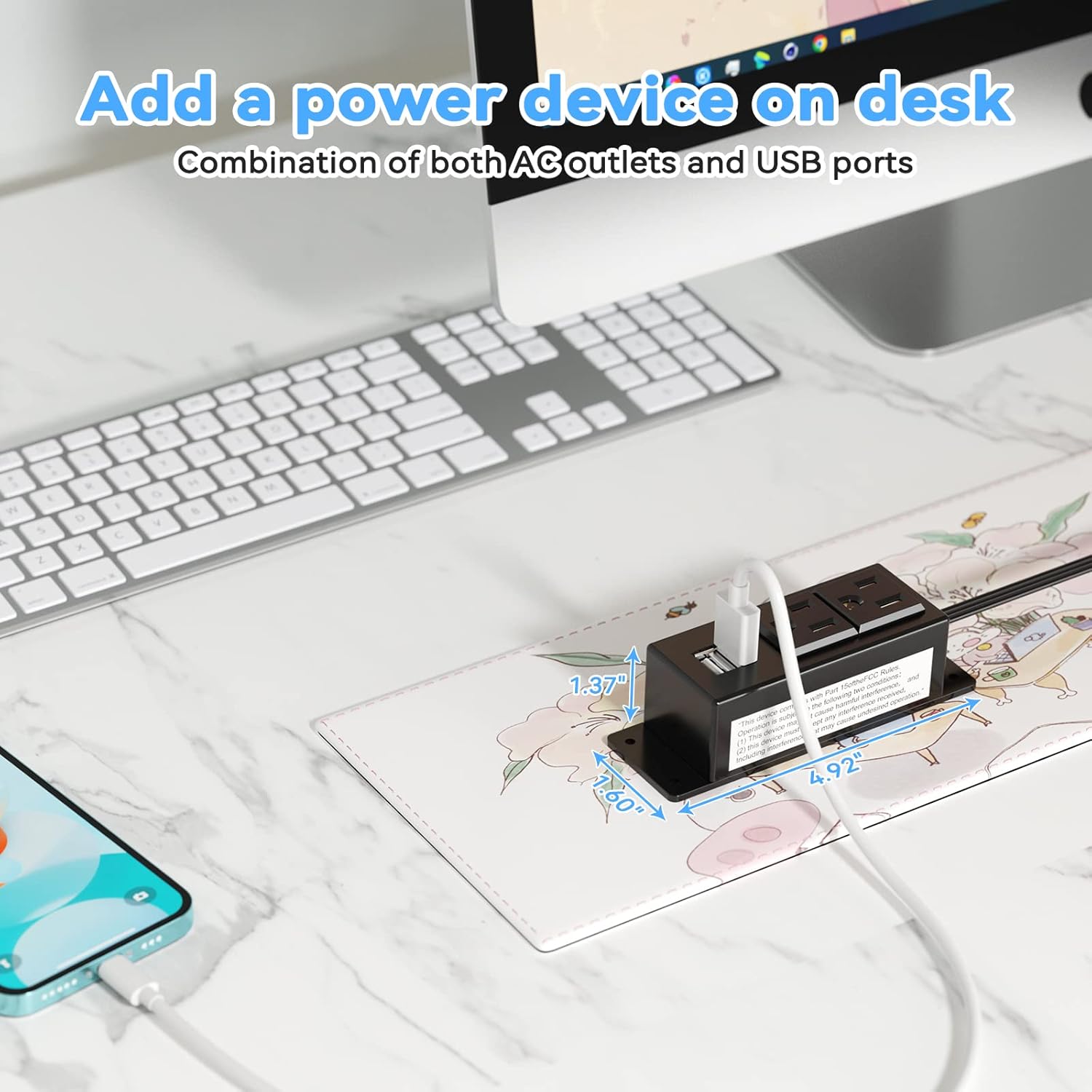
Figure 5: Desk Surface Installation

Figure 6: Under-Desk Installation

Figure 7: Wall-Mounted for TV

Figure 8: Nightstand Installation

Figure 9: Kitchen Cabinet Installation

Figure 10: Flat Plug for Space-Saving Placement
5. Instrucciones de funcionamiento
Using your Kungfuking Surge Protector Power Strip is straightforward:
- Enchufe al tomacorriente de pared: Ensure the power strip's flat plug is securely connected to a grounded 120V AC wall outlet.
- Conectar dispositivos de CA: Insert the power cords of your electronic devices into the two AC outlets.
- Conecte dispositivos USB: Plug your USB charging cables into the two USB-A ports to charge compatible devices.
- Encendido: The power strip is designed for continuous operation once plugged in. There is no on/off switch.
- Supervisar el uso: Avoid overloading the power strip by ensuring the total power consumption of connected devices does not exceed the rated capacity (12A, 120V).
6. Solución de problemas
Si tiene problemas con su regleta, consulte los siguientes problemas y soluciones comunes:
| Problema | Posible causa | Solución |
|---|---|---|
| No hay alimentación desde las tomas de CA ni los puertos USB. |
|
|
| Los dispositivos USB no se cargan. |
|
|
| La regleta de enchufes se siente caliente. |
|
|
7. Especificaciones
| Característica | Detalle |
|---|---|
| Modelo | Kungfuking 2AC+2USB |
| Salidas AC | 2 |
| Puertos USB | 2 (USB-A) |
| Vol de entradatage | 120 V CA |
| Clasificación de corriente CA | 12A |
| Frecuencia | 60 Hz |
| Salida USB | 5 V / 2.1 A (total) |
| Longitud del cable | 6.56 pies (2 metros) |
| Tipo de enchufe | Tapón plano |
| Material | ABS+PC ignífugo |
| Dimensiones (aprox.) | 4.92 x 3.74 x 1.37 pulgadas (largo x ancho x alto) |
| Peso (aprox.) | 10.5 onzas |
| Características especiales | Surge Protection, Mountable Design |
8. Mantenimiento
Proper maintenance ensures the longevity and safe operation of your power strip:
- Limpieza: Desconecte la regleta de la toma de corriente antes de limpiarla. Utilice un paño seco y suave para limpiar el exterior. No utilice limpiadores líquidos ni aerosoles.
- Inspección: Periodically inspect the power cord, plug, and housing for any signs of damage, such as cuts, fraying, or cracks. If damage is found, discontinue use immediately.
- Almacenamiento: Cuando no utilice el enchufe durante períodos prolongados, guárdelo en un lugar fresco y seco, alejado de la luz solar directa y de la humedad.
9. Garantía y soporte
Kungfuking products are designed for reliability and performance. For warranty information, technical support, or any questions regarding your product, please refer to the contact information provided at the point of purchase or visit the official Kungfuking websitio.
Conserve su comprobante de compra para reclamos de garantía.


