1. Introducción
The Makeblock mBot is an educational programmable robot designed to introduce users to robotics, engineering, and programming in an engaging way. This manual provides essential information for assembly, operation, and maintenance of your mBot.
The mBot features various modes of operation, including obstacle avoidance and line following, and can be controlled via remote control or a smartphone application. It supports block-based programming (Scratch) and Arduino, making it suitable for beginners and those looking to advance their coding skills.
2. Contenido del paquete
Before starting, ensure all components are present in your mBot kit:

Image: All components included in the Makeblock mBot kit, including the main robot chassis, mCore main control board, ultrasonic sensor, line follower sensor, wheels, motors, remote control, cables, and assembly tools.
- mCore Main Control Board
- Robot Chassis (blue aluminum frame)
- Wheels and Motors
- Sensor ultrasónico
- Line Follower Sensor
- Módulo Bluetooth
- Remote Control (IRDA)
- Cable USB
- Destornillador y tornillos
- Manual de instrucciones
- Other small parts for assembly
3. Configuración y montaje
The mBot is designed for quick and easy assembly, typically within 15 minutes, using a single screwdriver.
3.1 Pasos de montaje
- Desempaquetar componentes: Retire con cuidado todas las piezas del embalaje.
- Conecte los motores: Secure the motors to the robot chassis using the provided screws.
- Montar ruedas: Attach the wheels to the motor shafts.
- Install mCore Board: Place the mCore main control board onto the chassis and secure it.
- Conectar sensores: Connect the ultrasonic sensor and line follower sensor to the designated ports on the mCore board.
- Fuente de energía: Insert 4 AA batteries (not included) into the battery holder and connect it to the mCore board.
- Comprobaciones finales: Ensure all connections are secure and components are firmly attached.
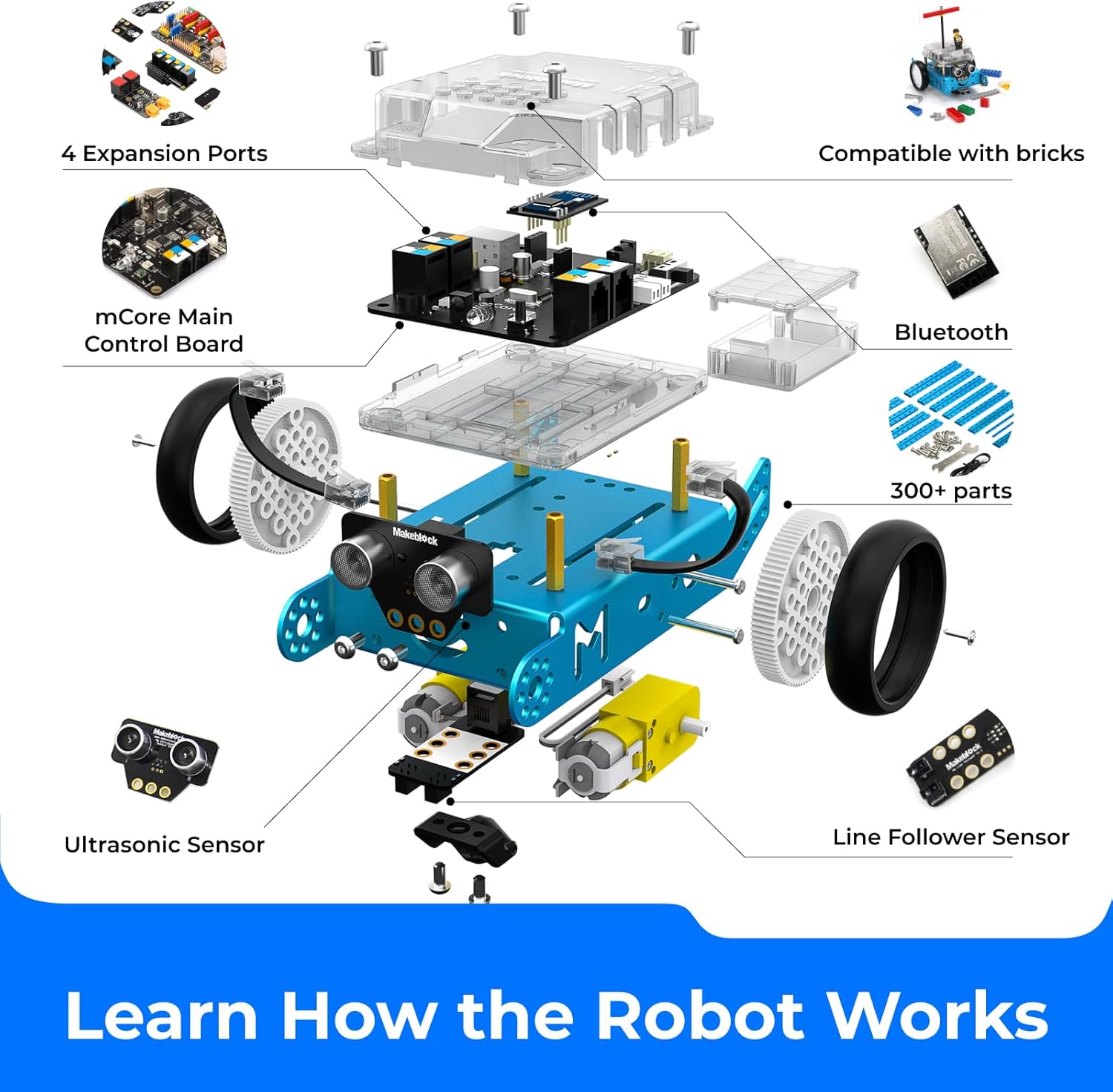
Image: A visual guide showing the process of assembling the mBot, from unpacking components to the final build, highlighting the ease of construction.
3.2 Instalación del software
To program and control your mBot, download the Makeblock App or mBlock software:
- Makeblock App: Disponible para dispositivos iOS y Android. Buscar "Makeblock" in your device's app store.
- mBlock Software: Desktop software compatible with Scratch and Arduino programming. Download from the official Makeblock websitio.

Image: Screenshot showing the block-based programming interface (Scratch) and Arduino code interface, demonstrating how the mBot can be programmed via PC, mobile, or tablet.
4. Operating the mBot
The mBot offers multiple ways to interact and program its functions.
4.1 Operación del control remoto
Use the included infrared (IRDA) remote control for basic movements and pre-programmed functions.
- Encendido: Ensure the mBot is powered on.
- Emparejamiento: The remote control should automatically pair with the mBot.
- Controles: Use the directional buttons for movement (forward, backward, turn left, turn right). Other buttons may trigger specific pre-programmed actions or modes.

Image: The mBot being controlled by an infrared remote control, showing the remote in hand and the robot responding to commands.
4.2 Bluetooth Control (Smartphone/Tablet)
For advanced control and custom programming, connect your mBot via Bluetooth to the Makeblock App.
- Habilitar Bluetooth: Active Bluetooth en su teléfono inteligente o tableta.
- Open Makeblock App: Launch the Makeblock App.
- Conectar: Select your mBot from the list of available devices in the app.
- Control: Use the app's interface for manual control, or upload custom programs.
4.3 Programming the mBot
The mBot supports block-based programming (similar to Scratch) and Arduino coding, allowing for a wide range of functionalities.
- Block-based Programming: Ideal for beginners, drag-and-drop code blocks to create sequences of actions. This helps develop logical thinking and problem-solving skills.
- Arduino Programming: For more experienced users, the mBot can be programmed using Arduino IDE, offering greater control and customization.
Common functions you can program include:
- Evitación de obstáculos: Using the ultrasonic sensor to detect objects and navigate around them.
- Seguimiento de línea: Utilizing the line follower sensor to track a path.
- Sonido y luz: Emitting sounds and controlling LED lights.
- Comunicación por infrarrojos: Interacting with other mBots or IR devices.

Image: The mBot performing obstacle avoidance (detecting a cone) and line following (tracking a black line on a white surface), showcasing its programmed functionalities.
5. Mantenimiento
Proper maintenance ensures the longevity and optimal performance of your mBot.
- Limpieza: Use a soft, dry cloth to wipe down the robot's exterior. Avoid using liquids or harsh chemicals.
- Cuidado de la batería: Remove batteries if the mBot will not be used for an extended period to prevent leakage. Replace depleted batteries promptly.
- Verificación de componentes: Periodically inspect screws and connections to ensure they are secure. The aluminum metal components are durable, but gentle handling is always recommended.
- Actualizaciones de software: Keep the Makeblock App and mBlock software updated to access the latest features and improvements.
6. Solución de problemas
If you encounter issues with your mBot, refer to the following common troubleshooting steps:
- El robot no se enciende:
- Check if batteries are correctly inserted and fully charged.
- Ensure the battery holder is securely connected to the mCore board.
- El control remoto no responde:
- Verify the remote control battery (CR2025 button cell, not included).
- Ensure there are no obstructions between the remote and the mBot's IR receiver.
- Problemas de conexión Bluetooth:
- Make sure Bluetooth is enabled on your device and the mBot.
- Restart both the mBot and your controlling device.
- Ensure the Makeblock App is updated to the latest version.
- Los motores no se mueven:
- Check motor cable connections to the mCore board.
- Verify that the program uploaded to the mBot includes motor control commands.
- Sensors Not Functioning:
- Ensure sensor cables are securely connected to the correct ports on the mCore board.
- Check for physical obstructions on the sensors.
- Verify that your program correctly reads data from the sensors.
For further assistance, consult the Makeblock official support resources online.
7. Especificaciones
| Característica | Detalle |
|---|---|
| Modelo | mBot |
| Marca | Bloque de creación |
| Dimensiones (L x An x Al) | 17 x 13 x 9 cm |
| Peso | 500 gramos |
| Material principal | Metal de aluminio |
| Edad recomendada | 12 años y más (recomendado por el fabricante: 14 años y más) |
| Valor educativo | Creative Competence, STEM learning, Programming practice, Robotics learning |
| Fuente de poder | 4 pilas AA (no incluidas) |
| Conectividad | Bluetooth, USB |
| Mando a distancia | Infrared (IRDA) Remote Control included |
| Requiere ensamblaje | Sí |
| Código Postal | 731630969695 |
8. Garantía y soporte
Specific warranty information is not provided in the product details. For warranty claims or detailed technical support, please refer to the official Makeblock websitio o comuníquese directamente con su servicio de atención al cliente.
Makeblock provides various online resources, tutorials, and community forums to assist users with their mBot. It is recommended to visit the official Makeblock support page for the most up-to-date information and assistance.


