1. Introducción
Welcome to the Argon Audio FORTE A5 powered speaker system. This manual provides essential information for setting up, operating, and maintaining your speakers to ensure optimal performance and longevity. Please read this manual thoroughly before using your speakers.
2. Instrucciones de seguridad
Para evitar incendios o descargas eléctricas, no exponga este aparato a la lluvia ni a la humedad. No abra el gabinete. Encargue las reparaciones únicamente a personal cualificado.
- Ventilación: Asegúrese de que haya suficiente ventilación alrededor de los altavoces. No bloquee ninguna abertura de ventilación.
- Fuente de energía: Connect the speakers only to the specified power supply.
- Agua y humedad: Do not expose the speakers to dripping or splashing water. Do not place objects filled with liquids, such as vases, on the speakers.
- Limpieza: Limpie solamente con un paño seco. No usar limpiadores líquidos o en aerosol.
- Calor: No lo instale cerca de fuentes de calor como radiadores, rejillas de calefacción, estufas u otros aparatos (incluidos ampificadores) que producen calor.
- Colocación: Coloque los altavoces sobre una superficie estable y nivelada para evitar que se caigan.
3. Contenido del paquete
Por favor, compruebe que todos los artículos estén presentes en el paquete:
- Argon Audio FORTE A5 Powered Speakers (1 pair)
- Special Speaker Cable (3 meters)
- Mando a distancia
- Cable de alimentación
- Manual de usuario (este documento)
4. Producto terminadoview
4.1 Panel frontal
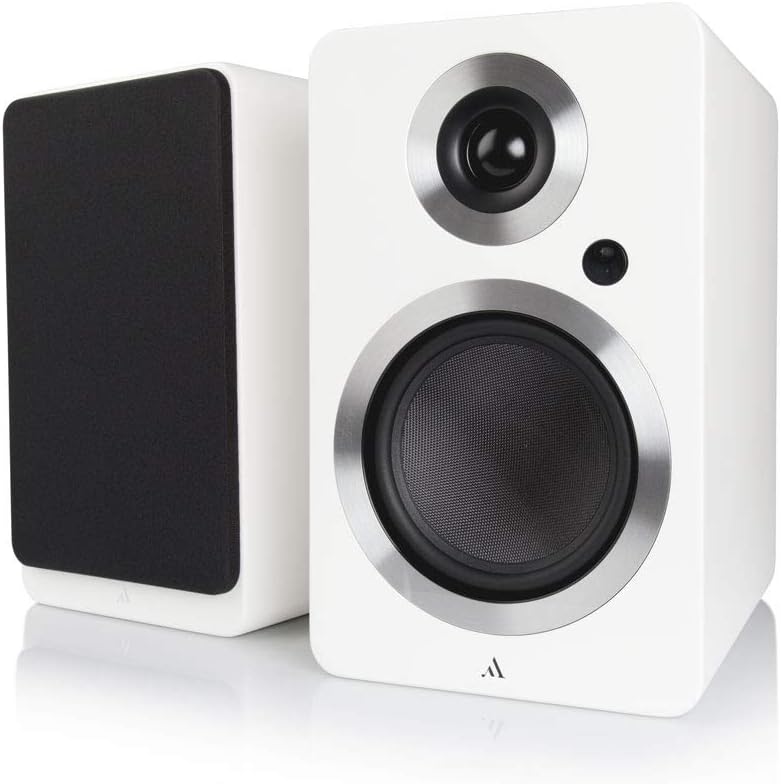
Imagen: Frente view of the Argon Audio FORTE A5 speakers. The image displays two white bookshelf speakers with black speaker cones and metallic rings around the drivers. The left speaker is shown from the side, while the right speaker is shown from the front, highlighting its clean design.
- tweeter: High-frequency driver.
- Mid/Bass Driver: Handles mid-range and bass frequencies.
- LED de estado: Indicates power status and selected input.
4.2 Panel trasero

Imagen: Trasera view of the Argon Audio FORTE A5 speakers. The image shows the back panel of the active speaker with various connection ports including RCA, optical, USB, and speaker terminals. The passive speaker's rear panel is also visible, showing only the speaker terminals.
- Entradas RCA (L/R): For connecting analog audio sources like CD players or turntables.
- Entradas ópticas (OPT1, OPT2): Para conectar fuentes de audio digital como televisores o consolas de juegos.
- Sin subtitulos: Para conectar un subwoofer externo.
- USB Charge (5V/1A): Para cargar dispositivos móviles.
- Speaker Cable Output: Se conecta al altavoz pasivo.
- Entrada de energía: Se conecta a la fuente de alimentación de CA.
5. Configuración
5.1 Colocación
Place the speakers on a stable surface, such as a bookshelf or speaker stands. For optimal stereo imaging, position the speakers equidistant from your listening position and angle them slightly towards you (toe-in). Ensure there is sufficient space behind the speakers for proper ventilation and cable connections.
5.2 Conexiones
- Conectar altavoces: Use the provided speaker cable to connect the active speaker (with all the inputs) to the passive speaker. Ensure correct polarity (+ to + and - to -).
- Conecte fuentes de audio:
- rca: Connect your analog audio device (e.g., CD player, turntable with pre-amp) to the RCA inputs.
- Óptico: Connect your digital audio device (e.g., TV, game console) to either OPT1 or OPT2.
- Bluetooth: For wireless connection, see section 6.3.
- Conecte la electricidad: Plug the power cable into the active speaker's power input, then plug the other end into a wall outlet.
6. Operación
6.1 Encendido y apagado
The speakers will automatically enter standby mode when no audio signal is detected for a period. They will wake up automatically when an audio signal is received on the selected input. To manually power off, use the remote control or the power button on the active speaker (if available).
6.2 Selección de entrada
Use the input selection buttons on the remote control or the active speaker to cycle through the available audio inputs (RCA, Optical 1, Optical 2, Bluetooth). The Status LED will change color to indicate the currently selected input.
6.3 Emparejamiento Bluetooth
- Select the Bluetooth input on your speakers. The Status LED will blink, indicating pairing mode.
- On your Bluetooth device (smartphone, tablet, laptop), enable Bluetooth and search for new devices.
- Select "Argon Audio FORTE A5" from the list of available devices.
- Once connected, the Status LED on the speaker will turn solid, and you can now play audio wirelessly.
6.4 Funciones de control remoto
The included remote control allows you to:
- Adjust Volume (Up/Down)
- Silenciar/Activar sonido
- Seleccionar fuente de entrada
- Encendido/apagado (en espera)
7. Mantenimiento
To keep your Argon Audio FORTE A5 speakers in optimal condition:
- Limpieza: Use a soft, dry, lint-free cloth to clean the cabinet surfaces. Do not use abrasive cleaners, waxes, or solvents.
- Rejillas: The speaker grilles can be carefully removed for cleaning, but ensure they are reattached securely to protect the drivers.
- Polvo: Regularly dust the speakers to prevent accumulation, especially around the drivers and ventilation ports.
8. Solución de problemas
If you experience issues with your speakers, please refer to the following table:
| Problema | Posible causa | Solución |
|---|---|---|
| Sin sonido | Alimentación no conectada; Entrada incorrecta seleccionada; Volumen demasiado bajo; Cables sueltos. | Check power connection; Select correct input; Increase volume; Reconnect all cables securely. |
| Sonido distorsionado | Volume too high; Source audio quality poor; Cables damaged. | Reduce volume; Try a different audio source; Check and replace cables if necessary. |
| El Bluetooth no se conecta | Los altavoces no están en modo de emparejamiento; el dispositivo está demasiado lejos; el dispositivo previamente emparejado está conectado. | Ensure speakers are in Bluetooth pairing mode; Move device closer; Disconnect from other Bluetooth devices. |
| El control remoto no funciona | Batteries dead; Obstruction between remote and speaker. | Reemplace las baterías; elimine cualquier obstrucción. |
If the problem persists, please contact Argon Audio customer support.
9. Especificaciones
| Característica | Especificación |
|---|---|
| Modelo | FUERTE A5 |
| Peso del artículo | 6.7 kilogramos |
| Dimensiones del producto (W x D x H) | 16.5 x 23 x 27 cm |
| Potencia máxima de salida del altavoz | 80 vatios |
| Tecnología de conectividad | Bluetooth |
| Modo de salida de audio | Estéreo |
| Tipo de montaje | Montaje en estante |
| Tipo de altavoz | Subwoofer (Note: This refers to the capability to connect a subwoofer, as these are bookshelf speakers) |
| Dispositivos compatibles | Smartphone, Tablet, Laptop, TV, Desktop, Turntable, MP3 Player |
| Configuración de sonido envolvente | 2.0 |
10. Garantía y soporte
Argon Audio products are designed and manufactured to the highest quality standards. For information regarding warranty terms and conditions, please refer to the warranty card included with your product or visit the official Argon Audio website. For technical support or service inquiries, please contact your local dealer or Argon Audio customer service.
Websitio: www.argonaudio.com


